

Topics API を使用すると、サードパーティ Cookie を使用せずにインタレスト ベースの広告を掲載できます。
Topics API の仕組み
Topics API を使用すると、ユーザーのアクティビティに基づいて、ユーザーの関心を持ちそうなトピックを検出してアクセスを提供できます。これにより、Topics API は、ユーザーのアクティビティに関する追加情報を開示することなく、API 呼び出し元(広告テクノロジー プラットフォームなど)にユーザーの興味 / 関心のトピックへのアクセスを許可できます。
主なコンセプト
- トピックは、現在のユーザーの関心を示すもので、人が読める形式になっています。Topics 分類に含まれます。
- 呼び出し元とは、ユーザーの関心を観察またはアクセスするために Topics API にリクエストを行うエンティティ(アプリ、サードパーティ SDK、ウェブサイト、サービスなど)です。
- トピックは、呼び出し元が、3 エポックの間に、トピックに関連付けられたウェブページまたはアプリから Topics API リクエストを行った場合に参照されます。
- エポックは、トピックの算出を行う期間です。デフォルトは 1 週間です。
- 分類は、
/Arts & Entertainment/Music & Audio/Soul & R&Bや/Business & Industrial/Business Services/Corporate Eventsなどのカテゴリを含む、カテゴリの階層リストです。 - トピックは、ユーザー アクティビティを 0 個以上のトピックにマッピングする分類モデルを使用して導出されます。
Topics API フローのコアステップ
Topics API のライフサイクルには、主に次の 3 つのステップがあります。
- ユーザー アクティビティ(ウェブページ
https://cats.example/tabby/index.htmlへのアクセスやアプリcatsのダウンロードなど)をモニタリングします。 - ユーザー アクティビティ(
/Pets & Animals/Pets/Catsなど)からトピックを導出します。 - ユーザーが以前にアクセスしたトピック。関連性の高い広告(猫用フードのプロモーションなど)を選択するためのシグナルとして使用されます。
トピックをモニタリングする
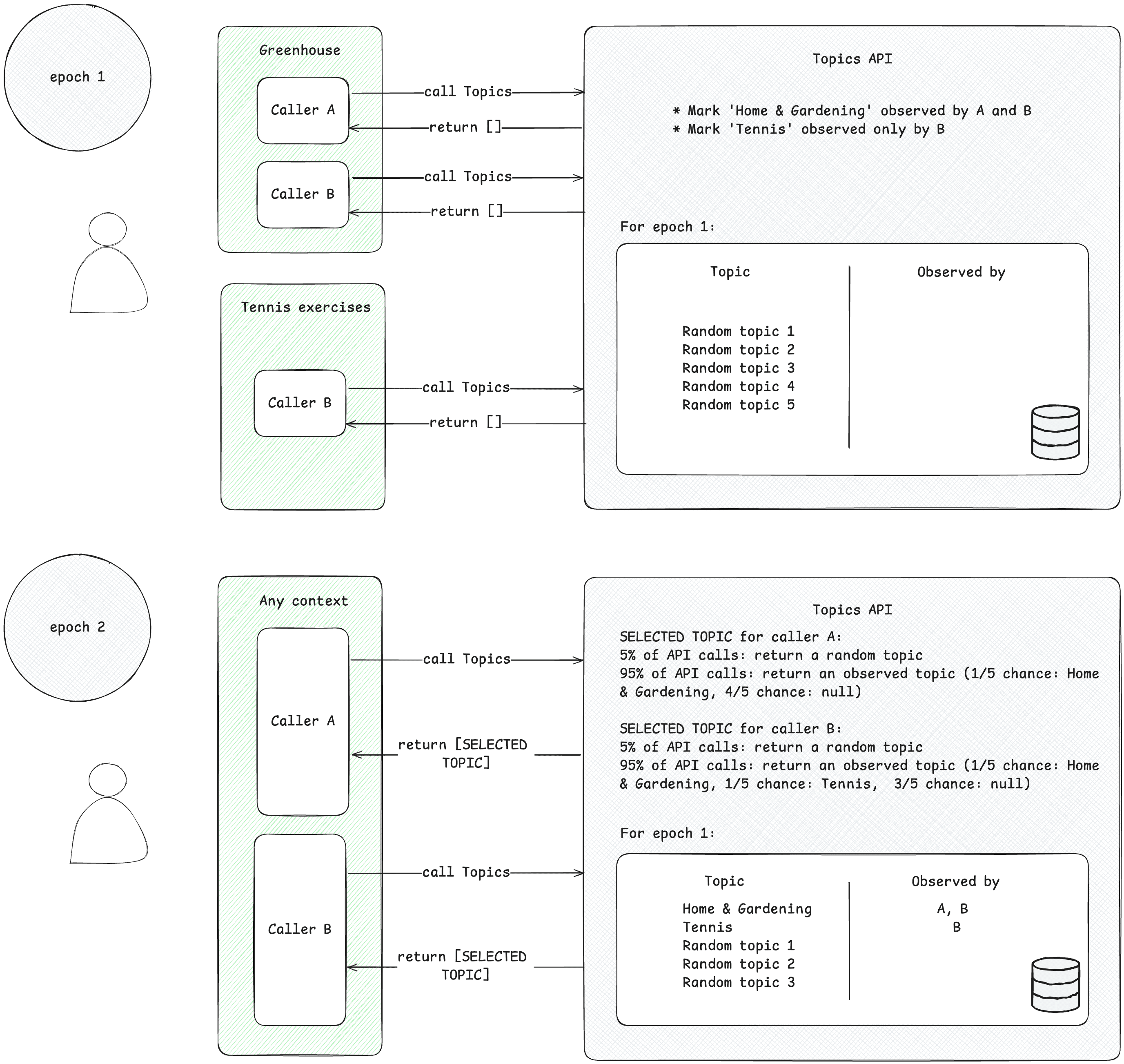
呼び出し元は、確認済みの関心のあるトピックにのみアクセスできます。呼び出し元がトピックを参照するのは、このトピックに関連付けられたコンテキストから Topics API リクエストを行った場合です。このコンセプトを説明するために、次の簡略化された例について考えてみましょう。
- A と B という 2 つの Topics API 呼び出し元があるとします。
- コンテキストは 2 つあります。
- Greenhouse(トピック
Home & Gardenに関連付けられた、Greenhouse という名前のアプリや greenhouse.example というウェブサイトなど)。 - テニス エクササイズ。たとえば、トピック
Sports/Tennisに関連付けられた、Tennis Exercises という名前のアプリや tennis.example というウェブサイトなど。
- Greenhouse(トピック
- 呼び出し元の A と B の両方が Greenhouse のコンテキストに存在します。
- テニス エクササイズのコンテキストには、呼び出し元の B のみが存在します。
- わかりやすくするため、エポック 1 より前にユーザーのトピックが観測されていないとします。
- ユーザーが Greenhouse アプリにアクセスし、呼び出し元 A と B が Topics API を呼び出して、ページまたはアプリへのユーザーのアクセスを記録します(Topics API の呼び出し方法については、次のステップで紹介されている実装ガイドをご覧ください)。このレコード(ホスト名またはアプリデータ)は、後で興味のあるトピックを導出するために使用されます。Topics API は、トピック
Home & Gardenを、呼び出し元 A と B の両方によって検出されたトピックとしてマークします。 - ユーザーが テニス エクササイズ アプリにアクセスします。呼び出し元 B のみが Topics API リクエストを送信します。Topics API は、後でトピック
Sports/Tennisを呼び出し元 B によって確認されたものとしてマークします。 - エポックの終わりまでに、Topics API はユーザーの上位トピックを更新し、ユーザーのアクティビティに基づいてこれらのトピックを観測した呼び出し元を決定します。
- 後で、呼び出し元 B が Topics API を再度呼び出すと、このユーザーの
Home & GardenトピックまたはSports/Tennisトピック(または 5% の確率でランダムなトピック)がレスポンス アレイで取得されます。 - 呼び出し元 A はトピック
Sports/Tennisを検出したことがないため、トピックHome & Gardenにのみアクセスできます。つまり、サードパーティは、ユーザーの関心のあるトピックについて、そのトピックが存在する特定のコンテキスト(アプリまたはウェブサイト)内でのみ知ることができます。
トピックを導出する
Topics は、ユーザー アクティビティから関心のあるトピックを導出します。トピックは事前に定義されたオープンソースの分類から選択されます。Topics は、エポックごとに 1 回、ユーザーの上位 5 つのトピックと、エポック中にそれらを観測した呼び出し元を更新します。Topics 分類モデルは、ユーザー アクティビティ(ウェブページのアクセスのホスト名、Android のアプリ情報)からトピックを導出します。
呼び出し元がユーザーの関心のあるトピックにアクセスする
API は、直近の 3 エポック内に呼び出し元によってすでに確認されているトピックのみを返します。呼び出し元には最大 3 つのトピックが返されます。最近の 3 つのエポックごとに 1 つのトピックが返されます(呼び出し元がそのエポックのトピックを観測した場合)。返されたトピックは、呼び出し元がコンテキスト情報を補完するために使用できます。また、組み合わせて使用することで、ユーザーに関連性の高い広告を見つけることができます。
エポック
Topics API では、提供される関心のあるトピックが最新の状態に保たれている必要があります。トピックは、エポックと呼ばれる期間(デフォルトでは 1 週間)のアクティビティに基づいてユーザーに対して推測されます。各ユーザーには独自のエポックがあり(エポックは「ユーザーごと」です)、最初の開始時間はランダムに設定されます。
Topics API はエポックごとに 1 回、ユーザーの上位 5 つのトピックを計算し、デバイス上の情報を基に、それらのトピックを検出した呼び出し元を特定します。エポックごとに選ばれるトピックは、その期間にユーザーが最も関心を持っている 5 つのトピックからランダムに抽出したものとなります。プライバシーを強化し、すべてのトピックが使用されるように、20 回に 1 回は興味 / 関心の分類に含まれる可能性があるすべてのトピックから無作為に選ばれます。
ウェブ上のトピックの実践
ウェブでは、ユーザーがアクセスしたページのホスト名からトピックが推測されます。たとえば、ウェブサイト dogs.example で推測されるトピックは /ペット、動物/ペット/犬になる可能性があります。
次の図は、Topics API がアドテック プラットフォームの適切な広告選択にどのように役立つかをわかりやすく示したものです。この例では、ウェブサイトのホスト名をトピックにマッピングするモデルがユーザーのブラウザに組み込み済みであることを前提としています。
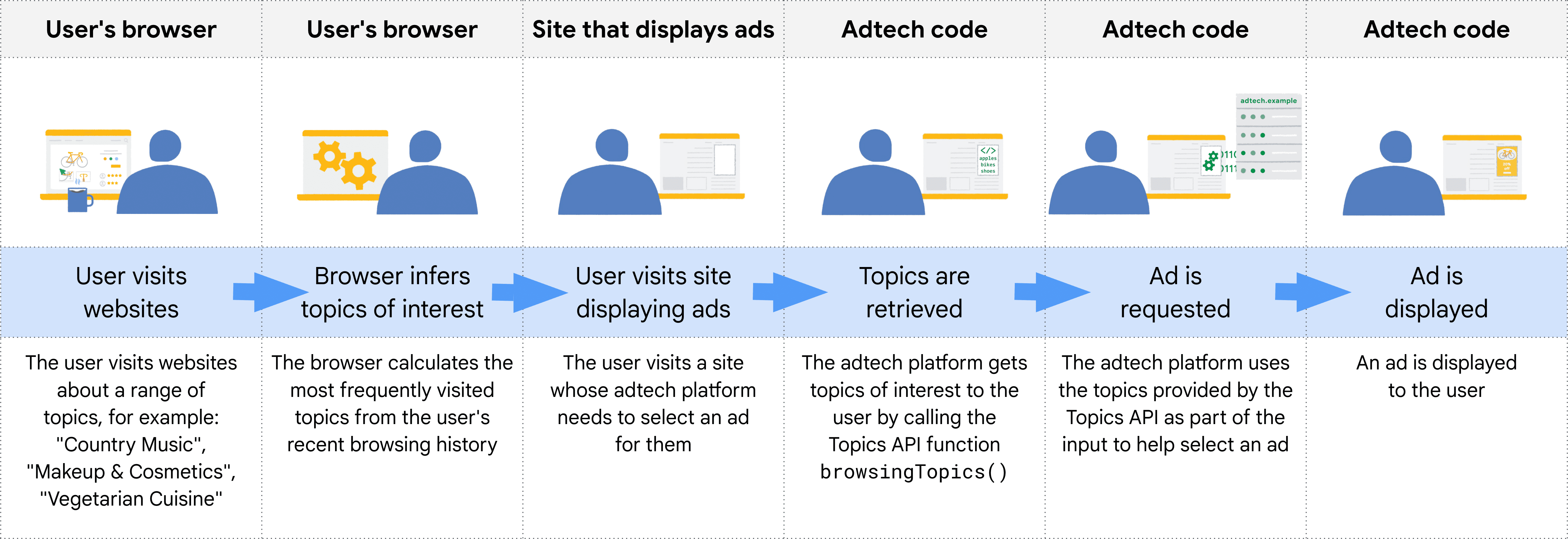
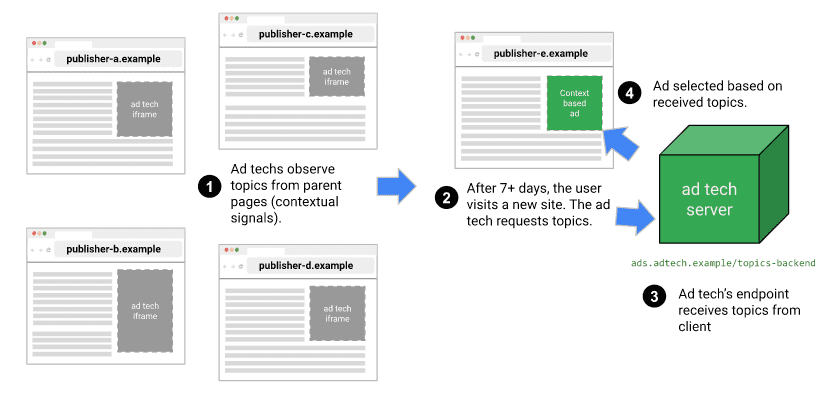
ブラウザは、Topics API を呼び出すコードのコンテキストから呼び出し元のオリジンを判断します。実際には、Topics ユーザーは参照元から iframe 内で API を呼び出すか、参照元への fetch にトピックを含めます。
たとえば、サプライサイド プラットフォーム(SSP)は複数のパブリッシャーのサイトに埋め込むことができます。SSP は、参照元から iframe 内で Topics API を呼び出して、各パブリッシャーのサイトでユーザーに関連付けられたトピックを検出できます。これらのトピックをデマンドサイド プラットフォーム(DSP)と共有して、ユーザーに関連性の高い広告を選択できます。
API がどの呼び出し元にどのトピックを表示するかを判断する仕組み
API 呼び出し元は最近確認したトピックのみを受け取り、ユーザーのトピックはエポック(Chrome の実装では 1 週間に設定されている期間)ごとに 1 回更新されます。つまり Topics API には、特定の呼び出し元が確認済みのトピックを受け取ることができるローリング ウィンドウが存在します。
次の表は、1 つのエポックにおけるユーザーの仮想的な閲覧履歴の例(実際にはありえないほど小さい)を示しています。訪問したサイトに関連付けられたトピックと、各サイトに存在する API 呼び出し元(サイトに含まれる JavaScript コードで document.browsingTopics() を呼び出すエンティティ)が示されています。
| サイト | トピック | サイトの API 呼び出し元 |
|---|---|---|
| running.example | Running & WalkingAthletic Shoes |
adtech1.example adtech2.example |
| dogs.example | Dogs |
adtech1.example |
| holiday.example | Hotels & Accommodations |
adtech2.example |
| sunglasses.example | Sunglasses |
[なし] |
エポック(デフォルトでは 1 週間)の最後に、Topics API はその週について、ブラウザの上位のトピックを生成します。
- adtech1.example は、running.example と dogs.example で確認したため、
Running & Walking、Athletic Shoes、Dogsのトピックを受け取ることができます。 - adtech1.example は、このユーザーについて
Hotels & Accommodationsトピックを受け取ることができません(このトピックに関連する、ユーザーが最近アクセスしたどのサイトにも存在しないため)。 - adtech2.example は
Running & Walking、Athletic Shoes、Hotels & Accommodationsのトピックを確認していますが、Dogsのトピックは確認していません。
ユーザーは Sunglasses のトピックがある sunglasses.example にアクセスしましたが、そのサイトに Topics API の呼び出しはありませんでした。つまりこの時点では、どの呼び出し元に対しても API が Sunglasses トピックを返すことはありません。
第 2 週に、ユーザーが別のサイトにアクセスします。
| サイト | トピック | サイトの API 呼び出し元 |
|---|---|---|
| cameras.example | Camera & Photo Equipment |
adtech2.example |
また、adtech2.example のコードが sunglasses.example に追加されます。
| サイト | トピック | サイトの API 呼び出し元 |
|---|---|---|
| sunglasses.example | Sunglasses |
adtech2.example |
第 1 週の Running & Walking、Athletic Shoes、Hotels & Accommodations と同様に、adtech2.example は後続のエポック(第 3 週)から Camera & Photo Equipment と Sunglasses のトピックを受け取れるようになります。これにより、第三者がユーザーの過去(この場合、ファッションに興味があること)について、Cookie を使用した場合よりも詳細に把握することはできなくなります。
さらに 2 週間後、Running & Walking、Athletic Shoes、Hotels & Accommodations は、adtech2.example のコードが含まれる、これらのトピックを持つサイトにユーザーがアクセスしなかった場合、adtech2.example の対象トピックのリストから外れる可能性があります。
分類モデル
Topics は、ウェブサイトのホスト名を 0 個以上のトピックにマッピングする分類モデルを使用します(完全な URL やページ コンテンツなどの追加情報を分析することで、広告の関連性が高まる可能性はありますが、プライバシーが損なわれるおそれもあります)。
分類
トピックは分類から選択されます。これらのトピックは Chrome によって厳選されたもので、信頼できるエコシステム貢献者によって維持されるリソースとなることを目指しています。分類においては、各トピックにより多くのユーザーのブラウザが関連付けられるよう、トピック数を必要最小限にする必要があります。最終的には、業界全体からのフィードバックやアイデアを組み込んだ分類を外部から提供されるようにしたいと考えています。
デリケートなカテゴリが含まれないよう、トピックは公開され、判読可能で、常に更新される必要があります。Chrome で使用される分類は、手動で選定され、一般的にデリケートと考えられるカテゴリ(民族や性的指向など)は除外されます。
トピックの分類
トピックは、上位 50,000 のサイトに対して手動でキュレーションされます。このキュレーションされたホスト名とトピックのオーバーライド リストは、分類器モデルのトレーニングに使用されます。上位サイトの場合、トピックは分類器モデルを使用するのではなく、オーバーライド リストからアクセスされます。オーバーライド リストは、パソコンのローカルで確認できます。
![[Classifier] パネルが選択された chrome://topics-internals ページ。](https://privacysandbox.google.com/static/private-advertising/topics/web/chrometopics-internals-8d62cfff441e4.png?authuser=5&hl=ja)
chrome://topics-internals ページの [Classifier] パネルには、モデルのバージョン、そのパス、リストに表示されている各ホストに関連付けられたトピックが一覧表示されます。Chrome の Topics API の実装では、モデルを表す TensorFlow Lite ファイルをダウンロードし、ユーザーのデバイスでローカルに使用できるようにします。
ユーザーの上位 5 つのトピックが選ばれる仕組み
API はエポックごとにトピックを 1 つ返します(最大 3 つ)。3 つ返される場合は、現在のエポックのトピックと、前 2 つのエポックのトピックが返されます。
- 各エポックの最後に、ブラウザは次の基準を満たすページのリストをコンパイルします。
- 対象エポック中にユーザーによってアクセスされたページ。
- このページには、
document.browsingTopics()を呼び出すコードが含まれています。 - API が有効になっている(たとえばユーザーまたはレスポンス ヘッダーによってブロックされていない)。
- ユーザーのデバイスで、ブラウザは Topics API が提供する分類モデルを使用して、各ページのホスト名をトピックのリストにマッピングします。
次に、document.browsingTopics() メソッドは、エポックごとに上位 5 つの中からランダムにトピックを返します(トピックの全分類からランダムに選ばれる確率は 5%)。Chrome では、ユーザーが個々のトピックを削除したり、閲覧履歴を消去したりすることで、API から返されるトピックの数を減らすこともできます。ユーザーは API をオプトアウトすることもできます。
現在のエポックで観測されたトピックに関する情報は、chrome://topics-internals ページで確認できます。
Next steps

Setup

Implement Topics
関連情報
ウェブ上の Topics API について理解を深めるには、Google のリソースをご覧ください。
- トピックのデモ、コラボレーション、チュートリアル動画をご覧ください。
- デベロッパーが Topics API をテスト用にカスタマイズできる Chrome フラグのリストをご覧ください。
- ユーザーとデベロッパーが API を制御する方法を確認する。
- 技術的な解説とサポートについては、リソースをご確認ください。質問したり、フィードバックを提供したり、交流したりできます。