

Topics API ช่วยให้สามารถโฆษณาตามความสนใจได้โดยไม่ต้องใช้คุกกี้ของบุคคลที่สาม
วิธีการทํางานของ Topics API
Topics API สามารถใช้เพื่อสังเกตและให้สิทธิ์เข้าถึงหัวข้อที่ดูเหมือนว่าผู้ใช้จะสนใจ โดยอิงตามกิจกรรมของผู้ใช้ จากนั้น Topics API จะให้สิทธิ์ผู้เรียก API (เช่น แพลตฟอร์มเทคโนโลยีโฆษณา) เข้าถึงหัวข้อความสนใจของผู้ใช้ได้ โดยไม่เปิดเผยข้อมูลเพิ่มเติมเกี่ยวกับกิจกรรมของผู้ใช้
หัวข้อสำคัญ
- หัวข้อคือหัวข้อที่ผู้ใช้ปัจจุบันสนใจซึ่งมนุษย์อ่านได้ และเป็นส่วนหนึ่งของการจัดหมวดหมู่หัวข้อ
- ผู้เรียกคือเอนทิตี เช่น แอป, SDK ของบุคคลที่สาม, เว็บไซต์ หรือบริการที่ส่งคําขอไปยัง Topics API เพื่อสังเกตหรือเข้าถึงความสนใจของผู้ใช้
- ระบบจะสังเกตหัวข้อเมื่อผู้เรียกใช้ส่งคำขอ Topics API จากหน้าเว็บหรือแอปที่เชื่อมโยงกับหัวข้อนี้ในช่วง 3 ยุคที่ผ่านมา
- ช่วงเวลาเริ่มต้นคือระยะเวลาของการคำนวณหัวข้อ ซึ่งค่าเริ่มต้นคือ 1 สัปดาห์
- การจัดหมวดหมู่คือรายการหมวดหมู่ที่เป็นลําดับชั้น ซึ่งรวมถึงหมวดหมู่ต่างๆ เช่น
/Arts & Entertainment/Music & Audio/Soul & R&Bและ/Business & Industrial/Business Services/Corporate Events - หัวข้อจะมาจากโมเดลตัวแยกประเภทที่เชื่อมโยงกิจกรรมของผู้ใช้กับหัวข้อตั้งแต่ 0 หัวข้อขึ้นไป
ขั้นตอนหลักของขั้นตอนการทํางานของ Topics API
วงจรการใช้งานของ Topics API มี 3 ขั้นตอนหลักดังนี้
- สังเกตกิจกรรมของผู้ใช้ เช่น เมื่อผู้ใช้เข้าชมหน้าเว็บ
https://cats.example/tabby/index.htmlหรือดาวน์โหลดแอปcats - ดึงข้อมูลหัวข้อจากกิจกรรมของผู้ใช้ เช่น
/Pets & Animals/Pets/Cats - เข้าถึงหัวข้อที่สังเกตได้ก่อนหน้านี้สําหรับผู้ใช้ เช่น เป็นสัญญาณในการเลือกการโฆษณาที่เกี่ยวข้อง (เช่น โปรโมชันอาหารแมว)
สังเกตหัวข้อ
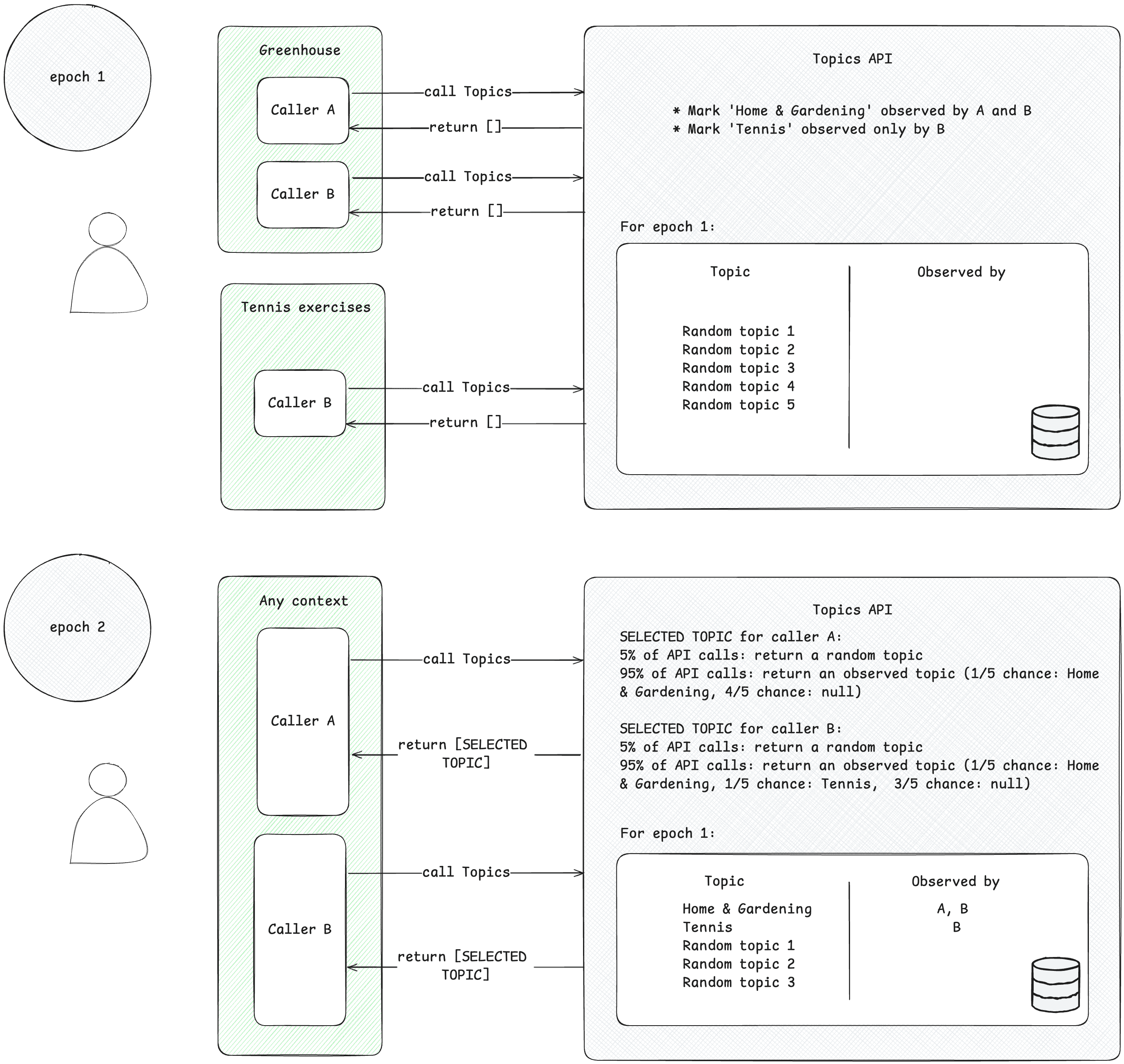
ผู้เรียกจะเข้าถึงได้เฉพาะหัวข้อที่น่าสนใจซึ่งตนได้สังเกตไว้ ผู้เรียกใช้จะสังเกตหัวข้อเมื่อส่งคำขอ Topics API จากบริบทที่เชื่อมโยงกับหัวข้อนี้ ตัวอย่างที่เข้าใจง่ายต่อไปนี้จะช่วยอธิบายแนวคิดนี้
- สมมติว่ามีผู้เรียกใช้ Topics API 2 ราย ได้แก่ A และ B
- บริบทมี 2 ประเภท ดังนี้
- Greenhouse เช่น แอปชื่อ Greenhouse หรือเว็บไซต์ greenhouse.example ที่เชื่อมโยงกับหัวข้อ
Home & Garden - การออกกำลังกายเทนนิส เช่น แอปชื่อ "การออกกำลังกายเทนนิส" หรือเว็บไซต์ tennis.example ที่เชื่อมโยงกับหัวข้อ
Sports/Tennis
- Greenhouse เช่น แอปชื่อ Greenhouse หรือเว็บไซต์ greenhouse.example ที่เชื่อมโยงกับหัวข้อ
- ทั้งผู้โทร A และ B อยู่ในบริบทของ Greenhouse
- เฉพาะผู้โทร B เท่านั้นที่อยู่ในบริบทของการออกกำลังกายเทนนิส
- สมมติว่าไม่มีหัวข้อใดที่สังเกตได้สําหรับผู้ใช้ก่อนศักราช 1 เพื่อลดความซับซ้อน
- ผู้ใช้เข้าชมแอป Greenhouse และผู้ที่โทร A และ B เรียกใช้ Topics API เพื่อบันทึกการเข้าชมหน้าเว็บหรือแอปของผู้ใช้ (ดูคู่มือการใช้งานที่แนะนำในขั้นตอนถัดไปเพื่อดูวิธีเรียกใช้ Topics API) ระบบจะใช้ระเบียนนี้ (ชื่อโฮสต์หรือข้อมูลแอป) ในภายหลังเพื่อดึงหัวข้อที่น่าสนใจ จากนั้น Topics API จะทําเครื่องหมายหัวข้อ
Home & Gardenว่าสังเกตโดยทั้งผู้เรียก A และ B - ผู้ใช้เข้าชมแอปการออกกําลังกายเทนนิส เฉพาะผู้ที่เรียกใช้ B เท่านั้นที่ส่งคําขอ Topics API จากนั้น Topics API จะทําเครื่องหมายหัวข้อ
Sports/Tennisตามที่สังเกตโดยผู้เรียก B - เมื่อสิ้นสุด Epoch Topics API จะรีเฟรชหัวข้อยอดนิยมของผู้ใช้และระบุผู้เรียกใช้ที่สังเกตหัวข้อเหล่านี้ตามกิจกรรมของผู้ใช้
- ต่อมา เมื่อผู้โทร B เรียกใช้ Topics API อีกครั้ง ระบบอาจได้รับหัวข้อ
Home & GardenหรือSports/Tennis(หรือหัวข้อแบบสุ่มโดยมีโอกาส 5%) สำหรับผู้ใช้รายนี้ในอาร์เรย์คำตอบ - ผู้เรียก A จะเข้าถึงได้เฉพาะหัวข้อ
Home & Gardenเนื่องจากไม่เคยสังเกตหัวข้อSports/Tennisซึ่งหมายความว่าบุคคลที่สามจะทราบเฉพาะหัวข้อที่ผู้ใช้สนใจภายในบริบทที่เฉพาะเจาะจง (แอปหรือเว็บไซต์) ที่หัวข้อนั้นปรากฏอยู่
ดึงหัวข้อ
หัวข้อจะดึงหัวข้อที่สนใจจากกิจกรรมของผู้ใช้ หัวข้อจะเลือกจากการจัดหมวดหมู่แบบโอเพนซอร์สที่กำหนดไว้ล่วงหน้า Topics จะรีเฟรชหัวข้อยอดนิยม 5 อันดับแรกของผู้เรียกใช้และหัวข้อที่ผู้ใช้เรียกใช้ในช่วง Epoch 1 ครั้ง โมเดลตัวแยกประเภท Topics จะดึงหัวข้อมาจากกิจกรรมของผู้ใช้ ได้แก่ ชื่อโฮสต์สำหรับการเข้าชมหน้าเว็บ ข้อมูลแอปใน Android
ผู้โทรเข้าถึงหัวข้อที่สนใจของผู้ใช้
API จะแสดงเฉพาะหัวข้อที่ผู้เรียกใช้สังเกตเห็นภายใน 3 ช่วงเวลาล่าสุด ระบบจะแสดงหัวข้อสูงสุด 3 หัวข้อต่อผู้เรียก โดยแสดงหัวข้อ 1 หัวข้อสำหรับแต่ละ Epoch 3 รายการล่าสุด (หากผู้เรียกสังเกตหัวข้อสำหรับ Epoch นั้น) ผู้เรียกใช้สามารถใช้หัวข้อที่แสดงผลเพื่อเสริมข้อมูลตามบริบทและรวมเข้าด้วยกันเพื่อช่วยค้นหาโฆษณาที่เกี่ยวข้องกับผู้ใช้มากขึ้นได้
Epoch
Topics API ต้องตรวจสอบว่าหัวข้อความสนใจที่ระบุเป็นข้อมูลล่าสุด ระบบจะอนุมานหัวข้อของผู้ใช้โดยพิจารณาจากกิจกรรมของผู้ใช้ในช่วงระยะเวลาหนึ่งๆ ที่รู้จักกันในชื่อ "Epoch" ซึ่งโดยค่าเริ่มต้นคือ 1 สัปดาห์ ผู้ใช้แต่ละรายจะมียุคของตนเอง (ยุคคือ "ต่อผู้ใช้") และระบบจะสุ่มเวลาเริ่มต้น
เมื่อแต่ละ Epoch เริ่มต้นขึ้น Topics API จะคํานวณหัวข้อยอดนิยม 5 อันดับแรกของผู้ใช้และระบุผู้เรียกใช้ที่สังเกตหัวข้อเหล่านั้นโดยใช้ข้อมูลในอุปกรณ์ หัวข้อที่เลือกไว้สำหรับแต่ละ Epoch จะถูกสุ่มเลือกจาก 5 หัวข้อยอดนิยมของผู้ใช้ในระยะเวลานั้นๆ ระบบจะสุ่มเลือกหัวข้อจากหัวข้อทั้งหมดที่เป็นไปได้ในการจัดหมวดหมู่ความสนใจโดยมีโอกาส 5% เพื่อเพิ่มความเป็นส่วนตัวและช่วยให้มั่นใจว่าหัวข้อทั้งหมดจะแสดง
หัวข้อบนเว็บในทางปฏิบัติ
ในเว็บ ระบบจะอนุมานหัวข้อจากชื่อโฮสต์ของหน้าที่ผู้ใช้เข้าชม เช่น หัวข้อที่อนุมานสำหรับเว็บไซต์ dogs.example อาจเป็น /สัตว์เลี้ยง/สัตว์เลี้ยง/สุนัข
แผนภาพต่อไปนี้แสดงตัวอย่างแบบย่อเพื่อสาธิตวิธีที่ Topics API อาจช่วยแพลตฟอร์มเทคโนโลยีโฆษณาเลือกโฆษณาที่เหมาะสม ตัวอย่างนี้ถือว่าเบราว์เซอร์ของผู้ใช้มีโมเดลอยู่แล้วเพื่อแมปชื่อโฮสต์ของเว็บไซต์กับหัวข้อ
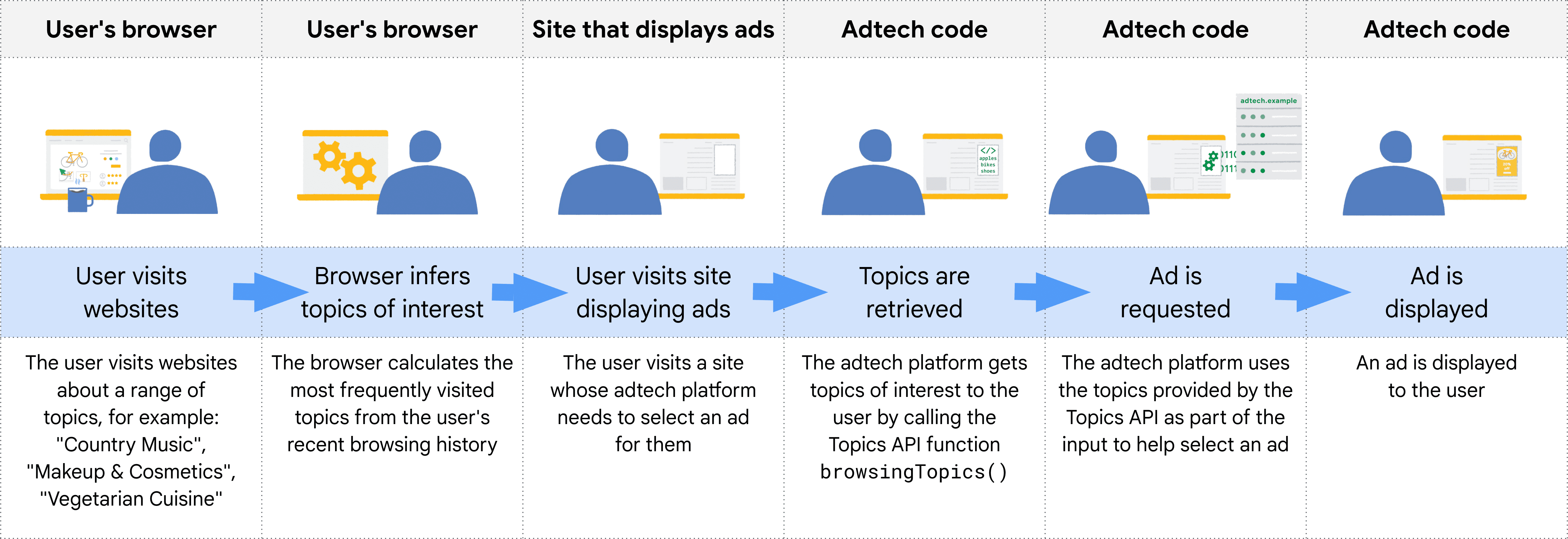
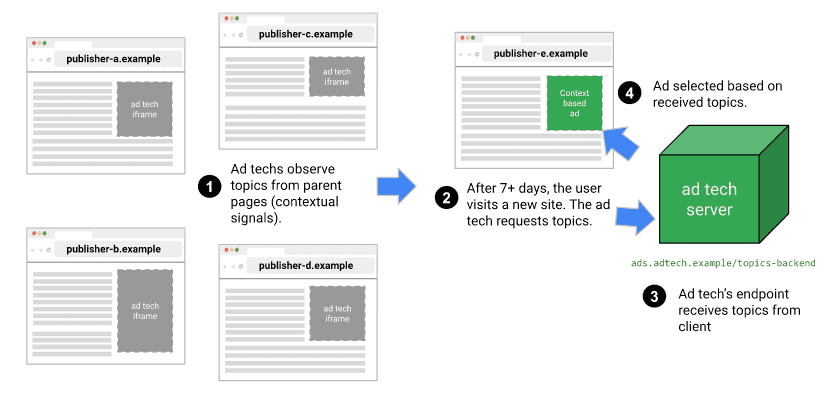
เบราว์เซอร์จะกำหนดต้นทางของผู้เรียกจากบริบทของโค้ดที่เรียกใช้ Topics API ในทางปฏิบัติ หมายความว่าผู้ใช้ Topics จะเรียกใช้ API ใน iframe จากต้นทาง หรือรวมหัวข้อไว้ใน fetch ไปยังต้นทาง
เช่น แพลตฟอร์มฝั่งขาย (SSP) สามารถฝังในเว็บไซต์ของผู้เผยแพร่โฆษณาได้หลายแห่ง จากนั้น SSP จะเรียกใช้ Topics API ภายใน iframe จากต้นทาง ซึ่งจะช่วยให้สามารถสังเกตหัวข้อที่เชื่อมโยงกับผู้ใช้ในเว็บไซต์ของผู้เผยแพร่โฆษณาเหล่านั้นได้ จากนั้นระบบจะแชร์หัวข้อเหล่านี้กับแพลตฟอร์มฝั่งดีมานด์ (DSP) เพื่อช่วยเลือกโฆษณาที่เกี่ยวข้องสําหรับผู้ใช้
วิธีที่ API ตัดสินว่าผู้โทรรายใดจะเห็นหัวข้อใด
ผู้เรียก API จะได้รับเฉพาะหัวข้อที่ได้สังเกตเมื่อเร็วๆ นี้ และระบบจะรีเฟรชหัวข้อสำหรับผู้ใช้ 1 ครั้งในแต่ละ Epoch ซึ่งเป็นระยะเวลาที่กำหนดไว้ 1 สัปดาห์ในการใช้งานของ Chrome ซึ่งหมายความว่า API จะมีช่วงเวลาต่อเนื่องที่ผู้เรียกใช้ที่เฉพาะเจาะจงอาจได้รับหัวข้อที่สังเกตได้
ตารางต่อไปนี้แสดงตัวอย่าง (แม้ว่าจะมีขนาดเล็กอย่างไม่สมจริง) ของประวัติการท่องเว็บสมมติของผู้ใช้ในช่วง Epoch เดียว โดยแสดงหัวข้อที่เชื่อมโยงกับเว็บไซต์ที่ผู้ใช้เข้าชม และผู้เรียก API ที่อยู่ในแต่ละเว็บไซต์ (เอนทิตีที่เรียก document.browsingTopics() ในโค้ด JavaScript ที่รวมอยู่ในเว็บไซต์)
| ไซต์ | หัวข้อ | ผู้เรียก API ในเว็บไซต์ |
|---|---|---|
| running.example | Running & WalkingAthletic Shoes |
adtech1.example adtech2.example |
| dogs.example | Dogs |
adtech1.example |
| holiday.example | Hotels & Accommodations |
adtech2.example |
| sunglasses.example | Sunglasses |
[ไม่มี] |
เมื่อสิ้นสุดช่วงเวลา (โดยค่าเริ่มต้นคือ 1 สัปดาห์) Topics API จะสร้างหัวข้อยอดนิยมของเบราว์เซอร์สำหรับสัปดาห์นั้น
- ตอนนี้ adtech1.example มีสิทธิ์รับหัวข้อ
Running & WalkingAthletic ShoesและDogsเนื่องจากสังเกตเห็นหัวข้อดังกล่าวใน running.example และ dogs.example - adtech1.example ไม่มีสิทธิ์รับ
Hotels & Accommodationsสำหรับผู้ใช้รายนี้ เนื่องจากไม่มีอยู่ในเว็บไซต์ใดๆ ที่ผู้ใช้เข้าชมเมื่อเร็วๆ นี้ซึ่งเชื่อมโยงกับหัวข้อนั้น - adtech2.example เห็นหัวข้อ
Running & Walking,Athletic ShoesและHotels & Accommodationsแต่ไม่เห็นหัวข้อDogs
ผู้ใช้เข้าชม sunglasses.example ซึ่งมีSunglasses แต่ไม่มีการเรียกใช้ Topics API ในเว็บไซต์นั้น ในตอนนี้ การดำเนินการนี้หมายความว่า API จะไม่แสดงผลหัวข้อ Sunglasses สำหรับผู้เรียกใช้รายใดก็ตาม
ในสัปดาห์ที่ 2 ผู้ใช้เข้าชมเว็บไซต์อื่น
| ไซต์ | หัวข้อ | ผู้เรียก API ในเว็บไซต์ |
|---|---|---|
| cameras.example | Camera & Photo Equipment |
adtech2.example |
นอกจากนี้ ระบบยังเพิ่มโค้ดจาก adtech2.example ไปยัง sunglasses.example ด้วย
| ไซต์ | หัวข้อ | ผู้เรียก API ในเว็บไซต์ |
|---|---|---|
| sunglasses.example | Sunglasses |
adtech2.example |
นอกจาก Running & Walking, Athletic Shoes และ Hotels & Accommodations จากสัปดาห์ที่ 1 แล้ว การดำเนินการนี้หมายความว่าตอนนี้ adtech2.example จะรับหัวข้อ Camera & Photo Equipment และ Sunglasses ได้ แต่จะรับได้ก็ต่อเมื่อถึงยุคถัดไป ซึ่งก็คือสัปดาห์ที่ 3 เพื่อให้มั่นใจว่าบุคคลที่สามจะไม่สามารถทราบข้อมูลเพิ่มเติมเกี่ยวกับอดีตของผู้ใช้ (ในกรณีนี้คือความสนใจในแฟชั่น) มากกว่าที่ทราบได้จากคุกกี้
หลังจากผ่านไปอีก 2 สัปดาห์ Running & Walking Athletic Shoes และ Hotels & Accommodations อาจหลุดออกจากรายการหัวข้อที่มีสิทธิ์ของ adtech2.example หากผู้ใช้ไม่ได้เข้าชมเว็บไซต์ที่มีหัวข้อเหล่านั้นซึ่งมีโค้ดจาก adtech2.example
โมเดลตัวแยกประเภท
Topics ใช้โมเดลตัวแยกประเภทที่แมปชื่อโฮสต์ของเว็บไซต์กับหัวข้อตั้งแต่ 0 รายการขึ้นไป (การวิเคราะห์ข้อมูลเพิ่มเติม เช่น URL แบบเต็มหรือเนื้อหาหน้าเว็บ อาจช่วยให้แสดงโฆษณาที่เกี่ยวข้องมากขึ้น แต่ก็อาจลดความเป็นส่วนตัวลงด้วย)
การจัดหมวดหมู่
ระบบจะเลือกหัวข้อจากอนุกรมวิธาน Chrome เป็นผู้ดูแลจัดการหัวข้อเหล่านี้ โดยมีเป้าหมายเพื่อให้การจัดหมวดหมู่กลายเป็นแหล่งข้อมูลที่ได้รับการดูแลโดยผู้มีส่วนร่วมในระบบนิเวศที่เชื่อถือได้ อนุกรมวิธานต้องมีขนาดเล็กพอที่เบราว์เซอร์ของผู้ใช้จำนวนมากจะเชื่อมโยงกับแต่ละหัวข้อ เป้าหมายสุดท้ายคือการให้การจัดหมวดหมู่มาจากบุคคลภายนอกที่รวมความคิดเห็นและแนวคิดจากทั่วทั้งอุตสาหกรรม
หากต้องการหลีกเลี่ยงหมวดหมู่ที่ละเอียดอ่อน หัวข้อต้องเป็นแบบสาธารณะ ดูแลจัดการโดยเจ้าหน้าที่ และเป็นข้อมูลล่าสุดอยู่เสมอ การจัดหมวดหมู่ที่ Chrome ใช้ได้รับการดูแลจัดการโดยมนุษย์เพื่อยกเว้นหมวดหมู่ที่โดยทั่วไปถือว่าละเอียดอ่อน เช่น ชาติพันธุ์หรือรสนิยมทางเพศ
การจัดประเภทหัวข้อ
เราดูแลจัดการหัวข้อสำหรับเว็บไซต์ยอดนิยม 50,000 เว็บไซต์ด้วยตนเอง และใช้รายการแทนที่ที่ดูแลจัดการของชื่อโฮสต์และหัวข้อนี้เพื่อฝึกโมเดลตัวแยกประเภท สำหรับเว็บไซต์ยอดนิยม ระบบจะเข้าถึงหัวข้อจากรายการลบล้างแทนที่จะใช้โมเดลตัวแยกประเภท คุณดูรายการการลบล้างได้ในคอมพิวเตอร์
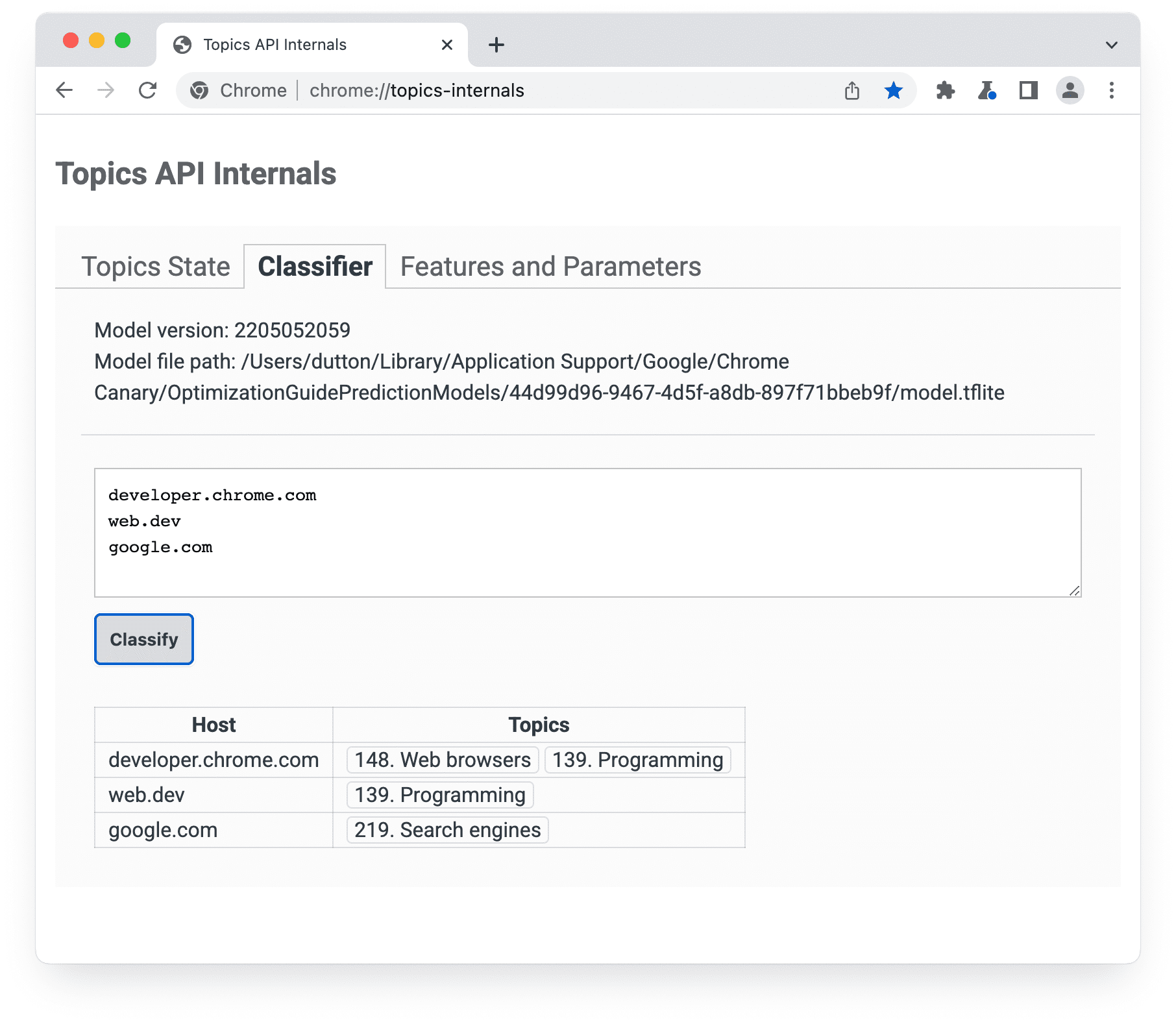
chrome://topics-internals จะแสดงเวอร์ชันของโมเดล เส้นทาง และหัวข้อที่เชื่อมโยงกับแต่ละโฮสต์ที่แสดงการติดตั้งใช้งาน Topics API ของ Chrome จะดาวน์โหลดไฟล์ TensorFlow Lite ที่แสดงถึงโมเดลเพื่อให้ใช้ในเครื่องบนอุปกรณ์ของผู้ใช้ได้
วิธีกำหนด 5 หัวข้อยอดนิยมของผู้ใช้
API จะแสดงผล 1 หัวข้อสำหรับแต่ละ Epoch โดยแสดงผลได้สูงสุด 3 หัวข้อ หากระบบแสดงผล 3 รายการ จะรวมถึงหัวข้อสำหรับ Epoch ปัจจุบันและ 2 Epoch ก่อนหน้า
- เมื่อสิ้นสุดแต่ละยุค เบราว์เซอร์จะรวบรวมรายการหน้าเว็บที่ตรงตามเกณฑ์ต่อไปนี้
- ผู้ใช้เข้าชมหน้าเว็บในระหว่างช่วงเวลา
- หน้าเว็บมีโค้ดที่เรียกใช้
document.browsingTopics() - API เปิดใช้แล้ว (เช่น ผู้ใช้หรือส่วนหัวของการตอบกลับไม่ได้บล็อก)
- เบราว์เซอร์ในอุปกรณ์ของผู้ใช้จะใช้โมเดลตัวแยกประเภทที่ Topics API จัดเตรียมไว้ให้เพื่อแมปชื่อโฮสต์ของแต่ละหน้ากับรายการหัวข้อ
เบราว์เซอร์จะสร้างรายการหัวข้อ 5 อันดับแรก
- ระบบจะกำหนดหัวข้อรูททั้ง 22 หัวข้อในอนุกรมวิธานให้กับกลุ่ม "มีประโยชน์สูง" หรือ "มีประโยชน์มาตรฐาน" โดยอิงตามความคิดเห็นจากระบบนิเวศการโฆษณา เบราว์เซอร์จะจัดเรียงหัวข้อตามการกำหนดกลุ่มก่อน หัวข้อลูกหลานทั้งหมดจะรับการกำหนดกลุ่มของหัวข้อรูทหลัก ระบบจะจัดลำดับความสำคัญของหัวข้อที่มี "ประโยชน์สูง"
- จากนั้นเบราว์เซอร์จะจัดเรียงหัวข้อตามความถี่ภายในแต่ละที่เก็บข้อมูล
- ระบบจะเลือก 5 หัวข้อแรกจากรายการที่จัดเรียงนี้เป็นหัวข้อยอดนิยมของผู้ใช้สำหรับ Epoch นั้น
จากนั้นdocument.browsingTopics()จะแสดงหัวข้อแบบสุ่มจาก 5 หัวข้อยอดนิยมสำหรับแต่ละ Epoch โดยมีโอกาส 5% ที่ระบบจะสุ่มเลือกหัวข้อใดก็ได้จากอนุกรมวิธานของหัวข้อทั้งหมด ใน Chrome ผู้ใช้ยังนำหัวข้อแต่ละรายการออกหรือล้างประวัติการท่องเว็บเพื่อลดจำนวนหัวข้อที่ API แสดงได้ด้วย ผู้ใช้ยังเลือกไม่ใช้ API ได้ด้วย
คุณดูข้อมูลเกี่ยวกับหัวข้อที่สังเกตได้ในระหว่าง Epoch ปัจจุบันได้จากหน้า chrome://topics-internals
ขั้นตอนถัดไป


ดูเพิ่มเติม
ดูแหล่งข้อมูลของเราเพื่อทำความเข้าใจเกี่ยวกับ Topics API บนเว็บให้ดียิ่งขึ้น
- ลองดูวิดีโอเดโม วิดีโอที่ทำร่วมกัน และวิดีโอคำแนะนำแบบทีละขั้นจาก Topics
- ดูรายการ Flag ของ Chrome ที่อนุญาตให้นักพัฒนาซอฟต์แวร์ปรับแต่ง Topics API สำหรับการทดสอบ
- ดูวิธีที่ผู้ใช้และนักพัฒนาแอปควบคุม API ได้
- ดูแหล่งข้อมูลสําหรับคำอธิบายและการสนับสนุนทางเทคนิค ถามคำถาม มีส่วนร่วม และแชร์ความคิดเห็น