

ดูข้อมูลเกี่ยวกับ Topics API ใน Android และขั้นตอนที่เกี่ยวข้องในการใช้งาน หรือจะข้ามไปใช้หัวข้อเลยก็ได้
วิธีการทํางานของ Topics API
Topics API สามารถใช้เพื่อสังเกตและให้สิทธิ์เข้าถึงหัวข้อที่ดูเหมือนว่าผู้ใช้จะสนใจ โดยอิงตามกิจกรรมของผู้ใช้ จากนั้น Topics API จะให้สิทธิ์ผู้เรียก API (เช่น แพลตฟอร์มเทคโนโลยีโฆษณา) เข้าถึงหัวข้อความสนใจของผู้ใช้ได้ โดยไม่เปิดเผยข้อมูลเพิ่มเติมเกี่ยวกับกิจกรรมของผู้ใช้
หัวข้อสำคัญ
- หัวข้อคือหัวข้อที่ผู้ใช้ปัจจุบันสนใจซึ่งมนุษย์อ่านได้ และเป็นส่วนหนึ่งของการจัดหมวดหมู่หัวข้อ
- ผู้เรียกคือเอนทิตี เช่น แอป, SDK ของบุคคลที่สาม, เว็บไซต์ หรือบริการที่ส่งคําขอไปยัง Topics API เพื่อสังเกตหรือเข้าถึงความสนใจของผู้ใช้
- ระบบจะสังเกตหัวข้อเมื่อผู้เรียกใช้ส่งคำขอ Topics API จากหน้าเว็บหรือแอปที่เชื่อมโยงกับหัวข้อนี้ในช่วง 3 ยุคที่ผ่านมา
- ช่วงเวลาเริ่มต้นคือระยะเวลาของการคำนวณหัวข้อ ซึ่งค่าเริ่มต้นคือ 1 สัปดาห์
- การจัดหมวดหมู่คือรายการหมวดหมู่ที่เป็นลําดับชั้น ซึ่งรวมถึงหมวดหมู่ต่างๆ เช่น
/Arts & Entertainment/Music & Audio/Soul & R&Bและ/Business & Industrial/Business Services/Corporate Events - หัวข้อจะมาจากโมเดลตัวแยกประเภทที่เชื่อมโยงกิจกรรมของผู้ใช้กับหัวข้อตั้งแต่ 0 หัวข้อขึ้นไป
ขั้นตอนหลักของขั้นตอนการทํางานของ Topics API
วงจรการใช้งานของ Topics API มี 3 ขั้นตอนหลักดังนี้
- สังเกตกิจกรรมของผู้ใช้ เช่น เมื่อผู้ใช้เข้าชมหน้าเว็บ
https://cats.example/tabby/index.htmlหรือดาวน์โหลดแอปcats - ดึงข้อมูลหัวข้อจากกิจกรรมของผู้ใช้ เช่น
/Pets & Animals/Pets/Cats - เข้าถึงหัวข้อที่สังเกตได้ก่อนหน้านี้สําหรับผู้ใช้ เช่น เป็นสัญญาณในการเลือกการโฆษณาที่เกี่ยวข้อง (เช่น โปรโมชันอาหารแมว)
สังเกตหัวข้อ
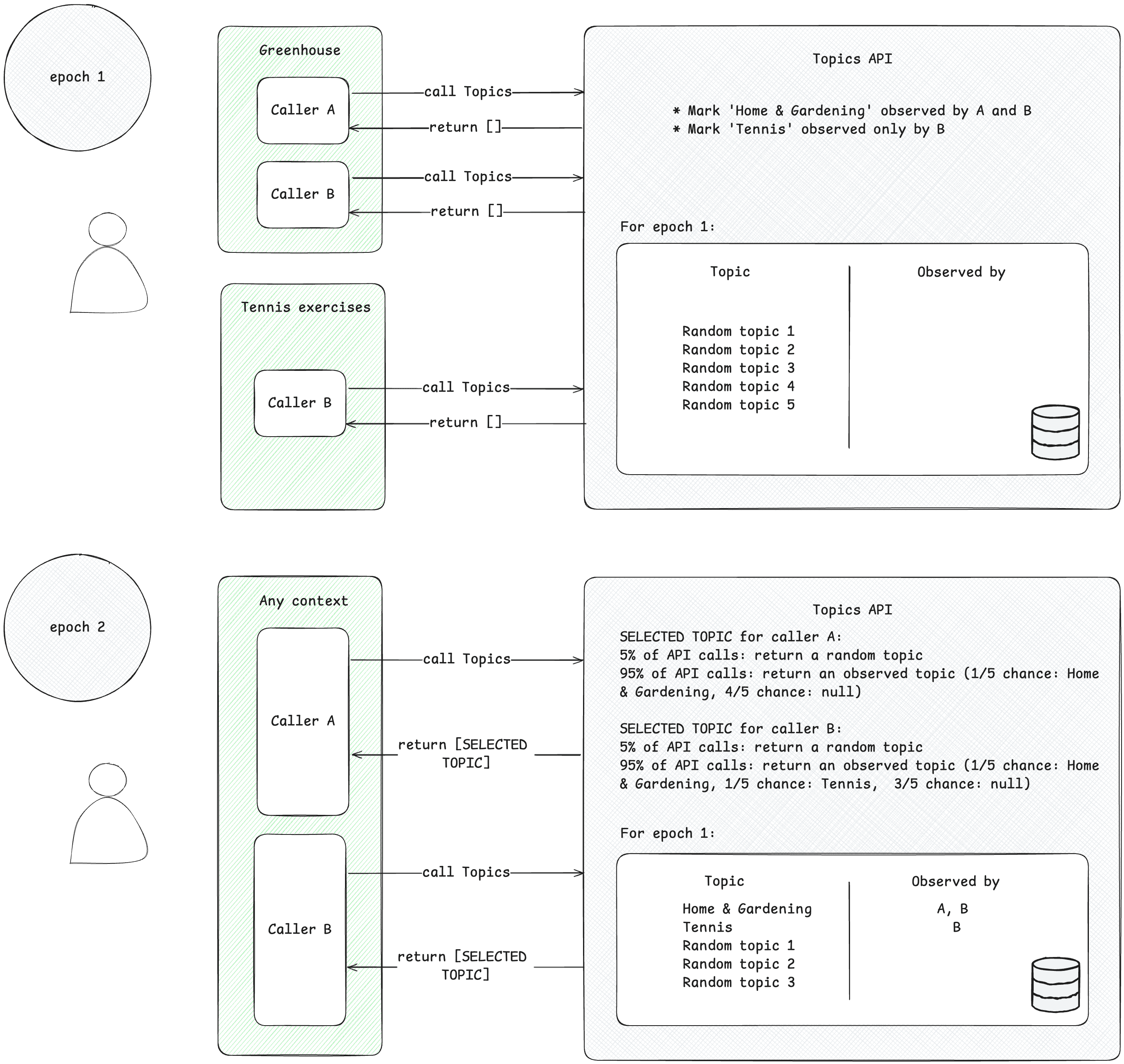
ผู้เรียกจะเข้าถึงได้เฉพาะหัวข้อที่น่าสนใจซึ่งตนได้สังเกตไว้ ผู้เรียกใช้จะสังเกตหัวข้อเมื่อส่งคำขอ Topics API จากบริบทที่เชื่อมโยงกับหัวข้อนี้ ตัวอย่างที่เข้าใจง่ายต่อไปนี้จะช่วยอธิบายแนวคิดนี้
- สมมติว่ามีผู้เรียกใช้ Topics API 2 ราย ได้แก่ A และ B
- บริบทมี 2 ประเภท ดังนี้
- Greenhouse เช่น แอปชื่อ Greenhouse หรือเว็บไซต์ greenhouse.example ที่เชื่อมโยงกับหัวข้อ
Home & Garden - การออกกำลังกายเทนนิส เช่น แอปชื่อ "การออกกำลังกายเทนนิส" หรือเว็บไซต์ tennis.example ที่เชื่อมโยงกับหัวข้อ
Sports/Tennis
- Greenhouse เช่น แอปชื่อ Greenhouse หรือเว็บไซต์ greenhouse.example ที่เชื่อมโยงกับหัวข้อ
- ทั้งผู้โทร A และ B อยู่ในบริบทของ Greenhouse
- เฉพาะผู้โทร B เท่านั้นที่อยู่ในบริบทของการออกกำลังกายเทนนิส
- สมมติว่าไม่มีหัวข้อใดที่สังเกตได้สําหรับผู้ใช้ก่อนศักราช 1 เพื่อลดความซับซ้อน
- ผู้ใช้เข้าชมแอป Greenhouse และผู้ที่โทร A และ B เรียกใช้ Topics API เพื่อบันทึกการเข้าชมหน้าเว็บหรือแอปของผู้ใช้ (ดูคู่มือการใช้งานที่แนะนำในขั้นตอนถัดไปเพื่อดูวิธีเรียกใช้ Topics API) ระบบจะใช้ระเบียนนี้ (ชื่อโฮสต์หรือข้อมูลแอป) ในภายหลังเพื่อดึงหัวข้อที่น่าสนใจ จากนั้น Topics API จะทําเครื่องหมายหัวข้อ
Home & Gardenว่าสังเกตโดยทั้งผู้เรียก A และ B - ผู้ใช้เข้าชมแอปการออกกําลังกายเทนนิส เฉพาะผู้ที่เรียกใช้ B เท่านั้นที่ส่งคําขอ Topics API จากนั้น Topics API จะทําเครื่องหมายหัวข้อ
Sports/Tennisตามที่สังเกตโดยผู้เรียก B - เมื่อสิ้นสุด Epoch Topics API จะรีเฟรชหัวข้อยอดนิยมของผู้ใช้และระบุผู้เรียกใช้ที่สังเกตหัวข้อเหล่านี้ตามกิจกรรมของผู้ใช้
- ต่อมา เมื่อผู้โทร B เรียกใช้ Topics API อีกครั้ง ระบบอาจได้รับหัวข้อ
Home & GardenหรือSports/Tennis(หรือหัวข้อแบบสุ่มโดยมีโอกาส 5%) สำหรับผู้ใช้รายนี้ในอาร์เรย์คำตอบ - ผู้เรียก A จะเข้าถึงได้เฉพาะหัวข้อ
Home & Gardenเนื่องจากไม่เคยสังเกตหัวข้อSports/Tennisซึ่งหมายความว่าบุคคลที่สามจะทราบเฉพาะหัวข้อที่ผู้ใช้สนใจภายในบริบทที่เฉพาะเจาะจง (แอปหรือเว็บไซต์) ที่หัวข้อนั้นปรากฏอยู่
ดึงหัวข้อ
หัวข้อจะดึงหัวข้อที่สนใจจากกิจกรรมของผู้ใช้ หัวข้อจะเลือกจากการจัดหมวดหมู่แบบโอเพนซอร์สที่กำหนดไว้ล่วงหน้า Topics จะรีเฟรชหัวข้อยอดนิยม 5 อันดับแรกของผู้เรียกใช้และหัวข้อที่ผู้ใช้เรียกใช้ในช่วง Epoch 1 ครั้ง โมเดลตัวแยกประเภท Topics จะดึงหัวข้อมาจากกิจกรรมของผู้ใช้ ได้แก่ ชื่อโฮสต์สำหรับการเข้าชมหน้าเว็บ ข้อมูลแอปใน Android
ผู้โทรเข้าถึงหัวข้อที่สนใจของผู้ใช้
API จะแสดงเฉพาะหัวข้อที่ผู้เรียกใช้สังเกตเห็นภายใน 3 ช่วงเวลาล่าสุด ระบบจะแสดงหัวข้อสูงสุด 3 หัวข้อต่อผู้เรียก โดยแสดงหัวข้อ 1 หัวข้อสำหรับแต่ละ Epoch 3 รายการล่าสุด (หากผู้เรียกสังเกตหัวข้อสำหรับ Epoch นั้น) ผู้เรียกใช้สามารถใช้หัวข้อที่แสดงผลเพื่อเสริมข้อมูลตามบริบทและรวมเข้าด้วยกันเพื่อช่วยค้นหาโฆษณาที่เกี่ยวข้องกับผู้ใช้มากขึ้นได้
Epoch
Topics API ต้องตรวจสอบว่าหัวข้อความสนใจที่ระบุเป็นข้อมูลล่าสุด ระบบจะอนุมานหัวข้อของผู้ใช้โดยพิจารณาจากกิจกรรมของผู้ใช้ในช่วงระยะเวลาหนึ่งๆ ที่รู้จักกันในชื่อ "Epoch" ซึ่งโดยค่าเริ่มต้นคือ 1 สัปดาห์ ผู้ใช้แต่ละรายจะมียุคของตนเอง (ยุคคือ "ต่อผู้ใช้") และระบบจะสุ่มเวลาเริ่มต้น
เมื่อแต่ละ Epoch เริ่มต้นขึ้น Topics API จะคํานวณหัวข้อยอดนิยม 5 อันดับแรกของผู้ใช้และระบุผู้เรียกใช้ที่สังเกตหัวข้อเหล่านั้นโดยใช้ข้อมูลในอุปกรณ์ หัวข้อที่เลือกไว้สำหรับแต่ละ Epoch จะถูกสุ่มเลือกจาก 5 หัวข้อยอดนิยมของผู้ใช้ในระยะเวลานั้นๆ ระบบจะสุ่มเลือกหัวข้อจากหัวข้อทั้งหมดที่เป็นไปได้ในการจัดหมวดหมู่ความสนใจโดยมีโอกาส 5% เพื่อเพิ่มความเป็นส่วนตัวและช่วยให้มั่นใจว่าหัวข้อทั้งหมดจะแสดง
หัวข้อใน Android ในทางปฏิบัติ
Topics API ใน Android ออกแบบมาเพื่อรองรับ SDK โฆษณาของบุคคลที่สามซึ่งมักทํางานในหลายแอป Topics จะให้หัวข้อโฆษณาแบบหยาบๆ ที่ผู้โทรสนใจโดยอิงตามการใช้แอปของผู้ใช้ โดยไม่ต้องอาศัยตัวระบุข้ามแอป โดยหัวข้อเหล่านี้จะใช้เพื่อเสริมข้อมูลตามบริบทที่เกี่ยวข้องกับแอปที่ต้องการแสดงโฆษณา และสามารถนำมารวมกันเพื่อช่วยเลือกโฆษณาที่เหมาะสมสำหรับผู้ใช้
ในบริบทของ Topics API ผู้ซื้อและผู้ลงโฆษณาจะขึ้นอยู่กับฝั่งผู้ขาย ฝั่งผู้ขายมีสถานะที่กว้างขวางในแอปของผู้เผยแพร่โฆษณา และสังเกตหัวข้อของผู้ใช้ จากนั้นจึงแชร์หัวข้อกับผู้ซื้อเพื่อช่วยให้ผู้ซื้อเลือกโฆษณาที่เกี่ยวข้องมากขึ้น หากต้องการรับหัวข้อ แอปและ SDK ฝั่งผู้ขายต้องสร้างร่องรอยโดยการเป็นผู้สังเกตการณ์ Topics API อย่างน้อย 1 Epoch
ดูตัวอย่างโค้ดที่แสดงวิธีตั้งค่าความสามารถในการดึงข้อมูลหัวข้อสำหรับการโฆษณาตามความสนใจได้ในคู่มือการติดตั้งใช้งาน Topics API
การผสานรวม Topics ตามประเภทธุรกิจ
เปิดใช้สำหรับ IBA (การโฆษณาตามความสนใจ) ด้วย Topics API ทําตามขั้นตอนตามประเภทธุรกิจเทคโนโลยีโฆษณาเพื่อผสานรวม Topics API และเตรียมพร้อมสําหรับการเปิดตัว
สำหรับเทคโนโลยีโฆษณาทั้งหมด
- ตรวจสอบการจัดหมวดหมู่ Topics และแสดงความคิดเห็น
- ทดลองใช้ Sample App ของ Topics API เพื่อดูว่าระบบจะแสดงข้อมูลหัวข้อใดจากเครื่องมือคัดแยกในอุปกรณ์
- อัปเดตโฟลว์ของแอปและ SDK เพื่อเริ่มเรียกใช้ Topics API
- อัปเดตโปรโตคอลเพื่อเริ่มส่งหัวข้อในคำขอโฆษณา
- ลงทะเบียนเทคโนโลยีโฆษณาของคุณกับ Privacy Sandbox
สำหรับเทคโนโลยีโฆษณาฝั่งผู้ขาย
- เป็นผู้สังเกตการณ์เพื่อสร้างร่องรอยของ Topics API Topics API มีสัญญาณใหม่ ดังนั้นคุณจะต้องอัปเดต SDK เพื่อเริ่มเรียกใช้ Topics API หากต้องการดึงข้อมูลหัวข้ออย่างสม่ำเสมอ SDK ต้องเรียก API จากแอปของผู้เผยแพร่อย่างน้อย 1 ครั้งต่อยุค ระบบจะใช้เวลาสูงสุด 4 ยุคเพื่อให้ได้หัวข้อจำนวนสูงสุด (3 หัวข้อ) ที่จะส่งไปพร้อมกับคำขอโฆษณา
- ใส่ข้อมูล Topics API ในคำขอโฆษณา เริ่มแชร์ข้อมูล Topics API กับพาร์ทเนอร์ฝั่งซื้อสำหรับคำขอโฆษณาแต่ละรายการ Topics API วางแผนที่จะเสริมสัญญาณอื่นๆ (เช่น สัญญาณตามบริบท) เพื่อช่วยค้นหาโฆษณาที่เหมาะสมสำหรับผู้เข้าชมที่เฉพาะเจาะจง
- ทำงานร่วมกันในโปรโตคอลสำหรับการแชร์หัวข้อกับพาร์ทเนอร์ฝั่งซื้อ Topics API ต้องการให้ SDK แต่ละรายการทำงานร่วมกับพาร์ทเนอร์ปลายทางเพื่อตกลงเกี่ยวกับวิธีแชร์ข้อมูล Topics API
สำหรับเทคโนโลยีโฆษณาฝั่งผู้ซื้อ
- ติดต่อพาร์ทเนอร์ฝั่งผู้ขายเพื่อยืนยันแผนการสังเกตหัวข้อและสร้างร่องรอย หากต้องการรับหัวข้อ ผู้ให้บริการฝั่งผู้ขายต้องเรียกใช้ Topics API อย่างน้อย 1 ครั้งต่อยุค
- ทำงานร่วมกันในโปรโตคอลสำหรับการรับหัวข้อจากพาร์ทเนอร์ฝั่งผู้ขาย Topics เป็นสัญญาณใหม่ที่พาร์ทเนอร์ฝั่งผู้ขายจะแชร์เป็นส่วนหนึ่งของคำขอโฆษณา ผู้บริโภคฝั่งซื้อจะต้องตรวจสอบว่าตนทำงานร่วมกับพาร์ทเนอร์ต้นทางในเรื่องวิธีแชร์ Topics
- รวมหัวข้อไว้ในโมเดลการเสนอราคาและการเพิ่มประสิทธิภาพ คาดว่า Topics API จะช่วยเสริมสัญญาณอื่นๆ เช่น บริบท เพื่อช่วยค้นหาโฆษณาที่เหมาะสมสำหรับผู้เข้าชม
วิธีที่ API อนุมานหัวข้อสำหรับแอป
ใน Android นั้น Topics API จะอนุมานหัวข้อสำหรับแอปโดยอิงตามข้อมูลแอปโดยใช้โมเดลตัวแยกประเภท ในการใช้งานปัจจุบัน Topics จะใช้ชื่อแอปและชื่อแพ็กเกจเพื่อกำหนดหัวข้อที่สนใจให้กับแอป แต่ในอนาคตอาจขยายการใช้งานให้รวมข้อมูลอื่นๆ เช่น คำอธิบายแอป
ตัวแยกประเภทหัวข้อ
ระบบจะดึงหัวข้อที่น่าสนใจจากโมเดลตัวแยกประเภทที่ได้รับการฝึกโดยใช้ข้อมูลแอปที่เผยแพร่ต่อสาธารณะ
- เมื่อใช้โมเดลตัวแยกประเภทสำหรับการอนุมานเพื่อคำนวณหัวข้อสำหรับ Epoch ที่กำหนด ชุดสัญญาณที่ใช้จะยังคงอยู่ในอุปกรณ์ ชุดสัญญาณนี้อาจรวมถึงแอปที่ติดตั้งหรือใช้ล่าสุด และอาจขยายให้รวมสัญญาณอื่นๆ ในภายหลัง
- โมเดล V5 ได้รับการฝึกโดย Google จากข้อมูลแอปที่เปิดเผยต่อสาธารณะจำนวน 540,000 รายการซึ่งมีป้ายกำกับจากมนุษย์ และข้อมูลแอปจำนวน 17 ล้านรายการซึ่งมีป้ายกำกับ ML จาก App Store เช่น Google Play Store โมเดลใช้ชื่อแอปและชื่อแพ็กเกจเป็นสัญญาณอินพุต และพร้อมให้นักพัฒนาแอปทดสอบและดูว่าแอปของตนจัดอยู่ในหมวดหมู่ใด
- แอปอาจแมปกับหัวข้อมากกว่า 1 หัวข้อ หรือไม่แมปกับหัวข้อใดเลย หรืออาจไม่ได้เพิ่มลงในประวัติหัวข้อของผู้ใช้ ในกรณีที่แอปเชื่อมโยงกับมากกว่า 1 หัวข้อในอนุกรมวิธาน ระบบจะจำกัดจำนวนหัวข้อที่เลือกสำหรับแอปนี้ไว้ที่ 3 อันดับแรก
หากต้องการทำความเข้าใจวิธีการทำงานของโมเดลตัวแยกประเภทให้ดียิ่งขึ้น คุณสามารถทดสอบว่าข้อมูลแอปต่างๆ ส่งผลต่อการแยกประเภทอย่างไรได้โดยใช้ Android Topics Classifier Colab
การจัดหมวดหมู่
ระบบจะเลือกหัวข้อจากการจัดหมวดหมู่โอเพนซอร์สที่กำหนดไว้ล่วงหน้า การจัดหมวดหมู่เผยแพร่ต่อสาธารณะและอาจมีการเปลี่ยนแปลง คุณส่งคำแนะนำได้โดยใช้ปุ่มความคิดเห็นที่ด้านบนของหน้านี้ การจัดหมวดหมู่นี้ได้รับการดูแลจัดการโดยเจ้าหน้าที่เพื่อให้หัวข้อที่ละเอียดอ่อนไม่ได้เป็นส่วนหนึ่งของการจัดหมวดหมู่ โดยจะปรับให้เหมาะกับหมวดหมู่ของโฆษณาที่แสดงในแอปบนอุปกรณ์เคลื่อนที่ใน Android ได้
หัวข้อใน Android ในทางปฏิบัติ
สมมติว่าผู้ใช้ติดตั้งแอป 7 แอปในอุปกรณ์ ได้แก่ A, B, C, D, E, F และ G สมมติว่าการจัดหมวดหมู่หัวข้อสำหรับแอปและ SDK เทคโนโลยีโฆษณาในแอปเหล่านี้เป็นดังนี้
| App | การจัดประเภทหัวข้อ | SDK เทคโนโลยีโฆษณา |
| A | T1, T5 | ad-sdk1, ad-sdk2 |
| B | T2 | ad-sdk2 |
| C | T3, T6 | ad-sdk3, ad-sdk4 |
| D | T1, T4 | ad-sdk1 |
| E | T5 | ad-sdk4, ad-sdk5 |
| F | T6 | ad-sdk2, ad-sdk3, ad-sdk4 |
| G | T7 | ad-sdk2 |
สิ้นสุดสัปดาห์ที่ 1: Topics API จะสร้างหัวข้อยอดนิยม 5 อันดับแรกของผู้ใช้สำหรับ Epoch นี้
| Top Topic | ผู้โทรที่สามารถดูข้อมูลเกี่ยวกับหัวข้อ |
| T1 | ad-sdk1, ad-sdk2 |
| T2 | ad-sdk2 |
| T3 | ad-sdk3, ad-sdk4 |
| T4 | ad-sdk1 |
| T5 | ad-sdk1, ad-sdk2, ad-sdk4, ad-sdk5 |
ในสัปดาห์ที่ 2 หากผู้โทรในแอปใดก็ตามเรียกใช้ API รายการหัวข้อที่แสดงจะรวมเฉพาะหัวข้อที่ผู้โทรอยู่ในคอลัมน์ "ผู้โทรที่ดูข้อมูลเกี่ยวกับหัวข้อได้" สำหรับหัวข้อนั้นในแอปนั้นสำหรับช่วงเวลาดังกล่าว
- ระยะเวลาประวัติที่รวมอยู่ในการคำนวณหัวข้อที่พร้อมใช้งานสำหรับผู้โทรแต่ละรายคือ 3 ยุค (หรือ 3 สัปดาห์)
- ระบบจะใช้เฉพาะหัวข้อที่เชื่อมโยงกับแอปที่เรียกใช้ Topics API ผ่าน SDK โฆษณาเท่านั้น ซึ่งหมายความว่าหากแอปไม่มี SDK โฆษณาที่เรียกใช้ Topics API หัวข้อที่เชื่อมโยงกับแอปนั้นจะไม่รวมอยู่ในกลุ่มหัวข้อที่ SDK โฆษณาสามารถเข้าถึงได้
- นอกจากนี้ แอปยังเลือกไม่ใช้ Topics API ได้ด้วยการประกาศ หัวข้อที่เชื่อมโยงกับแอปที่เลือกไม่ใช้จะไม่นำมาใช้ในการคำนวณหัวข้อรายสัปดาห์ เราจะอัปเดตเอกสารนี้ให้มีรายละเอียดการติดตั้งใช้งานที่เกี่ยวข้อง
หากมีการใช้งานแอปไม่เพียงพอที่แพลตฟอร์มจะอนุมาน 5 หัวข้อได้ แพลตฟอร์มอาจพิจารณาตัวเลือกต่างๆ เช่น การสร้างหัวข้อที่เหลือแบบสุ่ม
การเข้ารหัสหัวข้อที่แสดง
แพลตฟอร์มเทคโนโลยีโฆษณาที่ลงทะเบียนซึ่งเรียกใช้ Topics API จะต้องระบุ คีย์การเข้ารหัสเพื่อให้มั่นใจว่าผู้เรียกใช้เท่านั้นที่จะอ่านหัวข้อที่ส่งคืนได้
Privacy Sandbox จะดึงคีย์เหล่านี้จากปลายทางที่เทคโนโลยีโฆษณาจัดเตรียมไว้ เราขอแนะนำให้คุณอัปเดตคีย์เป็นประจำ แต่ต้องอัปเดตอย่างน้อยทุกๆ 6 เดือน
Privacy Sandbox จะขอให้เทคโนโลยีโฆษณายืนยันความพร้อมใช้งานของปลายทางที่ระบุในระหว่างกระบวนการลงทะเบียน ดูรายละเอียดเพิ่มเติมเกี่ยวกับการดำเนินการที่เทคโนโลยีโฆษณาปัจจุบันและเทคโนโลยีโฆษณาที่ลงทะเบียนใหม่ต้องทำได้ในคู่มือการลงทะเบียน
ขั้นตอนถัดไป

ใช้หัวข้อ

การควบคุมและความโปร่งใส
ดูเพิ่มเติม
ดูแหล่งข้อมูลของเราเพื่อทำความเข้าใจเกี่ยวกับ Topics API บน Android ให้ดียิ่งขึ้น
- ดูตัวอย่างแอป วิดีโอการทำงานร่วมกัน และวิดีโอแนะนำการใช้งานของ Topics
- ดูว่าผู้ใช้และนักพัฒนาซอฟต์แวร์จะควบคุม API นี้ได้อย่างไร
- โปรดดูแหล่งข้อมูลการสนับสนุนเพื่อถามคำถาม มีส่วนร่วม และแชร์ความคิดเห็น