

本文是使用 Shared Storage 和 Private Aggregation 的快速入門指南。您需要瞭解這兩個 API,因為 Shared Storage 會儲存值,而 Private Aggregation 則會建立可匯總的報表。
目標對象:廣告技術和評估供應商。
Shared Storage API
為防止跨網站追蹤,瀏覽器開始分割所有形式的儲存空間,包括本機儲存空間、Cookie 等。但有些用途需要未分割的儲存空間。Shared Storage API 提供不同頂層網站的無限寫入權限,同時保留隱私權保護的讀取權限。
Shared Storage 僅限於內容來源 (sharedStorage 的呼叫端)。
每個來源的共用儲存空間容量有限,且每筆項目都有字元數上限。如果達到上限,系統就不會再儲存任何輸入內容。資料儲存空間限制請參閱共用儲存空間說明。
叫用 Shared Storage
廣告技術人員可以使用 JavaScript 或回應標頭,將資料寫入共用儲存空間。從共用儲存空間讀取資料時,只會在稱為「小程式」的獨立 JavaScript 環境中進行。
使用 JavaScript:廣告技術可以執行特定的 Shared Storage 函式,例如在 JavaScript Worklet 以外設定、附加及刪除值。不過,讀取共用儲存空間和執行私人匯總等函式必須透過 JavaScript worklet 完成。如要瞭解可在 JavaScript Worklet 外部使用的方法,請參閱「建議的 API 介面 - Worklet 外部」。
您可以在建議的 API 介面 - Worklet 中,找到作業期間在 Worklet 中使用的方法。
使用回應標頭
與 JavaScript 類似,只有在共用儲存空間中設定、附加及刪除值等特定函式,才能使用回應標頭。如要在回應標頭中使用共用儲存空間,要求標頭中必須包含
Shared-Storage-Writable: ?1。如要從用戶端發出要求,請根據所選方法執行下列程式碼:
使用
fetch()fetch("https://a.example/path/for/updates", {sharedStorageWritable: true});使用
iframe或img標記<iframe src="https://a.example/path/for/updates" sharedstoragewritable></iframe>使用含有
iframe或img標記的 IDL 屬性let iframe = document.getElementById("my-iframe"); iframe.sharedStorageWritable = true; iframe.src = "https://a.example/path/for/updates";
詳情請參閱「共用儲存空間:回應標頭」。
寫入共用儲存空間
如要寫入 Shared Storage,請從 JavaScript worklet 內或外部呼叫 sharedStorage.set()。如果從工作單外部呼叫,資料會寫入呼叫來源的瀏覽環境。如果從 Worklet 內部呼叫,資料會寫入載入 Worklet 的瀏覽環境來源。設定的金鑰會在上次更新後的 30 天到期。
ignoreIfPresent 欄位為選填。如果存在且設為 true,則現有鍵不會更新。即使金鑰未更新,金鑰到期日也會在 set() 呼叫後延長 30 天。
如果在同一個網頁載入期間,使用相同鍵多次存取共用儲存空間,系統會覆寫該鍵的值。如果鍵需要保留先前的值,建議使用 sharedStorage.append()。
使用 JavaScript
在工作單外:
window.sharedStorage.set('myKey', 'myValue1', { ignoreIfPresent: true });
// Shared Storage: {'myKey': 'myValue1'}
window.sharedStorage.set('myKey', 'myValue2', { ignoreIfPresent: true });
// Shared Storage: {'myKey': 'myValue1'}
window.sharedStorage.set('myKey', 'myValue2', { ignoreIfPresent: false });
// Shared Storage: {'myKey': 'myValue2'}
同樣地,在 worklet 內:
sharedStorage.set('myKey', 'myValue1', { ignoreIfPresent: true });使用回應標頭
您也可以使用回應標頭寫入共用儲存空間。如要這麼做,請在回應標頭中使用
Shared-Storage-Write,並搭配下列指令:Shared-Storage-Write : set;key="myKey";value="myValue";ignore_if_presentShared-Storage-Write : set;key="myKey";value="myValue";ignore_if_present=?0多個項目可以逗號分隔,並可合併
set、append、delete和clear。Shared-Storage-Write : set;key="hello";value="world";ignore_if_present, set;key="good";value="bye"
附加值
您可以使用附加方法,將值附加至現有鍵。如果金鑰不存在,呼叫 append() 會建立金鑰並設定值。這項操作可透過 JavaScript 或回應標頭完成。
使用 JavaScript
如要更新現有鍵的值,請從工作單元內或外部使用
sharedStorage.append()。window.sharedStorage.append('myKey', 'myValue1'); // Shared Storage: {'myKey': 'myValue1'} window.sharedStorage.append('myKey', 'myValue2'); // Shared Storage: {'myKey': 'myValue1myValue2'} window.sharedStorage.append('anotherKey', 'hello'); // Shared Storage: {'myKey': 'myValue1myValue2', 'anotherKey': 'hello'}如要在 worklet 內附加內容:
sharedStorage.append('myKey', 'myValue1');使用回應標頭
與在共用儲存空間中設定值類似,您可以使用回應標頭中的
Shared-Storage-Write傳遞鍵/值組合。Shared-Storage-Write : append;key="myKey";value="myValue2"
批次更新值
您可以從 JavaScript worklet 內或外部呼叫 sharedStorage.batchUpdate(),並傳遞方法排序陣列,指定所選作業。每個方法建構函式接受的參數,與對應的個別方法 (用於設定、附加、刪除及清除) 相同。
您可以從 JavaScript 呼叫 batchUpdate(),或使用回應標頭:
使用 JavaScript
可與
batchUpdate()搭配使用的 JavaScript 方法包括:SharedStorageSetMethod():將鍵/值組合寫入共用儲存空間。SharedStorageAppendMethod():將值附加至共用儲存空間中的現有鍵,或在鍵尚不存在時寫入鍵/值配對。SharedStorageDeleteMethod():從共用儲存空間刪除鍵/值組合。SharedStorageClearMethod():清除 Shared Storage 中的所有金鑰。
sharedStorage.batchUpdate([
new SharedStorageSetMethod('keyOne', 'valueOne'),
new SharedStorageAppendMethod('keyTwo', 'valueTwo'),
new SharedStorageDeleteMethod('keyThree'),
new SharedStorageClearMethod()
]);
使用回應標頭
Shared-Storage-Write : set;key=keyOne;value=valueOne, append;key=keyTwo;value=valueTwo,delete;key=keyThree,clear
使用回應標頭會對標頭中的所有方法執行 batchUpdate()。
從共用儲存空間讀取
您只能從工作程式內讀取共用儲存空間。
await sharedStorage.get('mykey');
小程式模組載入來源的瀏覽環境來源,決定要讀取誰的共用儲存空間。
從共用儲存空間刪除
您可以使用工作單內或外的 JavaScript,或使用 delete() 的回應標頭,從共用儲存空間執行刪除作業。如要一次刪除所有鍵,請使用任一 clear()。
使用 JavaScript
如要從工作程式外部刪除共用儲存空間中的資料:
window.sharedStorage.delete('myKey');如要從工作程式內刪除共用儲存空間中的資料,請按照下列步驟操作:
sharedStorage.delete('myKey');如要從工作站外部一次刪除所有鍵:
window.sharedStorage.clear();如要從工作單元中一次刪除所有金鑰:
sharedStorage.clear();使用回應標頭
如要使用回應標頭刪除值,您也可以在回應標頭中使用
Shared-Storage-Write傳遞要刪除的鍵。delete;key="myKey"如要使用回應標頭刪除所有金鑰,請按照下列步驟操作:
clear;
從 Shared Storage 讀取 Protected Audience 興趣群組
您可以從共用儲存空間工作單讀取 Protected Audience 的興趣群組。interestGroups() 方法會傳回 StorageInterestGroup 物件陣列,包括 AuctionInterestGroup 和 GenerateBidInterestGroup 屬性。
以下範例說明如何讀取瀏覽環境興趣群組,以及對擷取的興趣群組執行的一些可能作業。可能使用的兩種作業是找出興趣群組數量,以及找出出價次數最高的興趣群組。
async function analyzeInterestGroups() {
  const interestGroups = await interestGroups();
  numIGs = interestGroups.length;
  maxBidCountIG = interestGroups.reduce((max, cur) => { return cur.bidCount > max.bidCount ? cur : max; }, interestGroups[0]);
  console.log("The IG that bid the most has name " + maxBidCountIG.name);
}
根據預設,系統會根據載入 Worklet 模組的瀏覽環境來源,判斷要讀取的興趣群組來源。如要進一步瞭解預設的 Worklet 來源和變更方式,請參閱「Shared Storage API Walkthrough」(Shared Storage API 逐步導覽) 中的「Executing Shared Storage and Private Aggregation」(執行 Shared Storage 和 Private Aggregation) 一節。
選項
所有 Shared Storage 修飾符方法都支援選用選項物件做為最後一個引數。
withLock
withLock 選項為選用項目。如有指定,這個選項會指示方法在繼續操作前,使用 Web Locks API 取得所定義資源的鎖定。要求鎖定時,系統會傳遞鎖定名稱。這個名稱代表資源,其用量會在來源內的多個分頁、工作站或程式碼之間協調。
withLock 選項可與下列 Shared Storage 修飾符方法搭配使用:
- set
- 附加
- 刪除
- 關閉
- 批次更新
您可以使用 JavaScript 或回應標頭設定鎖定:
使用 JavaScript
sharedStorage.set('myKey', 'myValue', { withLock: 'myResource' });使用回應標頭
Shared-Storage-Write : set;key="myKey";value="myValue",options;with_lock="myResource"
共用儲存空間鎖定會依資料來源劃分。無論鎖定是在 window 或 worker 環境中,這些鎖定都與使用 LockManager request() 方法取得的鎖定無關。不過,這些鎖定與在 SharedStorageWorklet 環境中使用 request() 取得的鎖定具有相同範圍。
雖然 request() 方法提供各種設定選項,但在 Shared Storage 中取得的鎖定一律會遵守下列預設設定:
mode: "exclusive":不得同時持有其他同名鎖定。steal: false:系統不會釋出同名的現有鎖定,以配合其他要求。ifAvailable: false:要求會無限期等待,直到鎖定可用為止。
使用 withLock 的時機
如果有多個工作單同時執行 (例如網頁上有許多工作單,或不同分頁中有許多工作單),且每個工作單都查看相同資料,鎖定功能就非常實用。在這種情況下,建議使用鎖定功能包裝相關的 worklet 程式碼,確保一次只處理一份報表。
如果工作單中有多個需要一起讀取的鍵,且這些鍵的狀態應同步處理,鎖定功能也很有用。在這種情況下,應使用鎖定包裝 get 呼叫,並確保在寫入這些鍵時取得相同的鎖定。
鎖的順序
由於網頁鎖定的性質,修飾符方法可能不會按照您定義的順序執行。如果第一個作業需要鎖定且遭到延遲,第二個作業可能會在第一個作業完成前啟動。
例如:
// This line might pause until the lock is available.
sharedStorage.set('keyOne', 'valueOne', { withLock: 'resource-lock' });

// This line will run right away, even if the first one is still waiting.
sharedStorage.set('keyOne', 'valueTwo');
修改多個鍵的範例
withLock 選項搭配 batchUpdate() 可確保與其他同時取得相同鎖定的作業互斥。您只能對整個批次套用 batchUpdate() 的 withLock 選項。如果將 withLock 套用至批次中的任何個別方法物件,系統會擲回例外狀況。
這個範例使用鎖定功能,確保工作單內的讀取和刪除作業會同時發生,避免工作單外的干擾。
下列 modify-multiple-keys.js 範例會使用 modify-lock 為 keyOne 和 keyTwo 設定新值,然後從工作單執行 modify-multiple-keys 作業:
// modify-multiple-keys.js
sharedStorage.batchUpdate([
    new SharedStorageSetMethod('keyOne', calculateValueFor('keyOne')),
    new SharedStorageSetMethod('keyTwo', calculateValueFor('keyTwo'))
], { withLock: 'modify-lock' });

const modifyWorklet = await sharedStorage.createWorklet('modify-multiple-keys-worklet.js');
await modifyWorklet.run('modify-multiple-keys');
然後,您可以在 modify-multiple-keys-worklet.js 中使用 navigator.locks.request() 要求鎖定,以便視需要讀取及修改鍵
// modify-multiple-keys-worklet.js
class ModifyMultipleKeysOperation {
  async run(data) {
    await navigator.locks.request('modify-lock', async (lock) => {
      const value1 = await sharedStorage.get('keyOne');
      const value2 = await sharedStorage.get('keyTwo');

      // Do something with `value1` and `value2` here.

      await sharedStorage.delete('keyOne');
      await sharedStorage.delete('keyTwo');
    });
  }
}
register('modify-multiple-keys', ModifyMultipleKeysOperation);
切換環境
系統會將共用儲存空間資料寫入呼叫來源的瀏覽內容來源 (例如 https://example.adtech.com)。
使用 <script> 標記載入第三方程式碼時,程式碼會在嵌入者的瀏覽環境中執行。因此,當第三方程式碼呼叫 sharedStorage.set() 時,資料會寫入嵌入者的共用儲存空間。在 iframe 中載入第三方程式碼時,該程式碼會收到新的瀏覽環境,且來源為 iframe 的來源。因此,iframe 發出的 sharedStorage.set() 呼叫會將資料儲存至 iframe 來源的共用儲存空間。
第一方情境
如果第一方網頁內嵌的第三方 JavaScript 程式碼會呼叫 sharedStorage.set() 或 sharedStorage.delete(),系統就會將鍵/值組合儲存在第一方環境中。
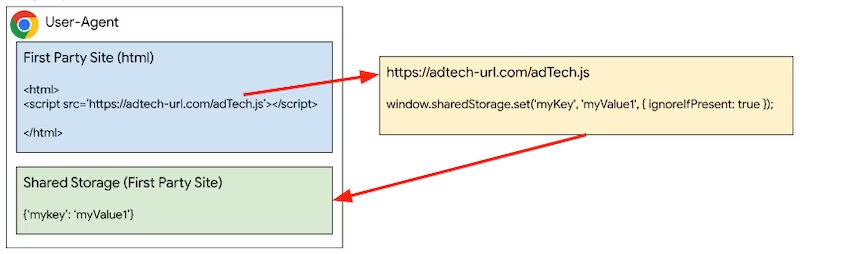
第三方情境
建立 iframe 並從 iframe 內的 JavaScript 程式碼呼叫 set() 或 delete(),即可將鍵/值組合儲存在廣告技術或第三方環境中。
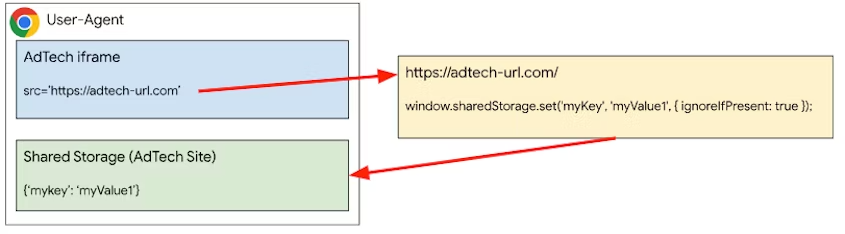
Private Aggregation API
如要評估儲存在 Shared Storage 中的可匯總資料,可以使用 Private Aggregation API。
如要建立報表,請在工作單中呼叫 contributeToHistogram(),並提供 bucket 和 value。儲存區會以不帶正負號的 128 位元整數表示,且必須以 BigInt 形式傳遞至函式。值為正整數。
為保護隱私權,報表的酬載 (包含 bucket 和值) 在傳輸過程中會經過加密,且只能使用匯總服務解密及匯總。
瀏覽器也會限制網站對輸出查詢的貢獻。具體來說,貢獻預算會限制特定瀏覽器在特定時間範圍內,從單一網站傳送至所有 bucket 的報表總數。如果超出目前預算,系統就不會產生報表。
privateAggregation.contributeToHistogram({
  bucket: BigInt(myBucket),
  value: parseInt(myBucketValue)
});
執行 Shared Storage 和 Private Aggregation
根據預設,使用 createWorklet() 共用儲存空間時,資料分割區來源會是叫用瀏覽環境的來源,而不是 Worklet 指令碼本身的來源。
如要變更預設行為,請在呼叫 createWorklet 時設定 dataOrigin 屬性。
dataOrigin: "context-origin":(預設) 資料會儲存在叫用瀏覽環境來源的共用儲存空間。dataOrigin: "script-origin":資料會儲存在工作單指令碼來源的共用儲存空間。您必須選擇採用,才能啟用這項模式。dataOrigin: "https://custom-data-origin.example":資料會儲存在自訂資料來源的共用儲存空間。如要啟用這項模式,您必須選擇加入,並取得自訂資料來源擁有者的同意聲明,詳情請參閱「自訂資料來源」。
sharedStorage.createWorklet(scriptUrl, {dataOrigin: "script-origin"});
如要啟用這項功能,使用 "script-origin" 或自訂來源時,指令碼端點必須以 Shared-Storage-Cross-Origin-Worklet-Allowed 標頭回應。如果是跨來源要求,也應啟用 CORS。
Shared-Storage-Cross-Origin-Worklet-Allowed : ?1
Access-Control-Allow-Origin: *
您也可以使用第三方 iframe 執行跨來源指令碼,在這種情況下,共用儲存空間動作會位於第三方瀏覽環境中。
使用跨來源 iframe
您需要使用 iframe 叫用共用儲存空間小程式。
在廣告的 iframe 中,呼叫 addModule() 載入 worklet 模組。如要執行在 sharedStorageWorklet.js worklet 檔案中註冊的方法,請在相同的廣告 iframe JavaScript 中呼叫 sharedStorage.run()。
const sharedStorageWorklet = await window.sharedStorage.createWorklet(
  'https://any-origin.example/modules/sharedStorageWorklet.js'
);
await sharedStorageWorklet.run('shared-storage-report', {
  data: { campaignId: '1234' },
});
在工作單指令碼中,您需要建立具有非同步 run 方法的類別,並 register 該類別,以便在廣告的 iframe 中執行。內含:
sharedStorageWorklet.js
class SharedStorageReportOperation {
  async run(data) {
    // Other code goes here.
    bucket = getBucket(...);
    value = getValue(...);
    privateAggregation.contributeToHistogram({
      bucket,
      value
    });
  }
}
register('shared-storage-report', SharedStorageReportOperation);
使用跨來源要求
Shared Storage 和 Private Aggregation 可建立跨來源工作單元,不必使用跨來源 iframe。
第一方網頁也可以呼叫 createWorklet(),連線至跨來源 JavaScript 端點。建立 Worklet 時,您需要將 Worklet 的資料分割區來源設為指令碼來源。
async function crossOriginCall() {
  const privateAggregationWorklet = await sharedStorage.createWorklet(
    'https://cross-origin.example/js/worklet.js',
    { dataOrigin: 'script-origin' }
  );
  await privateAggregationWorklet.run('pa-worklet');
}
crossOriginCall();
跨源 JavaScript 端點必須使用 Shared-Storage-Cross-Origin-Worklet-Allowed 標頭回應,並注意要求已啟用 CORS。
Shared-Storage-Cross-Origin-Worklet-Allowed : ?1
使用 createWorklet() 建立的 Worklet 會包含 selectURL 和 run()。
這項功能不支援「addModule()」。
class CrossOriginWorklet {
  async run(data){
    // Other code goes here.
    bucket = getBucket(...);
    value = getValue(...);
    privateAggregation.contributeToHistogram({
      bucket,
      value
    });
  }
}
自訂資料來源
如果 dataOrigin 設為有效來源,dataOrigin 的擁有者必須同意處理該 dataOrigin 的共用儲存空間,方法是在路徑 /.well-known/shared-storage/trusted-origins 託管列出 Worklet 指令碼來源的 JSON 檔案。檔案應為物件陣列,並包含 scriptOrigin 和 contextOrigin 鍵。這些鍵的值可以是字串或字串陣列。
使用下列資訊建構 trusted-origins 檔案:
- 來電者背景資訊
- Worklet 指令碼來源和網址
- 資料來源和擁有者
下表說明如何根據這項資訊建構 trusted-origins 檔案:
| 來電者背景資訊 | Worklet 指令碼網址 | 資料來源 | 資料擁有者 | 資料來源擁有者的受信任來源 JSON 檔案 |
|---|---|---|---|---|
| https://publisher.example | https://publisher.example/script.js | context-origin | https://publisher.example | 不需要 JSON |
| https://publisher.example | https://ad.example/script.js | script-origin | https://ad.example | 不需要 JSON |
| https://publisher.example | https://cdn-ad.example/script.js | https://ad.example | https://ad.example |
[{ "scriptOrigin": "https://cdn-ad.example", "contextOrigin": "https://publisher.example" }] |
| 任何來電者 | https://cdn-ad.example/script.js | https://ad.example | https://ad.example |
[{ "scriptOrigin": "https://cdn-ad.example", "contextOrigin": "*" }] |
| https://publisher-a.example,或 https://publisher-b.example | https://cdn-ad.example/script.js | https://ad.example | https://ad.example |
[{ "scriptOrigin": "https://cdn-ad.example", "contextOrigin": [ "https://publisher-a.example", "https://publisher-b.example" ] }] |
| https://publisher.example | https://cdn-a-ad.example/script.js,或 https://cdn-b-ad.example/script.js | https://ad.example | https://ad.example |
[{ "scriptOrigin": [ "https://cdn-a-ad.example", "https://cdn-b-ad.example" ], "contextOrigin": "https://publisher.example" }] |
舉例來說,下列 JSON 可託管於 https://custom-data-origin.example/.well-known/shared-storage/trusted-origins,並合併 https://custom-data-origin.example 來源的所有允許處理器。
[
  {
    "scriptOrigin": "https://script-origin.a.example",
    "contextOrigin": "https://context-origin.a.example"
  },
  {
    "scriptOrigin": "https://script-origin.b.example",
    "contextOrigin": [
      "https://context-origin.a.example",
      "https://context-origin.b.example"
    ]
}]
後續步驟
以下頁面說明 Shared Storage API 和 Private Aggregation API 的重要面向。
- 共用儲存空間簡介 (開發人員專用 Chrome)
- 共用儲存空間使用案例 (Developer Chrome)
- Private Aggregation 簡介 (開發人員專用 Chrome)
- 共用儲存空間說明 (GitHub)
- 私有匯總說明 (GitHub)
- 共用儲存空間和私密匯總示範
熟悉 API 後,您就可以開始收集報表,這些報表會以 POST 要求的形式,透過要求主體中的 JSON 傳送至下列端點。
- 偵錯報表 -
context-origin/.well-known/private-aggregation/debug/report-shared-storage - 報表 -
context-origin/.well-known/private-aggregation/report-shared-storage
收集報表後,您可以使用本機測試工具進行測試,或設定匯總服務的信任執行環境,取得匯總報表。
提供意見
您可以在 GitHub 上分享對 API 和說明文件的意見。