

Select URL API を使用して、共有ストレージを活用し、ユーザーがサイト間でどのクリエイティブを表示するかを決定します。
広告主やコンテンツ プロデューサーは、キャンペーンにさまざまなコンテンツ ローテーション戦略を適用し、コンテンツやクリエイティブをローテーションして効果を高めることができます。Select URL API を使用すると、さまざまなサイトで順次ローテーションや均等ローテーションなどのさまざまなローテーション戦略を実行できます。
Select URL API のクリエイティブ ローテーションでは、クリエイティブ ID、ビュー数、ユーザー インタラクションなどのデータを保存して、さまざまなサイトでユーザーに表示するクリエイティブを決定できます。
基盤となる API と選択の仕組みについて詳しくは、Select URL API のドキュメントをご覧ください。
クリエイティブ ローテーションを試す
クリエイティブのローテーションをテストするには、Select URL API と Shared Storage が有効になっていることを確認してください。
chrome://settings/content/siteDataで、Allow sites to save data on your deviceまたはDelete data sites have saved to your device when you close all windowsを選択します。chrome://settings/adPrivacy/sitesで、Site-suggested adsを選択します。
このドキュメントのコードサンプルのライブ バージョンについては、共有ストレージのライブデモをお試しください。
コードサンプルを使ったデモ
この例では、次のようになります。
creative-rotation.jsは、ローテーションするコンテンツと、次に選択して表示するコンテンツを決定するデータ(この例では重みなど)を定義するサードパーティ スクリプトです。パブリッシャー ページがこのスクリプトを実行します。このスクリプトは、共有ストレージ ワークレットを呼び出して、ストレージ内の利用可能なデータと選択する URL のリストに基づいて表示するコンテンツを決定します。creative-rotation-worklet.jsは、ローテーション戦略を検索し、次に公開するコンテンツを計算して、そのコンテンツを返すサードパーティの共有ストレージ ワークレットです。
デモの流れ
- ユーザーがパブリッシャーのページにアクセスすると、ページでサードパーティの
creative-rotation.jsスクリプトが読み込まれます。クリエイティブ ローテーション スクリプトは、共有ストレージ ワークレットの読み込みと実行を担当します。スクリプトは、選択する URL のリストをワークレット呼び出しに提供します。 - ワークレットで共有ストレージがまだ初期化されていない場合、ストレージは初期のクリエイティブ ローテーション戦略とクリエイティブ インデックスで初期化されます。このデモで使用する初期ローテーション戦略は、シーケンシャル戦略です。
- ワークレットは共有ストレージからローテーション モードを読み取り、次の広告のインデックスを返します。順次ローテーション モードの場合、共有ストレージ内のクリエイティブ インデックスも更新され、次の呼び出しで使用される新しい値が設定されます。ワークレットは、
selectURLの呼び出し時に使用されたresolveToConfig値に基づいて、FencedFrameConfigまたは不透明な URN オブジェクトを返します。 - クリエイティブ ローテーション スクリプトは、選択した広告をフェンス付きフレームまたは iframe に表示します。戻り値の型について詳しくは、広告のレンダリングに関するドキュメントをご覧ください。
- ユーザーがローテーション モードを変更すると、共有ストレージ ワークレットは共有ストレージに保存されているクリエイティブ ローテーション モードの値を更新します。
- パブリッシャー ページを再読み込みすると、手順 1 ~ 4 が繰り返され、選択したローテーション戦略に基づいて次に表示する広告を選択できるようになります。
コードサンプル
creative-rotation.js と creative-rotation-worklet.js のコードサンプルは次のとおりです。
const contentProducerUrl = 'https://your-server.example';

// Ad config with the URL of the ad, a probability weight for rotation, and the clickthrough rate.
const DEMO_AD_CONFIG = [
  {
    url: `${contentProducerUrl}/ads/ad-1.html`,
    weight: 0.7,
  },
  {
    url: `${contentProducerUrl}/ads/ad-2.html`,
    weight: 0.2,
  },
  {
    url: `${contentProducerUrl}/ads/ad-3.html`,
    weight: 0.1,
  },
];

async function setRotationMode(rotationMode) {
  // Load the worklet module
  const creativeRotationWorklet = await window.sharedStorage.createWorklet(
    `${contentProducerUrl}/url-selection/creative-rotation-worklet.js`,
    { dataOrigin: 'script-origin' }
  );

  await creativeRotationWorklet.run('set-rotation-mode', {
    data: { rotationMode }
  });
  console.log(`creative rotation mode set to ${rotationMode}`);
}

async function injectAd() {
  // Load the worklet module
  const creativeRotationWorklet = await window.sharedStorage.createWorklet(
    `${contentProducerUrl}/url-selection/creative-rotation-worklet.js`,
    { dataOrigin: 'script-origin' }
  );

  const urls = DEMO_AD_CONFIG.map(({ url }) => ({ url }));

  // Resolve the selectURL call to a fenced frame config only when it exists on the page
  const resolveToConfig = typeof window.FencedFrameConfig !== 'undefined';

  // Run the URL selection operation to determine the next ad that should be rendered
  const selectedUrl = await creativeRotationWorklet.selectURL('creative-rotation', urls, {
    data: DEMO_AD_CONFIG,
    resolveToConfig
  });

  const adSlot = document.getElementById('ad-slot');

  if (resolveToConfig && selectedUrl instanceof FencedFrameConfig) {
    adSlot.config = selectedUrl;
  } else {
    adSlot.src = selectedUrl;
  }
}

injectAd();
class SelectURLOperation {
  async run(urls, data) {
    // Initially set the storage to sequential mode for the demo
    await SelectURLOperation.seedStorage();

    // Read the rotation mode from Shared Storage
    const rotationMode = await sharedStorage.get('creative-rotation-mode');

    // Generate a random number to be used for rotation
    const randomNumber = Math.random();

    let index;

    switch (rotationMode) {
      /**
       * Sequential rotation
       * - Rotates the creatives in order
       * - Example: A -> B -> C -> A ...
       */
      case 'sequential':
        const currentIndex = await sharedStorage.get('creative-rotation-index');
        index = parseInt(currentIndex, 10);
        const nextIndex = (index + 1) % urls.length;

        console.log(`index = ${index} / next index = ${nextIndex}`);

        await sharedStorage.set('creative-rotation-index', nextIndex.toString());
        break;

      /**
       * Evenly-distributed rotation
       * - Rotates the creatives with equal probability
       * - Example: A=33% / B=33% / C=33%
       */
      case 'even-distribution':
        index = Math.floor(randomNumber * urls.length);
        break;

      /**
       * Weighted rotation
       * - Rotates the creatives with weighted probability
       * - Example: A=70% / B=20% / C=10%
       */
      case 'weighted-distribution':
        console.log('data = ', JSON.stringify(data));
        // Find the first URL where the cumnulative sum of the weights
        // exceed the random number. The array is sorted by the weight
        // in descending order.
        let weightSum = 0;
        const { url } = data
          .sort((a, b) => b.weight - a.weight)
          .find(({ weight }) => {
            weightSum += weight;
            return weightSum > randomNumber;
          });

        index = urls.indexOf(url);
        break;

      default:
        index = 0;
    }

    console.log(JSON.stringify({ index, randomNumber, rotationMode }));
    return index;
  }

  // Set the mode to sequential and set the starting index to 0.
  static async seedStorage() {
    await sharedStorage.set('creative-rotation-mode', 'sequential', {
      ignoreIfPresent: true,
    });

    await sharedStorage.set('creative-rotation-index', 0, {
      ignoreIfPresent: true,
    });
  }
}

class SetRotationModeOperation {
  async run({ rotationMode }) {
    await sharedStorage.set('creative-rotation-mode', rotationMode);
  }
}

// Register the operation as 'creative-rotation'
register('creative-rotation', SelectURLOperation);
register('set-rotation-mode', SetRotationModeOperation);
スクリーンショット付きのチュートリアル
Select URL API と共有ストレージを使用してクリエイティブのローテーションにアクセスするには、https://shared-storage-demo.web.app/ にアクセスします。[Creative Rotation] デモを選択します。
デモを「パブリッシャー A」として確認します。https://shared-storage-demo-publisher-a.web.app/creative-rotation にリダイレクトされます。このページでは、Select URL API を介してアクセスされる Shared Storage に保存されたクリエイティブ ローテーション データに基づいて、番号付きのコンテンツが読み込まれます。クリエイティブ ローテーションのデモモードは、順次、均等配分、重み付け配分です。ワークレットは、iframe に表示されるコンテンツを選択するロジックを実行します。次の画像は、パブリッシャー ページを示しています。
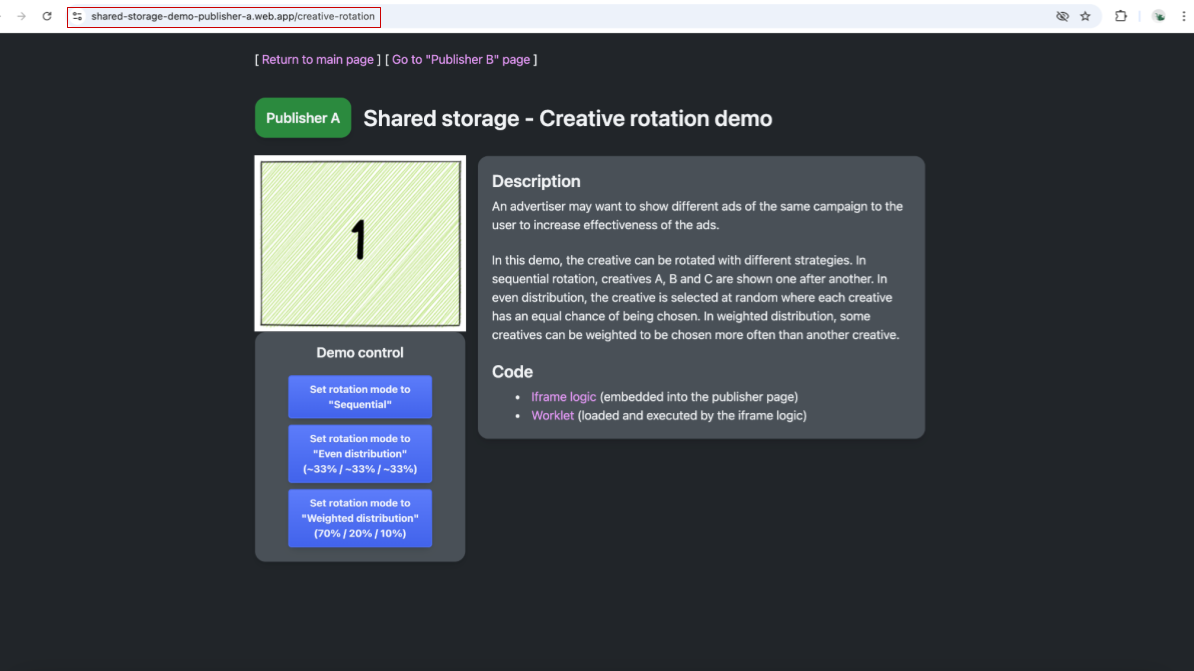
スクリーンショットは、パブリッシャー A のページを示しています。このページには、数字の 1 の画像と、クリエイティブ ローテーション戦略を選択するためのコントロールが表示されています。 共有ストレージに保存されている内容を表示するには、Chrome DevTools で [Application] -> [Shared Storage] に移動します。共有ストレージ用に 2 つのエントリが作成されます。https://shared-storage-demo-publisher-a.web.app オリジンで空のストレージが利用可能です。これには、そのオリジンに固有のストレージが含まれます。パブリッシャーは共有ストレージに書き込む必要がないため、デモでは空のままになります。デモで後でこのページにアクセスすると、Publisher B にも同様のストレージが作成されます。
![Chrome DevTools の [アプリケーション] セクションのスクリーンショット。共有ストレージのエントリがハイライト表示され、「Publisher A」https://shared-storage-demo-publisher-a.web.app のオリジンの空のストレージが表示されている。](https://privacysandbox.google.com/static/private-advertising/select-url/select-url-update-ad-creatives-2.png?authuser=2&hl=ja)
Chrome DevTools に、パブリッシャー A の共有ストレージが空で表示されます。 https://shared-storage-demo-content-producer.web.app オリジン用に別の Shared Storage エントリが作成されます。これは、パブリッシャー ページに埋め込まれたサードパーティ iframe のストレージです。このストレージは、利用可能な 2 つのパブリッシャー間でデータを共有し、クリエイティブの選択を調整するために使用されます。この共有ストレージは、2 つの Key-Value ペアを保存することで、表示されたクリエイティブとローテーション戦略に関する情報を保存するために使用されます。デモで使用される最初のキーは
creative-rotation-indexで、その値はシーケンシャル モードの現在のクリエイティブ インデックスです。2 つ目のキーはcreative-rotation-modeで、使用するローテーション戦略を決定します。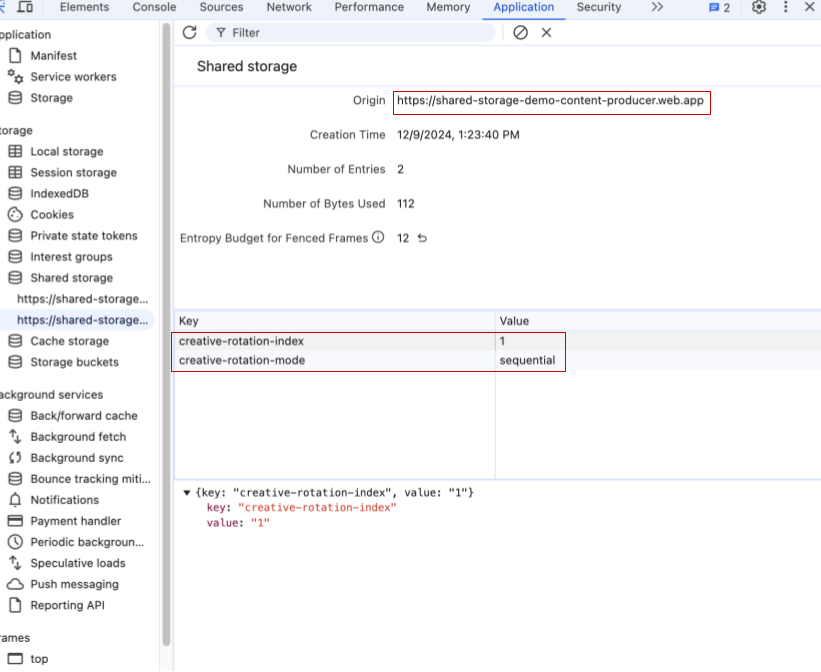
Chrome DevTools の共有ストレージのスクリーンショット。2 つのキーと値のペア(creative-rotation-index: 1、creative-rotation-mode: "sequential")が表示されている。 順次モードでページを更新すると、順序 1、2、3、1、… の次のクリエイティブが表示されます。順次モードでは、キー creative-rotation-index の値は、表示されたクリエイティブのインデックスに応じて変化します。
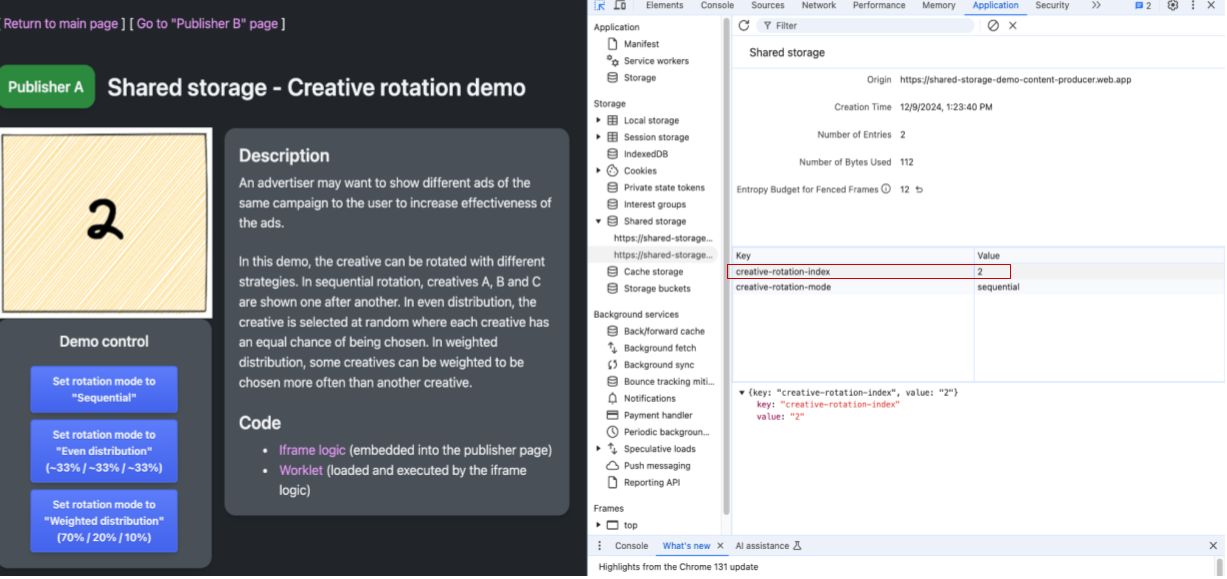
パブリッシャー A のウェブページとデベロッパー ツールを示すスクリーンショット。表示されたクリエイティブは 2、クリエイティブ ローテーション モードは順次、クリエイティブ ローテーション インデックスは 2 です。 コントロール ボタンを使用してクリエイティブのローテーション モードを変更すると、キー creative-rotation-mode の値が対応する戦略に更新されます。これは、ワークレット コードが iframe に表示する次のクリエイティブを選択するために使用されます。クリエイティブ ローテーション インデックスに保存される値は、順次以外のローテーション モードでは変更されません。
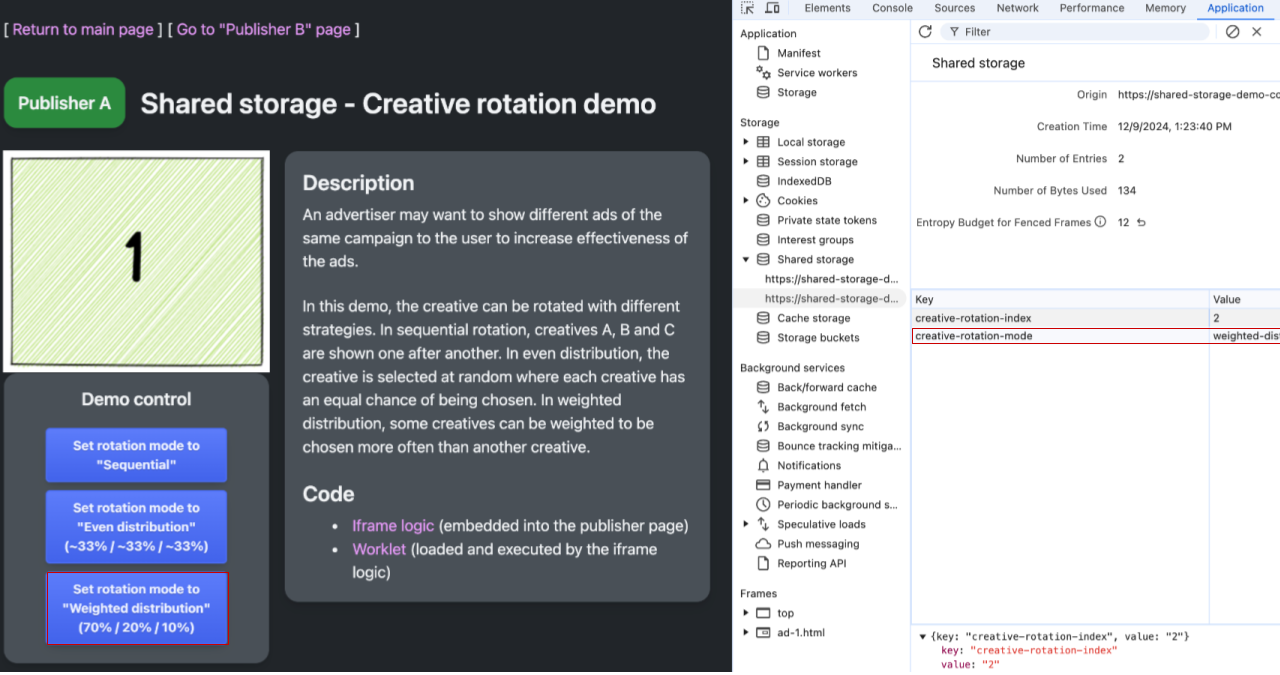
パブリッシャー A のウェブページとデベロッパー ツールを示すスクリーンショット。表示されるクリエイティブは 1、クリエイティブ ローテーション モードは重み付け分布、クリエイティブ ローテーション インデックスは 2(未使用)です。 https://shared-storage-demo-publisher-b.web.app/creative-rotation の「Publisher B」のページに移動します。シーケンシャル モードでは、「パブリッシャー A」の URL にアクセスしたときに表示されるクリエイティブは、シーケンスの次のクリエイティブである必要があります。コンテンツ プロデューサーの共有ストレージを調べると、「パブリッシャー A」と「パブリッシャー B」が同じストレージを共有し、その設定を使用して次に表示するクリエイティブと使用するローテーション戦略を選択していることがわかります。
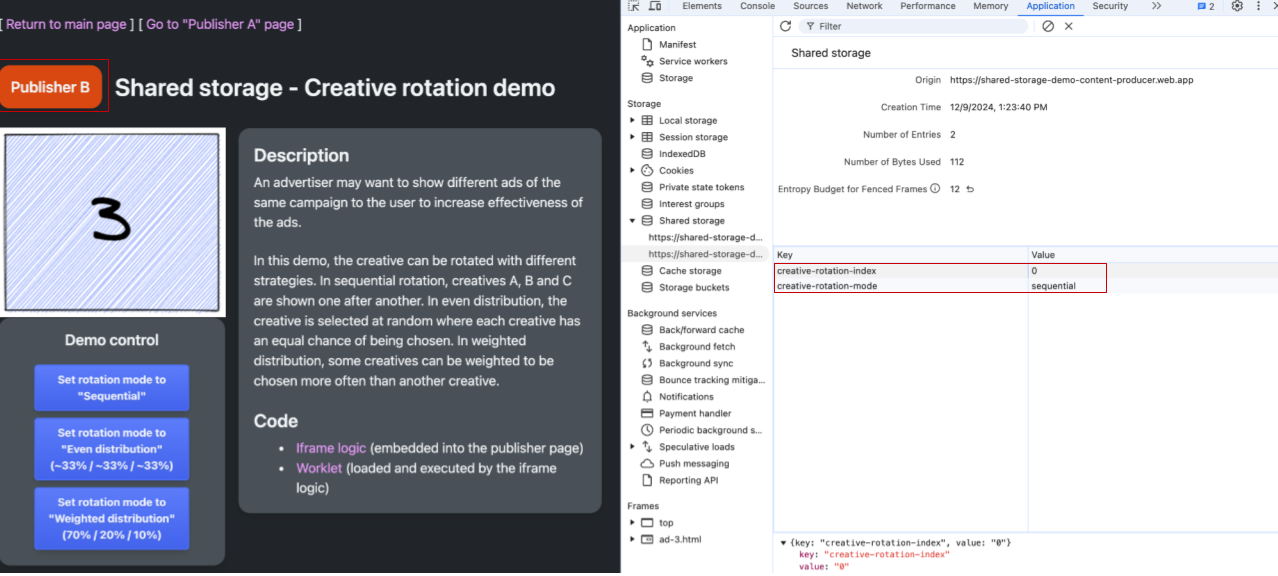
パブリッシャー B のウェブページと DevTools。共有ストレージのクリエイティブは 3、クリエイティブ ローテーションのインデックスは 3、クリエイティブ ローテーションのモードは順次です。 「パブリッシャー B」の共有ストレージは、「パブリッシャー A」の共有ストレージと同様に空です。
![Chrome DevTools の [アプリケーション] セクションのスクリーンショット。Shared Storage のエントリがハイライト表示され、「Publisher B」https://shared-storage-demo-publisher-b.web.app のオリジンのストレージが空であることが示されている。](https://privacysandbox.google.com/static/private-advertising/select-url/select-url-update-ad-creatives-7.png?authuser=2&hl=ja)
パブリッシャー B のオリジンに対する空の Shared Storage を示す Chrome DevTools。
ユースケース
このセクションでは、Select URL API で利用可能なすべてのユースケースについて説明します。フィードバックや新しいテストケースの検出に応じて、例を追加していきます。
- 広告クリエイティブをローテーションする: クリエイティブ ID やユーザー インタラクションなどのデータを保存して、ユーザーに表示するクリエイティブをさまざまなサイト間で決定します。
- フリークエンシーで広告クリエイティブを選択する: 視聴回数データを使用して、ユーザーがさまざまなサイトで目にするクリエイティブを特定します。
- A/B テストを実施する: ユーザーをテストグループに割り当て、そのグループを共有ストレージに保存して、クロスサイトからアクセスできるようにします。
- 既知のユーザー向けにエクスペリエンスをカスタマイズする: ユーザーの登録ステータスやその他のユーザー状態に基づいて、カスタム コンテンツや行動を促すフレーズを共有します。
意見交換とフィードバックの提供
Select URL API の提案は現在、活発な議論と開発が進められており、今後変更される可能性があります。
Select URL API に関する皆様のご意見をぜひお聞かせください。
- 提案: 詳細な提案内容を確認のうえ、ご検討ください。
- ディスカッション: 進行中のディスカッションに参加して、質問したり、インサイトを共有したりしてください。