

使用 Select 网址 API,利用 Shared Storage 确定用户在不同网站上看到的广告素材。
广告客户或内容制作方可能希望为广告系列应用不同的内容轮播策略,并轮播内容或广告素材以提高效果。Select 网址 API 可用于在不同网站上运行不同的轮播策略,例如顺序轮播和均匀轮播。
借助“选择网址”API 广告素材轮播功能,您可以存储广告素材 ID、观看次数和用户互动等数据,以确定用户在不同网站上看到的广告素材。
如需详细了解底层 API 和选择机制,请参阅 Select 网址 API 文档。
尝试广告素材轮播
如需尝试轮播广告素材,请确保已启用 Select 网址 API 和共享存储空间:
- 在
chrome://settings/content/siteData中,选择Allow sites to save data on your device或Delete data sites have saved to your device when you close all windows。 - 在
chrome://settings/adPrivacy/sites中,选择Site-suggested ads。
如需查看本文档中代码示例的实际版本,请试用我们的共享存储空间实时演示。
包含代码示例的演示
在此示例中:
creative-rotation.js是定义要轮换的内容的第三方脚本,以及确定要选择和显示的下一个内容的任何数据,例如本示例中的权重。发布商网页会执行此脚本。此脚本会调用共享存储空间 worklet,以根据存储空间中的可用数据和要从中选择的网址列表来确定要显示的内容。creative-rotation-worklet.js是第三方共享存储区工作程序,用于查找轮播策略、计算接下来要发布的内容,并返回相应内容。
演示版的工作原理
- 当用户访问发布商网页时,该网页会加载第三方的
creative-rotation.js脚本。广告素材轮播脚本负责加载和运行共享存储区 worklet。脚本会提供一个网址列表供工作程序调用选择。 - 在工作单元中,如果共享存储空间尚未初始化,则使用初始广告素材轮换策略和广告素材索引来初始化存储空间。此演示中使用的初始轮播策略是顺序轮播策略。
- 微件从共享存储空间读取轮播模式,并返回下一个广告的索引。对于顺序轮换模式,它还会使用新值更新共享存储区中的广告素材索引,以供下次调用时使用。工作程序会根据调用
selectURL时使用的resolveToConfig值返回FencedFrameConfig或不透明的 URN 对象。 - 广告素材轮播脚本会在 Fenced Frame 或 iframe 中显示所选广告。如需详细了解返回类型,请参阅呈现广告文档。
- 当用户更改轮播模式时,共享存储区工作程序会更新存储在共享存储区中的广告素材轮播模式值。
- 重新加载发布商页面时,系统会重复执行步骤 1-4,以便根据所选的轮播策略选择要观看的下一个广告
代码示例
以下是 creative-rotation.js 和 creative-rotation-worklet.js 的代码示例。
const contentProducerUrl = 'https://your-server.example';

// Ad config with the URL of the ad, a probability weight for rotation, and the clickthrough rate.
const DEMO_AD_CONFIG = [
  {
    url: `${contentProducerUrl}/ads/ad-1.html`,
    weight: 0.7,
  },
  {
    url: `${contentProducerUrl}/ads/ad-2.html`,
    weight: 0.2,
  },
  {
    url: `${contentProducerUrl}/ads/ad-3.html`,
    weight: 0.1,
  },
];

async function setRotationMode(rotationMode) {
  // Load the worklet module
  const creativeRotationWorklet = await window.sharedStorage.createWorklet(
    `${contentProducerUrl}/url-selection/creative-rotation-worklet.js`,
    { dataOrigin: 'script-origin' }
  );

  await creativeRotationWorklet.run('set-rotation-mode', {
    data: { rotationMode }
  });
  console.log(`creative rotation mode set to ${rotationMode}`);
}

async function injectAd() {
  // Load the worklet module
  const creativeRotationWorklet = await window.sharedStorage.createWorklet(
    `${contentProducerUrl}/url-selection/creative-rotation-worklet.js`,
    { dataOrigin: 'script-origin' }
  );

  const urls = DEMO_AD_CONFIG.map(({ url }) => ({ url }));

  // Resolve the selectURL call to a fenced frame config only when it exists on the page
  const resolveToConfig = typeof window.FencedFrameConfig !== 'undefined';

  // Run the URL selection operation to determine the next ad that should be rendered
  const selectedUrl = await creativeRotationWorklet.selectURL('creative-rotation', urls, {
    data: DEMO_AD_CONFIG,
    resolveToConfig
  });

  const adSlot = document.getElementById('ad-slot');

  if (resolveToConfig && selectedUrl instanceof FencedFrameConfig) {
    adSlot.config = selectedUrl;
  } else {
    adSlot.src = selectedUrl;
  }
}

injectAd();
class SelectURLOperation {
  async run(urls, data) {
    // Initially set the storage to sequential mode for the demo
    await SelectURLOperation.seedStorage();

    // Read the rotation mode from Shared Storage
    const rotationMode = await sharedStorage.get('creative-rotation-mode');

    // Generate a random number to be used for rotation
    const randomNumber = Math.random();

    let index;

    switch (rotationMode) {
      /**
       * Sequential rotation
       * - Rotates the creatives in order
       * - Example: A -> B -> C -> A ...
       */
      case 'sequential':
        const currentIndex = await sharedStorage.get('creative-rotation-index');
        index = parseInt(currentIndex, 10);
        const nextIndex = (index + 1) % urls.length;

        console.log(`index = ${index} / next index = ${nextIndex}`);

        await sharedStorage.set('creative-rotation-index', nextIndex.toString());
        break;

      /**
       * Evenly-distributed rotation
       * - Rotates the creatives with equal probability
       * - Example: A=33% / B=33% / C=33%
       */
      case 'even-distribution':
        index = Math.floor(randomNumber * urls.length);
        break;

      /**
       * Weighted rotation
       * - Rotates the creatives with weighted probability
       * - Example: A=70% / B=20% / C=10%
       */
      case 'weighted-distribution':
        console.log('data = ', JSON.stringify(data));
        // Find the first URL where the cumnulative sum of the weights
        // exceed the random number. The array is sorted by the weight
        // in descending order.
        let weightSum = 0;
        const { url } = data
          .sort((a, b) => b.weight - a.weight)
          .find(({ weight }) => {
            weightSum += weight;
            return weightSum > randomNumber;
          });

        index = urls.indexOf(url);
        break;

      default:
        index = 0;
    }

    console.log(JSON.stringify({ index, randomNumber, rotationMode }));
    return index;
  }

  // Set the mode to sequential and set the starting index to 0.
  static async seedStorage() {
    await sharedStorage.set('creative-rotation-mode', 'sequential', {
      ignoreIfPresent: true,
    });

    await sharedStorage.set('creative-rotation-index', 0, {
      ignoreIfPresent: true,
    });
  }
}

class SetRotationModeOperation {
  async run({ rotationMode }) {
    await sharedStorage.set('creative-rotation-mode', rotationMode);
  }
}

// Register the operation as 'creative-rotation'
register('creative-rotation', SelectURLOperation);
register('set-rotation-mode', SetRotationModeOperation);
包含屏幕截图的演练
如需使用 Select 网址 API 和共享存储空间访问广告素材轮播,请前往 https://shared-storage-demo.web.app/。选择“广告素材轮播”演示。
选择以“发布商 A”的身份探索演示。您将被重定向到 https://shared-storage-demo-publisher-a.web.app/creative-rotation。网页会根据保存在共享存储空间中的广告素材轮换数据(通过 Select 网址 API 访问)加载编号的内容。广告素材轮播的演示模式包括依序轮播、均匀轮播和加权轮播。工作程序会执行相应逻辑,以选择 iframe 中显示的内容。下图显示了发布商页面。
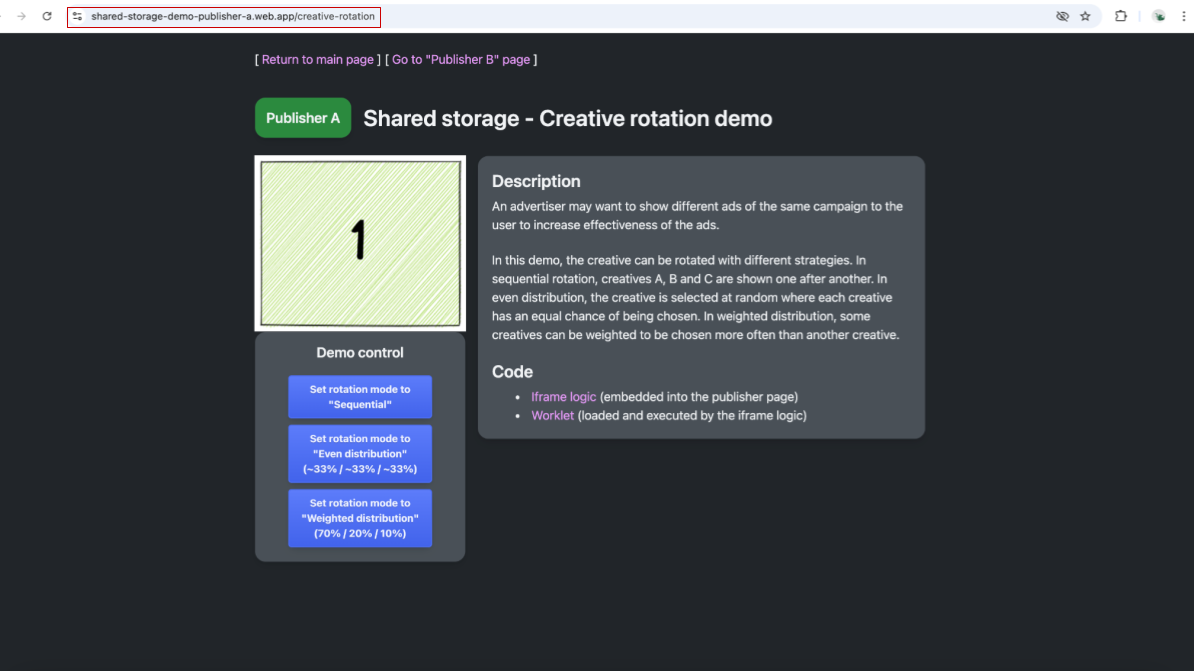
屏幕截图显示了发布商 A 页面,其中包含数字 1 的图片以及用于选择广告素材轮播策略的控件。 如需查看共享存储空间中存储的内容,请在 Chrome 开发者工具中依次前往“Application”(应用)->“Shared Storage”(共享存储空间)。系统会为共享存储空间创建两个条目。https://shared-storage-demo-publisher-a.web.app 源的空存储空间可用。此对象将包含特定于相应来源的存储空间,并且对于我们的演示来说将保持为空,因为发布者不需要写入共享存储空间。请注意,当您稍后访问该页面以进行演示时,系统会为发布商 B 创建类似的存储空间。
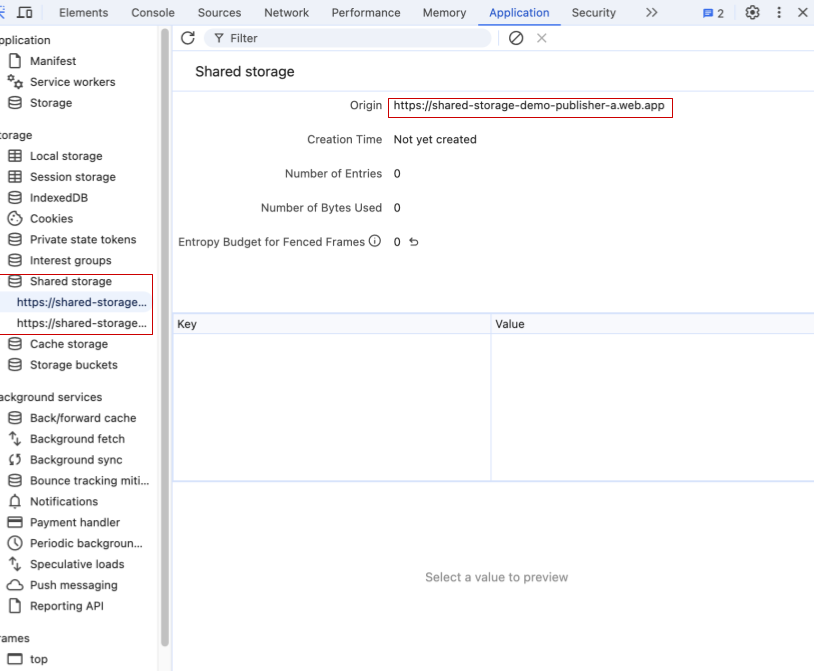
Chrome 开发者工具显示发布商 A 的共享存储空间为空。 系统将为 https://shared-storage-demo-content-producer.web.app 源创建另一个 Shared Storage 条目。这是嵌入在发布商网页上的第三方 iframe 的存储空间。此存储空间将用于在两个可用的发布商之间共享数据,以协调广告素材选择。此共享存储空间将用于保存有关所展示的广告素材和轮播策略的信息,方法是保存两个键值对。演示中使用的第一个键是
creative-rotation-index,其值是顺序模式下的当前广告素材指数。第二个键是creative-rotation-mode,用于指定所用的轮换策略。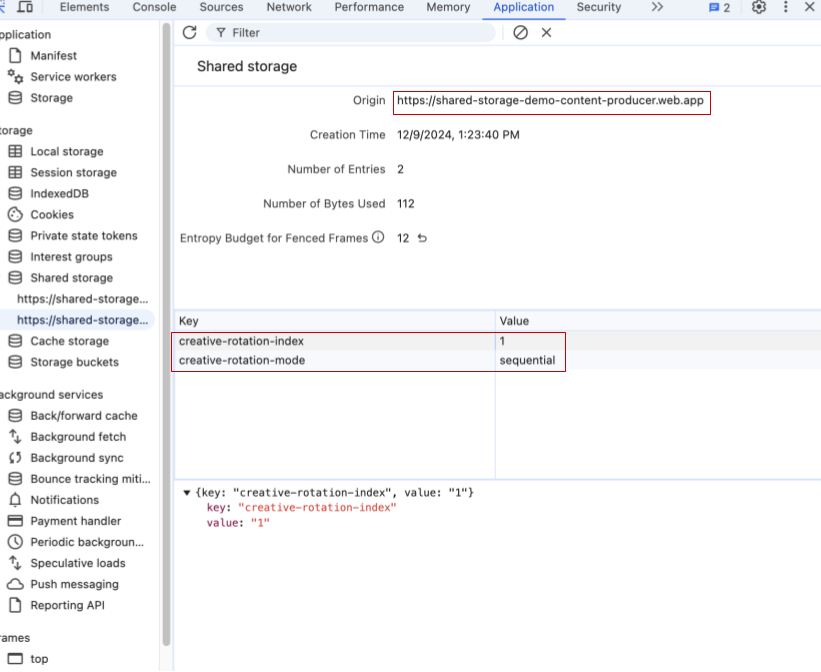
一张屏幕截图显示了 Chrome 开发者工具的共享存储空间,其中包含两个键值对:creative-rotation-index: 1 和 creative-rotation-mode: "sequential"。 在依序模式下刷新页面会导致显示序列 1、2、3、1… 中的下一个广告素材。在依序模式下,键 creative-rotation-index 的值会根据所显示广告素材的索引而变化。
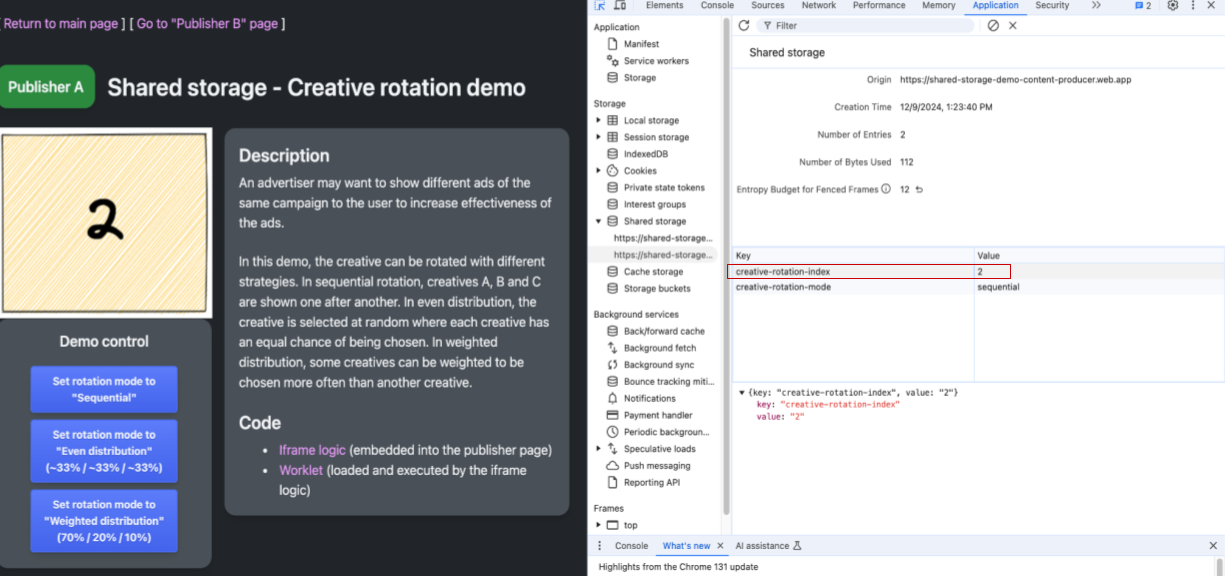
屏幕截图显示了发布商 A 的网页和开发者工具。展示的广告素材为 2,广告素材轮播模式为依序,广告素材轮播指数为 2。 使用控制按钮更改广告素材轮播模式会将键 creative-rotation-mode 的值更新为相应的策略。工作程序代码将使用此值来选择要在 iframe 中显示的下一个广告素材。请注意,对于除顺序轮播以外的轮播模式,为广告素材轮播指数保存的值不会发生变化。
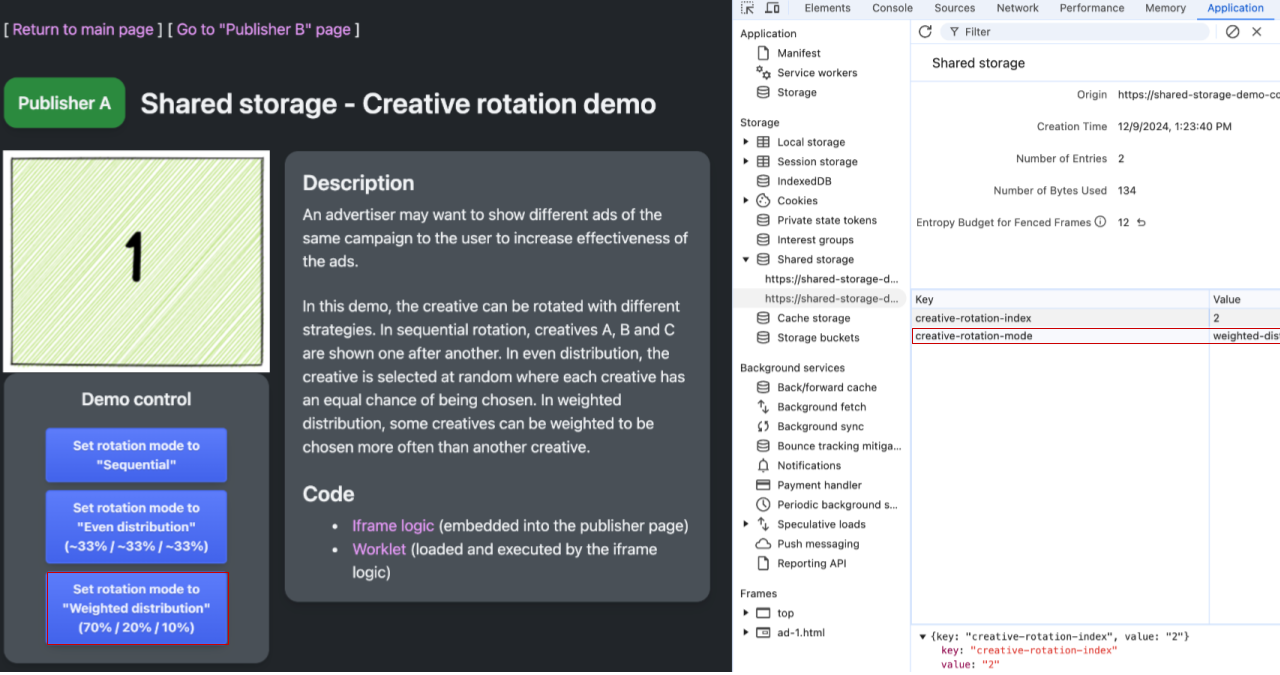
屏幕截图显示了发布商 A 的网页和开发者工具。展示的广告素材为 1,广告素材轮播模式为加权分配,广告素材轮播指数为 2(未使用)。 前往“发布商 B”的页面:https://shared-storage-demo-publisher-b.web.app/creative-rotation。在顺序模式下,访问“Publisher A”的网址时,显示的广告素材应为序列中的下一个广告素材。检查内容制作方的共享存储空间,您会发现“发布商 A”和“发布商 B”共享同一存储空间,并使用其中的设置来选择要显示的下一个广告素材和要使用的轮播策略。
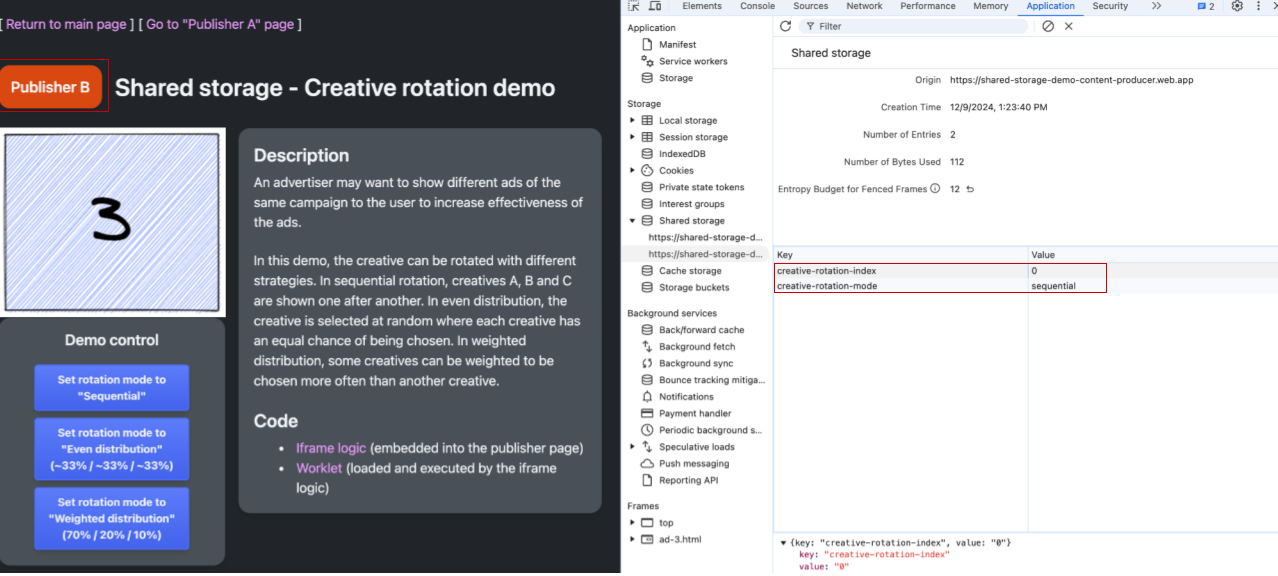
发布商 B 的网页和开发者工具。共享存储空间广告素材为 3,广告素材轮播索引为 3,广告素材轮播模式为依序。 “发布商 B”的共享存储空间为空,与“发布商 A”的共享存储空间类似。
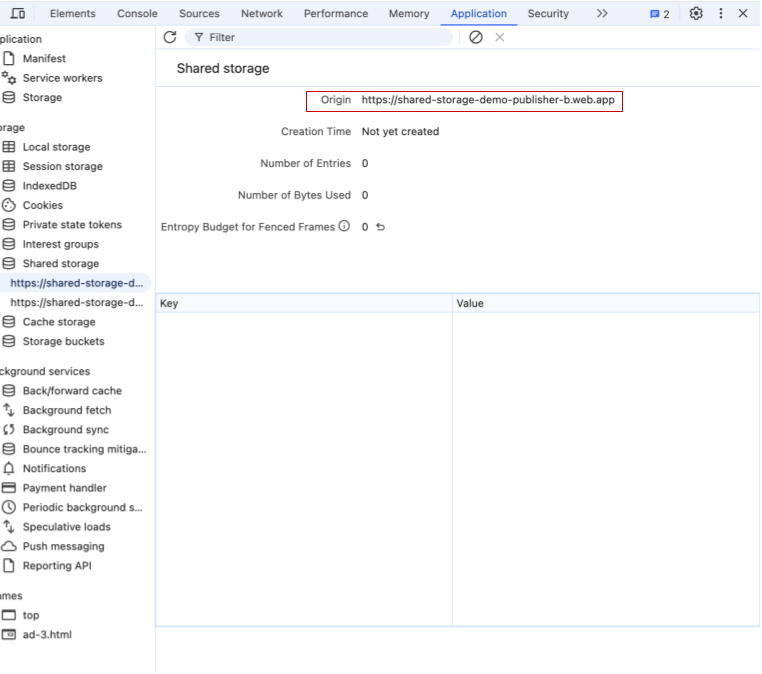
Chrome 开发者工具显示发布商 B 来源的共享存储空间为空。
使用场景
本部分介绍了 Select 网址 API 的所有可用用例。我们会根据收到的反馈和发现的新测试用例,不断添加示例。
- 轮替广告素材:存储广告素材 ID 和用户互动等数据,以确定用户在不同网站上看到的广告素材。
- 按频次选择广告素材:使用观看次数数据确定用户在不同网站上看到的广告素材。
- 运行 A/B 测试:您可以将用户分配到实验组,然后将该组存储在 Shared Storage 中以供跨网站访问。
- 为已知客户量身定制体验:根据用户的注册状态或其他用户状态分享自定义内容和号召性用语。
互动并分享反馈
请注意,Select 网址 API 提案正在积极讨论和制作中,因此可能会发生变化。
我们非常期待您就 Select 网址 API 提供反馈。