

بهروزرسانیهای اخیر
فهرست تغییرات آتی و مشکلات شناختهشده بهروزرسانی شد
معرفی requerying، یک ویژگی جدید که انتشار آن برای نیمه دوم سال 2025 در نظر گرفته شده است. requerying به تکنسینهای تبلیغات این امکان را میدهد که گزارشهای سرویس تجمیع را چندین بار پردازش کنند و از تجزیه و تحلیل انعطافپذیر برای نیازهای اندازهگیری مختلف پشتیبانی کنند. برای کسب اطلاعات بیشتر و ارائه بازخورد، به بحث در GitHub بپیوندید.
نمای کلی
امروزه، استفاده از شناسههای بینطرفی، مانند شناسه تبلیغات، برای راهکارهای انتساب و اندازهگیری موبایل رایج است. API گزارش انتساب به گونهای طراحی شده است که با حذف وابستگی به شناسههای کاربر بینطرفی، حریم خصوصی کاربر را بهبود بخشد و از موارد استفاده کلیدی برای انتساب و اندازهگیری تبدیل در برنامهها و وب پشتیبانی کند.
این API دارای سازوکارهای ساختاری زیر است که چارچوبی برای بهبود حریم خصوصی ارائه میدهد، که بخشهای بعدی این صفحه با جزئیات بیشتری به آنها اشاره میکنند:
تعداد بیتهای موجود برای گزارشهای سطح رویداد را محدود میکند.
دادههای تبدیل با دقت بالاتر را فقط در گزارشهای تجمیعی فعال میکند.
محدودیتهای نرخ برای محرکهای موجود (تبدیلها) و تعداد تکنسینهای تبلیغاتی که میتوانند با یک منبع انتساب واحد مرتبط باشند را معرفی میکند.
شامل تکنیکهای مختلف افزودن نویز
مکانیسمهای قبلی، امکان پیوند هویت کاربر در دو برنامه یا دامنه مختلف را محدود میکنند.
API گزارشدهی انتساب از موارد استفاده زیر پشتیبانی میکند:
- گزارش تبدیل: به تبلیغکنندگان کمک میکند تا عملکرد کمپینهای خود را با نشان دادن تعداد تبدیلها (محرکها) و مقادیر تبدیلها (محرکها) در ابعاد مختلف، مانند کمپین، گروه تبلیغاتی و خلاقیت تبلیغاتی، اندازهگیری کنند.
- بهینهسازی: گزارشهای سطح رویدادی ارائه دهید که از بهینهسازی هزینه تبلیغات پشتیبانی میکنند، با ارائه دادههای انتساب به ازای هر نمایش که میتوانند برای آموزش مدلهای یادگیری ماشینی استفاده شوند.
- تشخیص فعالیت نامعتبر: گزارشهایی ارائه میدهد که میتوانند در تشخیص و تحلیل ترافیک نامعتبر و کلاهبرداری تبلیغاتی مورد استفاده قرار گیرند.
در سطح بالا، رابط برنامهنویسی کاربردی گزارشدهی انتساب به شرح زیر عمل میکند که بخشهای بعدی این سند با جزئیات بیشتری آن را شرح میدهند:
- تکنسین تبلیغات، فرآیند ثبتنام را برای استفاده از API گزارشدهی انتساب تکمیل میکند .
- این فناوری تبلیغات، منابع انتساب - کلیکها یا بازدیدهای تبلیغ - را با API گزارشدهی انتساب ثبت میکند .
- ثبتهای فناوری تبلیغات، تبدیلهای کاربر در اپلیکیشن یا وبسایت تبلیغکننده را با استفاده از API گزارشدهی انتساب (Attribution Reporting API) فعال میکنند .
- رابط برنامهنویسی کاربردی گزارشدهی انتساب، محرکها را با منابع انتساب - یک انتساب تبدیل - مطابقت میدهد و یک یا چند محرک از طریق گزارشهای سطح رویداد و قابل جمعآوری، خارج از دستگاه به تکنسینهای تبلیغات ارسال میشوند.
به APIهای گزارشدهی انتساب دسترسی پیدا کنید
پلتفرمهای فناوری تبلیغات برای دسترسی به APIهای گزارشدهی انتساب باید ثبتنام کنند، برای اطلاعات بیشتر به بخش ثبتنام برای حساب کاربری Privacy Sandbox مراجعه کنید.
ثبت منبع ارجاع (کلیک کنید یا مشاهده کنید)
API گزارشدهی انتساب، کلیکها و بازدیدهای تبلیغاتی را به عنوان منابع انتساب معرفی میکند. برای ثبت یک کلیک یا بازدید تبلیغ، تابع registerSource() را فراخوانی کنید. این API پارامترهای زیر را میپذیرد:
- آدرس اینترنتی منبع انتساب: پلتفرم درخواستی را به این آدرس اینترنتی ارسال میکند تا فرادادههای مرتبط با منبع انتساب را دریافت کند.
- رویداد ورودی: یا یک شیء
InputEvent(برای رویداد کلیک) یاnull(برای رویداد مشاهده).
وقتی API درخواستی را به آدرس URL منبع انتساب ارسال میکند، تکنسین تبلیغات باید با فراداده منبع انتساب در یک هدر HTTP جدید Attribution-Reporting-Register-Source با فیلدهای زیر پاسخ دهد:
- شناسه رویداد منبع : این مقدار نشاندهنده دادههای سطح رویداد مرتبط با این منبع انتساب (کلیک روی تبلیغ یا مشاهده) است. باید یک عدد صحیح بدون علامت ۶۴ بیتی باشد که به صورت رشته قالببندی شده است.
- مقصد : مبدایی که eTLD+1 یا نام بسته برنامه آن در جایی که رویداد تریگر اتفاق میافتد، قرار دارد.
- انقضا (اختیاری) : انقضا، بر حسب ثانیه، برای زمانی که منبع باید از دستگاه حذف شود. مقدار پیشفرض ۳۰ روز است، با حداقل مقدار ۱ روز و حداکثر مقدار ۳۰ روز. این مقدار به نزدیکترین روز گرد میشود. میتواند به صورت یک عدد صحیح بدون علامت ۶۴ بیتی یا رشتهای قالببندی شود.
- پنجره گزارش رویداد (اختیاری) : مدت زمان بر حسب ثانیه پس از ثبت منبع که در طی آن میتوان گزارشهای رویداد را برای این منبع ایجاد کرد. اگر پنجره گزارش رویداد گذشته باشد، اما تاریخ انقضا هنوز نگذشته باشد، میتوان یک تریگر را همچنان با یک منبع مطابقت داد، اما گزارش رویداد برای آن تریگر ارسال نمیشود. نمیتواند بزرگتر از تاریخ انقضا باشد. میتواند به صورت یک عدد صحیح بدون علامت ۶۴ بیتی یا رشته قالببندی شود.
- پنجره گزارش تجمیعی (اختیاری) : مدت زمان بر حسب ثانیه پس از ثبت منبع که طی آن میتوان گزارشهای تجمیعی برای این منبع ایجاد کرد. نمیتواند بزرگتر از تاریخ انقضا باشد. میتواند به صورت یک عدد صحیح بدون علامت ۶۴ بیتی یا رشته قالببندی شود.
- اولویت منبع (اختیاری) : برای انتخاب منبع انتسابی که یک تریگر مشخص باید به آن مرتبط باشد، در صورتی که چندین منبع انتسابی بتوانند با تریگر مرتبط باشند، استفاده میشود. باید یک عدد صحیح علامتدار ۶۴ بیتی باشد که به صورت رشته قالببندی شده است.
وقتی یک تریگر دریافت میشود، API منبع انتساب منطبق با بالاترین مقدار اولویت منبع را پیدا میکند و گزارشی تولید میکند. هر پلتفرم فناوری تبلیغات میتواند استراتژی اولویتبندی خود را تعریف کند. برای جزئیات بیشتر در مورد چگونگی تأثیر اولویت بر انتساب، به بخش مثال اولویتبندی مراجعه کنید.
مقادیر بالاتر نشان دهنده اولویتهای بالاتر هستند. - پنجرههای انتساب نصب و پس از نصب (اختیاری): برای تعیین انتساب رویدادهای پس از نصب استفاده میشود که بعداً در این صفحه توضیح داده خواهد شد.
- فیلتر کردن دادهها (اختیاری): برای فیلتر کردن انتخابی برخی از محرکها و نادیده گرفتن مؤثر آنها استفاده میشود. برای جزئیات بیشتر، به بخش فیلترهای محرک در این صفحه مراجعه کنید.
- کلیدهای تجمیع (اختیاری): تقسیمبندی مورد استفاده برای گزارشهای تجمیعپذیر را مشخص کنید.
به صورت اختیاری، پاسخ فراداده منبع انتساب ممکن است شامل دادههای اضافی در سربرگ تغییر مسیرهای گزارش انتساب باشد. این دادهها حاوی URLهای تغییر مسیر هستند که به چندین تکنسین تبلیغات اجازه میدهد درخواستی را ثبت کنند .
راهنمای توسعهدهندگان شامل مثالهایی است که نحوه پذیرش ثبت منبع را نشان میدهد.
مراحل زیر نمونهای از گردش کار را نشان میدهد:
کیت توسعه نرمافزار (SDK) فناوری تبلیغات، API را برای شروع ثبت منبع انتساب فراخوانی میکند و یک URI برای فراخوانی API مشخص میکند:
registerSource(
    Uri.parse("https://adtech.example/attribution_source?AD_TECH_PROVIDED_METADATA"),
    myClickEvent);
این API با استفاده از یکی از هدرهای زیر، درخواستی را به
https://adtech.example/attribution_source? AD_TECH_PROVIDED_METADATAارسال میکند:<!-- For click events --> Attribution-Reporting-Source-Info: navigation <!-- For view events --> Attribution-Reporting-Source-Info: eventسرور HTTPS این شرکت تبلیغاتی با هدرهایی حاوی موارد زیر پاسخ میدهد:
Attribution-Reporting-Register-Source: {
    "destination": "android-app://com.advertiser.example",
    "source_event_id": "234",
    "expiry": "60000",
    "priority": "5"
}
Attribution-Reporting-Redirect:
https://adtechpartner1.example?their_ad_click_id=567
Attribution-Reporting-Redirect:
https://adtechpartner2.example?their_ad_click_id=890
API به هر URL مشخص شده در
Attribution-Reporting-Redirectیک درخواست ارسال میکند. در این مثال، دو URL شریک فناوری تبلیغات مشخص شدهاند، بنابراین API یک درخواست بهhttps://adtechpartner1.example?their_ad_click_id=567و درخواست دیگری بهhttps://adtechpartner2.example?their_ad_click_id=890ارسال میکند.سرور HTTPS این شرکت تبلیغاتی با هدرهایی حاوی موارد زیر پاسخ میدهد:
Attribution-Reporting-Register-Source: {
    "destination": "android-app://com.advertiser.example",
    "source_event_id": "789",
    "expiry": "120000",
    "priority": "2"
}
سه منبع ارجاع ناوبری (کلیک) بر اساس درخواستهای نشان داده شده در مراحل قبلی ثبت شدهاند.
ثبت منبع انتساب از WebView
WebView از موردی استفاده میکند که در آن یک برنامه در حال نمایش یک تبلیغ در یک WebView است. این کار توسط WebView که مستقیماً تابع registerSource() را فراخوانی میکند، انجام میشود. این فراخوانی، منبع انتساب را به جای مبدأ سطح بالا، به برنامه مرتبط میکند. ثبت منابع از محتوای وب جاسازیشده در یک زمینه مرورگر نیز پشتیبانی میشود. هم فراخوانیکنندگان API و هم برنامهها باید تنظیمات را برای انجام این کار تنظیم کنند. برای دستورالعملهای مربوط به فراخوانیکنندگان API به Register attribution source and trigger from WebView و برای دستورالعملهای مربوط به برنامهها به Attribution source and trigger registration from WebView مراجعه کنید.
از آنجایی که تکنسینهای تبلیغات از کد مشترکی در وب و وبویو استفاده میکنند، وبویو از ریدایرکتهای HTTP 302 پیروی میکند و ثبتهای معتبر را به پلتفرم منتقل میکند. ما قصد نداریم از هدر Attribution-Reporting-Redirect برای این سناریو پشتیبانی کنیم، اما اگر مورد استفادهی شما تحت تأثیر قرار گرفته است، با ما تماس بگیرید .
ثبت یک تریگر (تبدیل)
پلتفرمهای فناوری تبلیغات میتوانند با استفاده از متد registerTrigger() محرکها - تبدیلهایی مانند نصب یا رویدادهای پس از نصب - را ثبت کنند.
متد registerTrigger() پارامتر Trigger URI را دریافت میکند. API درخواستی را به این URI ارسال میکند تا فرادادههای مرتبط با trigger را دریافت کند.
این API از ریدایرکتها پیروی میکند. پاسخ سرور تبلیغات باید شامل یک هدر HTTP به نام Attribution-Reporting-Register-Trigger باشد که اطلاعات مربوط به یک یا چند تریگر ثبتشده را نشان میدهد. محتوای هدر باید به صورت JSON کدگذاری شده و شامل فیلدهای زیر باشد:
دادههای محرک: دادههایی برای شناسایی رویداد محرک (۳ بیت برای کلیکها، ۱ بیت برای نمایشها). باید یک عدد صحیح علامتدار ۶۴ بیتی باشد که به صورت رشته قالببندی شده است.
اولویت تریگر (اختیاری): اولویت این تریگر را در مقایسه با سایر تریگرها برای همان منبع انتساب نشان میدهد. باید یک عدد صحیح علامتدار ۶۴ بیتی باشد که به صورت رشته قالببندی شده است. برای جزئیات بیشتر در مورد چگونگی تأثیر اولویت بر گزارشدهی، به بخش اولویتبندی مراجعه کنید.
کلید حذف دادههای تکراری (اختیاری): برای شناسایی مواردی که یک تریگر چندین بار توسط یک پلتفرم فناوری تبلیغات، برای یک منبع انتساب، ثبت شده است، استفاده میشود. باید یک عدد صحیح علامتدار ۶۴ بیتی باشد که به صورت رشته قالببندی شده است.
کلیدهای تجمیع (اختیاری): فهرستی از دیکشنریها که کلیدهای تجمیع و گزارشهای تجمیعی که باید مقدارشان تجمیع شود را مشخص میکند .
مقادیر تجمیعی (اختیاری): فهرستی از مقادیری که در هر کلید مشارکت دارند.
فیلترها (اختیاری): برای فیلتر کردن انتخابی تریگرها یا دادههای تریگر استفاده میشود. برای جزئیات بیشتر، به بخش فیلترهای تریگر در این صفحه مراجعه کنید.
در صورت تمایل، پاسخ سرور فناوری تبلیغات ممکن است شامل دادههای اضافی در سربرگ Attribution Reporting Redirects باشد. این دادهها حاوی URLهای تغییر مسیر هستند که به چندین فناوری تبلیغات اجازه میدهد درخواستی را ثبت کنند .
چندین تکنسین تبلیغات میتوانند با استفاده از تغییر مسیرها در فیلد Attribution-Reporting-Redirect یا چندین فراخوانی متد registerTrigger() یک رویداد محرک یکسان را ثبت کنند. توصیه میکنیم در صورتی که یک تکنسین تبلیغات چندین پاسخ برای یک رویداد محرک یکسان ارائه میدهد، از فیلد کلید حذف دادههای تکراری استفاده کنید تا از درج محرکهای تکراری در گزارشها جلوگیری شود. درباره نحوه و زمان استفاده از کلید حذف دادههای تکراری بیشتر بدانید.
راهنمای توسعهدهندگان شامل مثالهایی است که نحوه پذیرش ثبت تریگر را نشان میدهد.
مراحل زیر نمونهای از گردش کار را نشان میدهد:
کیت توسعه نرمافزار (SDK) فناوری تبلیغات (Ad tech SDK) با استفاده از یک URI از پیش ثبتشده، API را برای شروع ثبت نام تریگر فراخوانی میکند. برای اطلاعات بیشتر به بخش ثبت نام برای حساب کاربری Privacy Sandbox مراجعه کنید.
registerTrigger(
    Uri.parse("https://adtech.example/attribution_trigger?AD_TECH_PROVIDED_METADATA"));
API درخواستی به
https://adtech.example/attribution_trigger? AD_TECH_PROVIDED_METADATAارسال میکند.سرور HTTPS این شرکت تبلیغاتی با هدرهایی حاوی موارد زیر پاسخ میدهد:
Attribution-Reporting-Register-Trigger: { "event_trigger_data": [{ "trigger_data": "1122", // This returns 010 for click-through conversions (CTCs) and 0 for // view-through conversions (VTCs) in reports "priority": "3", "deduplication_key": "3344" }], } Attribution-Reporting-Redirect: https://adtechpartner.example?app_install=567API به هر URL مشخص شده در
Attribution-Reporting-Redirectدرخواستی ارسال میکند. در این مثال، فقط یک URL مشخص شده است، بنابراین API درخواستی بهhttps://adtechpartner.example?app_install=567ارسال میکند.سرور HTTPS این شرکت تبلیغاتی با هدرهایی حاوی موارد زیر پاسخ میدهد:
Attribution-Reporting-Register-Trigger: {
"event_trigger_data":[{
  "trigger_data": "5566",
  "priority": "3",
  "deduplication_key": "3344"
}]
}
دو تریگر بر اساس درخواستهای مراحل قبلی ثبت میشوند.
قابلیتهای انتساب
بخشهای بعدی توضیح میدهند که چگونه API گزارشدهی انتساب، محرکهای تبدیل را با منابع انتساب مطابقت میدهد.
الگوریتم انتساب بر اساس اولویت منبع اعمال شد
رابط برنامهنویسی کاربردی گزارشدهی انتساب، از یک الگوریتم انتساب مبتنی بر منبع برای تطبیق یک محرک (تبدیل) با یک منبع انتساب استفاده میکند.
پارامترهای اولویت، روشهایی را برای سفارشیسازی انتساب محرکها به منابع ارائه میدهند:
- شما میتوانید محرکها را به رویدادهای تبلیغاتی خاصی نسبت به سایرین نسبت دهید. به عنوان مثال، میتوانید به جای بازدیدها، تأکید بیشتری بر کلیکها داشته باشید، یا روی رویدادهای کمپینهای خاص تمرکز کنید.
- شما میتوانید منبع انتساب و تریگر را طوری پیکربندی کنید که اگر به محدودیتهای نرخ رسیدید، احتمال دریافت گزارشهایی که برای شما مهمتر هستند، بیشتر شود. به عنوان مثال، ممکن است بخواهید مطمئن شوید که تبدیلهای قابل پیشنهاد یا تبدیلهای با ارزش بالا، احتمال بیشتری دارد که در این گزارشها ظاهر شوند.
در مواردی که چندین تکنسین تبلیغات یک منبع انتساب را ثبت میکنند ، همانطور که بعداً در این صفحه توضیح داده خواهد شد، این انتساب برای هر تکنسین تبلیغات به طور مستقل اتفاق میافتد. برای هر تکنسین تبلیغات، منبع انتساب با بالاترین اولویت به رویداد محرک نسبت داده میشود. اگر چندین منبع انتساب با اولویت یکسان وجود داشته باشد، API آخرین منبع انتساب ثبت شده را انتخاب میکند. هر منبع انتساب دیگری که انتخاب نشده باشد، کنار گذاشته میشود و دیگر واجد شرایط انتساب محرک در آینده نیست.
فیلترهای ماشه
ثبت منبع و تریگر شامل ویژگیهای اختیاری اضافی برای انجام موارد زیر است:
- به طور انتخابی برخی از محرکها را فیلتر کنید، و عملاً آنها را نادیده بگیرید.
- بر اساس دادههای منبع، دادههای محرک را برای گزارشهای سطح رویداد انتخاب کنید.
- انتخاب کنید که یک تریگر از گزارشهای سطح رویداد حذف شود.
برای فیلتر کردن انتخابی تریگرها، تکنسین تبلیغات میتواند دادههای فیلتر، شامل کلیدها و مقادیر، را در طول ثبت منبع و تریگر مشخص کند. اگر کلید یکسانی برای منبع و تریگر مشخص شده باشد، در صورت خالی بودن محل تقاطع، تریگر نادیده گرفته میشود. به عنوان مثال، یک منبع میتواند "product": ["1234"] را مشخص کند، که در آن product کلید فیلتر و 1234 مقدار است. اگر فیلتر تریگر روی "product": ["1111"] تنظیم شده باشد، تریگر نادیده گرفته میشود. اگر هیچ کلید فیلتر تریگری با product مطابقت نداشته باشد، فیلترها نادیده گرفته میشوند.
سناریوی دیگری که پلتفرمهای فناوری تبلیغات ممکن است بخواهند تریگرها را به صورت انتخابی فیلتر کنند، اعمال یک پنجره انقضای کوتاهتر است. در هنگام ثبت تریگر، یک فناوری تبلیغات میتواند (به ثانیه) یک پنجره بازگشت از زمانی که تبدیل رخ داده است را مشخص کند؛ برای مثال، یک پنجره بازگشت ۷ روزه به صورت زیر تعریف میشود: "_lookback_window": 604800 // 7d
برای تصمیمگیری در مورد اینکه آیا یک فیلتر مطابقت دارد یا خیر، API ابتدا پنجرهی Lookback را بررسی میکند. در صورت وجود، مدت زمان از زمان ثبت منبع باید کوچکتر یا مساوی مدت زمان پنجرهی Lookback باشد.
پلتفرمهای فناوری تبلیغات همچنین میتوانند دادههای تریگر را بر اساس دادههای رویداد منبع انتخاب کنند. به عنوان مثال، source_type به طور خودکار توسط API به عنوان navigation یا event تولید میشود. در طول ثبت تریگر، trigger_data میتواند به عنوان یک مقدار برای "source_type": ["navigation"] و به عنوان یک مقدار متفاوت برای "source_type": ["event"] .
اگر هر یک از موارد زیر درست باشد، تریگرها از گزارشهای سطح رویداد حذف میشوند:
- هیچ
trigger_dataمشخص نشده است. - منبع و تریگر کلید فیلتر یکسانی را مشخص میکنند، اما مقادیر با هم مطابقت ندارند. توجه داشته باشید که در این حالت، تریگر برای گزارشهای سطح رویداد و قابل تجمیع نادیده گرفته میشود.
انتساب پس از نصب
در برخی موارد، لازم است محرکهای پس از نصب به همان منبع انتساب که باعث نصب شده است، نسبت داده شوند، حتی اگر منابع انتساب واجد شرایط دیگری وجود داشته باشند که اخیراً رخ دادهاند.
این API میتواند با اجازه دادن به تکنسینهای تبلیغات برای تعیین یک دوره تخصیص پس از نصب، از این مورد استفاده پشتیبانی کند:
- هنگام ثبت منبع انتساب، یک بازه زمانی برای نصب مشخص کنید که در طی آن نصبها انتظار میرود (معمولاً ۲ تا ۷ روز، بازه پذیرفته شده ۱ تا ۳۰ روز). این بازه زمانی را به صورت تعداد ثانیه مشخص کنید.
- هنگام ثبت منبع انتساب، یک بازه زمانی انحصار انتساب پس از نصب مشخص کنید که در آن هرگونه رویداد محرک پس از نصب باید با منبع انتسابی که باعث نصب شده است مرتبط باشد (معمولاً ۷ تا ۳۰ روز، محدوده پذیرفته شده ۰ تا ۳۰ روز). این بازه زمانی را به صورت تعداد ثانیه مشخص کنید.
- API گزارشدهی انتساب، نصب یک برنامه را تأیید میکند و بهطور داخلی نصب را به منبع انتساب اولویتبندیشده نسبت میدهد. با این حال، نصب برای تکنسینهای تبلیغات ارسال نمیشود و جزو محدودیتهای نرخ مربوطه پلتفرمها محسوب نمیشود.
- اعتبارسنجی نصب برنامه برای هر برنامه دانلود شدهای در دسترس است.
- هرگونه محرک بعدی که در پنجره انتساب پس از نصب اتفاق بیفتد، به همان منبع انتساب نصب معتبر نسبت داده میشود، مادامی که آن منبع انتساب واجد شرایط باشد.
در آینده، ممکن است گسترش طراحی را برای پشتیبانی از مدلهای پیشرفتهتر انتساب بررسی کنیم.
جدول زیر مثالی از نحوه استفاده از انتساب پس از نصب توسط تکنسینهای تبلیغاتی را نشان میدهد. فرض کنید همه منابع انتساب و محرکها توسط یک شبکه تبلیغاتی ثبت میشوند و همه اولویتها یکسان هستند.
| رویداد | روزی که رویداد رخ میدهد | یادداشتها |
|---|---|---|
| کلیک ۱ | ۱ | install_attribution_window روی 172800 (۲ روز) و post_install_exclusivity_window روی 864000 (۱۰ روز) تنظیم شده است. |
| نصب تأیید شده | ۲ | API به صورت داخلی نصبهای تأیید شده را مشخص میکند، اما این نصبها به عنوان محرک در نظر گرفته نمیشوند. بنابراین، در حال حاضر هیچ گزارشی ارسال نمیشود. |
| ماشه ۱ (اولین باز شدن) | ۲ | اولین تریگر ثبت شده توسط تکنسین تبلیغات. در این مثال، این تریگر نشان دهنده اولین باز شدن است اما میتواند هر نوع تریگری باشد. به کلیک ۱ نسبت داده شده است (با نسبت نصب تأیید شده مطابقت دارد). |
| کلیک ۲ | ۴ | از همان مقادیری که برای install_attribution_window و post_install_exclusivity_window در Click 1 استفاده شده است، استفاده میکند. |
| ماشه ۲ (پس از نصب) | ۵ | دومین محرک توسط بخش تبلیغات ثبت شده است. در این مثال، نشاندهندهی یک تبدیل پس از نصب مانند خرید است. به کلیک ۱ نسبت داده شده است (با نسبت نصب تأیید شده مطابقت دارد). کلیک ۲ حذف شده است و واجد شرایط انتساب در آینده نیست. |
لیست زیر نکات اضافی در مورد انتساب پس از نصب ارائه میدهد:
- اگر نصب تأیید شده در تعداد روزهای مشخص شده توسط
install_attribution_windowانجام نشود، تخصیص پس از نصب اعمال نمیشود. - نصبهای تأیید شده توسط تکنسینهای تبلیغات ثبت نمیشوند و در گزارشها ارسال نمیشوند. آنها در محدودیتهای نرخ تکنسینهای تبلیغات محاسبه نمیشوند. نصبهای تأیید شده فقط برای شناسایی منبع انتسابی که نصب به آن نسبت داده شده است، استفاده میشوند.
- در مثال جدول قبل، تریگر ۱ و تریگر ۲ به ترتیب نشاندهندهی اولین باز شدن و تبدیل پس از نصب هستند. با این حال، پلتفرمهای فناوری تبلیغات میتوانند هر نوع تریگری را ثبت کنند. به عبارت دیگر، اولین تریگر لزوماً نباید اولین تریگر باز شده باشد.
- اگر پس از انقضای
post_install_exclusivity_window، محرکهای بیشتری ثبت شوند، کلیک ۱ همچنان واجد شرایط انتساب است، با فرض اینکه منقضی نشده و به محدودیتهای نرخ خود نرسیده باشد.- اگر منبع انتساب با اولویت بالاتر ثبت شده باشد، ممکن است کلیک ۱ همچنان از دست برود یا کنار گذاشته شود.
- اگر برنامه تبلیغکننده حذف و دوباره نصب شود، نصب مجدد به عنوان یک نصب تأیید شده جدید محسوب میشود.
- اگر کلیک ۱ یک رویداد مشاهده بود، هر دو محرک «اولین باز شدن» و پس از نصب همچنان به آن نسبت داده میشوند. API نسبت دادن را به یک محرک در هر مشاهده محدود میکند، به جز در مورد نسبت دادن پس از نصب که تا دو محرک در هر مشاهده مجاز است. در مورد نسبت دادن پس از نصب، فناوری تبلیغات میتواند ۲ پنجره گزارش مختلف (در ۲ روز یا در تاریخ انقضای منبع) دریافت کند.
تمام ترکیبات مسیرهای تریگر مبتنی بر برنامه و وب پشتیبانی میشوند
API گزارشدهی انتساب، امکان انتساب مسیرهای فعالسازی زیر را در یک دستگاه اندروید واحد فراهم میکند:
- اپلیکیشن به اپلیکیشن: کاربر تبلیغی را در یک اپلیکیشن میبیند، سپس در همان اپلیکیشن یا یک اپلیکیشن نصبشدهی دیگر، به خرید از آن اپلیکیشن اقدام میکند.
- اپلیکیشن به وب: کاربر تبلیغی را در یک اپلیکیشن میبیند، سپس در مرورگر موبایل یا اپلیکیشن به آن تبدیل میشود.
- وب به اپلیکیشن: کاربر تبلیغی را در مرورگر موبایل یا اپلیکیشن میبیند، سپس در یک اپلیکیشن به مشتری تبدیل میشود.
- وب به وب: کاربر تبلیغی را در مرورگر موبایل یا اپلیکیشن میبیند، سپس در همان مرورگر یا مرورگر دیگری در همان دستگاه، به کاربر دیگری تبدیل میشود.
ما به مرورگرهای وب اجازه میدهیم از ویژگیهای جدید تحت وب، مانند قابلیتهایی مشابه با Privacy Sandbox for the Web’s Attribution Reporting API ، که میتواند APIهای اندروید را برای فعال کردن Attribution در سراسر برنامه و وب فراخوانی کند، پشتیبانی کنند.
درباره تغییراتی که تکنسینهای تبلیغات و برنامهها باید برای پشتیبانی از مسیرهای راهاندازی برای اندازهگیری بین برنامهای و وب ایجاد کنند، اطلاعات کسب کنید.
اولویتبندی چندین محرک برای یک منبع انتساب واحد
یک منبع انتساب میتواند منجر به چندین محرک شود. برای مثال، یک جریان خرید میتواند شامل یک محرک «نصب برنامه»، یک یا چند محرک «افزودن به سبد خرید» و یک محرک «خرید» باشد. هر محرک طبق الگوریتم انتساب اولویتبندیشده بر اساس منبع ، که بعداً در این صفحه توضیح داده خواهد شد، به یک یا چند منبع انتساب نسبت داده میشود.
محدودیتهایی در مورد تعداد محرکهایی که میتوان به یک منبع انتساب نسبت داد، وجود دارد. برای جزئیات بیشتر، بخش مربوط به مشاهده دادههای اندازهگیری در گزارشهای انتساب را که بعداً در همین صفحه آمده است، مطالعه کنید.
در مواردی که چندین محرک فراتر از این محدودیتها وجود دارد، معرفی منطق اولویتبندی برای بازیابی ارزشمندترین محرکها مفید است. به عنوان مثال، توسعهدهندگان یک فناوری تبلیغات ممکن است بخواهند محرکهای «خرید» را نسبت به محرکهای «افزودن به سبد خرید» در اولویت قرار دهند.
برای پشتیبانی از این منطق، میتوان یک فیلد اولویت جداگانه روی تریگر تنظیم کرد و تریگرهای با بالاترین اولویت قبل از اعمال محدودیتها، در یک پنجره گزارشدهی مشخص، انتخاب میشوند.
به چندین تکنسین تبلیغات اجازه دهید منابع یا محرکهای انتساب را ثبت کنند
معمولاً بیش از یک تکنسین تبلیغات، گزارشهای انتساب را دریافت میکنند، که عموماً برای انجام حذف دادههای تکراری بین شبکهای است. بنابراین، API به چندین تکنسین تبلیغات اجازه میدهد تا منبع انتساب یا تریگر یکسانی را ثبت کنند. یک تکنسین تبلیغات باید هم منابع انتساب و هم تریگرها را ثبت کند تا بتواند از API پستبک دریافت کند و انتساب بین منابع انتساب و تریگرهایی که تکنسین تبلیغات در API ثبت کرده است، انجام میشود.
تبلیغکنندگانی که میخواهند از یک شخص ثالث برای انجام حذف دادههای تکراری بین شبکهای استفاده کنند، میتوانند با استفاده از تکنیکی مشابه زیر، به این کار ادامه دهند:
- راهاندازی یک سرور داخلی برای ثبت و دریافت گزارشها از API.
- ادامه استفاده از یک شریک اندازهگیری سیار موجود.
منابع انتساب
تغییر مسیرهای منبع انتساب در متد registerSource() پشتیبانی میشوند:
- تکنسین تبلیغاتی که متد
registerSource()را فراخوانی میکند، میتواند یک فیلدAttribution-Reporting-Redirectاضافی در پاسخ خود ارائه دهد که نشاندهنده مجموعهای از URLهای ریدایرکت تکنسین تبلیغاتی همکار است. - سپس API، URLهای ریدایرکت را فراخوانی میکند تا منبع ارجاع توسط تکنسینهای تبلیغات همکار ثبت شود.
میتوان چندین آدرس اینترنتی (URL) از شرکای فناوری تبلیغات را در فیلد Attribution-Reporting-Redirect فهرست کرد و شرکای فناوری تبلیغات نمیتوانند فیلد Attribution-Reporting-Redirect خود را مشخص کنند.
این API همچنین به تکنسینهای تبلیغاتی مختلف اجازه میدهد تا هر بار registerSource() فراخوانی کنند.
محرکها
برای ثبت تریگر، اشخاص ثالث به روشی مشابه پشتیبانی میشوند: تکنسینهای تبلیغات میتوانند یا از فیلد اضافی Attribution-Reporting-Redirect استفاده کنند، یا میتوانند هر کدام متد registerTrigger() فراخوانی کنند.
وقتی یک تبلیغکننده از چندین تکنسین تبلیغات برای ثبت یک رویداد محرک یکسان استفاده میکند، باید از یک کلید حذف دادههای تکراری استفاده شود. کلید حذف دادههای تکراری برای رفع ابهام از این گزارشهای تکراری از یک رویداد یکسان که توسط همان پلتفرم فناوری تبلیغات ثبت شده است، به کار میرود. به عنوان مثال، یک تکنسین تبلیغات میتواند SDK خود را طوری تنظیم کند که مستقیماً API را برای ثبت یک محرک فراخوانی کند و URL آنها را در فیلد تغییر مسیر فراخوانی تکنسین تبلیغات دیگر قرار دهد. اگر هیچ کلید حذف دادههای تکراری ارائه نشود، ممکن است محرکهای تکراری به عنوان منحصر به فرد به هر تکنسین تبلیغات گزارش شوند.
مدیریت محرکهای تکراری
یک تکنسین تبلیغات ممکن است یک تریگر را چندین بار با API ثبت کند. سناریوها شامل موارد زیر است:
- کاربر چندین بار یک عمل (ماشه) را انجام میدهد. برای مثال، کاربر چندین بار در یک پنجره گزارشگیری، یک محصول را مرور میکند.
- برنامه تبلیغکننده از چندین SDK برای اندازهگیری تبدیل استفاده میکند که همه آنها به یک فناوری تبلیغاتی یکسان هدایت میشوند. به عنوان مثال، برنامه تبلیغکننده از دو شریک اندازهگیری، MMP شماره ۱ و MMP شماره ۲، استفاده میکند. هر دو MMP به فناوری تبلیغاتی شماره ۳ هدایت میشوند. وقتی یک محرک اتفاق میافتد، هر دو MMP آن محرک را با API گزارشدهی نسبتدهی ثبت میکنند. سپس فناوری تبلیغاتی شماره ۳ دو هدایت جداگانه - یکی از MMP شماره ۱ و دیگری از MMP شماره ۲ - برای همان محرک دریافت میکند.
در این موارد، روشهای مختلفی برای سرکوب گزارشهای سطح رویداد در مورد محرکهای تکراری وجود دارد تا احتمال تجاوز از محدودیتهای نرخ اعمال شده بر گزارشهای سطح رویداد کاهش یابد. روش توصیه شده استفاده از کلید حذف دادههای تکراری است.
روش پیشنهادی: کلید حذف دادههای تکراری
روش پیشنهادی این است که برنامه تبلیغکننده یک کلید حذف تکرار منحصر به فرد را به هر تکنسین تبلیغات یا SDK که برای اندازهگیری تبدیل استفاده میکند، منتقل کند. هنگامی که تبدیلی رخ میدهد، برنامه یک کلید حذف تکرار را به تکنسینهای تبلیغات یا SDKها منتقل میکند. سپس آن تکنسینهای تبلیغات یا SDKها با استفاده از پارامتری در URLهای مشخص شده در Attribution-Reporting-Redirect ، کلید حذف تکرار را به ریدایرکتها منتقل میکنند.
تکنسینهای تبلیغات میتوانند فقط اولین تریگر را با یک کلید حذف دادههای تکراری ثبت کنند، یا میتوانند چندین تریگر یا همه تریگرها را ثبت کنند. تکنسینهای تبلیغات میتوانند هنگام ثبت تریگرهای تکراری، deduplication_key مشخص کنند.
اگر یک تکنسین تبلیغات چندین تریگر را با کلید حذف دادههای تکراری و منبع منتسب یکسان ثبت کند، فقط اولین تریگر ثبت شده در گزارشهای سطح رویداد ارسال میشود. تریگرهای تکراری همچنان در گزارشهای رمزگذاری شده و قابل جمعآوری ارسال میشوند.
روش جایگزین: تکنسینهای تبلیغات روی انواع محرکها برای هر تبلیغکننده توافق میکنند
در شرایطی که تکنسینهای تبلیغات نمیخواهند از کلید حذف دادههای تکراری استفاده کنند، یا جایی که برنامه تبلیغکننده نمیتواند کلید حذف دادههای تکراری را عبور دهد، یک گزینه جایگزین وجود دارد. همه تکنسینهای تبلیغات که تبدیلها را برای یک تبلیغکننده خاص اندازهگیری میکنند، باید با هم همکاری کنند تا انواع مختلف محرک را برای هر تبلیغکننده تعریف کنند.
تکنسینهای تبلیغاتی که فراخوانی ثبت تریگر را آغاز میکنند - برای مثال، SDKها - پارامتری را در URLهای مشخص شده در Attribution-Reporting-Redirect ، مانند duplicate_trigger_id ، قرار میدهند. این پارامتر duplicate_trigger_id میتواند شامل اطلاعاتی مانند نام SDK و نوع تریگر برای آن تبلیغکننده باشد. سپس تکنسینهای تبلیغاتی میتوانند زیرمجموعهای از این تریگرهای تکراری را به گزارشهای سطح رویداد ارسال کنند. تکنسینهای تبلیغاتی همچنین میتوانند این duplicate_trigger_id در کلیدهای تجمیع خود قرار دهند.
مثال انتساب بین شبکهای
در مثالی که در این بخش توضیح داده شده است، تبلیغکننده از دو پلتفرم فناوری تبلیغات (تبلیغات A و تبلیغات B) و یک شریک اندازهگیری (MMP) استفاده میکند.
برای شروع، هر یک از شرکتهای فناوری تبلیغات A، فناوری تبلیغات B و MMP باید ثبتنام خود را برای استفاده از API گزارشدهی انتساب تکمیل کنند. برای اطلاعات بیشتر به بخش ثبتنام برای حساب کاربری Privacy Sandbox مراجعه کنید.
لیست زیر مجموعهای فرضی از اقدامات کاربر را که هر کدام با فاصله یک روز اتفاق میافتند، و نحوه مدیریت این اقدامات توسط API گزارشدهی انتساب را در رابطه با فناوری تبلیغات A، فناوری تبلیغات B و MMP ارائه میدهد:
- روز اول: کاربر روی تبلیغی که توسط Ad tech A ارائه شده است کلیک میکند
تکنسین تبلیغات A تابع
registerSource()را با URI خود فراخوانی میکند. API درخواستی به URI ارسال میکند و کلیک با فرادادههای پاسخ سرور تکنسین تبلیغات A ثبت میشود.فناوری تبلیغات A همچنین URI مربوط به MMP را در هدر
Attribution-Reporting-Redirectقرار میدهد. API درخواستی به URI مربوط به MMP ارسال میکند و کلیک با فرادادههای پاسخ سرور MMP ثبت میشود.- روز دوم: کاربر روی تبلیغی که توسط Ad tech B ارائه شده است کلیک میکند
شرکت تبلیغاتی B تابع
registerSource()را با URI خود فراخوانی میکند. API درخواستی به URI ارسال میکند و کلیک با فرادادههای پاسخ سرور شرکت تبلیغاتی B ثبت میشود.مانند شرکت تبلیغاتی A، شرکت تبلیغاتی B نیز آدرس URL مربوط به MMP را در هدر
Attribution-Reporting-Redirectقرار داده است. API درخواستی را به آدرس URL مربوط به MMP ارسال میکند و کلیک با فرادادههای پاسخ سرور MMP ثبت میشود.- روز سوم: کاربر تبلیغی را که توسط Ad tech A ارائه شده است، مشاهده میکند.
API به همان روشی که در روز اول پاسخ داد، پاسخ میدهد، با این تفاوت که یک نما برای Ad tech A و MMP ثبت میشود.
- روز چهارم: کاربر برنامه را نصب میکند که از MMP برای اندازهگیری تبدیل استفاده میکند.
MMP تابع
registerTrigger()را با URI خود فراخوانی میکند. API درخواستی به URL ارسال میکند و تبدیل با فرادادههای پاسخ سرور MMP ثبت میشود.MMP همچنین شامل URI های مربوط به Ad tech A و Ad tech B در هدر
Attribution-Reporting-Redirectاست. API درخواستهایی را به سرورهای Ad tech A و Ad tech B ارسال میکند و تبدیل بر اساس فرادادههای پاسخهای سرور ثبت میشود.
نمودار زیر فرآیند شرح داده شده در لیست قبلی را نشان میدهد:
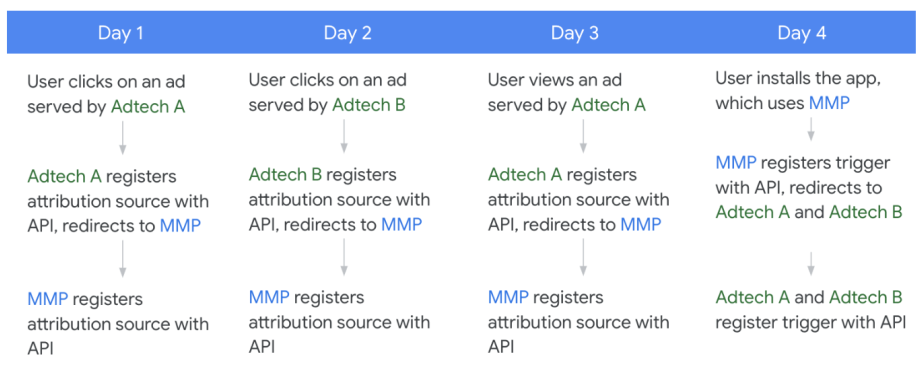
انتساب به شرح زیر عمل میکند:
- فناوری تبلیغات A اولویت کلیکها را بالاتر از بازدیدها قرار میدهد و بنابراین نصب را به کلیک روز اول نسبت میدهد.
- نصب مربوط به فناوری تبلیغات B در روز دوم انجام میشود.
- MMP اولویت کلیکها را بالاتر از بازدیدها قرار میدهد و نصب را به کلیک روز دوم نسبت میدهد. کلیک روز دوم، بالاترین اولویت و جدیدترین رویداد تبلیغ است.
انتساب بین شبکهای بدون تغییر مسیر
اگرچه توصیه میکنیم از ریدایرکتها برای ثبت منابع و محرکهای انتساب توسط چندین تکنسین تبلیغات استفاده کنید، اما میدانیم که ممکن است سناریوهایی وجود داشته باشد که استفاده از ریدایرکتها امکانپذیر نباشد. در این بخش نحوه پشتیبانی از انتساب بین شبکهای بدون ریدایرکتها توضیح داده شده است.
جریان سطح بالا
- در هنگام ثبت منبع، شبکه فناوری تبلیغات ارائه دهنده، کلیدهای تجمیع منبع خود را به اشتراک میگذارد.
- در هنگام ثبت نام تریگر، تبلیغ کننده یا شریک سنجش، قطعات کلیدی سمت منبع را برای استفاده انتخاب کرده و پیکربندی انتساب آنها را مشخص میکند.
- انتساب بر اساس پیکربندی انتساب، کلیدهای اشتراکی و هر منبعی که واقعاً توسط آن تبلیغکننده یا شریک اندازهگیری ثبت شده باشد (مثلاً از یک شبکه فناوری تبلیغاتی ارائه دهنده دیگر که ریدایرکتها را فعال کرده است) انجام میشود.
- اگر عامل محرک به منبعی از یک فناوری تبلیغاتی بدون هدایتکننده نسبت داده شود، تبلیغکننده یا شریک اندازهگیری میتواند یک گزارش قابل جمعآوری دریافت کند که بخشهای کلیدی منبع و عامل محرک را که در مرحله ۲ تعریف شدهاند، ترکیب میکند.
ثبت منبع
در هنگام ثبت منبع، شبکه فناوری تبلیغات ارائه دهنده میتواند به جای هدایت مجدد، کلیدهای تجمیع منبع یا زیرمجموعهای از کلیدهای تجمیع منبع خود را به اشتراک بگذارد. فناوری تبلیغات ارائه دهنده ملزم به استفاده واقعی از این کلیدهای منبع در گزارشهای تجمیعپذیر خود نیست و در صورت نیاز میتواند آنها را فقط از طرف تبلیغکننده یا شریک اندازهگیری اعلام کند.
کلیدهای تجمیع مشترک برای هر فناوری تبلیغاتی که یک محرک برای همان تبلیغکننده ثبت میکند، در دسترس است. با این حال، این به فناوری تبلیغات ارائهدهنده و فناوری تبلیغات اندازهگیری محرک بستگی دارد که در مورد انواع کلیدهای تجمیع مورد نیاز، نام آنها و نحوه رمزگشایی کلیدها به ابعاد قابل خواندن، همکاری کنند.
ثبت ماشه
در هنگام ثبت تریگر، تکنسین تبلیغات اندازهگیری انتخاب میکند که کدام قطعات کلید سمت منبع را برای هر قطعه کلید تریگر، از جمله هر قطعهای که توسط تکنسینهای تبلیغات ارائه دهنده به اشتراک گذاشته شده است، اعمال کند.
Additionally, the measurement ad tech must also specify their waterfall attribution logic using a new attribution configuration API call. In this config, the ad tech can specify source priority, expiry, and filters for sources that they had no visibility into (for example, sources that did not use a redirect).
انتساب
The Attribution Reporting API performs source-prioritized, last-touch attribution for the measurement ad tech based on their attribution config, shared keys, and any sources they registered. For example:
- The user clicked on ads served by ad techs A, B, C, and D. The user then installed the advertiser's app, which uses a measurement ad tech partner (MMP).
- Ad tech A redirects its sources to the MMP.
- Ad techs B and C don't redirect, but share their aggregation keys.
- Ad tech D neither redirects nor shares aggregation keys.
The MMP registers a source from Ad tech A, and defines an attribution config that includes Ad tech B and Ad tech D.
Attribution for the MMP now includes:
- Ad tech A, since the MMP registered a source from that ad tech's redirect.
- Ad tech B, since Ad tech B shared keys and the MMP included it in their attribution config.
Attribution for the MMP does not include:
- Ad tech C, since the MMP did not include it in their attribution config.
- Ad tech D, since they did not redirect nor share aggregation keys.
اشکالزدایی
To support debugging for cross-network attribution without redirects, an additional field, shared_debug_key , is available for ad techs to set upon source registration. If set on the original source registration, it will also be set on the corresponding derived source as debug_key during trigger registration for cross-network attribution without redirects. This debug key is attached as source_debug_key in event and aggregate reports.
This debug feature will only be supported for cross-network attribution without redirects under the following scenarios:
- App to app measurement where AdId is permitted
- App to web measurement where AdId is permitted and matching across both the app source and the web trigger
- Web to web measurement (on the same browser app) when
ar_debug` is present on both source and trigger
Key discovery for cross-network attribution without redirects
Key discovery is intended to streamline how ad techs (usually MMPs) implement their attribution config for the purposes of cross-network attribution when one or several serving ad techs are using shared aggregation keys (as described in Cross-network attribution without redirects above).
When an MMP queries the Aggregation Service to generate summary reports for campaigns that include derived sources, Aggregation Service requires the MMP to specify the list of possible keys as input for the aggregation job. In some cases, the list of potential source aggregation keys may be very large, or unknown. Large lists of possible keys are challenging to track, and are also likely to be quite complex and costly to process. Consider the following examples:
- List of all possible keys is large:
- A serving ad network is executing a complex user acquisition initiative that includes 20 campaigns, each with 10 ad groups, and each ad group with 5 creatives that are refreshed every week based on performance.
- List of all possible keys is unknown:
- A serving ad network is serving ads across many mobile apps where the full list of publisher app IDs is not known at campaign launch.
- An advertiser is working across multiple serving ad networks that are not redirecting to the MMP on source registration; each serving ad network has a different key structure and values, which may not be shared in advance with the MMP.
With the introduction of key discovery:
- The Aggregation Service no longer requires a full enumeration of possible aggregation keys.
- Instead of having to specify the full list of possible keys, an MMP can create an empty (or partially empty) set of keys and set a threshold, so that only (non pre-declared) keys with values exceeding the threshold are included in the output.
- MMP receives a summary report that includes noisy values for keys that have contributing values above the set threshold. The report may also include keys that have no associated real user contributions and are purely noised.
- MMP uses the
x_network_bit_mappingfield in trigger registration to determine which ad tech corresponds to which key. - MMP can then contact the appropriate serving ad tech to understand the values in the source key.
In summary, key discovery enables MMPs to obtain aggregation keys without knowing them in advance, and avoid processing a large volume of source keys at the expense of added noise.
Daisy chain redirects
By providing multiple Attribution-Reporting-Redirect headers in a source or trigger registration HTTPS server-response, an ad tech can use the Attribution Reporting API to perform multiple source and trigger registrations with a single registration API call.
In the server-response, the ad tech can also include a single Location (302 redirect) header with a URL, which in turn leads to another registration, up to a set limit.
Both types of headers are optional and none can be provided if redirects are not needed. Either one or both types of headers may be provided. Source and trigger registration requests (including redirects) are retried in case of network failure. The number of retries per request is limited to a fixed number to avoid significant impact on the device.
Redirects are not accepted for registerWebSource and registerWebTrigger used by browsers. More details can be found in the Cross Web and App Implementation Guide .
View measurement data in attribution reports
The Attribution Reporting API enables the following types of reports, described in more detail later on this page:
- Event-level reports associate a particular attribution source (click or view) with limited bits of high-fidelity trigger data.
- Aggregatable reports aren't necessarily tied with a specific attribution source. These reports provide richer, higher-fidelity trigger data than event-level reports, but this data is only available in an aggregate form.
These two report types are complementary to each other and can be used simultaneously.
Event-level reports
After a trigger is attributed to an attribution source, an event-level report is generated and stored on the device until it can be sent back to each ad tech's postback URL during one of the time windows for sending reports , described in more detail later on this page.
Event-level reports are useful when very little information is needed about the trigger. Event-level trigger data is limited to 3 bits of trigger data for clicks—which means that a trigger can be assigned one of eight categories—and 1 bit for views. In addition, event-level reports don't support encoding of high-fidelity trigger-side data, such as a specific price or trigger time. Because attribution happens on device, there is no support for cross-device analytics in the event-level reports.
The event-level report contains data such as the following:
- Destination: Advertiser app package name or eTLD+1 where the trigger happened
- Attribution Source ID: The same attribution source ID that was used for registering an attribution source
- Trigger type: 1 or 3 bits of low-fidelity trigger data, depending on the type of attribution source
Privacy-preserving mechanisms applied to all reports
The following limits are applied after priorities regarding attribution sources and triggers are taken into consideration.
Limits on number of ad techs
There are limits on the number of ad techs that can register or receive reports from the API, with a current proposal of the following:
- 100 ad techs with attribution sources per {source app, destination app, 30 days, device}.
- 10 ad techs with attributed triggers per {source app, destination app, 30 days, device}.
- 20 ad techs can register a single attribution source or trigger (via
Attribution-Reporting-Redirect)
Limits on number of unique destinations
These limits make it difficult for a set of ad techs to collude by querying a large number of apps to understand a given user's app usage behavior.
- Across all registered sources, across all ad techs, the API supports no more than 200 unique destinations, per source app, per minute.
- Across all registered sources, for a single ad tech, the API supports no more than 50 unique destinations, per source app, per minute. This limit prevents one ad tech from using up the entire budget from the previously mentioned rate limit.
Expired sources don't count towards the rate limits.
One reporting origin per source app per day
A given ad tech platform may only use one reporting origin to register sources on a publisher app, for a given device, on the same day. This rate limit prevents ad techs from using multiple reporting origins to access additional privacy budget.
Consider the following scenario, where a single ad tech wants to use multiple reporting origins to register sources on a publisher app, for a single device.
- Ad tech A's reporting origin 1 registers a source on App B
- 12 hours later, ad tech A's reporting origin 2 attempts to register a source on App B
The second source, for Ad tech A's reporting origin 2, would be rejected by the API. Ad tech A's reporting origin 2 wouldn't be able to successfully register a source on the same device on App B until the following day.
Cooldown and rate limits
To limit the amount of user identity leakage between a {source, destination} pair, the API throttles the amount of total information sent in a given time period for a user.
The current proposal is to limit each ad tech to 100 attributed triggers per {source app, destination app, 30 days, device}.
Number of unique destinations
The API limits the number of destinations that an ad tech can try to measure. The lower the limit, the harder it is for an ad tech to use the API to attempt to measure user browsing activity that isn't associated with ads being shown.
The current proposal is to limit each ad tech to 100 distinct destinations with non-expired sources per source app.
Privacy-preserving mechanisms applied to event-level reports
Limited fidelity of trigger data
The API provides 1 bit for view-through triggers and 3 bits for click-through triggers. Attribution sources continue to support the full 64 bits of metadata.
You should evaluate if and how to reduce the information expressed in triggers so they work with the limited number of bits available in event-level reports.
Framework for differential privacy noise
A goal of this API is to allow event-level measurement to satisfy local differential privacy requirements by using k-randomized responses to generate a noisy output for each source event.
Noise is applied on whether an attribution source event is reported truthfully. An attribution source is registered on the device with probability $ 1-p $ that the attribution source is registered as normal, and with probability $ p $ that the device randomly chooses among all possible output states of the API (including not reporting anything at all, or reporting multiple fake reports).
The k-randomized response is an algorithm that is epsilon differentially private if the following equation is satisfied:
For low values of ε, the true output is protected by the k-randomized response mechanism. Exact noise parameters are works in progress and are subject to change based on feedback, with a current proposal of the following:
- p=0.24% for navigation sources
- p=0.00025% for event sources
Limits on available triggers (conversions)
There are limits on the number of triggers per attribution source, with a current proposal of the following:
- 1-2 triggers for ad view attribution sources (2 triggers only available in the case of post-install attribution)
- 3 triggers for click ad attribution sources
Specific time windows for sending reports (default behaviour)
Event-level reports for ad view attribution sources are sent 1 hour after the source expires. This expiry date can be configured, but it cannot be less than 1 day or more than 30 days. If two triggers are attributed to an ad view attribution source (via post-install attribution )), event-level reports can be sent at the reporting window intervals specified as follows.
Event-level reports for ad click attribution sources cannot be configured and are sent before or when the source expires, at specified points in time relative to when the source was registered. The time between the attribution source and expiry is split into multiple reporting windows. Each reporting window has a deadline (from the attribution source time). At the end of each reporting window, the device collects all the triggers that have occurred since the previous reporting window and sends a scheduled report. The API supports the following reporting windows:
- 2 days: The device collects all the triggers that occurred at most 2 days after the attribution source was registered. The report is sent 2 days and 1 hour after the attribution source is registered.
- 7 days: The device collects all the triggers that occurred more than 2 days but no more than 7 days after the attribution source was registered. The report is sent 7 days and 1 hour after the attribution source is registered.
- A custom length of time, defined by the "expiry" attribute of an attribution source. The report is sent 1 hour after the specified expiry time. This value cannot be less than 1 day or more than 30 days.
Flexible event-level configuration
The default configuration for event level reporting is what ad techs are advised to start using as they begin utility testing, but may not be ideal for all use cases. The Attribution Reporting API will support optional, and more flexible configurations so that ad techs have increased control over the structure of their event level reports and are able to maximize the utility of the data.
This additional flexibility will be introduced into the Attribution Reporting API in two phases:
- Phase 1: Lite flexible event level configuration
- This version provides a subset of the full features, and can be used independently of Phase 2.
- Phase 2: Full version of flexible event level configuration
Phase 1 (Lite flexible event level) could be used to:
- Vary the frequency of reports by specifying the number of reporting windows
- Vary the number of attributions per source registration
- Reduce the amount of total noise by decreasing the preceding parameters
- Configure reporting windows rather than using the defaults
Phase 2 (Full flexible event level) could be used to do all of the capabilities in Phase 1 and:
- Vary the trigger data cardinality in a report
- Reduce the amount of total noise by decreasing the trigger data cardinality
Reducing one dimension of the default configuration allows the ad tech to increase another dimension. Alternatively, the total amount of noise in an event level report may be reduced by net decreasing the parameters mentioned earlier.
In addition to dynamically setting noise levels based on an ad tech's chosen configuration, we will have some parameter limits to avoid large computation costs and configurations with too many output states (where noise will increase considerably). Here is an example set of restrictions. Feedback is encouraged on the design proposal:
- Maximum of 20 total reports, globally and per trigger_data
- Maximum of 5 possible reporting windows per trigger_data
- Maximum of 32 trigger data cardinality (not applicable for Phase 1: Lite Flexible Event Level)
As ad techs start using this feature, be advised that using extrema values may result in a large amount of noise, or failure to register if privacy levels are not met.
Aggregatable reports
Before using aggregatable reports, you must set up your cloud account and start receiving aggregatable reports.
Aggregatable reports provide higher-fidelity trigger data from the device more quickly, beyond what is offered for event-level reports . This higher-fidelity data can only be learned in aggregate , and isn't associated with a particular trigger or user. Aggregation keys are up to 128 bits, and this allows aggregatable reports to support reporting use cases such as the following:
- Reports for trigger values, such as revenue
- Handling more trigger types
In addition, aggregatable reports use the same source-prioritized attribution logic as event-level reports, but they support more conversions attributed to a click or view.
The overall design of how the Attribution Reporting API prepares and sends aggregatable reports, shown in the diagram, is as follows:
- The device sends encrypted aggregatable reports to the ad tech. In a production environment, ad techs can't use these reports directly.
- The ad tech sends a batch of aggregatable reports to the aggregation service for aggregation.
- The aggregation service reads a batch of aggregatable reports, decrypts and aggregates them.
- The final aggregates are sent back to the ad tech in a summary report .
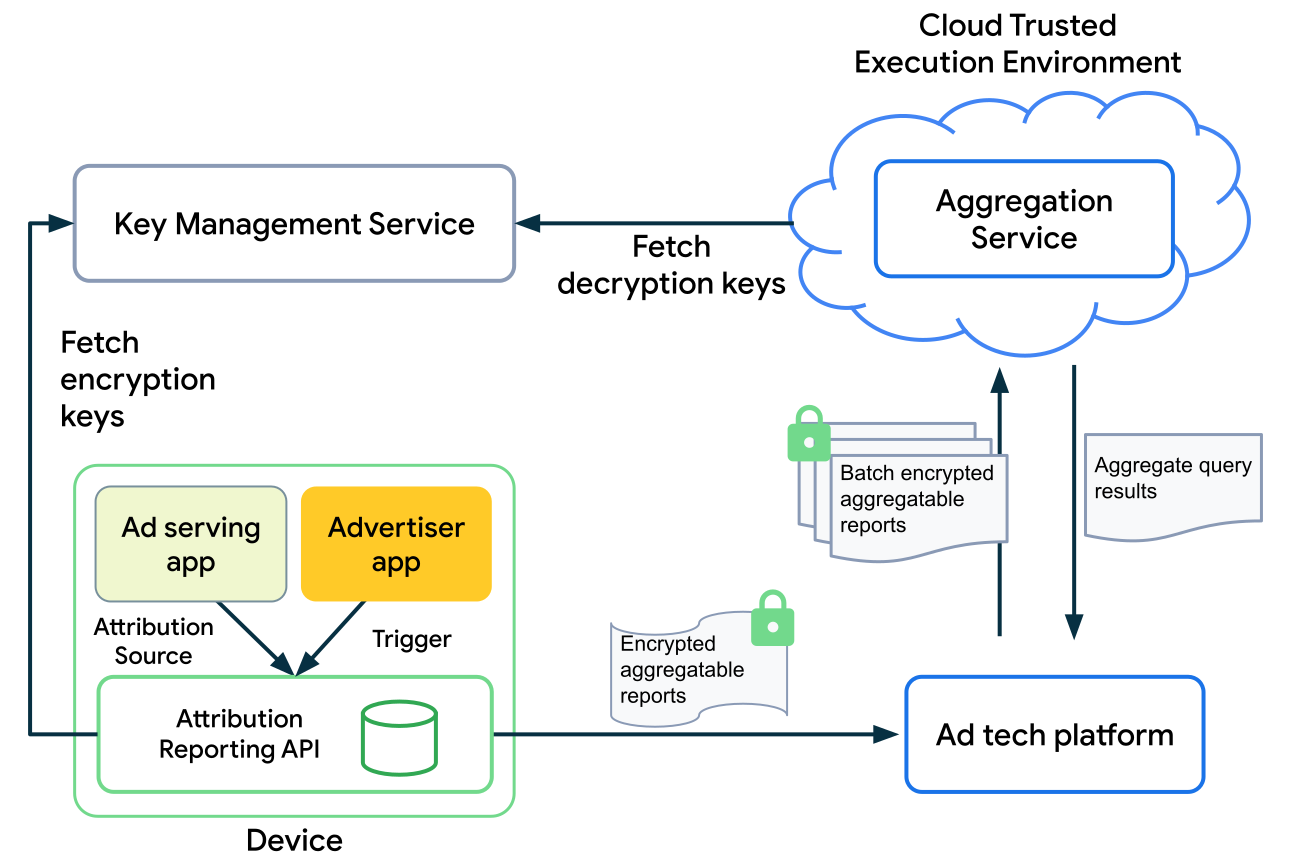
Aggregatable reports contain the following data related to attribution sources:
- Destination: The app's package name or eTLD+1 web URL where the trigger happened.
- Date: The date when the event represented by the attribution source occurred.
- Payload: Trigger values, collected as encrypted key/value pairs, which is used in the trusted aggregation service to compute aggregations.
Aggregation services
The following services provide data aggregation capabilities and safeguard against unauthorized access to aggregated data..
These services are managed by different parties, which are described in more detail later on this page:
- The aggregation service is the only one that ad techs are expected to deploy.
- The key management and aggregatable report accounting services are run by trusted parties called coordinators . These coordinators attest that the code running the aggregation service is the publicly-available code provided by Google and that all aggregation service users have the same key and aggregatable report accounting services applied to them.
Aggregation service
Ad tech platforms must, in advance, deploy an aggregation service that's based on binaries provided by Google.
This aggregation service operates in a Trusted Execution Environment (TEE) hosted in the cloud. A TEE offers the following security benefits:
- It ensures that the code operating in the TEE is the specific binary offered by Google. Unless this condition is satisfied, the aggregation service can't access the decryption keys it needs to operate.
- It offers security around the running process, isolating it from external monitoring or tampering.
These security benefits make it safer for an aggregation service to perform sensitive operations, such as accessing encrypted data.
For more information on the design, workflow, and security considerations of the aggregation service, see the aggregation service document on GitHub.
Key management service
This service verifies that an aggregation service is running an approved version of the binary and then provides the aggregation service in the ad tech with the correct decryption keys for their trigger data.
Aggregatable report accounting
This service tracks how often an ad tech's aggregation service accesses a specific trigger—which can contain multiple aggregation keys—and limits access to the appropriate number of decryptions. Refer to the Aggregation Service for the Attribution Reporting API design proposal for details.
Aggregatable Reports API
The API for creating contributions to aggregatable reports uses the same base API as when registering an attribution source for event-level reports. The following sections describe the extensions of the API.
Register the aggregatable source data
When the API makes a request to the Attribution Source URI, the ad tech can register a list of aggregation keys, named histogram_contributions , by responding with a new field called aggregation_keys in HTTP header Attribution-Reporting-Register-Source , with key as the key_name and value as key_piece :
- (Key) Key name: A string for the name of the key. Used as a join key to combine with trigger-side keys to form the final key.
- (Value) Key piece: A bitstring value for the key.
The final histogram bucket key is fully defined at trigger time by performing a binary OR operation on these pieces and the trigger-side pieces.
Final keys are restricted to a maximum of 128 bits; keys longer than this are truncated. This means that hex strings in the JSON should be limited to at most 32 digits.
Learn more about how aggregation keys are structured and how you can configure aggregation keys.
In the following example, an ad tech uses the API to collect the following:
- Aggregate conversion counts at a campaign level
- Aggregate purchase values at a geo level
// This is where the Attribution-Reporting-Register-Source object appears when
// an ad tech registers an attribution source.

// Attribution source metadata specifying histogram contributions in aggregate report.
Attribution-Reporting-Register-Source:
…
aggregation_keys: {
  // Generates a "0x159" key piece named (low order bits of the key) for the key
  // named "campaignCounts".
  // User saw an ad from campaign 345 (out of 511).

  "campaignCounts": "0x159",
  // Generates a "0x5" key piece (low order bits of the key) for the key name "geoValue"
  // Source-side geo region = 5 (US), out of a possible ~100 regions.
  "geoValue": "0x5"
}
Register the aggregatable trigger
Trigger registration includes two additional fields.
The first field is used to register a list of aggregate keys on the trigger side. The ad tech should respond back with the aggregatable_trigger_data field in HTTP header Attribution-Reporting-Register-Trigger , with the following fields for each aggregate key in the list:
- Key piece: A bitstring value for the key.
- Source keys: A list of strings with the names of attribution source side keys that the trigger key should be combined with to form the final keys.
The second field is used to register a list of values which should contribute to each key. The ad tech should respond back with the aggregatable_values field in the HTTP header Attribution-Reporting-Register-Trigger . The second field is used to register a list of values which should contribute to each key, which can be integers in the range $ [1, 2^{16}] $.
Each trigger can make multiple contributions to the aggregatable reports. The total amount of contributions to any given source event is bound by an $ L1 $ parameter, which is the maximum sum of contributions (values) across all aggregate keys for a given source. $ L1 $ refers to the L1 sensitivity or norm of the histogram contributions per source event. Exceeding these limits causes future contributions to silently drop. The initial proposal is to set $ L1 $ to $ 2^{16} $ (65536).
The noise in the aggregation service is scaled in proportion to this parameter. Given this, it is recommended to appropriately scale the values reported for a given aggregate key, based on the portion of $ L1 $ budget allocated to it. This approach helps make sure that the aggregate reports retain the highest possible fidelity when noise is applied. This mechanism is highly flexible and can support many aggregation strategies.
In the following example, the privacy budget is split equally between campaignCounts and geoValue by splitting the $ L1 $ contribution to each:
// This is where the Attribution-Reporting-Register-Trigger object appears
// when an ad tech registers a conversion trigger.

// Specify a list of dictionaries that generates aggregation keys.
Attribution-Reporting-Register-Trigger:{
    …
    "aggregatable_trigger_data":

    [
    // Each dictionary independently adds pieces to multiple source keys.
    {
    // Conversion type purchase = 2 at a 9-bit offset, i.e. 2 << 9.
    // A 9-bit offset is needed because there are 511 possible campaigns, which
    // will take up 9 bits in the resulting key.
        "key_piece": "0x400",// Conversion type purchase = 2
        // Apply this key piece to:
        "source_keys": ["campaignCounts"]
    },
    {
    // Purchase category shirts = 21 at a 7-bit offset, i.e. 21 << 7.
    // A 7-bit offset is needed because there are ~100 regions for the geo key,
    // which will take up 7 bits of space in the resulting key.
        "key_piece": "0xA80",
        // Apply this key piece to:
        "source_keys": ["geoValue", "nonMatchingIdsListedHereAreIgnored"]
    }
    ]

    // Specify an amount of an abstract value which can be integers in [1, 2^16] to
    // contribute to each key that is attached to aggregation keys in the order that
    // they're generated.
    aggregatable_values:
    {
    // Privacy budget for each key is L1 / 2 = 2^15 (32768).
    // Conversion count was 1.
    // Scale the count to use the full budget allocated: 1 * 32768 = 32768.
        "campaignCounts": 32768,

    // Purchase price was $52.
    // Purchase values for the app range from $1 to $1,024 (integers only).
    // Scaling factor applied is 32768 / 1024 = 32.
    // For $52 purchase, scale the value by 32 ($52 * 32 = $1,664).
        "geoValue": 1664
    }
}
The preceding example generates the following histogram contributions:
[
  // campaignCounts:
  {
    "key": "0x559", // = 0x159 | 0x400
    "value": 32768
  },
  // geoValue:
  {
    "key": "0xA85",  // = 0x5 | 0xA80
    "value": 1664
  }
]
The scaling factors can be inverted in order to obtain the correct values, modulo noise that is applied:
L1 = 65536
trueCampaignCounts = campaignCounts / (L1 / 2)
trueGeoValue = geoValue / (L1 / 2) * 1024
Differential privacy
A goal of this API is to have a framework which can support differentially private aggregate measurement. This can be achieved by adding noise proportional to the $ L1 $ budget, such as picking noise with the following distribution:
Protected Audience API and Attribution Reporting API Integration
Cross-API integration across the Protected Audience and Attribution Reporting APIs enables adtechs to evaluate their attribution performance across various remarketing tactics in order to understand which types of audiences deliver the highest ROI.
Through this cross-API integration, adtechs can:
- Create a key-value map of URIs to be used for both 1) interaction reporting and 2) source registration.
- Include
CustomAudiencein their source-side key mapping for aggregate summary reporting (using the Attribution Reporting API).
When a user sees or clicks on an ad:
- The URL used to report those interactions using Protected Audience will also be used to register a view or click as an eligible source with the Attribution Reporting API.
- The ad tech may choose to pass CustomAudience (or other relevant contextual information about the ad such as ad placement or view duration) using that URL so this metadata can propagate down to summary reports when the ad tech is reviewing aggregate campaign performance.
For more information on how this is enabled within Protected Audience, see the relevant section of the Protected Audience API explainer .
Registration priority, attribution, and reporting examples
This example showcases a set of user interactions and how ad tech defined attribution source and trigger priorities could affect attributed reports. In this example, we assume the following:
- All attribution sources and triggers are registered by the same ad tech, for the same advertiser.
- All attribution sources and triggers are happening during the first event reporting window (within 2 days of initially displaying the ads in a publisher app).
Consider the case where a user does the following:
- The user sees an ad. Ad tech registers an attribution source with the API, with a priority of
0(view #1). - The user sees an ad, registered with a priority of
0(view #2). - The user clicks an ad, registered with a priority of
1(click #1). - The user converts (reaches landing page) in an advertiser app. The ad tech registers a trigger with the API, with a priority of
0(conversion #1).- As triggers are registered, the API performs attribution first before generating reports.
- There are 3 attribution sources available: view #1, view #2, and click #1. The API attributes this trigger to click #1 because it's the highest priority and most recent.
- View #1 and view #2 are discarded and are no longer eligible for future attribution.
- The user adds an item to their cart in the advertiser app, registered with a priority of
1(conversion #2).- Click #1 is the only eligible attribution source. The API attributes this trigger to click #1.
- The user adds an item to their cart in the advertiser app, registered with a priority of
1(conversion #3).- Click #1 is the only eligible attribution source. The API attributes this trigger to click #1.
- The user adds an item to their cart in the advertiser app, registered with a priority of
1(conversion #4).- Click #1 is the only eligible attribution source. The API attributes this trigger to click #1.
- The user makes a purchase in the advertiser app, registered with a priority of
2(conversion #5).- Click #1 is the only eligible attribution source. The API attributes this trigger to click #1.
Event-level reports have the following characteristics:
- By default, the first 3 triggers attributed to a click and the first trigger attributed to a view are sent out after applicable reporting windows.
- Within the reporting window, if there are triggers registered with higher priority, those take precedence and replace the most recent trigger.
- In the preceding example, the ad tech receives 3 event reports after the 2-day reporting window, for conversion #2, conversion #3, and conversion #5.
- All 5 triggers are attributed to click #1. By default, the API would send out reports for the first 3 triggers: conversion #1, conversion #2, and conversion #3.
- However, conversion #4's priority (
1) is higher than conversion #1's priority (0). Conversion #4's event report replaces conversion #1's event report to be sent out. - Additionally, conversion #5's priority (
2) is higher than any other trigger. Conversion #5's event report replaces conversion #4's report to be sent out.
Aggregatable reports have the following characteristics:
Encrypted aggregatable reports are sent to the ad tech as soon as they are processed, a few hours after the triggers are registered.
As an ad tech, you create their batches based on the information that comes unencrypted in your aggregatable reports. This information is contained in the
shared_infofield in your aggregatable report, and includes timestamp and reporting origin. You can't batch based on any encrypted information in your aggregation key-value pairs. Some basic strategies you can follow are batching reports daily or weekly. Ideally, batches should contain at least 100 reports each.It's up to the ad tech on when and how to batch the aggregatable reports and send to the aggregation service.
Compared to event-level reports, encrypted aggregatable reports can attribute more triggers to a source.
In the preceding example, 5 aggregatable reports are sent out, one for each registered trigger.
Transitional debugging reports
The Attribution Reporting API is a new and fairly complex way to do attribution measurement without cross-app identifiers. As such, we are supporting a transitional mechanism to learn more information about attribution reports when the advertising ID is available (the user has not opted out of personalization using the advertising ID and the publisher or advertiser app has declared AdID permissions) . This ensures that the API can be fully understood during roll-out, help flush out any bugs, and more readily compare the performance to advertising ID-based alternatives. There are two types of debugging reports: attribution-success and verbose.
Read the guide on transitional debugging reports for details on debugging reports with app-to-web and web-to-app measurement.
Attribution-success debugging reports
Source and trigger registrations both accept a new 64-bit debug_key field (formatted as a String), which the ad tech populates. source_debug_key and trigger_debug_key are passed unaltered in both event-level and aggregate reports.
If a report is created with both source and trigger debug keys, a duplicate debug report is sent with limited delay to a .well-known/attribution-reporting/debug/report-event-attribution endpoint. The debug reports are identical to normal reports, including both debug key fields. Including these keys in both allows tying normal reports to the separate stream of debug reports.
- For event-level reports:
- Duplicate debug reports are sent with limited delay and therefore aren't suppressed by limits on available triggers , which allows ad tech to understand the impact of those limits for event-level reports.
- Event-level reports associated with false trigger events won't have
trigger_debug_keys. This allows ad tech to more closely understand how noise is applied in the API.
- For aggregatable reports:
- We will support a new
debug_cleartext_payloadfield which contains the decrypted payload, only if bothsource_debug_keyandtrigger_debug_keyare set.
- We will support a new
Verbose debugging reports
Verbose debugging reports allow developers to monitor certain failures in the attribution source or trigger registrations. These debugging reports are sent with limited delay after attribution source or trigger registrations to a . well-known/attribution-reporting/debug/verbose endpoint.
Each verbose report contains the following fields:
- Type : what caused the report to be generated. See the full list of verbose report types .
- In general, there are source verbose reports and trigger verbose reports.
- Source verbose reports require the advertising ID to be available to the publisher app, and trigger verbose reports require the advertising ID to be available to the advertiser app.
- Trigger verbose reports (with the exception of
trigger-no-matching-source) can optionally include thesource_debug_key. This can only be included if the advertising ID is also available to the publisher app.
- Body : The report's body, which depends on its type.
Ad techs need to opt in to receive verbose debugging reports using a new debug_reporting dictionary field in the Attribution-Reporting-Register_Source and Attribution-Reporting-Register-Trigger headers.
- Source verbose reports require opt-in on the source registration header only.
- Trigger debug reports require opt-in on the trigger registration header only.
How to use debug reports
If a conversion took place (according to your existing measurement system) and a debug report was received for that conversion, this means the trigger was successfully registered.
For each debug attribution report, check if you're receiving a regular attribution report that matches the two debug keys.
When there's no match, it can be for a number of reasons.
Works as intended:
- Privacy-preserving API behaviors:
- A user hits the report rate limit—causing all subsequent reports to not be sent in the time period; or a source is removed due to the pending destination limit.
- For event-level reports: the report is subject to randomized response (noise) and is suppressed, or you may receive a randomized report.
- For event-level reports: the limit of three (for clicks) or one (for views) reports has been reached, and subsequent reports have no explicit priority set, or a priority that is lower than existing reports.
- The contribution limits for aggregatable reports have been exceeded.
- Ad tech-defined business logic:
- A trigger is filtered out using filters or priority rules.
- Time delays or interactions with network availability (eg, the user turns off their device for an extended period of time).
Unintended causes:
- Implementation issues:
- The source header is misconfigured.
- The trigger header is misconfigured.
- Other configuration issues.
- Device or network issues:
- Failures due to network conditions.
- Source or trigger registration response doesn't reach the client.
- API bug.
Future considerations & open questions
The Attribution Reporting API is a work in progress. We're also exploring future potential features, such as non-last-click attribution models and cross-device measurement use cases.
Additionally, we'd like to seek feedback from the community on a few issues:
- Are there any use cases where you'd like the API to send out reports for the verified install? These reports would count against ad tech platforms' respective rate limits.
- Do you foresee any difficulties with passing the
InputEventfrom the app to ad tech for source registration? - Do you have any special attribution use cases for pre-loaded apps or re-installed apps?