

Topics API מאפשר לפרסם על סמך תחומי עניין בלי להשתמש בקובצי Cookie של צד שלישי.
איך Topics API פועל
אפשר להשתמש ב-Topics API כדי לבחון נושאים שנראים מעניינים למשתמש, על סמך הפעילות שלו, ולספק גישה אליהם. לאחר מכן, Topics API יכול לתת למפעילי API (כמו פלטפורמות של טכנולוגיות פרסום) גישה לתחומי העניין של המשתמש, בלי לחשוף מידע נוסף על הפעילות של המשתמש.
מושגים מרכזיים
- נושא הוא נושא שמעניין את המשתמש הנוכחי וקריאה לאנשים. הוא חלק מהטקסונומיה של Topics.
- מבצע קריאה הוא ישות, כמו אפליקציה, ערכת SDK של צד שלישי, אתר או שירות, ששולחת בקשה ל-Topics API כדי לצפות בתחומי העניין של משתמש או לגשת אליהם.
- נושא נצפה על ידי מבצע הקריאה, אם מבצע הקריאה שלח בקשה ל-Topics API מדף אינטרנט או מאפליקציה שמשויכים לנושא הזה במהלך שלושת העידנים האחרונים.
- תקופת זמן היא תקופה של חישוב נושאים, שמוגדרת כברירת מחדל לשבוע אחד.
- טקסונומיה היא רשימה היררכית של קטגוריות, שכוללת, לדוגמה, קטגוריות כמו
/Arts & Entertainment/Music & Audio/Soul & R&Bו-/Business & Industrial/Business Services/Corporate Events. - המערכת מסיקה את הנושאים באמצעות מודל סיווג שממפה את פעילות המשתמשים לאפס נושאים או יותר.
השלבים המרכזיים בתהליך של Topics API
מחזור החיים של Topics API כולל שלושה שלבים עיקריים:
- לבחון את פעילות המשתמשים, למשל כשהם מבקרים בדף האינטרנט
https://cats.example/tabby/index.htmlאו מורידים את האפליקציהcats. - הסקת נושאים מפעילות המשתמשים, לדוגמה
/Pets & Animals/Pets/Cats. - גישה לנושאים שנצפו בעבר אצל המשתמש, למשל כאות לבחירת פרסום רלוונטי (כמו קידום מכירות של מזון לחתולים).
מעקב אחר נושאים
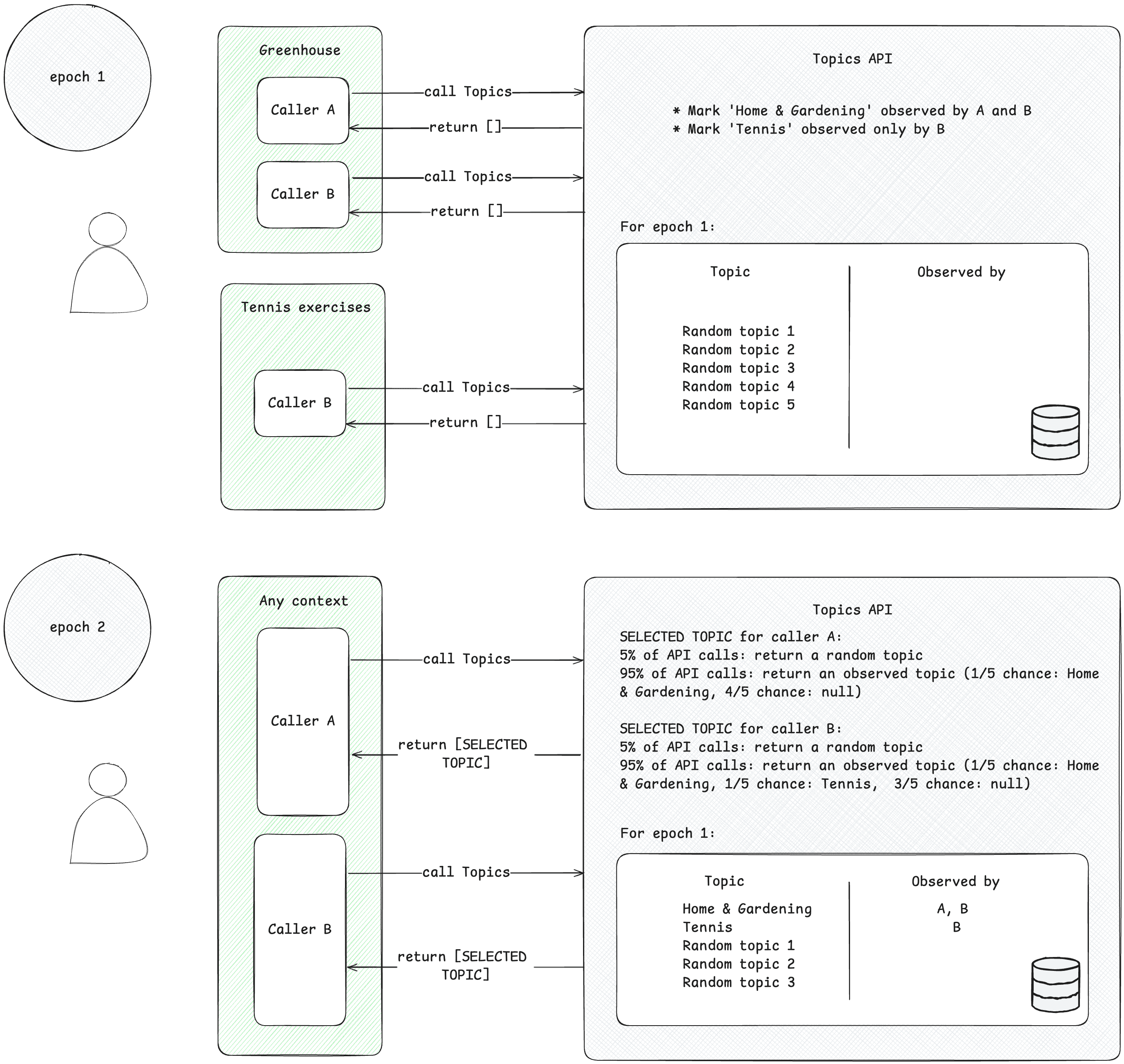
מבצעי הקריאה יכולים לגשת רק לנושאי עניין שהם הבחינו בהם. מבצע הקריאה עוקב אחרי נושא כששולח בקשה ל-Topics API מהקשר שמשויך לנושא הזה. כדי להמחיש את העיקרון הזה, נבחן את הדוגמה הפשוטה הבאה.
- נניח שיש שתי פונקציות קריאה חוזרת (caller) ל-Topics API: A ו-B.
- יש שני הקשרים:
- Greenhouse, לדוגמה אפליקציה בשם Greenhouse או אתר greenhouse.example, המשויכים לנושא
Home & Garden. - תרגילי טניס, לדוגמה אפליקציה בשם 'תרגילי טניס' או אתר tennis.example, שמשויכים לנושא
Sports/Tennis.
- Greenhouse, לדוגמה אפליקציה בשם Greenhouse או אתר greenhouse.example, המשויכים לנושא
- גם מבצע הקריאה החוזרת A וגם B נמצאים בהקשר של Greenhouse.
- רק המתקשר B נמצא בהקשר של תרגילי טניס.
- כדי לפשט את העניין, נניח שלא זוהו נושאים לגבי המשתמש לפני תקופת 1.
- המשתמש מבקר באפליקציה Greenhouse, והגורמים A ו-B מבצעים קריאה ל-Topics API כדי לתעד את הביקור של המשתמש בדף או באפליקציה (כדי ללמוד איך לבצע קריאה ל-Topics API, אפשר לעיין במדריך להטמעה שמופיע בקטע השלבים הבאים). הרשומה הזו (שם מארח או נתוני אפליקציה) משמשת מאוחר יותר להסקת נושאים שמעניינים אתכם. בהמשך, Topics API יסמן את הנושא
Home & Gardenכנושא שנצפה על ידי שני מבצעי הקריאה A ו-B. - המשתמש נכנס לאפליקציה Tennis exercises. רק מבצע הקריאה החוזרת B שולח בקשה ל-Topics API. בהמשך, Topics API יסמן את הנושא
Sports/Tennisכנושא שנצפה על ידי מבצע הקריאה B. - בסוף התקופה לקביעת נושאים, Topics API מרענן את הנושאים המובילים של המשתמש ומזהה את מבצעי הקריאה החוזרת שצפו בנושאים האלה על סמך פעילות המשתמש.
- בהמשך, כשמבצע הקריאה B יבצע קריאה נוספת ל-Topics API, הוא יכול לקבל את הנושא
Home & GardenאוSports/Tennis(או, עם סיכוי של 5%, נושא אקראי) עבור המשתמש הזה במערך התשובות. - למבצע הקריאה החוזרת A יש גישה רק לנושא
Home & Garden, כי הוא אף פעם לא צפה בנושאSports/Tennis. כלומר, צד שלישי ידע על תחום העניין של המשתמש רק בהקשר הספציפי (אפליקציה או אתר) שבו הוא מופיע.
הפקת נושאים
מערכת Topics מסיקה תחומי עניין מפעילות המשתמשים. הנושאים נבחרים מתוך טקסונומיה מוגדרת מראש בקוד פתוח. פעם בתקופה לקביעת נושאים, המערכת של Topics מרעננת את חמשת הנושאים המובילים של המשתמש ואת הגורמים שהציגו אותם במהלך התקופה. המודל המסווג של Topics API מסיק נושאים מפעילות המשתמשים: שם מארח לביקור בדף אינטרנט, פרטי האפליקציה ב-Android.
מבצע השיחה ניגש לתחומי העניין של המשתמש
ה-API מחזיר רק נושאים שהמבצע של הקריאה הבחין בהם במהלך שלושת הזמנים האחרונים. אפשר להחזיר לשולח הקריאה עד שלושה נושאים,נושא אחד לכל אחת משלוש תקופות הזמן האחרונות לקביעת נושאים (אם לשולח הקריאה נצפו נושאים באותה תקופה). מבצע הקריאה החוזרת יכול להשתמש בנושאים שמוחזרים כדי להשלים מידע הקשרי, ואפשר לשלב אותם כדי למצוא מודעה רלוונטית יותר למשתמש.
תקופות
Topics API צריך לוודא שהנושאים שמעניינים את המשתמשים יהיו מעודכנים. המערכת מסיקה את הנושאים של המשתמש על סמך הפעילות שלו במהלך תקופה שנקראת 'תקופת זמן לקביעת נושאים'. התקופה הזו היא שבוע כברירת מחדל. לכל משתמש יש תקופות ייחודיות (התקופות הן 'לכל משתמש') ושעת ההתחלה הראשונית נקבעת באופן אקראי.
בכל תקופת זמן לקביעת נושאים, Topics API מחשב את חמשת הנושאים המובילים של המשתמש ומזהה את מבצעי הקריאה החוזרת שצפו בנושאים האלה באמצעות מידע במכשיר. בכל תקופת זמן לקביעת נושאים ייבחר נושא אחד באופן אקראי מתוך חמשת הנושאים המובילים של המשתמש באותה תקופה. כדי לשפר עוד יותר את הפרטיות ולהבטיח שכל הנושאים יוצגו, יש 5% סיכוי שהנושא ייבחר באופן אקראי מתוך כל הנושאים האפשריים בטקסונומיה של תחומי העניין.
נושאים באינטרנט בפועל
באינטרנט, המערכת מסיקה את הנושאים משמות המארחים של הדפים שהמשתמש מבקר בהם. לדוגמה, הנושא שמשויך לאתר dogs.example יכול להיות /Pets & Animals/Pets/Dogs.
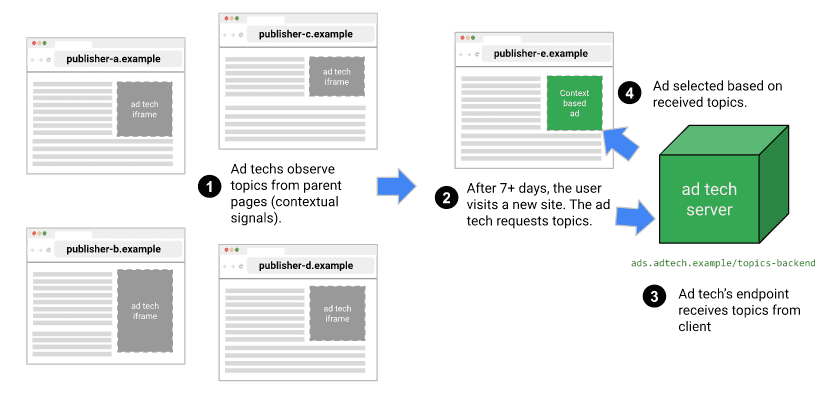
בתרשים הבא מוצגת דוגמה פשוטה שממחישה איך Topics API יכול לעזור לפלטפורמת טכנולוגיות פרסום לבחור מודעה מתאימה. בדוגמה הזו אנחנו מניחים שלדפדפן של המשתמש כבר יש מודל למיפוי שמות מארחים של אתרים לנושאים.

הדפדפן קובע את המקור של המתקשר מההקשר של הקוד שמפעיל את Topics API. בפועל, המשמעות היא שמשתמשי Topics שולחים קריאה ל-API ב-iframe מהמקור שלהם, או שהם כוללים נושאים בבקשת אחזור למקור שלהם.
לדוגמה, אפשר להטמיע פלטפורמה לספקים (SSP) בכמה אתרים של בעלי תוכן דיגיטלי. לאחר מכן, פלטפורמת ה-SSP יכולה לשלוח קריאה ל-Topics API בתוך iframe מהמקור שלה, וכך לבחון נושאים שמשויכים למשתמש באתרים האלה. את הנושאים האלה אפשר לשתף עם פלטפורמה למפרסמים (DSP) כדי לעזור לה לבחור מודעה רלוונטית למשתמש.
איך ה-API מחליט אילו נושאים יוצגו למשתמשים שקוראים לו
הנושאים שמוחזרים למי שקורא ל-API הם רק נושאים שהמערכת זיהתה לאחרונה, והנושאים שמשויכים למשתמש מתעדכנים פעם אחת בכל תקופה: פרק זמן שמוגדר כשבוע בהטמעה של Chrome. כלומר, ה-API מספק חלון זמן מתגלגל שבו גורם קורא נתון יכול לקבל נושאים שנצפו.
בטבלה הבאה מופיעה דוגמה (קטנה באופן לא מציאותי) של היסטוריית גלישה היפותטית של משתמש במהלך תקופה אחת, שבה מוצגים נושאים שמשויכים לאתרים שהוא ביקר בהם, והגורמים שקוראים ל-API שקיימים בכל אתר (הישויות שקוראות ל-document.browsingTopics() בקוד JavaScript שכלול באתר).
| אתר | נושאים | קריאות ל-API באתר |
|---|---|---|
| running.example | Running & WalkingAthletic Shoes |
adtech1.example adtech2.example |
| dogs.example | Dogs |
adtech1.example |
| holiday.example | Hotels & Accommodations |
adtech2.example |
| sunglasses.example | Sunglasses |
[none] |
בסוף התקופה (שבוע כברירת מחדל), Topics API יוצר את הנושאים המובילים בדפדפן לאותו שבוע.
- הדומיין adtech1.example עומד עכשיו בדרישות לקבלת הנושאים
Running & Walking, Athletic Shoesו-Dogs, כי הוא זיהה אותם בדומיין running.example וגם בדומיין dogs.example. - הדומיין adtech1.example לא עומד בדרישות לקבלת הנושא
Hotels & Accommodationsעבור המשתמש הזה, כי הוא לא מופיע באף אחד מהאתרים שהמשתמש ביקר בהם לאחרונה שמשויכים לנושא הזה. - הנושאים
Running & Walking,Athletic Shoesו-Hotels & Accommodationsנצפו ב-adtech2.example, אבל הנושאDogsלא נצפה בו.
המשתמש ביקר באתר sunglasses.example, שמוגדר בו הנושא Sunglasses, אבל לא בוצעו קריאות ל-Topics API באתר הזה. בשלב הזה, המשמעות היא שהנושא Sunglasses לא יוחזר על ידי ה-API לכל מתקשר.
בשבוע השני, המשתמש מבקר באתר אחר:
| אתר | נושאים | קריאות ל-API באתר |
|---|---|---|
| cameras.example | Camera & Photo Equipment |
adtech2.example |
בנוסף, קוד מ-adtech2.example מתווסף אל sunglasses.example:
| אתר | נושאים | קריאות ל-API באתר |
|---|---|---|
| sunglasses.example | Sunglasses |
adtech2.example |
בנוסף ל-Running & Walking, ל-Athletic Shoes ול-Hotels & Accommodations משבוע 1, המשמעות היא שעכשיו adtech2.example יוכל לקבל את הנושאים Camera & Photo Equipment ו-Sunglasses – אבל רק באפוקה הבאה, שבוע 3. כך מוודאים שצדדים שלישיים לא יוכלו ללמוד על העבר של משתמש (במקרה הזה, התעניינות באופנה) יותר ממה שהם יכולים ללמוד באמצעות קובצי Cookie.
אחרי שבועיים נוספים, יכול להיות שהנושאים Running & Walking, Athletic Shoes ו-Hotels & Accommodations יוסרו מרשימת הנושאים שעומדים בדרישות של adtech2.example אם המשתמש לא יבקר באתרים עם הנושאים האלה שכוללים קוד מ-adtech2.example.
מודל מסווג
השיטה 'נושאים' משתמשת במודל סיווג שממפה שמות מארחים של אתרים לאפס נושאים או יותר (ניתוח של מידע נוסף, כמו כתובות URL מלאות או תוכן דף, עשוי לאפשר הצגת מודעות רלוונטיות יותר, אבל גם עלול לפגוע בפרטיות).
טקסונומיה
הנושאים נבחרים מתוך טקסונומיה. הנושאים האלה נבחרו בקפידה על ידי Chrome, במטרה שהטקסונומיה תהפוך למשאב שמתוחזק על ידי תורמים מהימנים בסביבה העסקית. הטקסונומיה צריכה להיות קטנה מספיק כדי שדפדפנים של משתמשים רבים ישויכו לכל נושא. המטרה הסופית היא שהטקסונומיה תתבסס על מקור חיצוני שישלב משוב ורעיונות מכל הענף.
כדי להימנע מקטגוריות רגישות, הנושאים צריכים להיות גלויים לכולם, להתווסף על ידי אנשים ולהישאר עדכניים. הטקסונומיה שבה נעשה שימוש ב-Chrome נוצרה על ידי אנשים כדי להחריג קטגוריות שנחשבות בדרך כלל רגישות, כמו מוצא אתני או נטייה מינית.
סיווג נושאים
הנושאים נבחרים באופן ידני מתוך 50,000 האתרים המובילים, והרשימה הזו של שמות מארחים ונושאים משמשת לאימון מודל הסיווג. באתרים המובילים, הגישה לנושאים היא דרך רשימת הביטול ולא באמצעות מודל הסיווג. אתם יכולים לראות את רשימת ההחרגות באופן מקומי במחשב.
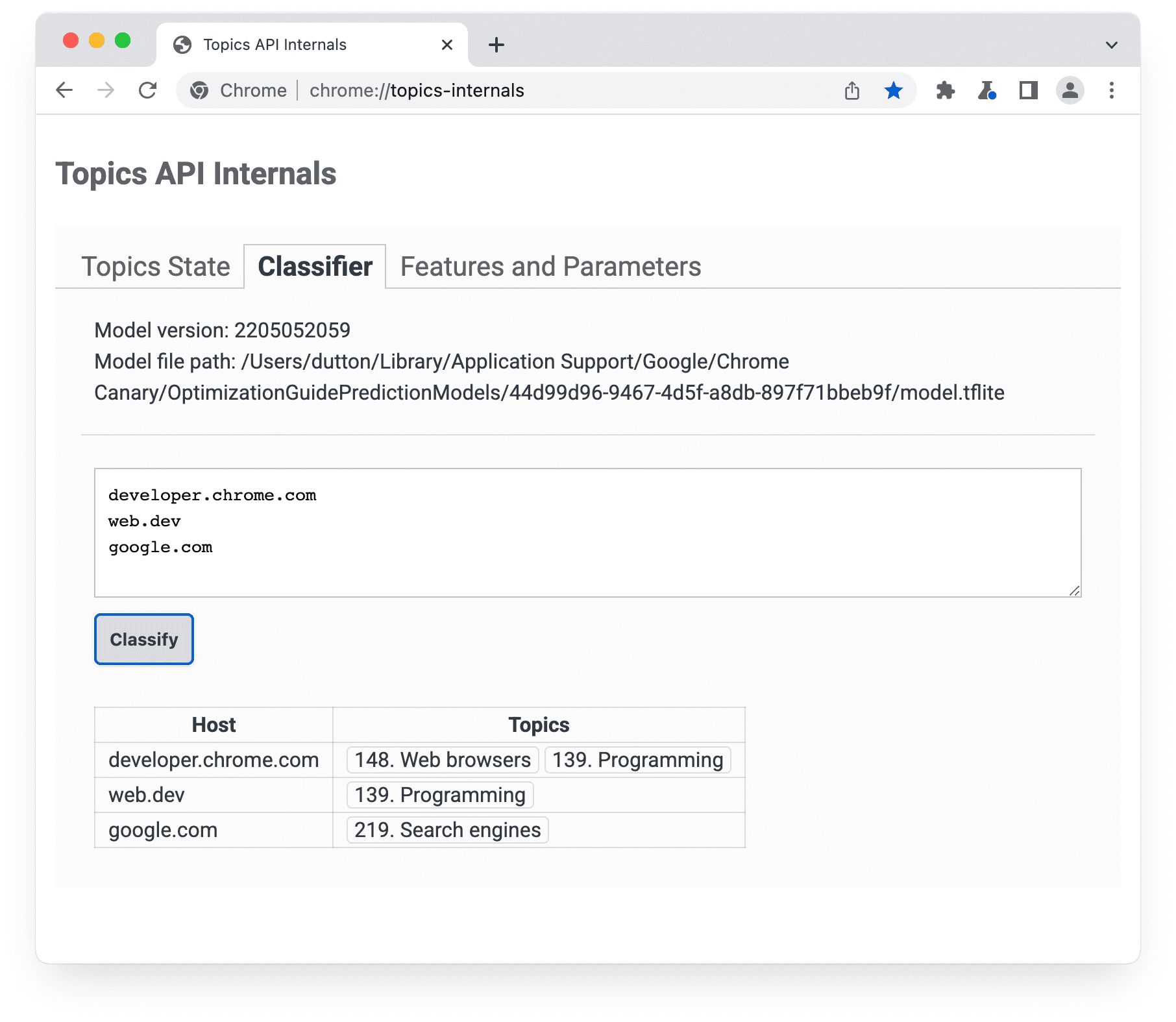
chrome://topics-internals מפורטים גרסת המודל, הנתיב שלו והנושאים שמשויכים לכל מארח שמופיע ברשימה.הטמעה של Topics API ב-Chrome מורידה קובץ TensorFlow Lite שמייצג את המודל, כדי שאפשר יהיה להשתמש בו באופן מקומי במכשיר של המשתמש.
איך נבחרים חמשת הנושאים המובילים של המשתמש
ה-API מחזיר נושא אחד לכל תקופה, עד למקסימום של שלושה נושאים. אם מוחזרים שלושה נושאים, הם כוללים את הנושאים של התקופה הנוכחית ושתי התקופות הקודמות.
- בסוף כל תקופה, הדפדפן מרכיב רשימה של דפים שעומדים בקריטריונים הבאים:
- המשתמש ביקר בדף במהלך התקופה.
- הדף כולל קוד שקורא ל-
document.browsingTopics(). - ממשק ה-API הופעל (לדוגמה, הוא לא נחסם על ידי המשתמש או על ידי כותרת תגובה).
- הדפדפן, במכשיר של המשתמש, משתמש במודל המסווג שמסופק על ידי Topics API כדי למפות את שם המארח של כל דף לרשימת נושאים.
הדפדפן יוצר רשימה של חמשת הנושאים המובילים.
- כל אחד מ-22 נושאי הבסיס בטקסונומיה משויך למאגר מסוג 'שימושיות גבוהה' או 'שימושיות רגילה', על סמך משוב ממערכת האקולוגית של הפרסום. הדפדפן ממיין קודם את הנושאים לפי ההקצאה שלהם לקטגוריות. כל נושאי הצאצא יורשים את הקצאה של הדלי של נושא השורש ההורה שלהם. נושאים עם 'שימושיות גבוהה' מקבלים עדיפות.
- לאחר מכן, הדפדפן ממיין את הנושאים לפי התדירות בכל קטגוריה.
- חמשת הנושאים המובילים מתוך הרשימה הממוינת הזו נבחרים כנושאים המובילים של המשתמש באותה תקופה.
השיטה document.browsingTopics() מחזירה נושא אקראי מתוך חמשת הנושאים המובילים לכל תקופת זמן לקביעת נושאים, עם סיכוי של 5% שכל אחד מהנושאים האלה ייבחר באופן אקראי מתוך הטקסונומיה המלאה של הנושאים. ב-Chrome, המשתמשים יכולים גם להסיר נושאים ספציפיים או לנקות את היסטוריית הגלישה שלהם כדי לצמצם את מספר הנושאים שמוחזרים על ידי ה-API. המשתמשים יכולים גם לבטל את ההסכמה לשימוש ב-API.
בדף chrome://topics-internals אפשר לראות מידע על נושאים שנצפו במהלך התקופה הנוכחית.
Next steps

Setup

Implement Topics
See also
Check out our resources to better understand the Topics API on the Web.
- Check out Topics demos, collab and walkthrough videos.
- See the list of Chrome flags that allow developers to customize the Topics API for testing.
- See how users and developers can control the API.
- Check out the resources for technical explainers and support. Ask questions, engage and share feedback.