

Topics API, तीसरे पक्ष की कुकी का इस्तेमाल किए बिना, दिलचस्पी के हिसाब से विज्ञापन दिखाने की सुविधा देता है.
How the Topics API works
The Topics API can be used to observe and provide access to topics that appear to be of interest to the user, based on their activity. The Topics API can then give API callers (such as ad tech platforms) access to a user's topics of interest, but without revealing additional information about the user's activity.
Key concepts
- A topic is a human-readable topic of interest for the current user and is part of the Topics taxonomy.
- A caller is an entity, such as an app, a third-party SDK, a website, or service, that makes a request to the Topics API to observe or access a user's interests.
- A topic is observed by a caller, if the caller made a Topics API request from a web page or app associated with this topic during the past three epochs.
- An epoch is a period of topic computation, which defaults to one week.
- A taxonomy is a hierarchical list of categories, which includes, for example, such categories as
/Arts & Entertainment/Music & Audio/Soul & R&Band/Business & Industrial/Business Services/Corporate Events. - Topics are derived using a classifier model that maps user activity to zero or more topics.
Topics API flow core steps
The Topics API lifecycle has three main steps:
- Observe user activity, such as when they visit the web page
https://cats.example/tabby/index.htmlor download the appcats. - Derive topics from user activity, for example
/Pets & Animals/Pets/Cats. - Access topics previously observed for the user, for example as a signal to select relevant advertising (such as a cat food promotion).
Observe topics
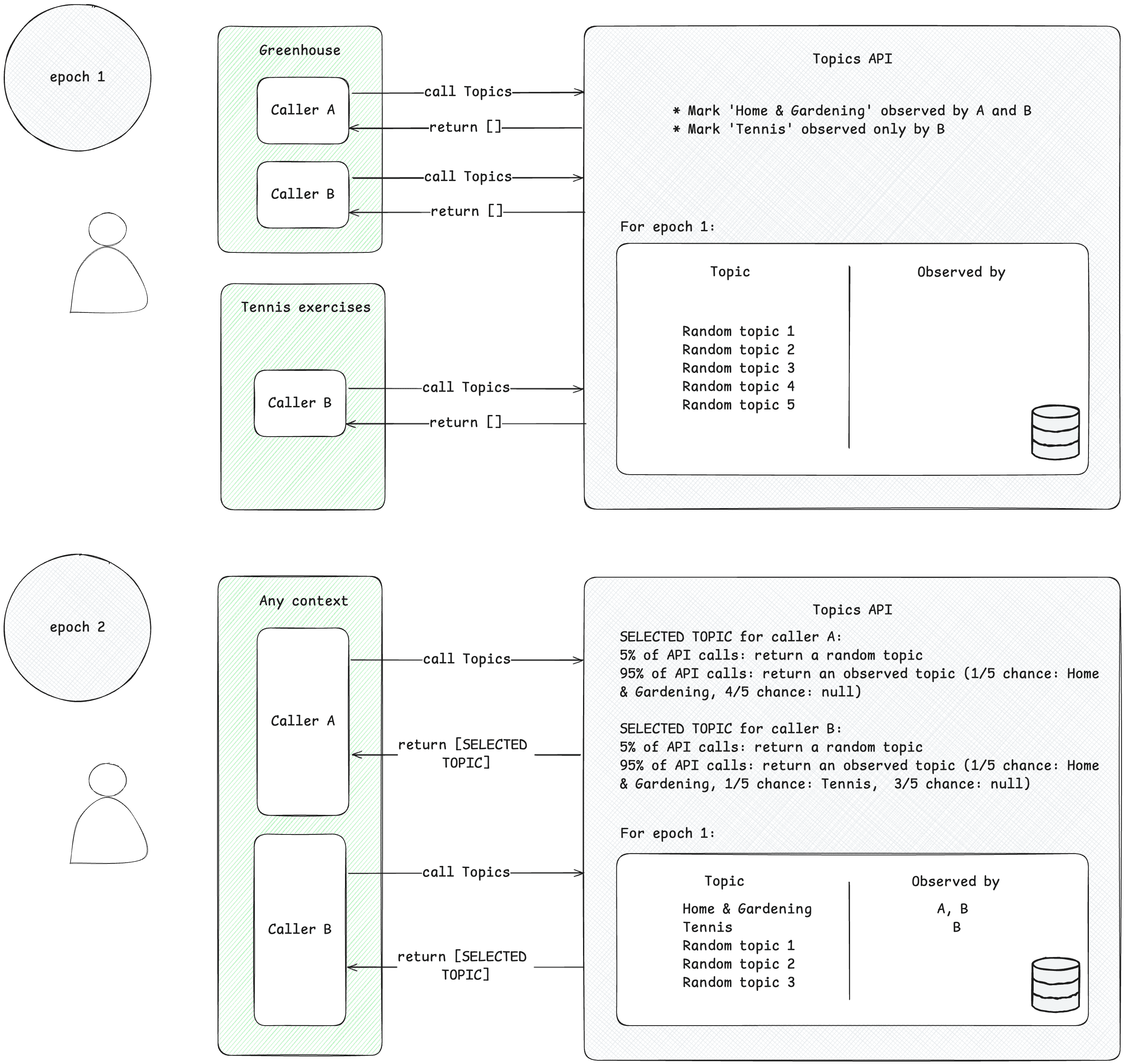
Callers can only access topics of interest that they've observed. A caller observes a topic when they make a Topics API request from a context associated with this topic. To illustrate this concept, consider the following simplified example.
- Suppose there are two Topics API callers: A and B.
- There are two contexts:
- Greenhouse, for example an app named Greenhouse or a website greenhouse.example, associated with the topic
Home & Garden. - Tennis exercises, for example an app named Tennis Exercises or a website tennis.example, associated with the topic
Sports/Tennis.
- Greenhouse, for example an app named Greenhouse or a website greenhouse.example, associated with the topic
- Both caller A and B are present in the context of Greenhouse.
- Only the caller B is present in the context of Tennis exercises.
- Assume that no topics were observed for the user before epoch 1, for the sake of simplification.
- The user visits the Greenhouse app, and callers A and B make a Topics API call to record the user visit to the page or app (see the implementation guide suggested in Next steps to find out how to call the Topics API). This record (a hostname or app data) is later used to derive topics of interest. The Topics API will later mark the topic
Home & Gardenas observed by both callers A and B. - The user visits the Tennis exercises app. Only the caller B sends a Topics API request. The Topics API will later mark the topic
Sports/Tennisas observed by the caller B. - By the end of the epoch, the Topics API refreshes the user's top topics and determines the callers that observed these topics based on user activity.
- Later, when the caller B makes another Topics API call, it can get either
Home & GardenorSports/Tennistopic (or, with a 5% chance, a random topic) for this user in the response array. - Caller A can only access the topic
Home & Garden, as it has never observed the topicSports/Tennis. This means that a third-party will only learn about a user's topic of interest within the specific context (app or website) where it is present.
Derive topics
Topics derives topics of interest from user activity. The topics are selected from a predefined open-source taxonomy. Once per epoch, Topics refreshes the user's top five topics and the callers that observed them during the epoch. The Topics classifier model derives topics from user activity: hostname for a web page visit, app information on Android.
Caller accesses user's topics of interest
The API returns only topics that have been observed by the caller within the most recent three epochs. A maximum of three topics may be returned to a caller,one topic for each of the three recent epochs (if the caller observed topics for that epoch). The returned topics can be used by the caller to supplement any contextual information and can be combined to help find a more relevant ad for the user.
Epochs
The Topics API must ensure that the topics of interest it provides are kept up to date. The topics are inferred for a user based on their activity during a period of time known as an epoch, one week by default. Each user has their own epochs (epochs are "per user") and the initial start time is randomized.
Once each epoch, the Topics API computes the user's top five topics and determines which callers observed those topics using on-device information. The topic selected for each epoch is randomly selected from the user's top five topics for that time period. To further enhance privacy and ensure that all topics may be represented, there is a 5% chance the topic is randomly selected from all possible topics in the taxonomy of interests.
वेब पर विषयों को लागू करने के तरीके
वेब पर, विषयों का अनुमान उन पेजों के होस्टनेम से लगाया जाता है जिन्हें उपयोगकर्ता विज़िट करता है. उदाहरण के लिए, dogs.example वेबसाइट के लिए अनुमानित विषय /Pets & Animals/Pets/Dogs हो सकता है.
यहां दिए गए डायग्राम में, एक आसान उदाहरण दिखाया गया है. इससे पता चलता है कि Topics API, विज्ञापन टेक्नोलॉजी प्लैटफ़ॉर्म को सही विज्ञापन चुनने में कैसे मदद कर सकता है. इस उदाहरण में यह माना गया है कि उपयोगकर्ता के ब्राउज़र में, वेबसाइट के होस्टनेम को विषयों से मैप करने के लिए पहले से ही कोई मॉडल मौजूद है.

ब्राउज़र, Topics API को कॉल करने वाले कोड के कॉन्टेक्स्ट से, कॉलर के ऑरिजिन का पता लगाता है. इसका मतलब है कि Topics का इस्तेमाल करने वाले लोग, अपने ऑरिजिन से iframe में एपीआई को कॉल करते हैं या वे अपने ऑरिजिन में फ़ेच में विषयों को शामिल करते हैं.
उदाहरण के लिए, सप्लाई-साइड प्लैटफ़ॉर्म (एसएसपी) को कई पब्लिशर की साइटों पर एम्बेड किया जा सकता है. इसके बाद, एसएसपी अपने शुरुआत की जगह से iframe में Topics API को कॉल कर सकता है. इससे, वह पब्लिशर की साइटों पर उपयोगकर्ता से जुड़े विषयों को देख सकता है. इसके बाद, इन विषयों को मांग पक्ष के प्लैटफ़ॉर्म (डीएसपी) के साथ शेयर किया जा सकता है, ताकि वह उपयोगकर्ता के लिए काम का विज्ञापन चुन सके.
एपीआई यह कैसे तय करता है कि कॉल करने वाले लोगों को कौनसे विषय दिखें
API कॉलर को सिर्फ़ वे विषय मिलते हैं जिन्हें उन्होंने हाल ही में देखा है. साथ ही, किसी उपयोगकर्ता के लिए विषयों को हर युग में एक बार रीफ़्रेश किया जाता है. युग, समय की एक अवधि होती है. Chrome में इसे एक हफ़्ते के लिए सेट किया जाता है. इसका मतलब है कि एपीआई, रोलिंग विंडो उपलब्ध कराता है. इसमें, कॉल करने वाले व्यक्ति या कंपनी को निगरानी में रखे गए विषय मिल सकते हैं.
यहां दी गई टेबल में, एक उपयोगकर्ता के ब्राउज़िंग इतिहास का उदाहरण दिया गया है. हालांकि, यह एक ही ईपॉक के दौरान का है और इसमें बहुत कम जानकारी शामिल है. इसमें, उपयोगकर्ता की विज़िट की गई साइटों से जुड़े विषय और हर साइट पर मौजूद एपीआई कॉलर दिखाए गए हैं. एपीआई कॉलर, ऐसी इकाइयां होती हैं जो साइट पर शामिल JavaScript कोड में document.browsingTopics() को कॉल करती हैं.
| साइट | विषय | साइट पर एपीआई कॉल करने वाले लोग |
|---|---|---|
| running.example | Running & WalkingAthletic Shoes |
adtech1.example adtech2.example |
| dogs.example | Dogs |
adtech1.example |
| holiday.example | Hotels & Accommodations |
adtech2.example |
| sunglasses.example | Sunglasses |
[none] |
इपोक के आखिर में (डिफ़ॉल्ट रूप से एक हफ़्ता), Topics API, ब्राउज़र के लिए हफ़्ते के सबसे लोकप्रिय विषयों को जनरेट करता है.
- adtech1.example अब
Running & Walking,Athletic Shoes, औरDogsविषयों को पाने की ज़रूरी शर्तें पूरी करता है. ऐसा इसलिए, क्योंकि उसने running.example और dogs.example पर इन विषयों को मॉनिटर किया था. - adtech1.example, इस उपयोगकर्ता के लिए
Hotels & Accommodationsविषय पाने की ज़रूरी शर्तें पूरी नहीं करता. ऐसा इसलिए है, क्योंकि यह उन साइटों पर मौजूद नहीं है जिन पर उपयोगकर्ता ने हाल ही में विज़िट किया है और जो उस विषय से जुड़ी हैं. - adtech2.example ने
Running & Walking,Athletic Shoes, औरHotels & Accommodationsविषयों को देखा है, लेकिनDogsविषय को नहीं देखा है.
उपयोगकर्ता ने sunglasses.example साइट पर विज़िट किया. इस साइट पर Sunglasses विषय है, लेकिन इस साइट पर Topics API को कोई कॉल नहीं किया गया. इस समय, इसका मतलब है कि एपीआई, किसी भी कॉलर के लिए Sunglasses विषय को वापस नहीं भेजेगा.
दूसरे हफ़्ते में, उपयोगकर्ता किसी दूसरी साइट पर जाता है:
| साइट | विषय | साइट पर एपीआई कॉल करने वाले लोग |
|---|---|---|
| cameras.example | Camera & Photo Equipment |
adtech2.example |
इसके अलावा, adtech2.example का कोड sunglasses.example में जोड़ा जाता है:
| साइट | विषय | साइट पर एपीआई कॉल करने वाले लोग |
|---|---|---|
| sunglasses.example | Sunglasses |
adtech2.example |
पहले हफ़्ते से Running & Walking, Athletic Shoes, और Hotels & Accommodations के साथ-साथ, इसका मतलब यह भी है कि adtech2.example अब Camera & Photo Equipment और Sunglasses विषयों को पा सकेगा. हालांकि, ऐसा अगले ईपॉक यानी तीसरे हफ़्ते तक नहीं होगा. इससे यह पक्का होता है कि तीसरे पक्ष, किसी उपयोगकर्ता के बारे में कुकी से ज़्यादा जानकारी इकट्ठा नहीं कर सकते. इस मामले में, फ़ैशन में दिलचस्पी रखने वाले उपयोगकर्ता की जानकारी.
दो हफ़्ते बाद, Running & Walking, Athletic Shoes, और Hotels & Accommodations को adtech2.example की उन विषयों की सूची से हटाया जा सकता है जिनके लिए उपयोगकर्ता की दिलचस्पी के हिसाब से विज्ञापन दिखाए जा सकते हैं. ऐसा तब होगा, जब उपयोगकर्ता उन विषयों से जुड़ी किसी भी ऐसी साइट पर नहीं जाता है जिसमें adtech2.example का कोड शामिल हो.

क्लासिफ़ायर मॉडल
Topics API, क्लासिफ़ायर मॉडल का इस्तेमाल करता है. यह मॉडल, वेबसाइट के होस्टनेम को शून्य या उससे ज़्यादा विषयों से मैप करता है. पूरी जानकारी का विश्लेषण करने से ज़्यादा काम के विज्ञापन दिखाए जा सकते हैं. जैसे, पूरे यूआरएल या पेज का कॉन्टेंट. हालांकि, इससे निजता कम हो सकती है.
टैक्सनॉमी
विषय, टैक्सोनॉमी से चुने जाते हैं. इन विषयों को Chrome ने चुना है, ताकि टैक्सोनॉमी को भरोसेमंद नेटवर्क के योगदान देने वाले लोग मैनेज कर सकें. टैक्सोनॉमी इतनी छोटी होनी चाहिए कि कई उपयोगकर्ताओं के ब्राउज़र, हर विषय से जुड़े हों. हमारा लक्ष्य यह है कि टैक्सोनॉमी, किसी बाहरी पार्टी से उपलब्ध कराई जाए. इस पार्टी में, पूरे इंडस्ट्री के सुझाव और राय शामिल होनी चाहिए.
संवेदनशील कैटगरी से बचने के लिए, विषयों को सार्वजनिक होना चाहिए. साथ ही, उन्हें मैन्युअल तरीके से चुना जाना चाहिए और अप-टू-डेट रहना चाहिए. Chrome में इस्तेमाल की गई टैक्सोनॉमी को, किसी व्यक्ति ने बनाया है. इसमें ऐसी कैटगरी शामिल नहीं हैं जिन्हें आम तौर पर संवेदनशील माना जाता है. जैसे, जातीयता या यौन रुझान.
विषयों के हिसाब से कैटगरी तय करना
50,000 सबसे लोकप्रिय साइटों के लिए विषयों को मैन्युअल तरीके से चुना जाता है. होस्टनेम और विषयों की इस चुनी गई सूची का इस्तेमाल, क्लासिफ़ायर मॉडल को ट्रेन करने के लिए किया जाता है. सबसे ज़्यादा ट्रैफ़िक वाली साइटों के लिए, विषयों को क्लासिफ़ायर मॉडल का इस्तेमाल करके ऐक्सेस करने के बजाय, ओवरराइड सूची से ऐक्सेस किया जाता है. अपने कंप्यूटर पर, बदलावों की सूची देखी जा सकती है.
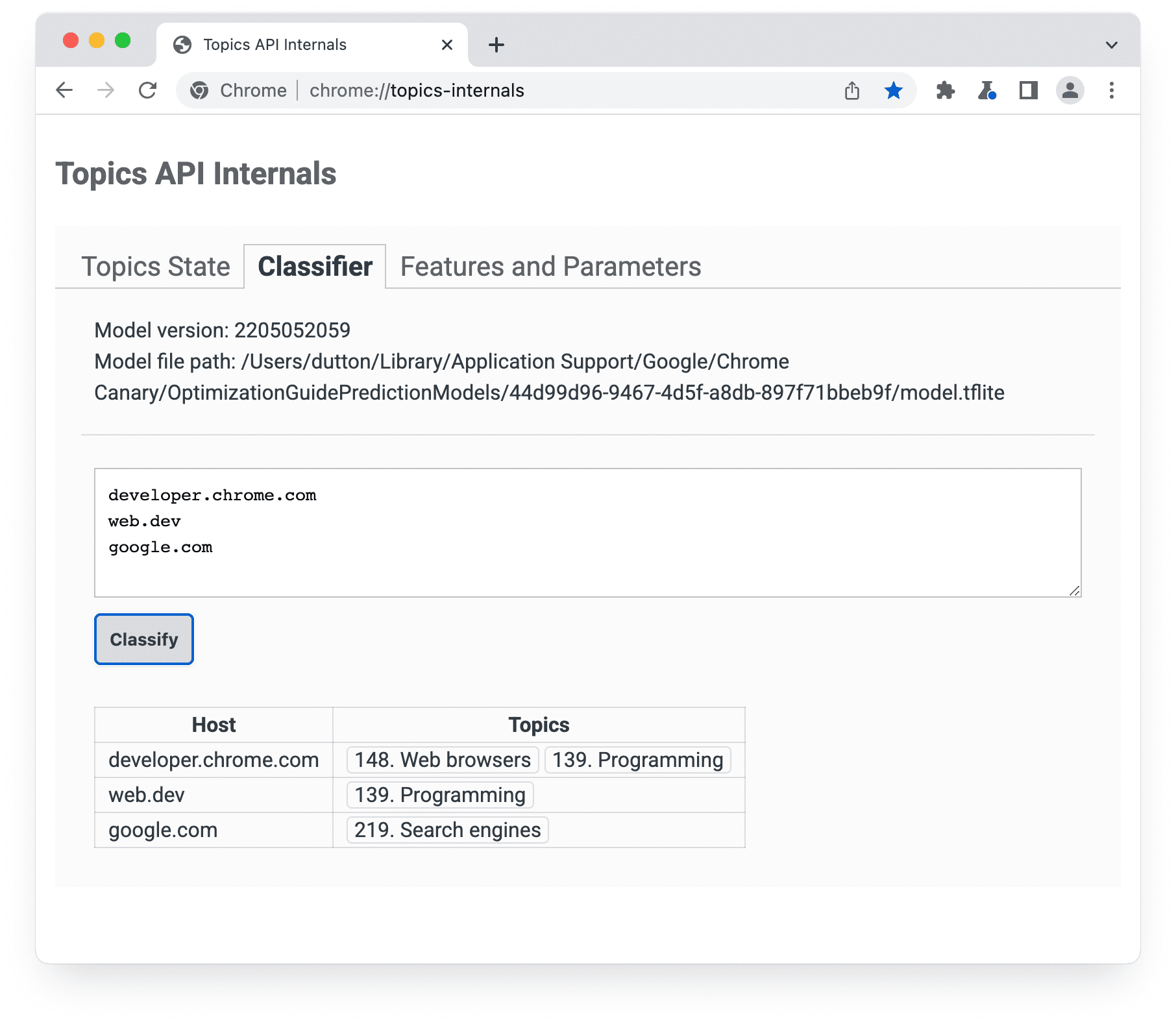
chrome://topics-internals पेज के क्लासिफ़ायर पैनल में, मॉडल का वर्शन, उसका पाथ, और लिस्ट किए गए हर होस्ट से जुड़े विषयों की जानकारी होती है.Chrome में Topics API को लागू करने के लिए, मॉडल को दिखाने वाली TensorFlow Lite फ़ाइल डाउनलोड की जाती है. इससे, उपयोगकर्ता के डिवाइस पर इसका इस्तेमाल किया जा सकता है.
उपयोगकर्ता के सबसे ज़्यादा ब्राउज़ किए गए पांच विषयों को कैसे चुना जाता है
एपीआई, हर ईपॉक के लिए एक विषय दिखाता है. हालांकि, ज़्यादा से ज़्यादा तीन विषय दिखाए जाते हैं. अगर तीन विषय दिखाए जाते हैं, तो इनमें मौजूदा और पिछले दो युगों के विषय शामिल होते हैं.
- हर ईपॉक के आखिर में, ब्राउज़र उन पेजों की सूची बनाता है जो इन शर्तों को पूरा करते हैं:
- उपयोगकर्ता ने इस पेज को इपोक के दौरान देखा था.
- इस पेज में ऐसा कोड शामिल है जो
document.browsingTopics()को कॉल करता है. - एपीआई चालू किया गया हो. उदाहरण के लिए, उपयोगकर्ता या जवाब के हेडर ने इसे ब्लॉक न किया हो.
- उपयोगकर्ता के डिवाइस पर मौजूद ब्राउज़र, Topics API से मिले क्लासिफ़ायर मॉडल का इस्तेमाल करता है. इससे, हर पेज के होस्टनेम को विषयों की सूची से मैप किया जाता है.
ब्राउज़र, पांच सबसे अहम विषयों की सूची जनरेट करता है.
- विज्ञापन के इकोसिस्टम से मिले सुझाव, राय या शिकायत के आधार पर, टैक्सोनॉमी में मौजूद 22 रूट विषयों में से हर एक को "ज़्यादा काम का" या "सामान्य काम का" बकेट में असाइन किया जाता है. ब्राउज़र, सबसे पहले विषयों को उनके बकेट असाइनमेंट के हिसाब से क्रम में लगाता है. सभी डिसेंडेंट टॉपिक, अपने पैरंट रूट टॉपिक के बकेट असाइनमेंट को इनहेरिट करते हैं. "ज़्यादा काम के" विषयों को प्राथमिकता दी जाती है.
- इसके बाद, ब्राउज़र हर बकेट में मौजूद विषयों को फ़्रीक्वेंसी के हिसाब से क्रम में लगाता है.
- इस क्रम से लगाई गई सूची में से, सबसे ऊपर के पांच विषयों को उस epoch के लिए उपयोगकर्ता के सबसे ज़्यादा खोजे गए विषयों के तौर पर चुना जाता है.
इसके बाद, document.browsingTopics() तरीके से हर epoch के लिए, सबसे ज़्यादा ब्राउज़ किए गए पांच विषयों में से कोई विषय चुना जाता है. हालांकि, 5% संभावना यह भी होती है कि कोई विषय, विषयों की पूरी टैक्सोनॉमी से चुना जाए. Chrome में, उपयोगकर्ता एक-एक करके विषयों को हटा सकते हैं. इसके अलावा, वे अपना ब्राउज़िंग इतिहास मिटा सकते हैं, ताकि एपीआई से कम विषय दिखाए जाएं. उपयोगकर्ता, एपीआई से ऑप्ट आउट भी कर सकते हैं.
मौजूदा समय में देखे गए विषयों के बारे में जानकारी, chrome://topics-internals पेज पर देखी जा सकती है.
Next steps

Setup

Implement Topics
See also
Check out our resources to better understand the Topics API on the Web.
- Check out Topics demos, collab and walkthrough videos.
- See the list of Chrome flags that allow developers to customize the Topics API for testing.
- See how users and developers can control the API.
- Check out the resources for technical explainers and support. Ask questions, engage and share feedback.