

সাম্প্রতিক আপডেটগুলি
আসন্ন পরিবর্তন এবং জ্ঞাত সমস্যাগুলির তালিকা আপডেট করা হয়েছে
২০২৫ সালের দ্বিতীয়ার্ধের জন্য রিকোয়েরিং নামে একটি নতুন ফিচার টার্গেটিং রিলিজ চালু করা হচ্ছে। রিকোয়েরি বিজ্ঞাপন প্রযুক্তিবিদদের একাধিকবার অ্যাগ্রিগেশন সার্ভিস রিপোর্ট প্রক্রিয়া করতে সক্ষম করে, বিভিন্ন পরিমাপের প্রয়োজনের জন্য নমনীয় বিশ্লেষণকে সমর্থন করে। আরও জানতে এবং প্রতিক্রিয়া জানাতে GitHub-এর আলোচনায় যোগ দিন।
সংক্ষিপ্ত বিবরণ
আজকাল, মোবাইল অ্যাট্রিবিউশন এবং পরিমাপ সমাধানের জন্য বিজ্ঞাপন আইডির মতো ক্রস-পার্টি শনাক্তকারী ব্যবহার করা সাধারণ। অ্যাট্রিবিউশন রিপোর্টিং এপিআই ক্রস-পার্টি ব্যবহারকারী শনাক্তকারীর উপর নির্ভরতা অপসারণ করে উন্নত ব্যবহারকারীর গোপনীয়তা প্রদানের জন্য এবং অ্যাপ এবং ওয়েব জুড়ে অ্যাট্রিবিউশন এবং রূপান্তর পরিমাপের জন্য মূল ব্যবহারের ক্ষেত্রে সহায়তা করার জন্য ডিজাইন করা হয়েছে।
এই API-তে নিম্নলিখিত কাঠামোগত প্রক্রিয়া রয়েছে যা গোপনীয়তা উন্নত করার জন্য একটি কাঠামো প্রদান করে, যা এই পৃষ্ঠার পরবর্তী বিভাগগুলিতে আরও বিশদে বর্ণনা করা হয়েছে:
ইভেন্ট-স্তরের প্রতিবেদনের জন্য উপলব্ধ বিটের সংখ্যা সীমিত করে
শুধুমাত্র সমষ্টিগত প্রতিবেদনে উচ্চ-বিশ্বস্ততার রূপান্তর ডেটা সক্ষম করে
উপলব্ধ ট্রিগার (রূপান্তর) এবং একটি একক অ্যাট্রিবিউশন উৎসের সাথে যুক্ত হতে পারে এমন বিজ্ঞাপন প্রযুক্তির সংখ্যার জন্য হারের সীমা প্রবর্তন করে
বিভিন্ন শব্দ সংযোজন কৌশল অন্তর্ভুক্ত করে
পূর্ববর্তী পদ্ধতিগুলি দুটি ভিন্ন অ্যাপ বা ডোমেনে ব্যবহারকারীর পরিচয় লিঙ্ক করার ক্ষমতা সীমিত করে।
অ্যাট্রিবিউশন রিপোর্টিং API নিম্নলিখিত ব্যবহারের ক্ষেত্রে সমর্থন করে:
- রূপান্তর প্রতিবেদন: বিজ্ঞাপনদাতাদের প্রচারণা, বিজ্ঞাপন গোষ্ঠী এবং বিজ্ঞাপন সৃজনশীলতার মতো বিভিন্ন মাত্রায় রূপান্তর (ট্রিগার) গণনা এবং রূপান্তর (ট্রিগার) মান দেখিয়ে তাদের প্রচারণার কর্মক্ষমতা পরিমাপ করতে সহায়তা করুন।
- অপ্টিমাইজেশন: ML মডেলগুলিকে প্রশিক্ষণ দেওয়ার জন্য ব্যবহার করা যেতে পারে এমন প্রতি-ইম্প্রেশন অ্যাট্রিবিউশন ডেটা প্রদান করে বিজ্ঞাপন ব্যয়ের অপ্টিমাইজেশন সমর্থন করে এমন ইভেন্ট-স্তরের প্রতিবেদন সরবরাহ করুন।
- অবৈধ কার্যকলাপ সনাক্তকরণ: এমন প্রতিবেদন প্রদান করুন যা অবৈধ ট্র্যাফিক এবং বিজ্ঞাপন জালিয়াতি সনাক্তকরণ এবং বিশ্লেষণে ব্যবহার করা যেতে পারে।
উচ্চ স্তরে, অ্যাট্রিবিউশন রিপোর্টিং API নিম্নলিখিতভাবে কাজ করে, যা এই নথির পরবর্তী বিভাগগুলিতে আরও বিশদে বর্ণনা করা হয়েছে:
- অ্যাট্রিবিউশন রিপোর্টিং API ব্যবহার করার জন্য বিজ্ঞাপন প্রযুক্তিবিদ একটি তালিকাভুক্তি প্রক্রিয়া সম্পন্ন করেন ।
- বিজ্ঞাপন প্রযুক্তিবিদ অ্যাট্রিবিউশন রিপোর্টিং API-এর সাহায্যে অ্যাট্রিবিউশন উৎস — বিজ্ঞাপন ক্লিক বা ভিউ — নিবন্ধন করে ।
- বিজ্ঞাপন প্রযুক্তি নিবন্ধকরা অ্যাট্রিবিউশন রিপোর্টিং API ব্যবহার করে — বিজ্ঞাপনদাতার অ্যাপ বা ওয়েবসাইটে ব্যবহারকারীর রূপান্তর — ট্রিগার করে ।
- অ্যাট্রিবিউশন রিপোর্টিং এপিআই ট্রিগারগুলিকে অ্যাট্রিবিউশন সোর্স - একটি কনভার্সন অ্যাট্রিবিউশন - এর সাথে মেলায় এবং এক বা একাধিক ট্রিগার ডিভাইসের বাইরে ইভেন্ট-লেভেল এবং সমষ্টিগত প্রতিবেদনের মাধ্যমে বিজ্ঞাপন প্রযুক্তিবিদদের কাছে পাঠানো হয়।
অ্যাট্রিবিউশন রিপোর্টিং API-তে অ্যাক্সেস পান
অ্যাট্রিবিউশন রিপোর্টিং API অ্যাক্সেস করার জন্য বিজ্ঞাপন প্রযুক্তি প্ল্যাটফর্মগুলিকে নথিভুক্ত করতে হবে, আরও তথ্যের জন্য প্রাইভেসি স্যান্ডবক্স অ্যাকাউন্টের জন্য নথিভুক্ত করুন দেখুন।
একটি অ্যাট্রিবিউশন সোর্স নিবন্ধন করুন (ক্লিক করুন অথবা দেখুন)
অ্যাট্রিবিউশন রিপোর্টিং API বিজ্ঞাপনের ক্লিক এবং ভিউগুলিকে অ্যাট্রিবিউশন সোর্স হিসেবে উল্লেখ করে। একটি বিজ্ঞাপন ক্লিক বা বিজ্ঞাপন ভিউ নিবন্ধন করতে, registerSource() এ কল করুন। এই API নিম্নলিখিত প্যারামিটারগুলি আশা করে:
- অ্যাট্রিবিউশন সোর্স URI: প্ল্যাটফর্মটি অ্যাট্রিবিউশন সোর্সের সাথে সম্পর্কিত মেটাডেটা আনার জন্য এই URI-তে একটি অনুরোধ জারি করে।
- ইনপুট ইভেন্ট: হয় একটি
InputEventঅবজেক্ট (একটি ক্লিক ইভেন্টের জন্য) অথবাnull(একটি ভিউ ইভেন্টের জন্য)।
যখন API অ্যাট্রিবিউশন সোর্স URI-তে কোনও অনুরোধ করে, তখন বিজ্ঞাপন প্রযুক্তিবিদকে নিম্নলিখিত ক্ষেত্রগুলি সহ একটি নতুন HTTP হেডার Attribution-Reporting-Register-Source এ অ্যাট্রিবিউশন সোর্স মেটাডেটা সহ প্রতিক্রিয়া জানাতে হবে:
- সোর্স ইভেন্ট আইডি : এই মানটি এই অ্যাট্রিবিউশন সোর্সের সাথে সম্পর্কিত ইভেন্ট-স্তরের ডেটা (বিজ্ঞাপন ক্লিক বা ভিউ) উপস্থাপন করে। অবশ্যই একটি স্ট্রিং হিসাবে ফর্ম্যাট করা একটি 64-বিট স্বাক্ষরবিহীন পূর্ণসংখ্যা হতে হবে।
- গন্তব্য : এমন একটি অরিজিন যার eTLD+1 অথবা অ্যাপ প্যাকেজের নাম যেখানে ট্রিগার ইভেন্টটি ঘটে।
- মেয়াদোত্তীর্ণ (ঐচ্ছিক) : ডিভাইস থেকে উৎসটি কখন মুছে ফেলা হবে তার জন্য সেকেন্ডে মেয়াদোত্তীর্ণ। ডিফল্ট 30 দিন, সর্বনিম্ন মান 1 দিন এবং সর্বোচ্চ মান 30 দিন। এটি নিকটতম দিনে পূর্ণসংখ্যা করা হয়। 64-বিট স্বাক্ষরবিহীন পূর্ণসংখ্যা বা স্ট্রিং হিসাবে ফর্ম্যাট করা যেতে পারে।
- ইভেন্ট রিপোর্ট উইন্ডো (ঐচ্ছিক) : সোর্স রেজিস্ট্রেশনের পর সেকেন্ডে সময়কাল, যে সময়কালে এই সোর্সের জন্য ইভেন্ট রিপোর্ট তৈরি করা যেতে পারে। যদি ইভেন্ট রিপোর্ট উইন্ডোটি পেরিয়ে যায়, কিন্তু মেয়াদ শেষ না হয়, তাহলেও একটি ট্রিগার একটি সোর্সের সাথে মেলানো যেতে পারে, কিন্তু সেই ট্রিগারের জন্য একটি ইভেন্ট রিপোর্ট পাঠানো হয় না। মেয়াদ শেষ হওয়ার চেয়ে বেশি হতে পারে না। 64-বিট স্বাক্ষরবিহীন পূর্ণসংখ্যা বা স্ট্রিং হিসাবে ফর্ম্যাট করা যেতে পারে।
- সমষ্টিগত প্রতিবেদন উইন্ডো (ঐচ্ছিক) : উৎস নিবন্ধনের পর সেকেন্ডে সময়কাল, যে সময়কালে এই উৎসের জন্য সমষ্টিগত প্রতিবেদন তৈরি করা যেতে পারে। মেয়াদ শেষ হওয়ার চেয়ে বেশি হতে পারে না। 64-বিট স্বাক্ষরবিহীন পূর্ণসংখ্যা বা স্ট্রিং হিসাবে ফর্ম্যাট করা যেতে পারে।
- উৎস অগ্রাধিকার (ঐচ্ছিক) : কোন অ্যাট্রিবিউশন উৎসের সাথে কোন ট্রিগার যুক্ত করা উচিত তা নির্বাচন করতে ব্যবহৃত হয়, যদি একাধিক অ্যাট্রিবিউশন উৎস ট্রিগারের সাথে যুক্ত হতে পারে। একটি স্ট্রিং হিসাবে ফর্ম্যাট করা একটি 64-বিট স্বাক্ষরিত পূর্ণসংখ্যা হতে হবে।
যখন একটি ট্রিগার পাওয়া যায়, তখন API সর্বোচ্চ উৎস অগ্রাধিকার মানের সাথে মিলে যাওয়া অ্যাট্রিবিউশন উৎস খুঁজে বের করে এবং একটি প্রতিবেদন তৈরি করে। প্রতিটি বিজ্ঞাপন প্রযুক্তি প্ল্যাটফর্ম তাদের নিজস্ব অগ্রাধিকার কৌশল নির্ধারণ করতে পারে। অগ্রাধিকার কীভাবে অ্যাট্রিবিউশনকে প্রভাবিত করে সে সম্পর্কে আরও বিস্তারিত জানার জন্য, অগ্রাধিকার উদাহরণ বিভাগটি দেখুন।
উচ্চতর মান উচ্চতর অগ্রাধিকার নির্দেশ করে। - ইনস্টল এবং পোস্ট-ইনস্টল অ্যাট্রিবিউশন উইন্ডোজ (ঐচ্ছিক): ইনস্টল-পরবর্তী ইভেন্টগুলির জন্য অ্যাট্রিবিউশন নির্ধারণ করতে ব্যবহৃত হয়, যা এই পৃষ্ঠায় পরে বর্ণিত হয়েছে।
- ফিল্টার ডেটা (ঐচ্ছিক): কিছু ট্রিগারকে কার্যকরভাবে উপেক্ষা করে বেছে বেছে ফিল্টার করতে ব্যবহৃত হয়। আরও বিস্তারিত জানার জন্য, এই পৃষ্ঠায় ট্রিগার ফিল্টার বিভাগটি দেখুন।
- সমষ্টিগত কী (ঐচ্ছিক): সমষ্টিগত প্রতিবেদনের জন্য ব্যবহৃত সেগমেন্টেশন নির্দিষ্ট করুন।
ঐচ্ছিকভাবে, অ্যাট্রিবিউশন সোর্স মেটাডেটা প্রতিক্রিয়াতে অ্যাট্রিবিউশন রিপোর্টিং রিডাইরেক্ট হেডারে অতিরিক্ত ডেটা অন্তর্ভুক্ত থাকতে পারে। ডেটাতে রিডাইরেক্ট URL রয়েছে, যা একাধিক বিজ্ঞাপন প্রযুক্তিবিদকে একটি অনুরোধ নিবন্ধন করার অনুমতি দেয় ।
ডেভেলপারের নির্দেশিকাতে এমন উদাহরণ রয়েছে যা দেখায় যে কীভাবে উৎস নিবন্ধন গ্রহণ করতে হয়।
নিম্নলিখিত ধাপগুলি একটি উদাহরণ কর্মপ্রবাহ দেখায়:
বিজ্ঞাপন প্রযুক্তি SDK অ্যাট্রিবিউশন সোর্স রেজিস্ট্রেশন শুরু করার জন্য API-কে কল করে, API-কে কল করার জন্য একটি URI নির্দিষ্ট করে:
registerSource(
    Uri.parse("https://adtech.example/attribution_source?AD_TECH_PROVIDED_METADATA"),
    myClickEvent);
API নিম্নলিখিত হেডারগুলির মধ্যে একটি ব্যবহার করে
https://adtech.example/attribution_source? AD_TECH_PROVIDED_METADATAএ একটি অনুরোধ করে:<!-- For click events --> Attribution-Reporting-Source-Info: navigation <!-- For view events --> Attribution-Reporting-Source-Info: eventএই বিজ্ঞাপন প্রযুক্তির HTTPS সার্ভার নিম্নলিখিত শিরোনাম সহ উত্তর দেয়:
Attribution-Reporting-Register-Source: {
    "destination": "android-app://com.advertiser.example",
    "source_event_id": "234",
    "expiry": "60000",
    "priority": "5"
}
Attribution-Reporting-Redirect:
https://adtechpartner1.example?their_ad_click_id=567
Attribution-Reporting-Redirect:
https://adtechpartner2.example?their_ad_click_id=890
API
Attribution-Reporting-Redirectএ উল্লেখিত প্রতিটি URL-এ একটি অনুরোধ করে। এই উদাহরণে, দুটি বিজ্ঞাপন প্রযুক্তি অংশীদার URL নির্দিষ্ট করা হয়েছে, তাই API একটি অনুরোধhttps://adtechpartner1.example?their_ad_click_id=567এবং আরেকটি অনুরোধhttps://adtechpartner2.example?their_ad_click_id=890।এই বিজ্ঞাপন প্রযুক্তির HTTPS সার্ভার নিম্নলিখিত শিরোনাম সহ উত্তর দেয়:
Attribution-Reporting-Register-Source: {
    "destination": "android-app://com.advertiser.example",
    "source_event_id": "789",
    "expiry": "120000",
    "priority": "2"
}
পূর্ববর্তী ধাপগুলিতে দেখানো অনুরোধের উপর ভিত্তি করে তিনটি নেভিগেশন (ক্লিক) অ্যাট্রিবিউশন উৎস নিবন্ধিত হয়েছে।
WebView থেকে একটি অ্যাট্রিবিউশন সোর্স নিবন্ধন করুন
WebView এমন একটি ব্যবহারের ক্ষেত্রে সমর্থন করে যেখানে একটি অ্যাপ WebView-এর মধ্যে একটি বিজ্ঞাপন রেন্ডার করছে। এটি WebView দ্বারা সরাসরি registerSource() কল করে পরিচালিত হয়। এই কলটি শীর্ষ-স্তরের উৎসের পরিবর্তে অ্যাপের সাথে অ্যাট্রিবিউশন সোর্স সংযুক্ত করে। ব্রাউজার প্রসঙ্গে এমবেডেড ওয়েব কন্টেন্ট থেকে উৎস নিবন্ধন করাও সমর্থিত; এটি করার জন্য API কলার এবং অ্যাপ উভয়কেই সেটিংস সামঞ্জস্য করতে হবে। API কলারদের জন্য নির্দেশাবলীর জন্য Register attribution source এবং trigger from WebView এবং অ্যাপের জন্য নির্দেশাবলীর জন্য Attribution source এবং trigger from WebView দেখুন।
যেহেতু বিজ্ঞাপন প্রযুক্তিবিদরা ওয়েব এবং ওয়েবভিউ জুড়ে সাধারণ কোড ব্যবহার করেন, তাই ওয়েবভিউ HTTP 302 রিডাইরেক্ট অনুসরণ করে এবং বৈধ নিবন্ধনগুলি প্ল্যাটফর্মে প্রেরণ করে। আমরা এই পরিস্থিতিতে Attribution-Reporting-Redirect হেডার সমর্থন করার পরিকল্পনা করছি না, তবে আপনার যদি কোনও প্রভাবিত ব্যবহারের ক্ষেত্রে থাকে তবে যোগাযোগ করুন ।
একটি ট্রিগার নিবন্ধন করুন (রূপান্তর)
বিজ্ঞাপন প্রযুক্তি প্ল্যাটফর্মগুলি registerTrigger() পদ্ধতি ব্যবহার করে ট্রিগারগুলি নিবন্ধন করতে পারে — ইনস্টল বা ইনস্টল-পরবর্তী ইভেন্টের মতো রূপান্তরগুলি।
registerTrigger() পদ্ধতিটি Trigger URI প্যারামিটার আশা করে। API এই URI-কে ট্রিগারের সাথে সম্পর্কিত মেটাডেটা আনার জন্য একটি অনুরোধ জারি করে।
API রিডাইরেক্ট অনুসরণ করে। বিজ্ঞাপন প্রযুক্তি সার্ভারের প্রতিক্রিয়ায় Attribution-Reporting-Register-Trigger নামক একটি HTTP হেডার থাকা উচিত, যা এক বা একাধিক নিবন্ধিত ট্রিগারের তথ্য উপস্থাপন করে। হেডারের কন্টেন্ট JSON-এনকোডেড হওয়া উচিত এবং নিম্নলিখিত ক্ষেত্রগুলি অন্তর্ভুক্ত করা উচিত:
ট্রিগার ডেটা: ট্রিগার ইভেন্ট শনাক্ত করার জন্য ডেটা (ক্লিকের জন্য 3 বিট, ভিউয়ের জন্য 1 বিট)। স্ট্রিং হিসাবে ফর্ম্যাট করা একটি 64-বিট স্বাক্ষরিত পূর্ণসংখ্যা হতে হবে।
ট্রিগার অগ্রাধিকার (ঐচ্ছিক): একই অ্যাট্রিবিউশন উৎসের জন্য অন্যান্য ট্রিগারের তুলনায় এই ট্রিগারের অগ্রাধিকার প্রতিনিধিত্ব করে। স্ট্রিং হিসেবে ফর্ম্যাট করা একটি 64-বিট স্বাক্ষরিত পূর্ণসংখ্যা হতে হবে। অগ্রাধিকার কীভাবে প্রতিবেদনকে প্রভাবিত করে সে সম্পর্কে আরও বিস্তারিত জানার জন্য, অগ্রাধিকার বিভাগ বিভাগটি দেখুন।
ডিডুপ্লিকেশন কী (ঐচ্ছিক): একই বিজ্ঞাপন প্রযুক্তি প্ল্যাটফর্মে একই অ্যাট্রিবিউশন উৎসের জন্য একই ট্রিগার একাধিকবার নিবন্ধিত হলে, সেইসব ক্ষেত্রে সনাক্ত করতে ব্যবহৃত হয়। স্ট্রিং হিসেবে ফর্ম্যাট করা একটি 64-বিট স্বাক্ষরিত পূর্ণসংখ্যা হতে হবে।
একত্রীকরণ কী (ঐচ্ছিক): অভিধানের একটি তালিকা যা একত্রীকরণ কী নির্দিষ্ট করে এবং কোন একত্রীকরণযোগ্য প্রতিবেদনগুলির মান একত্রিত করা উচিত।
সমষ্টিগত মান (ঐচ্ছিক): প্রতিটি কীতে অবদান রাখে এমন মানের পরিমাণের একটি তালিকা।
ফিল্টার (ঐচ্ছিক): ট্রিগার বা ট্রিগার ডেটা নির্বাচনীভাবে ফিল্টার করতে ব্যবহৃত হয়। আরও বিস্তারিত জানার জন্য, এই পৃষ্ঠায় ট্রিগার ফিল্টার বিভাগটি দেখুন।
ঐচ্ছিকভাবে, বিজ্ঞাপন প্রযুক্তি সার্ভারের প্রতিক্রিয়াতে অ্যাট্রিবিউশন রিপোর্টিং রিডাইরেক্টস হেডারে অতিরিক্ত ডেটা অন্তর্ভুক্ত থাকতে পারে। ডেটাতে রিডাইরেক্ট URL রয়েছে, যা একাধিক বিজ্ঞাপন প্রযুক্তিবিদকে একটি অনুরোধ নিবন্ধন করার অনুমতি দেয় ।
একাধিক বিজ্ঞাপন প্রযুক্তিবিদ Attribution-Reporting-Redirect ফিল্ডে রিডাইরেক্ট অথবা registerTrigger() পদ্ধতিতে একাধিক কল ব্যবহার করে একই ট্রিগার ইভেন্ট নিবন্ধন করতে পারেন। একই বিজ্ঞাপন প্রযুক্তিবিদ একই ট্রিগার ইভেন্টের জন্য একাধিক প্রতিক্রিয়া প্রদান করলে, রিপোর্টে ডুপ্লিকেট ট্রিগার অন্তর্ভুক্ত না করার জন্য আমরা আপনাকে ডিডুপ্লিকেশন কী ফিল্ড ব্যবহার করার পরামর্শ দিচ্ছি । ডিডুপ্লিকেশন কী কীভাবে এবং কখন ব্যবহার করবেন সে সম্পর্কে আরও জানুন।
ডেভেলপারের নির্দেশিকাতে এমন উদাহরণ রয়েছে যা দেখায় যে কীভাবে ট্রিগার নিবন্ধন গ্রহণ করতে হয়।
নিম্নলিখিত ধাপগুলি একটি উদাহরণ কর্মপ্রবাহ দেখায়:
অ্যাড টেক SDK একটি প্রাক-নথিভুক্ত URI ব্যবহার করে নিবন্ধন ট্রিগার শুরু করার জন্য API-কে কল করে। আরও তথ্যের জন্য "একটি গোপনীয়তা স্যান্ডবক্স অ্যাকাউন্টের জন্য নিবন্ধন করুন" দেখুন।
registerTrigger(
    Uri.parse("https://adtech.example/attribution_trigger?AD_TECH_PROVIDED_METADATA"));
API
https://adtech.example/attribution_trigger? AD_TECH_PROVIDED_METADATAএ একটি অনুরোধ করে।এই বিজ্ঞাপন প্রযুক্তির HTTPS সার্ভার নিম্নলিখিত শিরোনাম সহ উত্তর দেয়:
Attribution-Reporting-Register-Trigger: { "event_trigger_data": [{ "trigger_data": "1122", // This returns 010 for click-through conversions (CTCs) and 0 for // view-through conversions (VTCs) in reports "priority": "3", "deduplication_key": "3344" }], } Attribution-Reporting-Redirect: https://adtechpartner.example?app_install=567Attribution-Reporting-Redirectএ উল্লেখিত প্রতিটি URL-এ API একটি অনুরোধ করে। এই উদাহরণে, শুধুমাত্র একটি URL নির্দিষ্ট করা হয়েছে, তাই APIhttps://adtechpartner.example?app_install=567এ একটি অনুরোধ করে।এই বিজ্ঞাপন প্রযুক্তির HTTPS সার্ভার নিম্নলিখিত শিরোনাম সহ উত্তর দেয়:
Attribution-Reporting-Register-Trigger: {
"event_trigger_data":[{
  "trigger_data": "5566",
  "priority": "3",
  "deduplication_key": "3344"
}]
}
পূর্ববর্তী ধাপগুলিতে অনুরোধের উপর ভিত্তি করে দুটি ট্রিগার নিবন্ধিত হয়েছে।
অ্যাট্রিবিউশন ক্ষমতা
নিম্নলিখিত বিভাগগুলিতে ব্যাখ্যা করা হয়েছে যে কীভাবে অ্যাট্রিবিউশন রিপোর্টিং API রূপান্তর ট্রিগারগুলিকে অ্যাট্রিবিউশন উৎসের সাথে মেলায়।
উৎস-অগ্রাধিকারযুক্ত অ্যাট্রিবিউশন অ্যালগরিদম প্রয়োগ করা হয়েছে
অ্যাট্রিবিউশন রিপোর্টিং API একটি উৎস-অগ্রাধিকারপ্রাপ্ত অ্যাট্রিবিউশন অ্যালগরিদম ব্যবহার করে যা একটি ট্রিগার (রূপান্তর) একটি অ্যাট্রিবিউশন উৎসের সাথে মেলায়।
অগ্রাধিকার প্যারামিটারগুলি উৎসগুলিতে ট্রিগারের অ্যাট্রিবিউশন কাস্টমাইজ করার উপায় প্রদান করে:
- আপনি নির্দিষ্ট বিজ্ঞাপন ইভেন্টগুলিকে অন্যদের চেয়ে বেশি ট্রিগার হিসেবে চিহ্নিত করতে পারেন। উদাহরণস্বরূপ, আপনি ভিউয়ের চেয়ে ক্লিকের উপর বেশি জোর দিতে পারেন, অথবা নির্দিষ্ট প্রচারণার ইভেন্টগুলিতে ফোকাস করতে পারেন।
- আপনি অ্যাট্রিবিউশন সোর্সটি কনফিগার করতে পারেন এবং ট্রিগার করতে পারেন যাতে, যদি আপনি রেট সীমা অতিক্রম করেন, তাহলে আপনার কাছে গুরুত্বপূর্ণ রিপোর্টগুলি পাওয়ার সম্ভাবনা বেশি থাকে। উদাহরণস্বরূপ, আপনি নিশ্চিত করতে পারেন যে এই রিপোর্টগুলিতে বিডযোগ্য রূপান্তর বা উচ্চ-মূল্যের রূপান্তরগুলি প্রদর্শিত হওয়ার সম্ভাবনা বেশি।
এই পৃষ্ঠায় পরে বর্ণিত একাধিক বিজ্ঞাপন প্রযুক্তিবিদ একটি অ্যাট্রিবিউশন সোর্স নিবন্ধন করলে , প্রতিটি বিজ্ঞাপন প্রযুক্তিবিদদের জন্য এই অ্যাট্রিবিউশন স্বাধীনভাবে ঘটে। প্রতিটি বিজ্ঞাপন প্রযুক্তিবিদদের জন্য, সর্বোচ্চ অগ্রাধিকারপ্রাপ্ত অ্যাট্রিবিউশন সোর্সটি ট্রিগার ইভেন্টের সাথে অ্যাট্রিবিউশন করা হয়। যদি একই অগ্রাধিকারপ্রাপ্ত একাধিক অ্যাট্রিবিউশন সোর্স থাকে, তাহলে API শেষ নিবন্ধিত অ্যাট্রিবিউশন সোর্সটি বেছে নেয়। অন্য যে কোনও অ্যাট্রিবিউশন সোর্স, যা বেছে নেওয়া হয়নি, তা বাতিল করা হয় এবং ভবিষ্যতে ট্রিগার অ্যাট্রিবিউশনের জন্য আর যোগ্য নয়।
ট্রিগার ফিল্টার
উৎস এবং ট্রিগার নিবন্ধনে নিম্নলিখিতগুলি করার জন্য অতিরিক্ত ঐচ্ছিক বৈশিষ্ট্য অন্তর্ভুক্ত রয়েছে:
- কিছু ট্রিগার নির্বাচনীভাবে ফিল্টার করুন, কার্যকরভাবে সেগুলিকে উপেক্ষা করুন।
- উৎস ডেটার উপর ভিত্তি করে ইভেন্ট-স্তরের প্রতিবেদনের জন্য ট্রিগার ডেটা বেছে নিন।
- ইভেন্ট-স্তরের রিপোর্ট থেকে একটি ট্রিগার বাদ দিতে বেছে নিন।
ট্রিগারগুলিকে বেছে বেছে ফিল্টার করার জন্য, বিজ্ঞাপন প্রযুক্তিবিদ উৎস এবং ট্রিগার নিবন্ধনের সময় কী এবং মান সমন্বিত ফিল্টার ডেটা নির্দিষ্ট করতে পারেন। যদি উৎস এবং ট্রিগার উভয়ের জন্য একই কী নির্দিষ্ট করা থাকে, তাহলে ছেদটি খালি থাকলে ট্রিগারটি উপেক্ষা করা হয়। উদাহরণস্বরূপ, একটি উৎস "product": ["1234"] নির্দিষ্ট করতে পারে, যেখানে product হল ফিল্টার কী এবং 1234 হল মান। যদি ট্রিগার ফিল্টারটি "product": ["1111"] তে সেট করা থাকে, তাহলে ট্রিগারটি উপেক্ষা করা হয়। যদি product সাথে মিলে যাওয়া কোনও ট্রিগার ফিল্টার কী না থাকে, তাহলে ফিল্টারগুলি উপেক্ষা করা হয়।
আরেকটি পরিস্থিতি যেখানে বিজ্ঞাপন প্রযুক্তি প্ল্যাটফর্মগুলি ট্রিগারগুলিকে বেছে বেছে ফিল্টার করতে চাইতে পারে তা হল একটি ছোট মেয়াদোত্তীর্ণ সময়কাল জোর করে। ট্রিগার নিবন্ধনের সময়, একজন বিজ্ঞাপন প্রযুক্তিবিদ রূপান্তরটি কখন ঘটেছে তার একটি লুকব্যাক উইন্ডো (সেকেন্ডে) নির্দিষ্ট করতে পারেন; উদাহরণস্বরূপ, একটি 7 দিনের লুকব্যাক উইন্ডোকে এইভাবে সংজ্ঞায়িত করা হবে: "_lookback_window": 604800 // 7d
কোনও ফিল্টার মিলছে কিনা তা নির্ধারণ করতে, API প্রথমে লুকব্যাক উইন্ডোটি পরীক্ষা করবে। যদি উপলব্ধ থাকে, তাহলে উৎসটি নিবন্ধিত হওয়ার পর থেকে সময়কাল লুকব্যাক উইন্ডোর সময়কালের চেয়ে কম বা সমান হতে হবে।
বিজ্ঞাপন প্রযুক্তি প্ল্যাটফর্মগুলি সোর্স ইভেন্ট ডেটার উপর ভিত্তি করে ট্রিগার ডেটাও বেছে নিতে পারে। উদাহরণস্বরূপ, source_type API দ্বারা স্বয়ংক্রিয়ভাবে navigation বা event হিসাবে তৈরি হয়। ট্রিগার রেজিস্ট্রেশনের সময়, trigger_data "source_type": ["navigation"] এর জন্য একটি মান এবং "source_type": ["event"] এর জন্য একটি ভিন্ন মান হিসাবে সেট করা যেতে পারে।
নিম্নলিখিতগুলির মধ্যে যেকোনও একটি সত্য হলে ইভেন্ট-স্তরের রিপোর্ট থেকে ট্রিগারগুলি বাদ দেওয়া হবে:
- কোন
trigger_dataনির্দিষ্ট করা নেই। - সোর্স এবং ট্রিগার একই ফিল্টার কী নির্দিষ্ট করে, কিন্তু মানগুলি মিলছে না। মনে রাখবেন, এই ক্ষেত্রে, ইভেন্ট-স্তর এবং সমষ্টিগত প্রতিবেদন উভয়ের জন্যই ট্রিগার উপেক্ষা করা হয়।
ইনস্টল-পরবর্তী অ্যাট্রিবিউশন
কিছু ক্ষেত্রে, ইনস্টল-পরবর্তী ট্রিগারগুলিকে ইনস্টলের জন্য দায়ী করা প্রয়োজন, এমনকি যদি সম্প্রতি অন্যান্য যোগ্য অ্যাট্রিবিউশন উৎসও থাকে।
এপিআই এই ব্যবহারের ক্ষেত্রে বিজ্ঞাপন প্রযুক্তিবিদদের ইনস্টল-পরবর্তী অ্যাট্রিবিউশন সময়কাল সেট করার অনুমতি দিয়ে সহায়তা করতে পারে:
- একটি অ্যাট্রিবিউশন সোর্স নিবন্ধন করার সময়, একটি ইনস্টল অ্যাট্রিবিউশন উইন্ডো নির্দিষ্ট করুন যার মধ্যে ইনস্টলগুলি প্রত্যাশিত (সাধারণত 2-7 দিন, গৃহীত পরিসর 1 থেকে 30 দিন)। এই সময় উইন্ডোটি সেকেন্ডের সংখ্যা হিসাবে নির্দিষ্ট করুন।
- একটি অ্যাট্রিবিউশন সোর্স নিবন্ধন করার সময়, একটি পোস্ট-ইনস্টল অ্যাট্রিবিউশন এক্সক্লুসিভিটি উইন্ডো নির্দিষ্ট করুন যেখানে যেকোনো পোস্ট-ইনস্টল ট্রিগার ইভেন্টগুলি ইনস্টলটি চালিত অ্যাট্রিবিউশন সোর্সের সাথে সম্পর্কিত হওয়া উচিত (সাধারণত 7-30 দিন, গৃহীত পরিসর 0 থেকে 30 দিন)। এই সময় উইন্ডোটি সেকেন্ডের সংখ্যা হিসাবে নির্দিষ্ট করুন।
- কোনও অ্যাপ ইনস্টলেশনের সময় অ্যাট্রিবিউশন রিপোর্টিং API যাচাই করে এবং অভ্যন্তরীণভাবে ইনস্টলেশনটিকে সোর্স-অগ্রাধিকারপ্রাপ্ত অ্যাট্রিবিউশন সোর্সের সাথে অ্যাট্রিবিউট করে। তবে, ইনস্টলেশনটি বিজ্ঞাপন প্রযুক্তিবিদদের কাছে পাঠানো হয় না এবং প্ল্যাটফর্মের সংশ্লিষ্ট হারের সীমার মধ্যে গণনা করা হয় না।
- যেকোনো ডাউনলোড করা অ্যাপের জন্য অ্যাপ ইনস্টলের বৈধতা উপলব্ধ।
- ইনস্টল-পরবর্তী অ্যাট্রিবিউশন উইন্ডোর মধ্যে ভবিষ্যতে ঘটতে পারে এমন যেকোনো ট্রিগার যাচাইকৃত ইনস্টলের মতো একই অ্যাট্রিবিউশন সোর্সকে দায়ী করা হবে, যতক্ষণ না সেই অ্যাট্রিবিউশন সোর্সটি যোগ্য।
ভবিষ্যতে, আমরা আরও উন্নত অ্যাট্রিবিউশন মডেলগুলিকে সমর্থন করার জন্য নকশাটি সম্প্রসারণের বিষয়টি অন্বেষণ করতে পারি।
নিম্নলিখিত টেবিলে বিজ্ঞাপন প্রযুক্তিবিদরা কীভাবে ইনস্টল-পরবর্তী অ্যাট্রিবিউশন ব্যবহার করতে পারেন তার একটি উদাহরণ দেখানো হয়েছে। ধরে নিন যে সমস্ত অ্যাট্রিবিউশন উৎস এবং ট্রিগার একই বিজ্ঞাপন প্রযুক্তি নেটওয়ার্ক দ্বারা নিবন্ধিত হচ্ছে এবং সমস্ত অগ্রাধিকার একই।
| ইভেন্ট | যেদিন ঘটনাটি ঘটে | মন্তব্য |
|---|---|---|
| ১ এ ক্লিক করুন | ১ | install_attribution_window 172800 (২ দিন) তে সেট করা হয়েছে, এবং post_install_exclusivity_window 864000 (১০ দিন) তে সেট করা হয়েছে। |
| যাচাইকৃত ইনস্টল | ২ | API অভ্যন্তরীণভাবে যাচাইকৃত ইনস্টলগুলিকে বৈশিষ্ট্যযুক্ত করে, কিন্তু সেই ইনস্টলগুলিকে ট্রিগার হিসাবে বিবেচনা করা হয় না। অতএব, এই মুহুর্তে কোনও প্রতিবেদন পাঠানো হয় না। |
| ট্রিগার ১ (প্রথম খোলা) | ২ | বিজ্ঞাপন প্রযুক্তি দ্বারা নিবন্ধিত প্রথম ট্রিগার। এই উদাহরণে, এটি একটি প্রথম খোলা ট্রিগার উপস্থাপন করে তবে এটি যেকোনো ধরণের ট্রিগার হতে পারে। ক্লিক ১-এর সাথে সম্পর্কিত (যাচাইকৃত ইনস্টলের বৈশিষ্ট্যের সাথে মিলে যায়)। |
| ২ ক্লিক করুন | ৪ | install_attribution_window এবং post_install_exclusivity_window এর জন্য Click 1-এর মতো একই মান ব্যবহার করে। |
| ট্রিগার ২ (ইনস্টল করার পরে) | ৫ | বিজ্ঞাপন প্রযুক্তি দ্বারা নিবন্ধিত দ্বিতীয় ট্রিগার। এই উদাহরণে, এটি একটি ক্রয়ের মতো ইনস্টল-পরবর্তী রূপান্তরকে প্রতিনিধিত্ব করে। ক্লিক ১-এর সাথে সম্পর্কিত (যাচাইকৃত ইনস্টলের বৈশিষ্ট্যের সাথে মিলে যায়)। ক্লিক ২ বাতিল করা হয়েছে এবং ভবিষ্যতে অ্যাট্রিবিউশনের জন্য যোগ্য নয়। |
নিম্নলিখিত তালিকাটি ইনস্টল-পরবর্তী অ্যাট্রিবিউশন সম্পর্কিত কিছু অতিরিক্ত নোট প্রদান করে:
- যদি
install_attribution_windowদ্বারা নির্দিষ্ট দিনের মধ্যে যাচাইকৃত ইনস্টলেশন না হয়, তাহলে ইনস্টল-পরবর্তী অ্যাট্রিবিউশন প্রয়োগ করা হয় না। - যাচাইকৃত ইনস্টলগুলি বিজ্ঞাপন প্রযুক্তিবিদদের দ্বারা নিবন্ধিত হয় না এবং প্রতিবেদনে পাঠানো হয় না। এগুলি কোনও বিজ্ঞাপন প্রযুক্তিবিদদের হারের সীমার মধ্যে গণনা করা হয় না। যাচাইকৃত ইনস্টলগুলি শুধুমাত্র ইনস্টলের সাথে ক্রেডিট করা অ্যাট্রিবিউশন উৎস সনাক্ত করতে ব্যবহৃত হয়।
- পূর্ববর্তী টেবিলের উদাহরণে, ট্রিগার ১ এবং ট্রিগার ২ যথাক্রমে প্রথম খোলা এবং ইনস্টল-পরবর্তী রূপান্তরকে প্রতিনিধিত্ব করে। তবে, বিজ্ঞাপন প্রযুক্তি প্ল্যাটফর্মগুলি যেকোনো ধরণের ট্রিগার নিবন্ধন করতে পারে। অন্য কথায়, প্রথম ট্রিগারটি প্রথম খোলা ট্রিগার হতে হবে না।
-
post_install_exclusivity_windowমেয়াদ শেষ হওয়ার পরে যদি আরও ট্রিগার নিবন্ধিত হয়, তাহলে 1 ক্লিকটি এখনও অ্যাট্রিবিউশনের জন্য যোগ্য, ধরে নিচ্ছি যে এটির মেয়াদ শেষ হয়নি এবং তার রেট সীমায় পৌঁছায়নি।- যদি উচ্চ-অগ্রাধিকার অ্যাট্রিবিউশন উৎস নিবন্ধিত থাকে, তাহলে ক্লিক ১ এখনও হারাতে পারে, অথবা বাতিল করা হতে পারে।
- যদি বিজ্ঞাপনদাতার অ্যাপটি আনইনস্টল করে পুনরায় ইনস্টল করা হয়, তাহলে পুনরায় ইনস্টল করা একটি নতুন যাচাইকৃত ইনস্টল হিসাবে গণনা করা হবে।
- যদি ক্লিক ১ একটি ভিউ ইভেন্ট হয়, তাহলে "প্রথম খোলা" এবং ইনস্টল-পরবর্তী ট্রিগার উভয়ই এর সাথে সম্পর্কিত হবে। API প্রতি ভিউতে একটি ট্রিগারের জন্য অ্যাট্রিবিউশন সীমাবদ্ধ করে, ইনস্টল-পরবর্তী অ্যাট্রিবিউশনের ক্ষেত্রে যেখানে প্রতি ভিউতে সর্বাধিক দুটি ট্রিগার অনুমোদিত। ইনস্টল-পরবর্তী অ্যাট্রিবিউশনের ক্ষেত্রে, বিজ্ঞাপন প্রযুক্তিবিদ 2টি ভিন্ন রিপোর্টিং উইন্ডো পেতে পারেন (2 দিন বা উৎসের মেয়াদ শেষ হওয়ার সময়)।
অ্যাপ- এবং ওয়েব-ভিত্তিক ট্রিগার পাথের সমস্ত সমন্বয় সমর্থিত
অ্যাট্রিবিউশন রিপোর্টিং API একটি একক অ্যান্ড্রয়েড ডিভাইসে নিম্নলিখিত ট্রিগার পাথগুলির অ্যাট্রিবিউশন সক্ষম করে:
- অ্যাপ-টু-অ্যাপ: ব্যবহারকারী একটি অ্যাপে একটি বিজ্ঞাপন দেখেন, তারপর সেই অ্যাপে অথবা অন্য কোনও ইনস্টল করা অ্যাপে রূপান্তরিত করেন।
- অ্যাপ-টু-ওয়েব: ব্যবহারকারী একটি অ্যাপে একটি বিজ্ঞাপন দেখেন, তারপর মোবাইল বা অ্যাপ ব্রাউজারে রূপান্তরিত করেন।
- ওয়েব-টু-অ্যাপ: ব্যবহারকারী মোবাইল বা অ্যাপ ব্রাউজারে একটি বিজ্ঞাপন দেখেন, তারপর একটি অ্যাপে রূপান্তরিত করেন।
- ওয়েব-টু-ওয়েব: ব্যবহারকারী একটি মোবাইল বা অ্যাপ ব্রাউজারে একটি বিজ্ঞাপন দেখেন, তারপর একই ব্রাউজারে অথবা একই ডিভাইসের অন্য ব্রাউজারে রূপান্তরিত করেন।
আমরা ওয়েব ব্রাউজারগুলিকে নতুন ওয়েব-এক্সপোজড বৈশিষ্ট্যগুলি সমর্থন করার অনুমতি দিই, যেমন ওয়েবের অ্যাট্রিবিউশন রিপোর্টিং API-এর জন্য প্রাইভেসি স্যান্ডবক্সের অনুরূপ কার্যকারিতা, যা অ্যাপ এবং ওয়েব জুড়ে অ্যাট্রিবিউশন সক্ষম করতে Android API গুলিকে কল করতে পারে।
ক্রস অ্যাপ এবং ওয়েব পরিমাপের জন্য ট্রিগার পাথ সমর্থন করার জন্য বিজ্ঞাপন প্রযুক্তিবিদ এবং অ্যাপগুলিকে কী কী পরিবর্তন করতে হবে সে সম্পর্কে জানুন।
একটি একক অ্যাট্রিবিউশন উৎসের জন্য একাধিক ট্রিগারকে অগ্রাধিকার দিন
একটি একক অ্যাট্রিবিউশন উৎস একাধিক ট্রিগারের দিকে পরিচালিত করতে পারে। উদাহরণস্বরূপ, একটি ক্রয় প্রবাহে একটি "অ্যাপ ইনস্টল" ট্রিগার, এক বা একাধিক "অ্যাড-টু-কার্ট" ট্রিগার এবং একটি "ক্রয়" ট্রিগার অন্তর্ভুক্ত থাকতে পারে। এই পৃষ্ঠায় পরে বর্ণিত সোর্স-অগ্রাধিকারীকৃত অ্যাট্রিবিউশন অ্যালগরিদম অনুসারে প্রতিটি ট্রিগার এক বা একাধিক অ্যাট্রিবিউশন উৎসের সাথে সম্পর্কিত।
একটি একক অ্যাট্রিবিউশন উৎসে কতগুলি ট্রিগার দায়ী করা যেতে পারে তার সীমা রয়েছে। আরও বিস্তারিত জানার জন্য, এই পৃষ্ঠায় পরে অ্যাট্রিবিউশন রিপোর্টে পরিমাপ ডেটা দেখার বিভাগটি পড়ুন।
যেসব ক্ষেত্রে এই সীমার বাইরে একাধিক ট্রিগার থাকে, সেখানে সবচেয়ে মূল্যবান ট্রিগারগুলি ফিরে পেতে অগ্রাধিকার যুক্তি প্রবর্তন করা কার্যকর। উদাহরণস্বরূপ, কোনও বিজ্ঞাপন প্রযুক্তির বিকাশকারীরা "অ্যাড-টু-কার্ট" ট্রিগারের চেয়ে "ক্রয়" ট্রিগারগুলি পেতে অগ্রাধিকার দিতে চাইতে পারেন।
এই যুক্তি সমর্থন করার জন্য, ট্রিগারে একটি পৃথক অগ্রাধিকার ক্ষেত্র সেট করা যেতে পারে, এবং একটি নির্দিষ্ট রিপোর্টিং উইন্ডোর মধ্যে সীমা প্রয়োগ করার আগে সর্বোচ্চ অগ্রাধিকার ট্রিগারগুলি বেছে নেওয়া হয়।
একাধিক বিজ্ঞাপন প্রযুক্তিবিদকে অ্যাট্রিবিউশন সোর্স বা ট্রিগার নিবন্ধনের অনুমতি দিন
একাধিক বিজ্ঞাপন প্রযুক্তিবিদ অ্যাট্রিবিউশন রিপোর্ট গ্রহণ করেন, সাধারণত ক্রস-নেটওয়ার্ক ডিডুপ্লিকেশন সম্পাদন করেন। অতএব, API একাধিক বিজ্ঞাপন প্রযুক্তিবিদকে একই অ্যাট্রিবিউশন সোর্স বা ট্রিগার নিবন্ধন করার অনুমতি দেয়। API থেকে পোস্টব্যাক গ্রহণ করার জন্য একজন বিজ্ঞাপন প্রযুক্তিবিদকে অ্যাট্রিবিউশন সোর্স এবং ট্রিগার উভয়ই নিবন্ধন করতে হবে এবং বিজ্ঞাপন প্রযুক্তিবিদ API-তে নিবন্ধিত অ্যাট্রিবিউশন সোর্স এবং ট্রিগারগুলির মধ্যে অ্যাট্রিবিউশন করা হয়।
যেসব বিজ্ঞাপনদাতারা তৃতীয় পক্ষের মাধ্যমে ক্রস-নেটওয়ার্ক ডিডুপ্লিকেশন করতে চান তারা নিম্নলিখিত কৌশল ব্যবহার করে এটি চালিয়ে যেতে পারেন:
- API থেকে নিবন্ধন এবং প্রতিবেদন গ্রহণের জন্য একটি ইন-হাউস সার্ভার সেট আপ করা।
- একটি বিদ্যমান মোবাইল পরিমাপ অংশীদার ব্যবহার চালিয়ে যাওয়া।
অ্যাট্রিবিউশন সোর্স
registerSource() পদ্ধতিতে অ্যাট্রিবিউশন সোর্স রিডাইরেক্ট সমর্থিত:
- যে বিজ্ঞাপন প্রযুক্তিবিদরা
registerSource()পদ্ধতিটি কল করেন তারা তাদের প্রতিক্রিয়ায় একটি অতিরিক্তAttribution-Reporting-Redirectক্ষেত্র প্রদান করতে পারেন, যা অংশীদার বিজ্ঞাপন প্রযুক্তিবিদদের পুনঃনির্দেশিত URL গুলির সেটকে প্রতিনিধিত্ব করে। - এরপর API রিডাইরেক্ট URL গুলিকে কল করে যাতে অ্যাট্রিবিউশন সোর্সটি পার্টনার অ্যাড টেকনিশিয়ানদের দ্বারা নিবন্ধিত করা যায়।
একাধিক পার্টনার বিজ্ঞাপন প্রযুক্তির URL Attribution-Reporting-Redirect ফিল্ডে তালিকাভুক্ত করা যেতে পারে এবং পার্টনার বিজ্ঞাপন প্রযুক্তিবিদরা তাদের নিজস্ব Attribution-Reporting-Redirect ফিল্ড নির্দিষ্ট করতে পারবেন না।
API প্রতিটি কল registerSource() এর জন্য বিভিন্ন বিজ্ঞাপন প্রযুক্তির অনুমতি দেয়।
ট্রিগার
ট্রিগার রেজিস্ট্রেশনের জন্য, তৃতীয় পক্ষগুলি একইভাবে সমর্থিত: বিজ্ঞাপন প্রযুক্তিবিদরা অতিরিক্ত Attribution-Reporting-Redirect ক্ষেত্রটি ব্যবহার করতে পারেন, অথবা তারা প্রত্যেকে registerTrigger() পদ্ধতিটি কল করতে পারেন।
যখন একজন বিজ্ঞাপনদাতা একই ট্রিগার ইভেন্ট নিবন্ধনের জন্য একাধিক বিজ্ঞাপন প্রযুক্তি ব্যবহার করেন, তখন একটি ডিডুপ্লিকেশন কী ব্যবহার করা উচিত। ডিডুপ্লিকেশন কী একই বিজ্ঞাপন প্রযুক্তি প্ল্যাটফর্ম দ্বারা নিবন্ধিত একই ইভেন্টের এই বারবার রিপোর্টগুলিকে দ্ব্যর্থতামুক্ত করার জন্য কাজ করে। উদাহরণস্বরূপ, একজন বিজ্ঞাপন প্রযুক্তিবিদ তাদের SDK কে সরাসরি API-তে কল করে একটি ট্রিগার নিবন্ধন করতে পারেন এবং অন্য বিজ্ঞাপন প্রযুক্তিবিদদের কলের রিডাইরেক্ট ফিল্ডে তাদের URL রাখতে পারেন। যদি কোনও ডিডুপ্লিকেশন কী প্রদান না করা হয়, তাহলে প্রতিটি বিজ্ঞাপন প্রযুক্তিবিদকে অনন্য হিসাবে ডুপ্লিকেট ট্রিগারগুলি রিপোর্ট করা যেতে পারে।
ডুপ্লিকেট ট্রিগারগুলি পরিচালনা করুন
একজন বিজ্ঞাপন প্রযুক্তিবিদ API-তে একই ট্রিগার একাধিকবার নিবন্ধন করতে পারেন। পরিস্থিতিগুলির মধ্যে নিম্নলিখিতগুলি অন্তর্ভুক্ত থাকে:
- ব্যবহারকারী একই ক্রিয়া (ট্রিগার) একাধিকবার সম্পাদন করে। উদাহরণস্বরূপ, ব্যবহারকারী একই প্রতিবেদন উইন্ডোতে একই পণ্য একাধিকবার ব্রাউজ করে।
- বিজ্ঞাপনদাতা অ্যাপটি রূপান্তর পরিমাপের জন্য একাধিক SDK ব্যবহার করে, যেগুলো সব একই বিজ্ঞাপন প্রযুক্তিতে পুনঃনির্দেশিত হয়। উদাহরণস্বরূপ, বিজ্ঞাপনদাতা অ্যাপ দুটি পরিমাপ অংশীদার ব্যবহার করে, MMP #1 এবং MMP #2। উভয় MMPই বিজ্ঞাপন প্রযুক্তি #3-এ পুনঃনির্দেশিত হয়। যখন একটি ট্রিগার ঘটে, তখন উভয় MMPই সেই ট্রিগারটি অ্যাট্রিবিউশন রিপোর্টিং API-এর সাথে নিবন্ধন করে। বিজ্ঞাপন প্রযুক্তি #3 তারপর একই ট্রিগারের জন্য দুটি পৃথক পুনঃনির্দেশ পায় - একটি MMP #1 থেকে এবং একটি MMP #2 থেকে।
এই ক্ষেত্রে, ডুপ্লিকেট ট্রিগারের উপর ইভেন্ট-স্তরের প্রতিবেদনগুলিকে দমন করার বিভিন্ন উপায় রয়েছে, যাতে ইভেন্ট-স্তরের প্রতিবেদনগুলিতে প্রযোজ্য হারের সীমা অতিক্রম করার সম্ভাবনা কম হয়। প্রস্তাবিত উপায় হল একটি ডিডুপ্লিকেশন কী ব্যবহার করা।
প্রস্তাবিত পদ্ধতি: ডিডুপ্লিকেশন কী
প্রস্তাবিত পদ্ধতি হল বিজ্ঞাপনদাতা অ্যাপটি রূপান্তর পরিমাপের জন্য ব্যবহার করা যেকোনো বিজ্ঞাপন প্রযুক্তিবিদ বা SDK-তে একটি অনন্য ডিডুপ্লিকেশন কী পাঠাবে। যখন কোনও রূপান্তর ঘটে, তখন অ্যাপটি বিজ্ঞাপন প্রযুক্তিবিদ বা SDK-তে একটি ডিডুপ্লিকেশন কী পাঠায়। সেই বিজ্ঞাপন প্রযুক্তিবিদ বা SDKগুলি তখন Attribution-Reporting-Redirect এ নির্দিষ্ট URL-এর একটি প্যারামিটার ব্যবহার করে রিডাইরেক্টগুলিতে ডিডুপ্লিকেশন কী পাঠাতে থাকে।
বিজ্ঞাপন প্রযুক্তিবিদরা একটি নির্দিষ্ট ডিডুপ্লিকেশন কী দিয়ে শুধুমাত্র প্রথম ট্রিগারটি নিবন্ধন করতে পারেন, অথবা একাধিক ট্রিগার বা সমস্ত ট্রিগার নিবন্ধন করতে পারেন। ডুপ্লিকেট ট্রিগার নিবন্ধন করার সময় বিজ্ঞাপন প্রযুক্তিবিদরা deduplication_key নির্দিষ্ট করতে পারেন।
যদি কোনও বিজ্ঞাপন প্রযুক্তিবিদ একই ডিডুপ্লিকেশন কী এবং অ্যাট্রিবিউটেড সোর্স ব্যবহার করে একাধিক ট্রিগার নিবন্ধন করেন, তাহলে ইভেন্ট-স্তরের রিপোর্টে শুধুমাত্র প্রথম নিবন্ধিত ট্রিগারটি পাঠানো হবে। এনক্রিপ্ট করা সমষ্টিগত রিপোর্টে ডুপ্লিকেট ট্রিগারগুলি এখনও পাঠানো হয়।
বিকল্প পদ্ধতি: বিজ্ঞাপন প্রযুক্তিবিদরা প্রতি-বিজ্ঞাপনদাতার ট্রিগারের ধরণ সম্পর্কে একমত হন
যেসব পরিস্থিতিতে বিজ্ঞাপন প্রযুক্তিবিদরা ডিডুপ্লিকেশন কী ব্যবহার করতে চান না, অথবা যেখানে বিজ্ঞাপনদাতার অ্যাপটি ডিডুপ্লিকেশন কী পাস করতে পারে না, সেখানে একটি বিকল্প বিকল্প বিদ্যমান। একটি নির্দিষ্ট বিজ্ঞাপনদাতার জন্য রূপান্তর পরিমাপকারী সমস্ত বিজ্ঞাপন প্রযুক্তিবিদদের প্রতিটি বিজ্ঞাপনদাতার জন্য বিভিন্ন ধরণের ট্রিগার সংজ্ঞায়িত করার জন্য একসাথে কাজ করতে হবে।
যেসব বিজ্ঞাপন প্রযুক্তিবিদ ট্রিগার রেজিস্ট্রেশন কল শুরু করেন—যেমন, SDK—তারা Attribution-Reporting-Redirect এ নির্দিষ্ট URL-এ একটি প্যারামিটার অন্তর্ভুক্ত করে, যেমন duplicate_trigger_id । সেই duplicate_trigger_id প্যারামিটারে SDK নাম এবং সেই বিজ্ঞাপনদাতার ট্রিগারের ধরণের মতো তথ্য অন্তর্ভুক্ত থাকতে পারে। বিজ্ঞাপন প্রযুক্তিবিদরা এরপর এই ডুপ্লিকেট ট্রিগারগুলির একটি উপসেট ইভেন্ট-স্তরের প্রতিবেদনে পাঠাতে পারেন। বিজ্ঞাপন প্রযুক্তিবিদরা তাদের অ্যাগ্রিগেশন কী-তে এই duplicate_trigger_id ও অন্তর্ভুক্ত করতে পারেন।
ক্রস-নেটওয়ার্ক অ্যাট্রিবিউশনের উদাহরণ
এই বিভাগে বর্ণিত উদাহরণে, বিজ্ঞাপনদাতা দুটি পরিবেশনকারী বিজ্ঞাপন প্রযুক্তি প্ল্যাটফর্ম (বিজ্ঞাপন প্রযুক্তি A এবং বিজ্ঞাপন প্রযুক্তি B) এবং একটি পরিমাপ অংশীদার (MMP) ব্যবহার করছেন।
শুরু করার জন্য, অ্যাড টেক A, অ্যাড টেক B, এবং MMP-কে অ্যাট্রিবিউশন রিপোর্টিং API ব্যবহার করার জন্য অবশ্যই নথিভুক্তি সম্পন্ন করতে হবে। আরও তথ্যের জন্য প্রাইভেসি স্যান্ডবক্স অ্যাকাউন্টের জন্য নথিভুক্তি দেখুন।
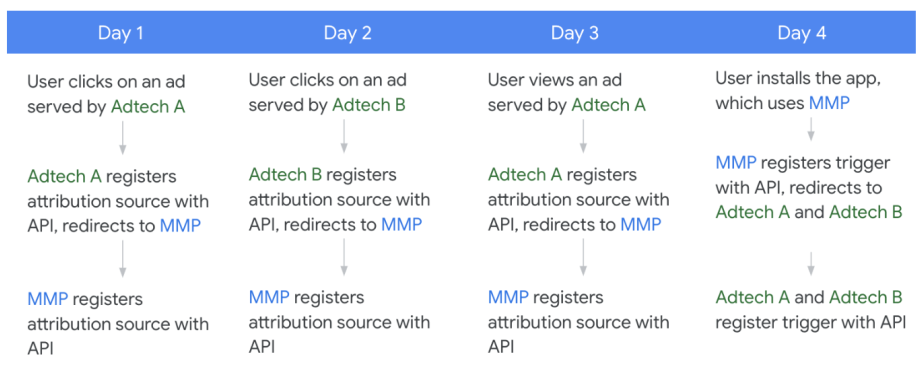
নিম্নলিখিত তালিকাটি ব্যবহারকারীর ক্রিয়াকলাপের একটি কাল্পনিক সিরিজ প্রদান করে যা প্রতিটি একদিনের ব্যবধানে ঘটে এবং কীভাবে অ্যাট্রিবিউশন রিপোর্টিং API অ্যাড টেক এ, অ্যাড টেক বি এবং এমএমপি সম্পর্কিত এই ক্রিয়াকলাপগুলি পরিচালনা করে:
- দিন ১: অ্যাড টেক A দ্বারা পরিবেশিত একটি বিজ্ঞাপনে ব্যবহারকারীর ক্লিক
অ্যাড টেক A তাদের URI দিয়ে
registerSource()কল করে। API URI-তে একটি অনুরোধ করে এবং ক্লিকটি অ্যাড টেক A-এর সার্ভার প্রতিক্রিয়া থেকে মেটাডেটা দিয়ে নিবন্ধিত হয়।অ্যাড টেক A-তে
Attribution-Reporting-Redirectহেডারে MMP-এর URIও অন্তর্ভুক্ত থাকে। API MMP-এর URI-তে একটি অনুরোধ করে এবং ক্লিকটি MMP-এর সার্ভার প্রতিক্রিয়া থেকে মেটাডেটা দিয়ে নিবন্ধিত হয়।- দিন ২: অ্যাড টেক বি দ্বারা পরিবেশিত একটি বিজ্ঞাপনে ব্যবহারকারীর ক্লিক
অ্যাড টেক বি তাদের ইউআরআই দিয়ে
registerSource()কল করে। এপিআই ইউআরআই-তে একটি অনুরোধ করে এবং ক্লিকটি অ্যাড টেক বি-এর সার্ভার প্রতিক্রিয়া থেকে মেটাডেটা দিয়ে নিবন্ধিত হয়।অ্যাড টেক A এর মতো, অ্যাড টেক B
Attribution-Reporting-Redirectহেডারে MMP-এর URI অন্তর্ভুক্ত করেছে। API MMP-এর URI-তে একটি অনুরোধ করে এবং ক্লিকটি MMP-এর সার্ভার প্রতিক্রিয়া থেকে মেটাডেটা দিয়ে নিবন্ধিত হয়।- দিন ৩: ব্যবহারকারী অ্যাড টেক এ দ্বারা পরিবেশিত একটি বিজ্ঞাপন দেখেছেন
API প্রথম দিনে যেমনটি করেছিল ঠিক তেমনই সাড়া দেয়, তবে অ্যাড টেক A এবং MMP-এর জন্য একটি ভিউ নিবন্ধিত থাকে।
- দিন ৪: ব্যবহারকারী অ্যাপটি ইনস্টল করেন, যা রূপান্তর পরিমাপের জন্য MMP ব্যবহার করে।
MMP তাদের URI দিয়ে
registerTrigger()কল করে। API URL-এ একটি অনুরোধ করে এবং রূপান্তরটি MMP-এর সার্ভার প্রতিক্রিয়া থেকে মেটাডেটা দিয়ে নিবন্ধিত হয়।MMP-তে
Attribution-Reporting-Redirectহেডারে Ad tech A এবং Ad tech B-এর URI গুলিও অন্তর্ভুক্ত থাকে। API Ad tech A এবং Ad tech B-এর সার্ভারগুলিতে অনুরোধ করে এবং সার্ভারের প্রতিক্রিয়া থেকে প্রাপ্ত মেটাডেটার সাথে সেই অনুযায়ী রূপান্তরটি নিবন্ধিত হয়।
নিম্নলিখিত চিত্রটি পূর্ববর্তী তালিকায় বর্ণিত প্রক্রিয়াটি চিত্রিত করে:
অ্যাট্রিবিউশন নিম্নরূপ কাজ করে:
- অ্যাড টেক A ভিউয়ের চেয়ে ক্লিকের অগ্রাধিকার বেশি নির্ধারণ করে এবং তাই প্রথম দিনের ক্লিকের জন্য ইনস্টলেশনের জন্য দায়ী করে।
- অ্যাড টেক বি দ্বিতীয় দিনে ইনস্টলের বৈশিষ্ট্য পায়।
- MMP ভিউয়ের চেয়ে ক্লিকের অগ্রাধিকার বেশি নির্ধারণ করে এবং দ্বিতীয় দিনের ক্লিকের সাথে ইনস্টলের জন্য দায়ী করে। দ্বিতীয় দিনের ক্লিক হল সর্বোচ্চ অগ্রাধিকার, সাম্প্রতিক বিজ্ঞাপন ইভেন্ট।
পুনঃনির্দেশ ছাড়াই ক্রস-নেটওয়ার্ক অ্যাট্রিবিউশন
যদিও আমরা একাধিক বিজ্ঞাপন প্রযুক্তিবিদকে অ্যাট্রিবিউশন সোর্স এবং ট্রিগার নিবন্ধনের অনুমতি দেওয়ার জন্য রিডাইরেক্ট ব্যবহার করার পরামর্শ দিচ্ছি, আমরা স্বীকার করি যে এমন কিছু পরিস্থিতি থাকতে পারে যেখানে রিডাইরেক্ট ব্যবহার করা সম্ভব নয়। এই বিভাগে রিডাইরেক্ট ছাড়াই ক্রস-নেটওয়ার্ক অ্যাট্রিবিউশন কীভাবে সমর্থন করা যায় তা বিস্তারিতভাবে বর্ণনা করা হবে।
উচ্চ স্তরের প্রবাহ
- সোর্স রেজিস্ট্রেশনের সময়, সার্ভিং অ্যাড টেক নেটওয়ার্ক তাদের সোর্স অ্যাগ্রিগেশন কী শেয়ার করে।
- ট্রিগার রেজিস্ট্রেশনের সময়, বিজ্ঞাপনদাতা বা পরিমাপ অংশীদার কোন সোর্স-সাইড কী অংশগুলি ব্যবহার করবেন তা বেছে নেন এবং তাদের অ্যাট্রিবিউশন কনফিগারেশন নির্দিষ্ট করেন।
- অ্যাট্রিবিউশন অ্যাট্রিবিউশন কনফিগারেশন, শেয়ার্ড কী এবং সেই বিজ্ঞাপনদাতা বা পরিমাপ অংশীদারের দ্বারা প্রকৃতপক্ষে নিবন্ধিত যেকোনো উৎসের উপর ভিত্তি করে তৈরি করা হয় (যেমন, অন্য কোনও পরিবেশনকারী বিজ্ঞাপন প্রযুক্তি নেটওয়ার্ক থেকে যেখানে পুনঃনির্দেশনা সক্ষম করা আছে)।
- যদি ট্রিগারটি কোনও নন-রিডাইরেক্টিং সার্ভিং বিজ্ঞাপন প্রযুক্তির উৎসের সাথে সম্পর্কিত হয়, তাহলে বিজ্ঞাপনদাতা বা পরিমাপ অংশীদার একটি সমষ্টিগত প্রতিবেদন পেতে পারেন যা ধাপ #২-এ বর্ণিত উৎস এবং ট্রিগারের মূল অংশগুলিকে একত্রিত করে।
উৎস নিবন্ধন
সোর্স রেজিস্ট্রেশনের ক্ষেত্রে, সার্ভিং অ্যাড টেক নেটওয়ার্ক রিডাইরেক্ট করার পরিবর্তে তাদের সোর্স অ্যাগ্রিগেশন কী অথবা তাদের সোর্স অ্যাগ্রিগেশন কী-এর একটি সাবসেট শেয়ার করতে পারে। সার্ভিং অ্যাড টেককে তাদের নিজস্ব অ্যাগ্রিগেটেবল রিপোর্টে এই সোর্স কীগুলি আসলে ব্যবহার করতে হবে না এবং প্রয়োজনে শুধুমাত্র বিজ্ঞাপনদাতা বা পরিমাপ অংশীদারের পক্ষ থেকে সেগুলি ঘোষণা করতে পারে।
শেয়ার্ড অ্যাগ্রিগেশন কীগুলি একই বিজ্ঞাপনদাতার জন্য একটি ট্রিগার নিবন্ধনকারী যেকোনো বিজ্ঞাপন প্রযুক্তির কাছে উপলব্ধ। তবে, কী ধরণের অ্যাগ্রিগেশন কী প্রয়োজন, তাদের নাম এবং কীভাবে কীগুলিকে পঠনযোগ্য মাত্রায় ডিকোড করা যায় সে বিষয়ে সহযোগিতা করা পরিবেশনকারী বিজ্ঞাপন প্রযুক্তি এবং ট্রিগার পরিমাপ বিজ্ঞাপন প্রযুক্তির উপর নির্ভর করে।
ট্রিগার নিবন্ধন
ট্রিগার রেজিস্ট্রেশনের সময়, পরিমাপ বিজ্ঞাপন প্রযুক্তিবিদ প্রতিটি ট্রিগার কী অংশে কোন সোর্স-সাইড কী অংশ প্রয়োগ করবেন তা বেছে নেন, যার মধ্যে পরিবেশনকারী বিজ্ঞাপন প্রযুক্তিবিদদের দ্বারা ভাগ করা কোনও অংশও অন্তর্ভুক্ত থাকে।
Additionally, the measurement ad tech must also specify their waterfall attribution logic using a new attribution configuration API call. In this config, the ad tech can specify source priority, expiry, and filters for sources that they had no visibility into (for example, sources that did not use a redirect).
গুণাবলী
The Attribution Reporting API performs source-prioritized, last-touch attribution for the measurement ad tech based on their attribution config, shared keys, and any sources they registered. For example:
- The user clicked on ads served by ad techs A, B, C, and D. The user then installed the advertiser's app, which uses a measurement ad tech partner (MMP).
- Ad tech A redirects its sources to the MMP.
- Ad techs B and C don't redirect, but share their aggregation keys.
- Ad tech D neither redirects nor shares aggregation keys.
The MMP registers a source from Ad tech A, and defines an attribution config that includes Ad tech B and Ad tech D.
Attribution for the MMP now includes:
- Ad tech A, since the MMP registered a source from that ad tech's redirect.
- Ad tech B, since Ad tech B shared keys and the MMP included it in their attribution config.
Attribution for the MMP does not include:
- Ad tech C, since the MMP did not include it in their attribution config.
- Ad tech D, since they did not redirect nor share aggregation keys.
ডিবাগিং
To support debugging for cross-network attribution without redirects, an additional field, shared_debug_key , is available for ad techs to set upon source registration. If set on the original source registration, it will also be set on the corresponding derived source as debug_key during trigger registration for cross-network attribution without redirects. This debug key is attached as source_debug_key in event and aggregate reports.
This debug feature will only be supported for cross-network attribution without redirects under the following scenarios:
- App to app measurement where AdId is permitted
- App to web measurement where AdId is permitted and matching across both the app source and the web trigger
- Web to web measurement (on the same browser app) when
ar_debug` is present on both source and trigger
Key discovery for cross-network attribution without redirects
Key discovery is intended to streamline how ad techs (usually MMPs) implement their attribution config for the purposes of cross-network attribution when one or several serving ad techs are using shared aggregation keys (as described in Cross-network attribution without redirects above).
When an MMP queries the Aggregation Service to generate summary reports for campaigns that include derived sources, Aggregation Service requires the MMP to specify the list of possible keys as input for the aggregation job. In some cases, the list of potential source aggregation keys may be very large, or unknown. Large lists of possible keys are challenging to track, and are also likely to be quite complex and costly to process. Consider the following examples:
- List of all possible keys is large:
- A serving ad network is executing a complex user acquisition initiative that includes 20 campaigns, each with 10 ad groups, and each ad group with 5 creatives that are refreshed every week based on performance.
- List of all possible keys is unknown:
- A serving ad network is serving ads across many mobile apps where the full list of publisher app IDs is not known at campaign launch.
- An advertiser is working across multiple serving ad networks that are not redirecting to the MMP on source registration; each serving ad network has a different key structure and values, which may not be shared in advance with the MMP.
With the introduction of key discovery:
- The Aggregation Service no longer requires a full enumeration of possible aggregation keys.
- Instead of having to specify the full list of possible keys, an MMP can create an empty (or partially empty) set of keys and set a threshold, so that only (non pre-declared) keys with values exceeding the threshold are included in the output.
- MMP receives a summary report that includes noisy values for keys that have contributing values above the set threshold. The report may also include keys that have no associated real user contributions and are purely noised.
- MMP uses the
x_network_bit_mappingfield in trigger registration to determine which ad tech corresponds to which key. - MMP can then contact the appropriate serving ad tech to understand the values in the source key.
In summary, key discovery enables MMPs to obtain aggregation keys without knowing them in advance, and avoid processing a large volume of source keys at the expense of added noise.
Daisy chain redirects
By providing multiple Attribution-Reporting-Redirect headers in a source or trigger registration HTTPS server-response, an ad tech can use the Attribution Reporting API to perform multiple source and trigger registrations with a single registration API call.
In the server-response, the ad tech can also include a single Location (302 redirect) header with a URL, which in turn leads to another registration, up to a set limit.
Both types of headers are optional and none can be provided if redirects are not needed. Either one or both types of headers may be provided. Source and trigger registration requests (including redirects) are retried in case of network failure. The number of retries per request is limited to a fixed number to avoid significant impact on the device.
Redirects are not accepted for registerWebSource and registerWebTrigger used by browsers. More details can be found in the Cross Web and App Implementation Guide .
View measurement data in attribution reports
The Attribution Reporting API enables the following types of reports, described in more detail later on this page:
- Event-level reports associate a particular attribution source (click or view) with limited bits of high-fidelity trigger data.
- Aggregatable reports aren't necessarily tied with a specific attribution source. These reports provide richer, higher-fidelity trigger data than event-level reports, but this data is only available in an aggregate form.
These two report types are complementary to each other and can be used simultaneously.
Event-level reports
After a trigger is attributed to an attribution source, an event-level report is generated and stored on the device until it can be sent back to each ad tech's postback URL during one of the time windows for sending reports , described in more detail later on this page.
Event-level reports are useful when very little information is needed about the trigger. Event-level trigger data is limited to 3 bits of trigger data for clicks—which means that a trigger can be assigned one of eight categories—and 1 bit for views. In addition, event-level reports don't support encoding of high-fidelity trigger-side data, such as a specific price or trigger time. Because attribution happens on device, there is no support for cross-device analytics in the event-level reports.
The event-level report contains data such as the following:
- Destination: Advertiser app package name or eTLD+1 where the trigger happened
- Attribution Source ID: The same attribution source ID that was used for registering an attribution source
- Trigger type: 1 or 3 bits of low-fidelity trigger data, depending on the type of attribution source
Privacy-preserving mechanisms applied to all reports
The following limits are applied after priorities regarding attribution sources and triggers are taken into consideration.
Limits on number of ad techs
There are limits on the number of ad techs that can register or receive reports from the API, with a current proposal of the following:
- 100 ad techs with attribution sources per {source app, destination app, 30 days, device}.
- 10 ad techs with attributed triggers per {source app, destination app, 30 days, device}.
- 20 ad techs can register a single attribution source or trigger (via
Attribution-Reporting-Redirect)
Limits on number of unique destinations
These limits make it difficult for a set of ad techs to collude by querying a large number of apps to understand a given user's app usage behavior.
- Across all registered sources, across all ad techs, the API supports no more than 200 unique destinations, per source app, per minute.
- Across all registered sources, for a single ad tech, the API supports no more than 50 unique destinations, per source app, per minute. This limit prevents one ad tech from using up the entire budget from the previously mentioned rate limit.
Expired sources don't count towards the rate limits.
One reporting origin per source app per day
A given ad tech platform may only use one reporting origin to register sources on a publisher app, for a given device, on the same day. This rate limit prevents ad techs from using multiple reporting origins to access additional privacy budget.
Consider the following scenario, where a single ad tech wants to use multiple reporting origins to register sources on a publisher app, for a single device.
- Ad tech A's reporting origin 1 registers a source on App B
- 12 hours later, ad tech A's reporting origin 2 attempts to register a source on App B
The second source, for Ad tech A's reporting origin 2, would be rejected by the API. Ad tech A's reporting origin 2 wouldn't be able to successfully register a source on the same device on App B until the following day.
Cooldown and rate limits
To limit the amount of user identity leakage between a {source, destination} pair, the API throttles the amount of total information sent in a given time period for a user.
The current proposal is to limit each ad tech to 100 attributed triggers per {source app, destination app, 30 days, device}.
Number of unique destinations
The API limits the number of destinations that an ad tech can try to measure. The lower the limit, the harder it is for an ad tech to use the API to attempt to measure user browsing activity that isn't associated with ads being shown.
The current proposal is to limit each ad tech to 100 distinct destinations with non-expired sources per source app.
Privacy-preserving mechanisms applied to event-level reports
Limited fidelity of trigger data
The API provides 1 bit for view-through triggers and 3 bits for click-through triggers. Attribution sources continue to support the full 64 bits of metadata.
You should evaluate if and how to reduce the information expressed in triggers so they work with the limited number of bits available in event-level reports.
Framework for differential privacy noise
A goal of this API is to allow event-level measurement to satisfy local differential privacy requirements by using k-randomized responses to generate a noisy output for each source event.
Noise is applied on whether an attribution source event is reported truthfully. An attribution source is registered on the device with probability $ 1-p $ that the attribution source is registered as normal, and with probability $ p $ that the device randomly chooses among all possible output states of the API (including not reporting anything at all, or reporting multiple fake reports).
The k-randomized response is an algorithm that is epsilon differentially private if the following equation is satisfied:
For low values of ε, the true output is protected by the k-randomized response mechanism. Exact noise parameters are works in progress and are subject to change based on feedback, with a current proposal of the following:
- p=0.24% for navigation sources
- p=0.00025% for event sources
Limits on available triggers (conversions)
There are limits on the number of triggers per attribution source, with a current proposal of the following:
- 1-2 triggers for ad view attribution sources (2 triggers only available in the case of post-install attribution)
- 3 triggers for click ad attribution sources
Specific time windows for sending reports (default behaviour)
Event-level reports for ad view attribution sources are sent 1 hour after the source expires. This expiry date can be configured, but it cannot be less than 1 day or more than 30 days. If two triggers are attributed to an ad view attribution source (via post-install attribution )), event-level reports can be sent at the reporting window intervals specified as follows.
Event-level reports for ad click attribution sources cannot be configured and are sent before or when the source expires, at specified points in time relative to when the source was registered. The time between the attribution source and expiry is split into multiple reporting windows. Each reporting window has a deadline (from the attribution source time). At the end of each reporting window, the device collects all the triggers that have occurred since the previous reporting window and sends a scheduled report. The API supports the following reporting windows:
- 2 days: The device collects all the triggers that occurred at most 2 days after the attribution source was registered. The report is sent 2 days and 1 hour after the attribution source is registered.
- 7 days: The device collects all the triggers that occurred more than 2 days but no more than 7 days after the attribution source was registered. The report is sent 7 days and 1 hour after the attribution source is registered.
- A custom length of time, defined by the "expiry" attribute of an attribution source. The report is sent 1 hour after the specified expiry time. This value cannot be less than 1 day or more than 30 days.
Flexible event-level configuration
The default configuration for event level reporting is what ad techs are advised to start using as they begin utility testing, but may not be ideal for all use cases. The Attribution Reporting API will support optional, and more flexible configurations so that ad techs have increased control over the structure of their event level reports and are able to maximize the utility of the data.
This additional flexibility will be introduced into the Attribution Reporting API in two phases:
- Phase 1: Lite flexible event level configuration
- This version provides a subset of the full features, and can be used independently of Phase 2.
- Phase 2: Full version of flexible event level configuration
Phase 1 (Lite flexible event level) could be used to:
- Vary the frequency of reports by specifying the number of reporting windows
- Vary the number of attributions per source registration
- Reduce the amount of total noise by decreasing the preceding parameters
- Configure reporting windows rather than using the defaults
Phase 2 (Full flexible event level) could be used to do all of the capabilities in Phase 1 and:
- Vary the trigger data cardinality in a report
- Reduce the amount of total noise by decreasing the trigger data cardinality
Reducing one dimension of the default configuration allows the ad tech to increase another dimension. Alternatively, the total amount of noise in an event level report may be reduced by net decreasing the parameters mentioned earlier.
In addition to dynamically setting noise levels based on an ad tech's chosen configuration, we will have some parameter limits to avoid large computation costs and configurations with too many output states (where noise will increase considerably). Here is an example set of restrictions. Feedback is encouraged on the design proposal:
- Maximum of 20 total reports, globally and per trigger_data
- Maximum of 5 possible reporting windows per trigger_data
- Maximum of 32 trigger data cardinality (not applicable for Phase 1: Lite Flexible Event Level)
As ad techs start using this feature, be advised that using extrema values may result in a large amount of noise, or failure to register if privacy levels are not met.
Aggregatable reports
Before using aggregatable reports, you must set up your cloud account and start receiving aggregatable reports.
Aggregatable reports provide higher-fidelity trigger data from the device more quickly, beyond what is offered for event-level reports . This higher-fidelity data can only be learned in aggregate , and isn't associated with a particular trigger or user. Aggregation keys are up to 128 bits, and this allows aggregatable reports to support reporting use cases such as the following:
- Reports for trigger values, such as revenue
- Handling more trigger types
In addition, aggregatable reports use the same source-prioritized attribution logic as event-level reports, but they support more conversions attributed to a click or view.
The overall design of how the Attribution Reporting API prepares and sends aggregatable reports, shown in the diagram, is as follows:
- The device sends encrypted aggregatable reports to the ad tech. In a production environment, ad techs can't use these reports directly.
- The ad tech sends a batch of aggregatable reports to the aggregation service for aggregation.
- The aggregation service reads a batch of aggregatable reports, decrypts and aggregates them.
- The final aggregates are sent back to the ad tech in a summary report .
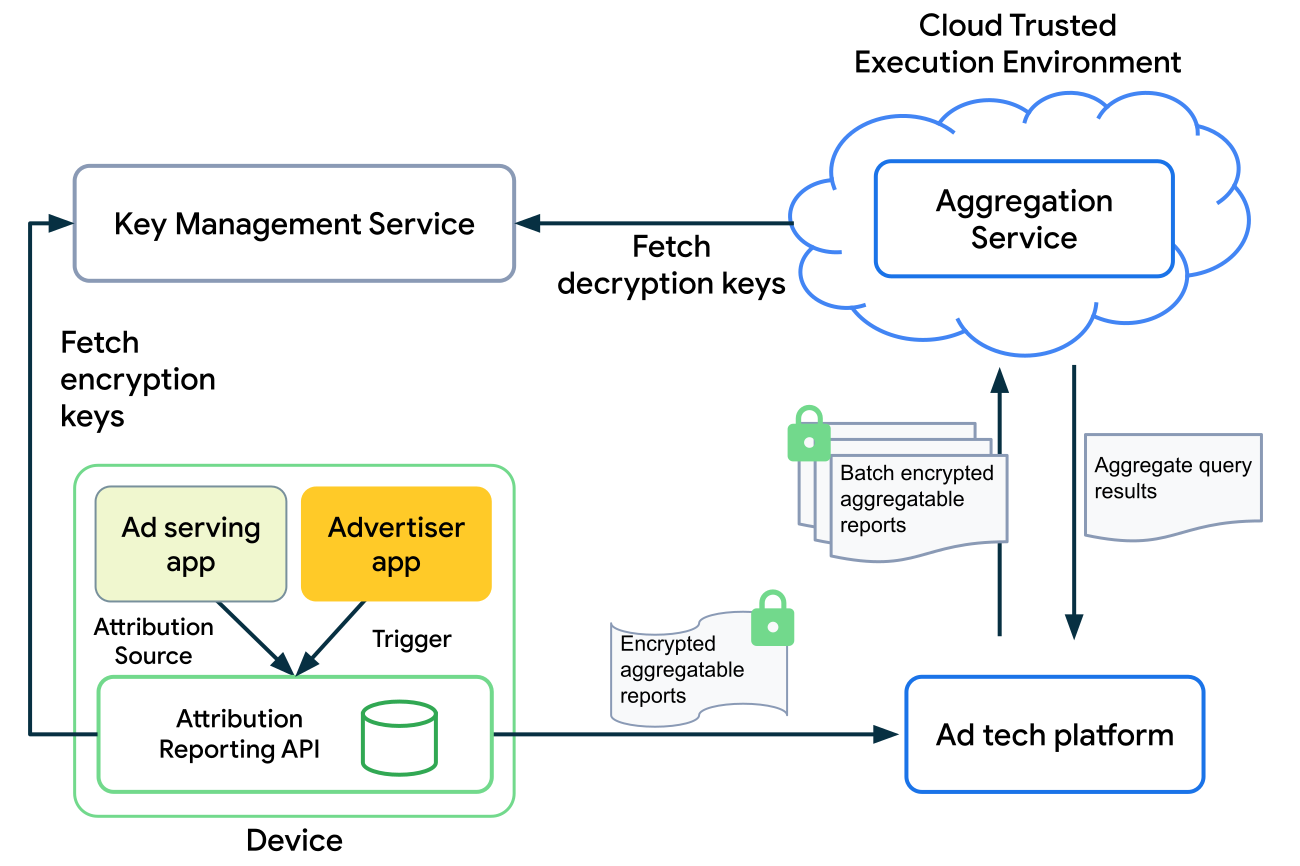
Aggregatable reports contain the following data related to attribution sources:
- Destination: The app's package name or eTLD+1 web URL where the trigger happened.
- Date: The date when the event represented by the attribution source occurred.
- Payload: Trigger values, collected as encrypted key/value pairs, which is used in the trusted aggregation service to compute aggregations.
Aggregation services
The following services provide data aggregation capabilities and safeguard against unauthorized access to aggregated data..
These services are managed by different parties, which are described in more detail later on this page:
- The aggregation service is the only one that ad techs are expected to deploy.
- The key management and aggregatable report accounting services are run by trusted parties called coordinators . These coordinators attest that the code running the aggregation service is the publicly-available code provided by Google and that all aggregation service users have the same key and aggregatable report accounting services applied to them.
Aggregation service
Ad tech platforms must, in advance, deploy an aggregation service that's based on binaries provided by Google.
This aggregation service operates in a Trusted Execution Environment (TEE) hosted in the cloud. A TEE offers the following security benefits:
- It ensures that the code operating in the TEE is the specific binary offered by Google. Unless this condition is satisfied, the aggregation service can't access the decryption keys it needs to operate.
- It offers security around the running process, isolating it from external monitoring or tampering.
These security benefits make it safer for an aggregation service to perform sensitive operations, such as accessing encrypted data.
For more information on the design, workflow, and security considerations of the aggregation service, see the aggregation service document on GitHub.
Key management service
This service verifies that an aggregation service is running an approved version of the binary and then provides the aggregation service in the ad tech with the correct decryption keys for their trigger data.
Aggregatable report accounting
This service tracks how often an ad tech's aggregation service accesses a specific trigger—which can contain multiple aggregation keys—and limits access to the appropriate number of decryptions. Refer to the Aggregation Service for the Attribution Reporting API design proposal for details.
Aggregatable Reports API
The API for creating contributions to aggregatable reports uses the same base API as when registering an attribution source for event-level reports. The following sections describe the extensions of the API.
Register the aggregatable source data
When the API makes a request to the Attribution Source URI, the ad tech can register a list of aggregation keys, named histogram_contributions , by responding with a new field called aggregation_keys in HTTP header Attribution-Reporting-Register-Source , with key as the key_name and value as key_piece :
- (Key) Key name: A string for the name of the key. Used as a join key to combine with trigger-side keys to form the final key.
- (Value) Key piece: A bitstring value for the key.
The final histogram bucket key is fully defined at trigger time by performing a binary OR operation on these pieces and the trigger-side pieces.
Final keys are restricted to a maximum of 128 bits; keys longer than this are truncated. This means that hex strings in the JSON should be limited to at most 32 digits.
Learn more about how aggregation keys are structured and how you can configure aggregation keys.
In the following example, an ad tech uses the API to collect the following:
- Aggregate conversion counts at a campaign level
- Aggregate purchase values at a geo level
// This is where the Attribution-Reporting-Register-Source object appears when
// an ad tech registers an attribution source.

// Attribution source metadata specifying histogram contributions in aggregate report.
Attribution-Reporting-Register-Source:
…
aggregation_keys: {
  // Generates a "0x159" key piece named (low order bits of the key) for the key
  // named "campaignCounts".
  // User saw an ad from campaign 345 (out of 511).

  "campaignCounts": "0x159",
  // Generates a "0x5" key piece (low order bits of the key) for the key name "geoValue"
  // Source-side geo region = 5 (US), out of a possible ~100 regions.
  "geoValue": "0x5"
}
Register the aggregatable trigger
Trigger registration includes two additional fields.
The first field is used to register a list of aggregate keys on the trigger side. The ad tech should respond back with the aggregatable_trigger_data field in HTTP header Attribution-Reporting-Register-Trigger , with the following fields for each aggregate key in the list:
- Key piece: A bitstring value for the key.
- Source keys: A list of strings with the names of attribution source side keys that the trigger key should be combined with to form the final keys.
The second field is used to register a list of values which should contribute to each key. The ad tech should respond back with the aggregatable_values field in the HTTP header Attribution-Reporting-Register-Trigger . The second field is used to register a list of values which should contribute to each key, which can be integers in the range $ [1, 2^{16}] $.
Each trigger can make multiple contributions to the aggregatable reports. The total amount of contributions to any given source event is bound by an $ L1 $ parameter, which is the maximum sum of contributions (values) across all aggregate keys for a given source. $ L1 $ refers to the L1 sensitivity or norm of the histogram contributions per source event. Exceeding these limits causes future contributions to silently drop. The initial proposal is to set $ L1 $ to $ 2^{16} $ (65536).
The noise in the aggregation service is scaled in proportion to this parameter. Given this, it is recommended to appropriately scale the values reported for a given aggregate key, based on the portion of $ L1 $ budget allocated to it. This approach helps make sure that the aggregate reports retain the highest possible fidelity when noise is applied. This mechanism is highly flexible and can support many aggregation strategies.
In the following example, the privacy budget is split equally between campaignCounts and geoValue by splitting the $ L1 $ contribution to each:
// This is where the Attribution-Reporting-Register-Trigger object appears
// when an ad tech registers a conversion trigger.

// Specify a list of dictionaries that generates aggregation keys.
Attribution-Reporting-Register-Trigger:{
    …
    "aggregatable_trigger_data":

    [
    // Each dictionary independently adds pieces to multiple source keys.
    {
    // Conversion type purchase = 2 at a 9-bit offset, i.e. 2 << 9.
    // A 9-bit offset is needed because there are 511 possible campaigns, which
    // will take up 9 bits in the resulting key.
        "key_piece": "0x400",// Conversion type purchase = 2
        // Apply this key piece to:
        "source_keys": ["campaignCounts"]
    },
    {
    // Purchase category shirts = 21 at a 7-bit offset, i.e. 21 << 7.
    // A 7-bit offset is needed because there are ~100 regions for the geo key,
    // which will take up 7 bits of space in the resulting key.
        "key_piece": "0xA80",
        // Apply this key piece to:
        "source_keys": ["geoValue", "nonMatchingIdsListedHereAreIgnored"]
    }
    ]

    // Specify an amount of an abstract value which can be integers in [1, 2^16] to
    // contribute to each key that is attached to aggregation keys in the order that
    // they're generated.
    aggregatable_values:
    {
    // Privacy budget for each key is L1 / 2 = 2^15 (32768).
    // Conversion count was 1.
    // Scale the count to use the full budget allocated: 1 * 32768 = 32768.
        "campaignCounts": 32768,

    // Purchase price was $52.
    // Purchase values for the app range from $1 to $1,024 (integers only).
    // Scaling factor applied is 32768 / 1024 = 32.
    // For $52 purchase, scale the value by 32 ($52 * 32 = $1,664).
        "geoValue": 1664
    }
}
The preceding example generates the following histogram contributions:
[
  // campaignCounts:
  {
    "key": "0x559", // = 0x159 | 0x400
    "value": 32768
  },
  // geoValue:
  {
    "key": "0xA85",  // = 0x5 | 0xA80
    "value": 1664
  }
]
The scaling factors can be inverted in order to obtain the correct values, modulo noise that is applied:
L1 = 65536
trueCampaignCounts = campaignCounts / (L1 / 2)
trueGeoValue = geoValue / (L1 / 2) * 1024
ডিফারেনশিয়াল গোপনীয়তা
A goal of this API is to have a framework which can support differentially private aggregate measurement. This can be achieved by adding noise proportional to the $ L1 $ budget, such as picking noise with the following distribution:
Protected Audience API and Attribution Reporting API Integration
Cross-API integration across the Protected Audience and Attribution Reporting APIs enables adtechs to evaluate their attribution performance across various remarketing tactics in order to understand which types of audiences deliver the highest ROI.
Through this cross-API integration, adtechs can:
- Create a key-value map of URIs to be used for both 1) interaction reporting and 2) source registration.
- Include
CustomAudiencein their source-side key mapping for aggregate summary reporting (using the Attribution Reporting API).
When a user sees or clicks on an ad:
- The URL used to report those interactions using Protected Audience will also be used to register a view or click as an eligible source with the Attribution Reporting API.
- The ad tech may choose to pass CustomAudience (or other relevant contextual information about the ad such as ad placement or view duration) using that URL so this metadata can propagate down to summary reports when the ad tech is reviewing aggregate campaign performance.
For more information on how this is enabled within Protected Audience, see the relevant section of the Protected Audience API explainer .
Registration priority, attribution, and reporting examples
This example showcases a set of user interactions and how ad tech defined attribution source and trigger priorities could affect attributed reports. In this example, we assume the following:
- All attribution sources and triggers are registered by the same ad tech, for the same advertiser.
- All attribution sources and triggers are happening during the first event reporting window (within 2 days of initially displaying the ads in a publisher app).
Consider the case where a user does the following:
- The user sees an ad. Ad tech registers an attribution source with the API, with a priority of
0(view #1). - The user sees an ad, registered with a priority of
0(view #2). - The user clicks an ad, registered with a priority of
1(click #1). - The user converts (reaches landing page) in an advertiser app. The ad tech registers a trigger with the API, with a priority of
0(conversion #1).- As triggers are registered, the API performs attribution first before generating reports.
- There are 3 attribution sources available: view #1, view #2, and click #1. The API attributes this trigger to click #1 because it's the highest priority and most recent.
- View #1 and view #2 are discarded and are no longer eligible for future attribution.
- The user adds an item to their cart in the advertiser app, registered with a priority of
1(conversion #2).- Click #1 is the only eligible attribution source. The API attributes this trigger to click #1.
- The user adds an item to their cart in the advertiser app, registered with a priority of
1(conversion #3).- Click #1 is the only eligible attribution source. The API attributes this trigger to click #1.
- The user adds an item to their cart in the advertiser app, registered with a priority of
1(conversion #4).- Click #1 is the only eligible attribution source. The API attributes this trigger to click #1.
- The user makes a purchase in the advertiser app, registered with a priority of
2(conversion #5).- Click #1 is the only eligible attribution source. The API attributes this trigger to click #1.
Event-level reports have the following characteristics:
- By default, the first 3 triggers attributed to a click and the first trigger attributed to a view are sent out after applicable reporting windows.
- Within the reporting window, if there are triggers registered with higher priority, those take precedence and replace the most recent trigger.
- In the preceding example, the ad tech receives 3 event reports after the 2-day reporting window, for conversion #2, conversion #3, and conversion #5.
- All 5 triggers are attributed to click #1. By default, the API would send out reports for the first 3 triggers: conversion #1, conversion #2, and conversion #3.
- However, conversion #4's priority (
1) is higher than conversion #1's priority (0). Conversion #4's event report replaces conversion #1's event report to be sent out. - Additionally, conversion #5's priority (
2) is higher than any other trigger. Conversion #5's event report replaces conversion #4's report to be sent out.
Aggregatable reports have the following characteristics:
Encrypted aggregatable reports are sent to the ad tech as soon as they are processed, a few hours after the triggers are registered.
As an ad tech, you create their batches based on the information that comes unencrypted in your aggregatable reports. This information is contained in the
shared_infofield in your aggregatable report, and includes timestamp and reporting origin. You can't batch based on any encrypted information in your aggregation key-value pairs. Some basic strategies you can follow are batching reports daily or weekly. Ideally, batches should contain at least 100 reports each.It's up to the ad tech on when and how to batch the aggregatable reports and send to the aggregation service.
Compared to event-level reports, encrypted aggregatable reports can attribute more triggers to a source.
In the preceding example, 5 aggregatable reports are sent out, one for each registered trigger.
Transitional debugging reports
The Attribution Reporting API is a new and fairly complex way to do attribution measurement without cross-app identifiers. As such, we are supporting a transitional mechanism to learn more information about attribution reports when the advertising ID is available (the user has not opted out of personalization using the advertising ID and the publisher or advertiser app has declared AdID permissions) . This ensures that the API can be fully understood during roll-out, help flush out any bugs, and more readily compare the performance to advertising ID-based alternatives. There are two types of debugging reports: attribution-success and verbose.
Read the guide on transitional debugging reports for details on debugging reports with app-to-web and web-to-app measurement.
Attribution-success debugging reports
Source and trigger registrations both accept a new 64-bit debug_key field (formatted as a String), which the ad tech populates. source_debug_key and trigger_debug_key are passed unaltered in both event-level and aggregate reports.
If a report is created with both source and trigger debug keys, a duplicate debug report is sent with limited delay to a .well-known/attribution-reporting/debug/report-event-attribution endpoint. The debug reports are identical to normal reports, including both debug key fields. Including these keys in both allows tying normal reports to the separate stream of debug reports.
- For event-level reports:
- Duplicate debug reports are sent with limited delay and therefore aren't suppressed by limits on available triggers , which allows ad tech to understand the impact of those limits for event-level reports.
- Event-level reports associated with false trigger events won't have
trigger_debug_keys. This allows ad tech to more closely understand how noise is applied in the API.
- For aggregatable reports:
- We will support a new
debug_cleartext_payloadfield which contains the decrypted payload, only if bothsource_debug_keyandtrigger_debug_keyare set.
- We will support a new
Verbose debugging reports
Verbose debugging reports allow developers to monitor certain failures in the attribution source or trigger registrations. These debugging reports are sent with limited delay after attribution source or trigger registrations to a . well-known/attribution-reporting/debug/verbose endpoint.
Each verbose report contains the following fields:
- Type : what caused the report to be generated. See the full list of verbose report types .
- In general, there are source verbose reports and trigger verbose reports.
- Source verbose reports require the advertising ID to be available to the publisher app, and trigger verbose reports require the advertising ID to be available to the advertiser app.
- Trigger verbose reports (with the exception of
trigger-no-matching-source) can optionally include thesource_debug_key. This can only be included if the advertising ID is also available to the publisher app.
- Body : The report's body, which depends on its type.
Ad techs need to opt in to receive verbose debugging reports using a new debug_reporting dictionary field in the Attribution-Reporting-Register_Source and Attribution-Reporting-Register-Trigger headers.
- Source verbose reports require opt-in on the source registration header only.
- Trigger debug reports require opt-in on the trigger registration header only.
How to use debug reports
If a conversion took place (according to your existing measurement system) and a debug report was received for that conversion, this means the trigger was successfully registered.
For each debug attribution report, check if you're receiving a regular attribution report that matches the two debug keys.
When there's no match, it can be for a number of reasons.
Works as intended:
- Privacy-preserving API behaviors:
- A user hits the report rate limit—causing all subsequent reports to not be sent in the time period; or a source is removed due to the pending destination limit.
- For event-level reports: the report is subject to randomized response (noise) and is suppressed, or you may receive a randomized report.
- For event-level reports: the limit of three (for clicks) or one (for views) reports has been reached, and subsequent reports have no explicit priority set, or a priority that is lower than existing reports.
- The contribution limits for aggregatable reports have been exceeded.
- Ad tech-defined business logic:
- A trigger is filtered out using filters or priority rules.
- Time delays or interactions with network availability (eg, the user turns off their device for an extended period of time).
Unintended causes:
- Implementation issues:
- The source header is misconfigured.
- The trigger header is misconfigured.
- Other configuration issues.
- Device or network issues:
- Failures due to network conditions.
- Source or trigger registration response doesn't reach the client.
- API bug.
Future considerations & open questions
The Attribution Reporting API is a work in progress. We're also exploring future potential features, such as non-last-click attribution models and cross-device measurement use cases.
Additionally, we'd like to seek feedback from the community on a few issues:
- Are there any use cases where you'd like the API to send out reports for the verified install? These reports would count against ad tech platforms' respective rate limits.
- Do you foresee any difficulties with passing the
InputEventfrom the app to ad tech for source registration? - Do you have any special attribution use cases for pre-loaded apps or re-installed apps?