

Topics API 可讓您放送符合興趣的廣告,不必使用第三方 Cookie。
Topics API 的運作方式
Topics API 可用於觀察使用者的活動,並提供他們感興趣的主題存取權。接著,Topics API 就能讓 API 呼叫端 (例如廣告技術平台) 存取使用者感興趣的主題,但不會揭露使用者活動的其他資訊。
核心概念
- 「主題」是人類可讀形式的使用者興趣主題,並屬於 主題分類。
- 呼叫端是指向 Topics API 發出要求,以觀察或存取使用者興趣的實體,例如應用程式、第三方 SDK、網站或服務。
- 如果呼叫端在過去三個週期內,曾經從與某個主題相關聯的網頁或應用程式發出 Topics API 要求,即表示呼叫端「觀察」了該主題。
- 「週期」是主題計算作業的時間長度,預設為一週。
- 分類法是類別的階層清單,例如
/Arts & Entertainment/Music & Audio/Soul & R&B和/Business & Industrial/Business Services/Corporate Events等類別。 - 系統會使用分類器模型擷取主題,將使用者活動對應至零個或多個主題。
Topics API 流程核心步驟
Topics API 生命週期有三個主要步驟:
- 觀察使用者活動,例如使用者造訪網頁
https://cats.example/tabby/index.html或下載應用程式cats時。 - 從使用者活動推導主題,例如
/Pets & Animals/Pets/Cats。 - 存取使用者先前觀察的主題,例如做為選取相關廣告 (例如貓食促銷活動) 的信號。
觀察主題
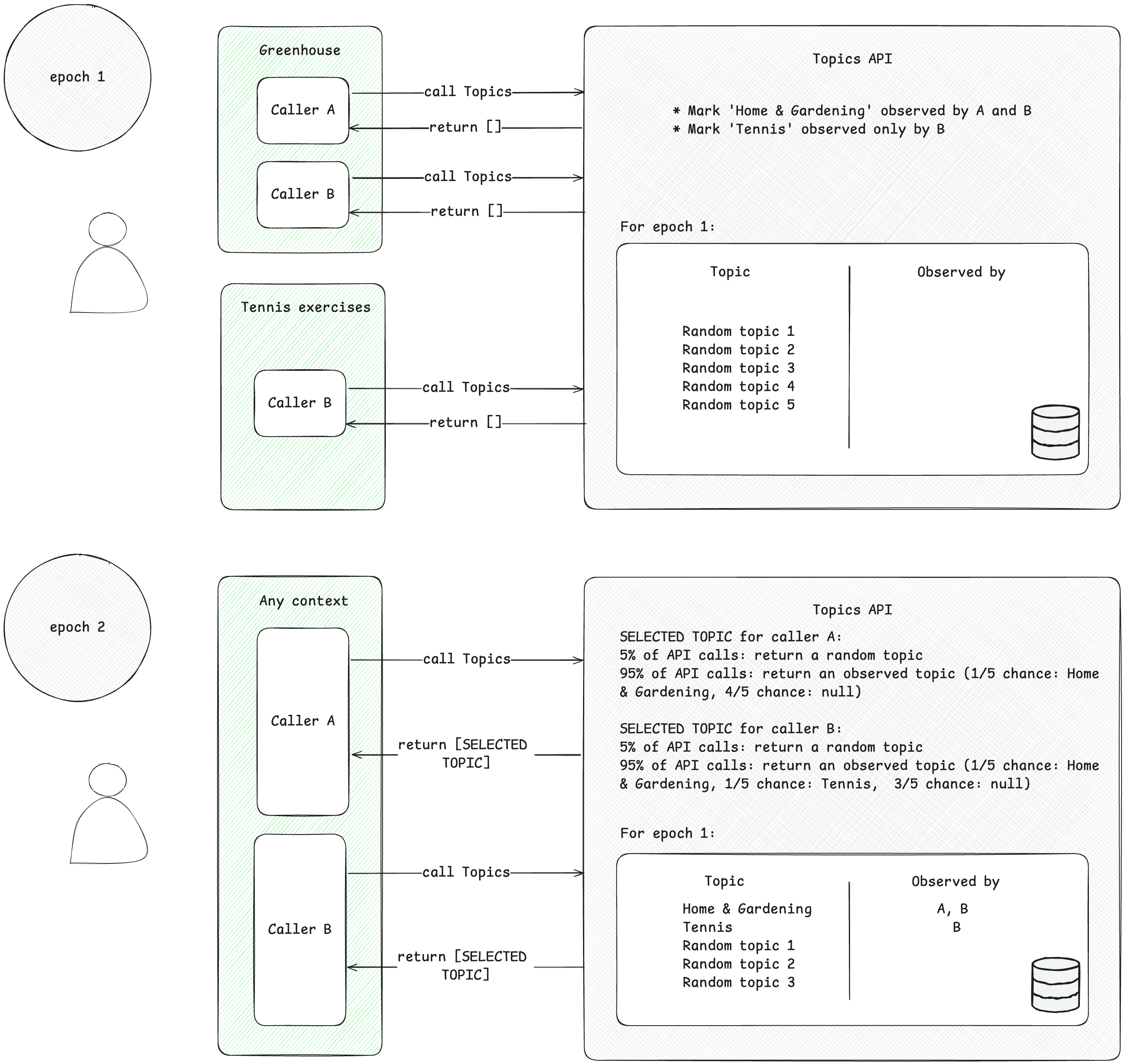
呼叫端只能存取「觀察」過的主題。當呼叫端從與該主題相關聯的內容發出 Topics API 要求時,即表示呼叫端觀察了該主題。為了說明這個概念,請參考以下簡化的範例。
- 假設有兩個 Topics API 呼叫端:A 和 B。
- 有兩種情境:
- Greenhouse,例如與主題
Home & Garden相關聯的應用程式 Greenhouse 或網站 greenhouse.example。 - 網球練習,例如與主題
Sports/Tennis相關聯的應用程式「網球練習」或網站 tennis.example。
- Greenhouse,例如與主題
- 呼叫端 A 和 B 都位於 Greenhouse 的內容中。
- 網球練習情境中只有呼叫端 B。
- 為了簡化說明,我們假設在第 1 個時間週期之前,使用者並未觀察到任何主題。
- 使用者造訪 Greenhouse 應用程式,呼叫端 A 和 B 發出 Topics API 呼叫,記錄使用者造訪該網頁或應用程式 (如要瞭解如何呼叫 Topics API,請參閱「後續步驟」中建議的實作指南)。這個記錄 (主機名稱或應用程式資料) 稍後會用於衍生出感興趣的主題。Topics API 稍後會將主題
Home & Garden標示為由呼叫端 A 和 B 觀察到。 - 使用者造訪「網球練習」應用程式。只有呼叫端 B 會傳送 Topics API 要求。Topics API 稍後會將主題
Sports/Tennis標示為呼叫端 B 觀察到的。 - 在週期結束時,Topics API 會重新整理使用者最感興趣的主題,並根據使用者活動判斷觀察這些主題的呼叫端。
- 稍後,當呼叫端 B 發出另一個 Topics API 呼叫時,它可以在回應陣列中取得
Home & Garden或Sports/Tennis主題 (或有 5% 機率取得隨機主題),以便為此使用者提供服務。 - 呼叫端 A 從未觀察到主題
Sports/Tennis,因此只能存取主題Home & Garden。也就是說,第三方只能在特定情境 (應用程式或網站) 中瞭解使用者感興趣的主題。
衍生主題
主題會從使用者活動中找出感興趣的主題。系統會從預先定義的開放原始碼分類中選取主題。每個週期,Topics 都會重新整理使用者最感興趣的五個主題,以及在該週期內觀察到這些主題的呼叫端。主題分類器模型會根據使用者活動推斷主題,包括網頁造訪的主機名稱,以及 Android 上的應用程式資訊。
呼叫端存取使用者感興趣的主題
API 只會傳回呼叫端在最近三個週期內觀察到的主題。系統最多會向呼叫端傳回三個主題,每個最近的三個週期各一個 (如果呼叫端觀察到該週期的主題)。呼叫端可使用傳回的主題補充任何脈絡資訊,也可以將這些主題結合,為使用者尋找更相關的廣告。
訓練週期
Topics API 必須確保提供的興趣主題保持最新狀態。系統會根據使用者在「訓練週期」內 (目前建議長度為一週) 的活動,推測使用者的偏好主題。每位使用者都有自己的 epoch (epoch 為「每位使用者」),且初始開始時間為隨機。
在每個週期中,Topics API 會計算使用者最感興趣的五個主題,並根據裝置端資訊判斷哪些呼叫端觀察到這些主題。系統會在每個訓練週期內推測出使用者的五大偏好,並從中隨機選出一項做為該週期的主題。為進一步強化隱私權並確保所有主題都能呈現,系統會從興趣分類中隨機選取主題,機率為 5%。
實際使用網頁主題
在網路上,系統會根據使用者造訪網頁的主機名稱推斷主題。舉例來說,系統為 dogs.example 網站推斷的主題可能是 /寵物與動物/寵物/狗。
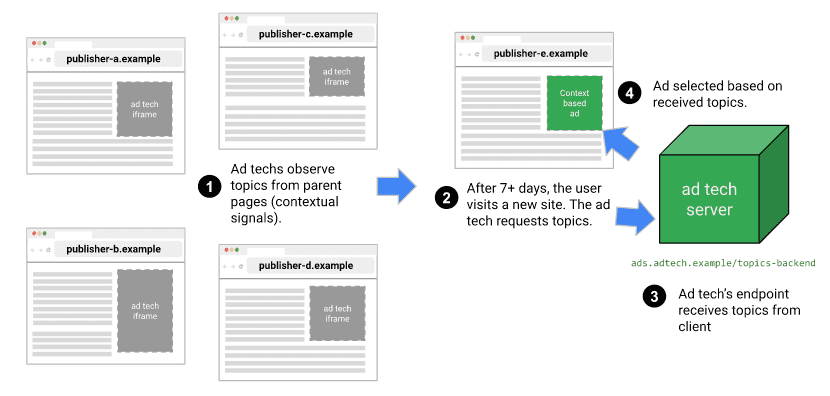
下圖是簡化範例,說明廣告技術平台如何透過 Topics API 選取合適的廣告。這個範例假設使用者的瀏覽器已有模型,可將網站主機名稱對應至主題。
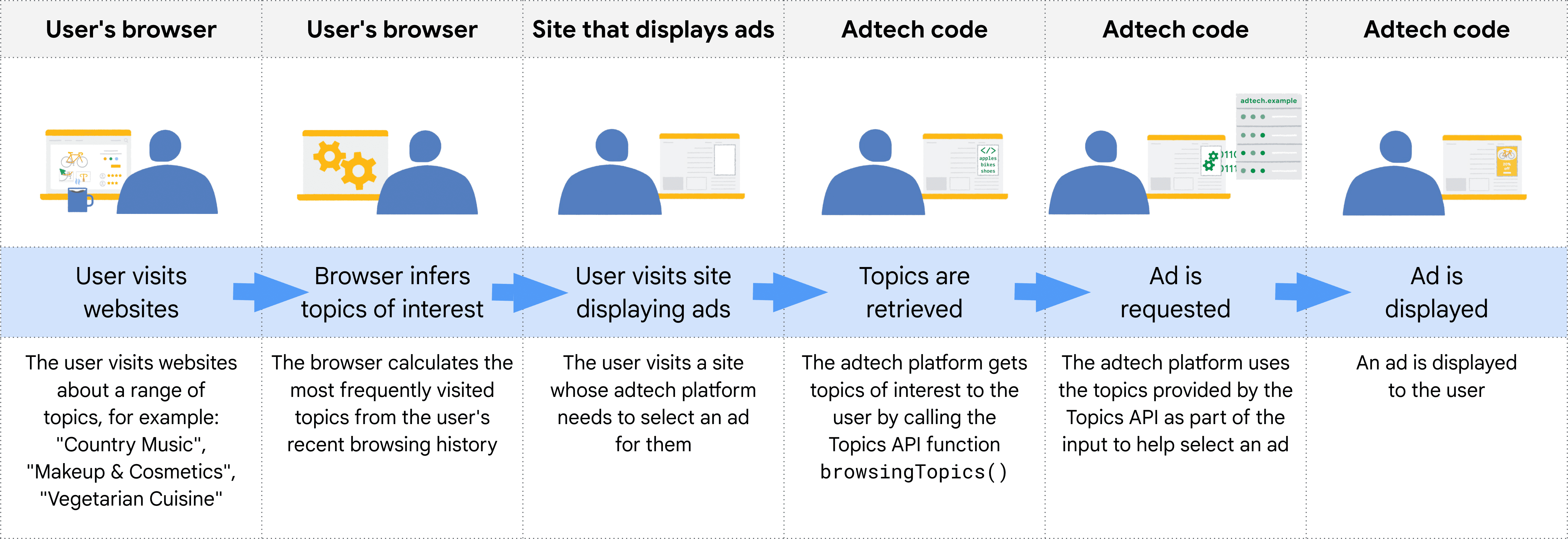
瀏覽器會根據呼叫 Topics API 的程式碼環境,判斷呼叫端的來源。在實務上,這表示 Topics 使用者會從來源呼叫 iframe 中的 API,或在 fetch 中加入主題,傳送至來源。
舉例來說,供應端平台 (SSP) 可嵌入多個發布商網站。接著,供應端平台從來源呼叫 iframe 中的 Topics API,觀察使用者在這些發布商網站上的相關主題。這些主題會提供給需求端平台 (DSP),為使用者選取相關廣告。
API 如何決定哪些來電者會看到哪些主題
API 呼叫端只會收到近期觀察到的主題,且系統會在每個週期 (Chrome 實作中設定為一週) 重新整理使用者的主題。也就是說,API 會提供滾動式視窗,讓指定呼叫端可接收觀察到的主題。
下表列出一個假設的使用者在單一時期內的瀏覽記錄範例 (雖然小得不太實際),顯示與使用者造訪網站相關的主題,以及每個網站上的 API 呼叫端 (在網站上 JavaScript 程式碼中呼叫 document.browsingTopics() 的實體)。
| 網站 | 主題 | 網站上的 API 呼叫者 |
|---|---|---|
| running.example | Running & WalkingAthletic Shoes |
adtech1.example adtech2.example |
| dogs.example | Dogs |
adtech1.example |
| holiday.example | Hotels & Accommodations |
adtech2.example |
| sunglasses.example | Sunglasses |
[none] |
在週期結束時 (預設為一週),Topics API 會產生該週瀏覽器最感興趣的主題。
- adtech1.example 現在有資格接收
Running & Walking、Athletic Shoes和Dogs主題,因為該廣告技術在 running.example 和 dogs.example 上觀察到這些主題。 - adtech1.example 無法接收這位使用者的
Hotels & Accommodations主題,因為使用者最近造訪的網站中,沒有任何與該主題相關聯的網站。 - adtech2.example 看過
Running & Walking、Athletic Shoes和Hotels & Accommodations主題,但未看過Dogs主題。
使用者造訪了 sunglasses.example,該網站有 Sunglasses 主題,但該網站上沒有對 Topics API 的呼叫。此時,這表示 API 不會為任何呼叫端傳回 Sunglasses 主題。
在第二週,使用者造訪另一個網站:
| 網站 | 主題 | 網站上的 API 呼叫者 |
|---|---|---|
| cameras.example | Camera & Photo Equipment |
adtech2.example |
此外,adtech2.example 的程式碼會新增至 sunglasses.example:
| 網站 | 主題 | 網站上的 API 呼叫者 |
|---|---|---|
| sunglasses.example | Sunglasses |
adtech2.example |
除了第 1 週的 Running & Walking、Athletic Shoes 和 Hotels & Accommodations,這也表示 adtech2.example 現在可以接收 Camera & Photo Equipment 和 Sunglasses 主題,但要等到下一個時期 (第 3 週) 才會生效。確保第三方無法透過 Cookie 以外的方式,進一步瞭解使用者的過往資訊 (在本例中為對時尚的興趣)。
如果使用者未造訪任何包含 adtech2.example 程式碼,且與 Running & Walking、Athletic Shoes 和 Hotels & Accommodations 相關的網站,這些主題可能會在兩週後從 adtech2.example 的適用主題清單中移除。
分類器模型
主題會使用分類器模型,將網站主機名稱對應至零或多個主題 (分析完整網址或網頁內容等額外資訊,可能有助於放送關聯性更高的廣告,但也可能降低隱私權)。
分類
系統會從分類中選出主題。這些主題是由 Chrome 策劃,目標是讓分類成為由可信的生態系統貢獻者維護的資源。分類架構必須夠小,才能讓許多使用者的瀏覽器與每個主題建立關聯。最終目標是讓外部供應商提供分類,並納入業界的意見和構想。
為避免使用敏感類別,主題必須公開、經過人工收錄,且隨時保持最新狀態。Chrome 使用的分類架構經過人工收錄,排除一般認為的敏感類別,例如族裔或性傾向。
主題分類
我們會為 50,000 個頂層網站手動管理主題,並使用這份經過管理的代管主機名稱和主題覆寫清單,訓練分類器模型。對於熱門網站,系統會從覆寫清單存取主題,而非使用分類器模型。您可以在電腦上查看覆寫清單。
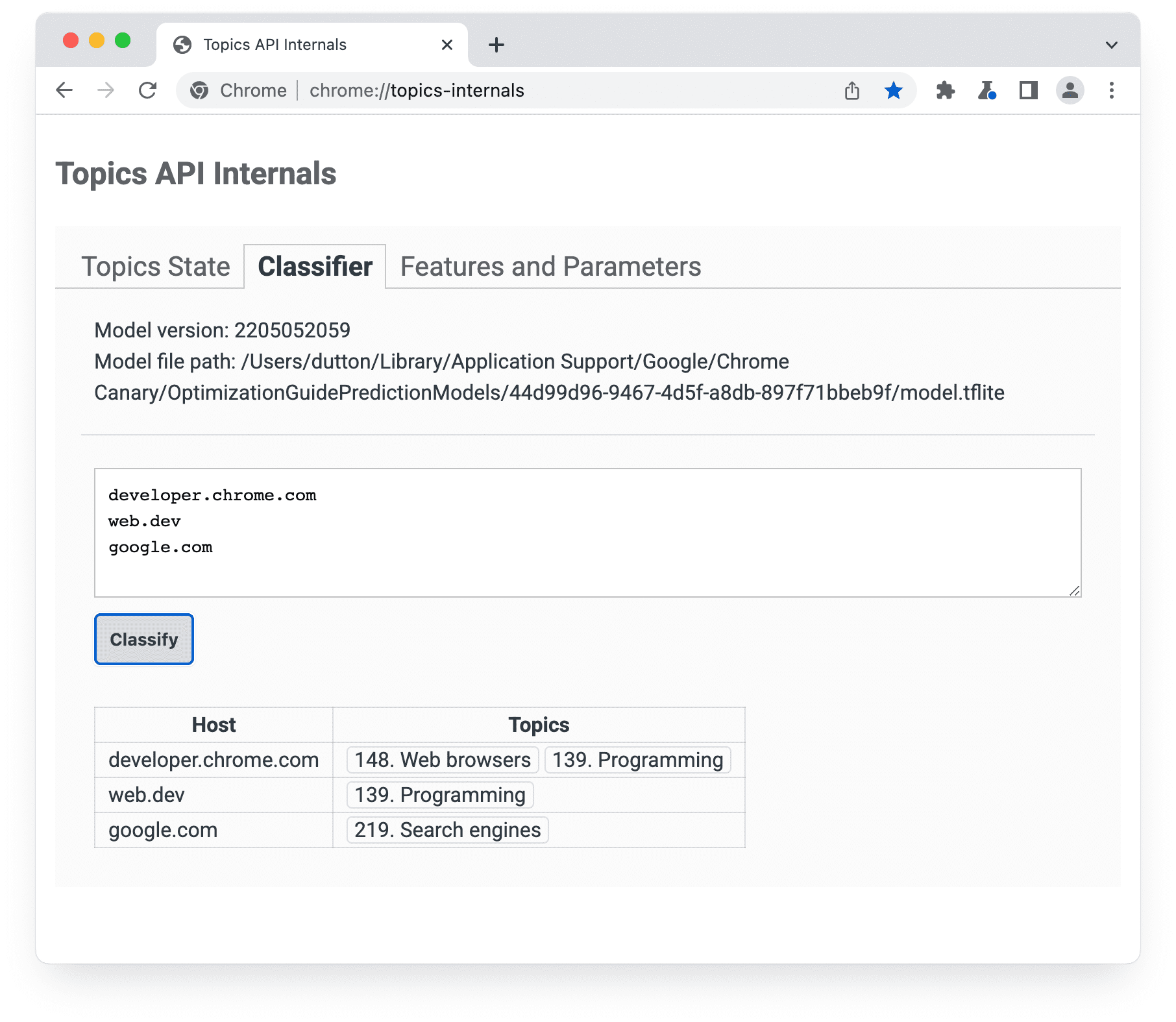
chrome://topics-internalsChrome 實作 Topics API 時,會下載代表模型的 TensorFlow Lite 檔案,以便在使用者裝置上在本機使用。
如何選取使用者的前五大主題
API 會針對每個週期傳回一個主題,最多三個。如果傳回三個主題,則包括目前和前兩個時期的主題。
- 每個時期結束時,瀏覽器會編譯符合下列條件的網頁清單:
- 使用者在該時間範圍內造訪了網頁。
- 該頁面包含呼叫
document.browsingTopics()的程式碼。 - API 已啟用 (例如未遭使用者或回應標頭封鎖)。
- 使用者裝置上的瀏覽器會使用 Topics API 提供的分類器模型,將每個網頁的主機名稱對應至主題清單。
接著,document.browsingTopics() 方法會從每個週期的前五大主題中隨機傳回一個主題,並有 5% 的機率會從完整的主題分類中隨機選擇。在 Chrome 中,使用者也能移除個別主題,或清除瀏覽記錄,減少 API 傳回的主題數量。使用者也可以選擇停用這項 API。
您可以在 chrome://topics-internals 頁面查看目前週期觀察到的主題相關資訊。
後續步驟


另請參閱
請參閱我們的資源,進一步瞭解 Topics API 在網路上的運作方式。
- 請參閱主題的示範、合作和操作說明影片。
- 請參閱 Chrome 旗標清單,瞭解開發人員如何自訂 Topics API 以進行測試。
- 瞭解使用者和開發人員如何「控管」 API。
- 請參閱資源,瞭解技術說明和支援資訊。提出問題、互動並提供意見。