

API موضوعات، تبلیغات مبتنی بر علاقه را بدون استفاده از کوکیهای شخص ثالث فعال میکند.
نحوه عملکرد Topics API
Topics API را می توان برای مشاهده و دسترسی به موضوعاتی که به نظر می رسد مورد علاقه کاربر است، بر اساس فعالیت آنها استفاده کرد. سپس Topics API می تواند به تماس گیرندگان API (مانند پلتفرم های فناوری تبلیغات) به موضوعات مورد علاقه کاربر دسترسی داشته باشد، اما بدون افشای اطلاعات اضافی در مورد فعالیت کاربر.
مفاهیم کلیدی
- موضوع یک موضوع قابل خواندن برای کاربر مورد علاقه کاربر فعلی است و بخشی از طبقه بندی موضوعات است.
- تماس گیرنده موجودی است، مانند یک برنامه، یک SDK شخص ثالث، یک وبسایت یا سرویس که برای مشاهده یا دسترسی به علایق کاربر از Topics API درخواست میکند.
- یک موضوع توسط تماسگیرنده مشاهده میشود، اگر تماسگیرنده یک درخواست Topics API از یک صفحه وب یا برنامه مرتبط با این موضوع در طول سه دوره گذشته داشته باشد.
- دوره یک دوره محاسبه موضوع است که به طور پیش فرض یک هفته است.
- طبقهبندی فهرستی سلسله مراتبی از دستهها است که برای مثال شامل دستههایی مانند
/Arts & Entertainment/Music & Audio/Soul & R&Bو/Business & Industrial/Business Services/Corporate Events. - موضوعات با استفاده از یک مدل طبقه بندی کننده مشتق می شوند که فعالیت کاربر را به عنوان صفر یا بیشتر نشان می دهد.
مراحل اصلی جریان موضوعات API
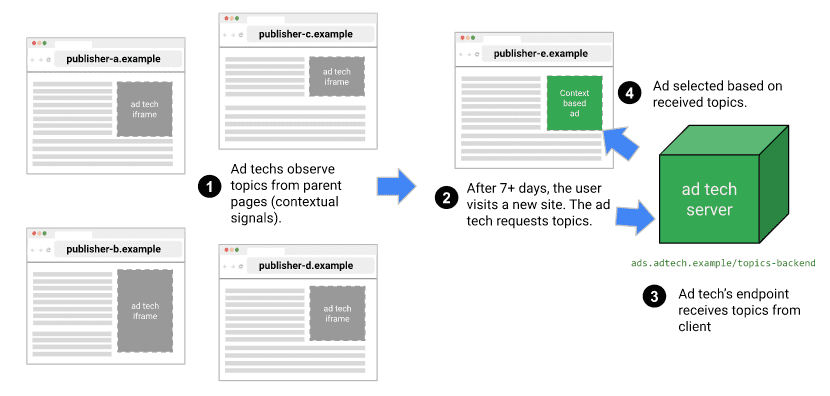
چرخه عمر Topics API سه مرحله اصلی دارد:
- فعالیت کاربر را مشاهده کنید ، مانند زمانی که آنها از صفحه وب
https://cats.example/tabby/index.htmlبازدید می کنند یا برنامهcatsرا دانلود می کنند. - موضوعات را از فعالیت کاربر استخراج کنید ، به عنوان مثال
/Pets & Animals/Pets/Cats. - به موضوعاتی که قبلاً برای کاربر مشاهده شده است دسترسی داشته باشید ، به عنوان مثال به عنوان سیگنالی برای انتخاب تبلیغات مرتبط (مانند تبلیغ غذای گربه).
موضوعات را رعایت کنید
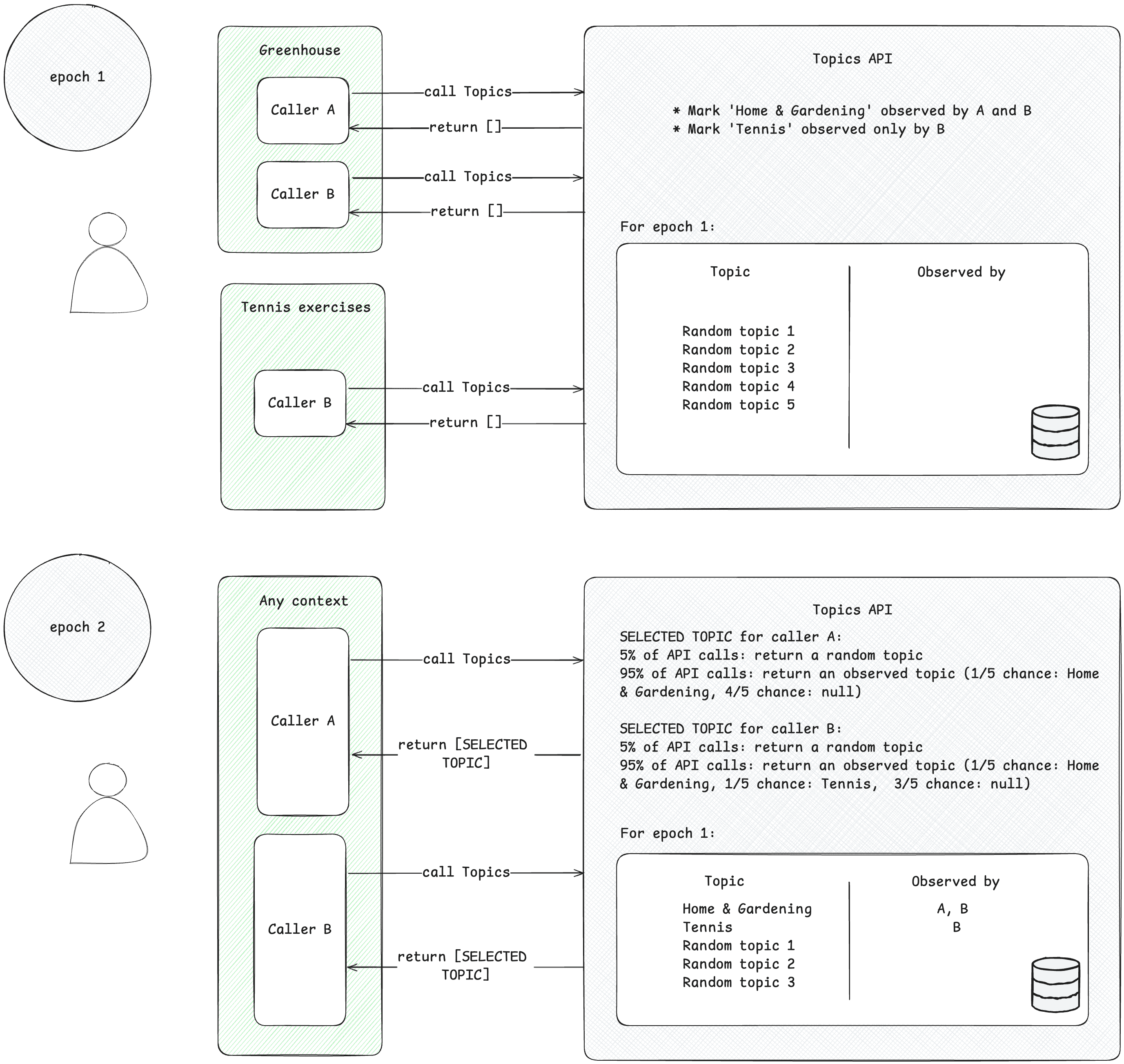
تماس گیرندگان فقط می توانند به موضوعات مورد علاقه ای که مشاهده کرده اند دسترسی داشته باشند. زمانی که تماس گیرنده از یک زمینه مرتبط با این موضوع درخواست Topics API می دهد، موضوعی را مشاهده می کند. برای نشان دادن این مفهوم، به مثال ساده زیر توجه کنید.
- فرض کنید دو تماس گیرنده Topics API وجود دارد: A و B.
- دو زمینه وجود دارد:
- Greenhouse ، برای مثال برنامه ای به نام Greenhouse یا وب سایت greenhouse.example که با موضوع
Home & Gardenمرتبط است. - تمرینات تنیس ، به عنوان مثال یک برنامه با نام Tennis Exercises یا یک وب سایت tennis.example، مرتبط با موضوع
Sports/Tennis.
- Greenhouse ، برای مثال برنامه ای به نام Greenhouse یا وب سایت greenhouse.example که با موضوع
- هر دو تماس گیرنده A و B در زمینه گلخانه حضور دارند.
- فقط تماس گیرنده B در زمینه تمرینات تنیس حضور دارد.
- فرض کنید که هیچ موضوعی برای کاربر قبل از دوره 1 مشاهده نشده است، به خاطر ساده سازی.
- کاربر از برنامه Greenhouse بازدید می کند و تماس گیرندگان A و B برای ضبط بازدید کاربر از صفحه یا برنامه یک تماس API Topics برقرار می کنند (برای اطلاع از نحوه فراخوانی Topics API به راهنمای پیاده سازی پیشنهاد شده در مراحل بعدی مراجعه کنید). این رکورد (نام میزبان یا داده های برنامه) بعداً برای استخراج موضوعات مورد علاقه استفاده می شود. Topics API بعداً موضوع
Home & Gardenرا همانطور که توسط تماس گیرندگان A و B مشاهده شده است علامت گذاری می کند. - کاربر از برنامه تمرینات تنیس بازدید می کند. فقط تماس گیرنده B یک درخواست Topics API ارسال می کند. Topics API بعداً موضوع
Sports/Tennisرا همانطور که توسط تماس گیرنده B مشاهده می شود علامت گذاری می کند. - در پایان دوره ، Topics API موضوعات اصلی کاربر را تازه می کند و تماس گیرندگانی را که این موضوعات را مشاهده کرده اند بر اساس فعالیت کاربر تعیین می کند.
- بعداً، هنگامی که تماسگیرنده B تماس دیگری با Topics API برقرار میکند، میتواند برای این کاربر در آرایه پاسخ، موضوع
Home & GardenیاSports/Tennis(یا با احتمال 5 درصد، موضوع تصادفی) را دریافت کند. - تماس گیرنده A فقط می تواند به موضوع
Home & Gardenدسترسی داشته باشد، زیرا هرگز موضوعSports/Tennisرا مشاهده نکرده است. این بدان معنی است که شخص ثالث فقط در مورد موضوع مورد علاقه کاربر در زمینه خاص (برنامه یا وب سایت) که در آن حضور دارد، یاد می گیرد.
موضوعات را استخراج کنید
موضوع ها موضوعات مورد علاقه را از فعالیت کاربر به دست می آورند. موضوعات از یک طبقه بندی منبع باز از پیش تعریف شده انتخاب شده اند. یک بار در هر دوره ، موضوعات پنج موضوع برتر کاربر و تماسگیرندگانی را که در طول دوره مشاهده کردهاند، تازه میکند. مدل طبقهبندیکننده Topics موضوعاتی را از فعالیت کاربر استخراج میکند: نام میزبان برای بازدید از صفحه وب، اطلاعات برنامه در Android.
تماس گیرنده به موضوعات مورد علاقه کاربر دسترسی دارد
API فقط موضوعاتی را برمی گرداند که در سه دوره اخیر توسط تماس گیرنده مشاهده شده است. حداکثر سه موضوع ممکن است به یک تماس گیرنده برگردانده شود، یک موضوع برای هر یک از سه دوره اخیر (اگر تماس گیرنده موضوعات مربوط به آن دوره را مشاهده کرده باشد). عناوین برگشتی می توانند توسط تماس گیرنده برای تکمیل هرگونه اطلاعات متنی استفاده شوند و می توانند برای کمک به یافتن آگهی مرتبط تر برای کاربر با هم ترکیب شوند.
دوره ها
Topics API باید اطمینان حاصل کند که موضوعات مورد علاقه ای که ارائه می دهد به روز نگه داشته می شوند. موضوعات برای یک کاربر بر اساس فعالیت آنها در یک دوره زمانی که به عنوان یک دوره شناخته می شود، به طور پیش فرض یک هفته استنباط می شود. هر کاربر دوره های مخصوص به خود را دارد (دوران "به ازای هر کاربر" است) و زمان شروع اولیه تصادفی است.
در هر دوره، Topics API پنج موضوع اصلی کاربر را محاسبه میکند و تعیین میکند که کدام تماسگیرندگان آن موضوعات را با استفاده از اطلاعات روی دستگاه مشاهده کردهاند. موضوع انتخاب شده برای هر دوره به طور تصادفی از پنج موضوع برتر کاربر برای آن دوره انتخاب می شود. برای افزایش بیشتر حریم خصوصی و اطمینان از اینکه همه موضوعات ممکن است نمایش داده شوند، به احتمال 5٪ موضوع به طور تصادفی از همه موضوعات ممکن در طبقه بندی علایق انتخاب شود.
مباحث کاربردی در وب
در وب، موضوعات از نام میزبان صفحاتی که کاربر بازدید میکند استنباط میشوند. برای مثال، موضوع استنباط شده برای وبسایت dogs.example میتواند /Pets & Animals/Pets/Dogs باشد.
نمودار زیر یک مثال سادهشده را نشان میدهد که نشان میدهد چگونه API موضوعات میتواند به یک پلتفرم فناوری تبلیغات در انتخاب یک تبلیغ مناسب کمک کند. این مثال فرض میکند که مرورگر کاربر از قبل مدلی برای نگاشت نام میزبان وبسایت به موضوعات دارد.
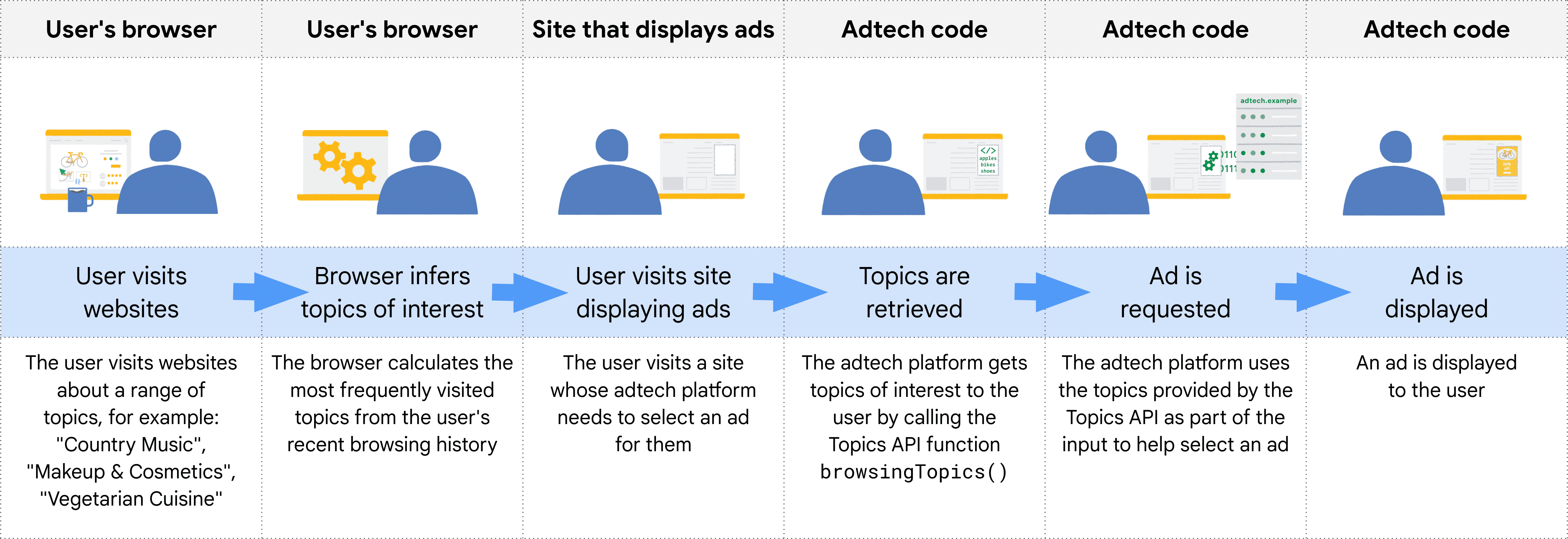
مرورگر، مبدا فراخوانیکننده را از متن کدی که API مربوط به Topics را فراخوانی میکند، تشخیص میدهد. در عمل، این بدان معناست که کاربران Topics، API را در یک iframe از مبدا خود فراخوانی میکنند یا تاپیکها را در یک واکشی به مبدا خود قرار میدهند.
برای مثال، یک پلتفرم سمت عرضه (SSP) میتواند در سایتهای چندین ناشر تعبیه شود. سپس SSP میتواند API موضوعات را در یک iframe از مبدا خود فراخوانی کند و به آن اجازه دهد موضوعات مرتبط با یک کاربر را در سایتهای آن ناشر مشاهده کند. سپس این موضوعات میتوانند با یک پلتفرم سمت تقاضا (DSP) به اشتراک گذاشته شوند تا به آن در انتخاب یک تبلیغ مرتبط برای کاربر کمک کنند.
چگونه API تصمیم میگیرد که کدام تماسگیرندهها کدام تاپیکها را ببینند
فراخوانندگان API فقط موضوعاتی را دریافت میکنند که اخیراً مشاهده کردهاند، و موضوعات برای یک کاربر هر بار در هر دوره (epoch) بهروزرسانی میشوند: یک دوره زمانی که در پیادهسازی کروم روی یک هفته تنظیم شده است. این بدان معناست که API یک پنجره غلتان فراهم میکند که در آن یک فراخواننده معین میتواند موضوعات مشاهده شده را دریافت کند.
جدول زیر مثالی (هرچند به طور غیرواقعی کوچک) از تاریخچه مرور فرضی یک کاربر در طول یک دوره زمانی واحد را نشان میدهد که موضوعات مرتبط با سایتهایی که بازدید کردهاند و فراخوانهای API موجود در هر سایت (موجودیتهایی که document.browsingTopics() را در کد جاوا اسکریپت موجود در سایت فراخوانی میکنند) را نشان میدهد.
| سایت | مباحث | تماسگیرندگان API در محل |
|---|---|---|
| مثال در حال اجرا | Running & WalkingAthletic Shoes | مثال adtech1 مثال adtech2 |
| سگها.مثال | Dogs | مثال adtech1 |
| مثال تعطیلات | Hotels & Accommodations | مثال adtech2 |
| عینک آفتابی.مثال | Sunglasses | [هیچکدام] |
در پایان دوره (به طور پیشفرض یک هفته)، API موضوعات، موضوعات برتر مرورگر را برای آن هفته تولید میکند.
- adtech1.example اکنون واجد شرایط دریافت موضوعات
Running & Walking،Athletic ShoesوDogsاست، زیرا آنها را در running.example و همچنین dogs.example مشاهده کرده است. - adtech1.example واجد شرایط دریافت موضوع
Hotels & Accommodationsبرای این کاربر نیست، زیرا در هیچ سایتی که کاربر اخیراً بازدید کرده و با آن موضوع مرتبط باشد، وجود ندارد. - adtech2.example موضوعات
Running & Walking،Athletic ShoesوHotels & Accommodationsرا دیده است، اما موضوعDogsرا ندیده است.
کاربر از سایت sunglasses.example بازدید کرده است که موضوع Sunglasses را دارد، اما هیچ فراخوانی به API موضوعات در آن سایت انجام نشده است. در حال حاضر، این بدان معناست که موضوع Sunglasses توسط API برای هیچ فراخوانیکنندهای بازگردانده نمیشود.
در هفته دوم، کاربر از سایت دیگری بازدید میکند:
| سایت | مباحث | تماسگیرندگان API در محل |
|---|---|---|
| دوربینها.مثال | Camera & Photo Equipment | مثال adtech2 |
علاوه بر این، کدی از adtech2.example به sunglasses.example اضافه میشود:
| سایت | مباحث | تماسگیرندگان API در محل |
|---|---|---|
| عینک آفتابی.مثال | Sunglasses | مثال adtech2 |
علاوه بر موضوعات Running & Walking ، Athletic Shoes و Hotels & Accommodations از هفته اول، adtech2.example اکنون میتواند موضوعات Camera & Photo Equipment و Sunglasses را نیز دریافت کند - اما نه تا دوره بعدی، هفته سوم. این تضمین میکند که اشخاص ثالث نمیتوانند اطلاعات بیشتری در مورد گذشته کاربر (در این مورد، علاقه به مد) نسبت به آنچه که با کوکیها میتوانند، کسب کنند.
پس از دو هفته دیگر، اگر کاربر از هیچ سایتی با این موضوعات که شامل کد adtech2.example هستند بازدید نکند، ممکن است موضوعات Running & Walking ، Athletic Shoes و Hotels & Accommodations از فهرست موضوعات واجد شرایط adtech2.example خارج شوند.
مدل طبقهبندیکننده
تاپیکز از یک مدل طبقهبندی استفاده میکند که نامهای میزبان وبسایت را به صفر یا چند تاپیک نگاشت میکند (تجزیه و تحلیل اطلاعات اضافی، مانند URL های کامل یا محتوای صفحه، ممکن است امکان تبلیغات مرتبطتر را فراهم کند، اما میتواند حریم خصوصی را نیز کاهش دهد).
طبقهبندی
موضوعات از یک طبقهبندی انتخاب میشوند. این موضوعات توسط کروم گردآوری شدهاند، با این هدف که طبقهبندی به منبعی تبدیل شود که توسط مشارکتکنندگان مورد اعتماد اکوسیستم نگهداری میشود. طبقهبندی باید به اندازهای کوچک باشد که مرورگرهای بسیاری از کاربران با هر موضوع مرتبط باشند. هدف نهایی این است که طبقهبندی از یک طرف خارجی که بازخوردها و ایدههای سراسر صنعت را در بر میگیرد، تهیه شود.
برای جلوگیری از دستهبندیهای حساس، موضوعات باید عمومی، توسط انسان انتخاب شده و بهروز باشند. طبقهبندی مورد استفاده کروم توسط انسان انتخاب شده است تا دستهبندیهایی که عموماً حساس تلقی میشوند، مانند قومیت یا گرایش جنسی، را حذف کند .
دستهبندی موضوعات
موضوعات به صورت دستی برای ۵۰،۰۰۰ سایت برتر انتخاب میشوند و این فهرست جایگزین انتخاب شده از نامهای میزبان و موضوعات برای آموزش مدل طبقهبندی کننده استفاده میشود. برای سایتهای برتر، موضوعات از فهرست جایگزین به جای استفاده از مدل طبقهبندی کننده قابل دسترسی هستند. میتوانید فهرست جایگزین را به صورت محلی در رایانه خود مشاهده کنید .
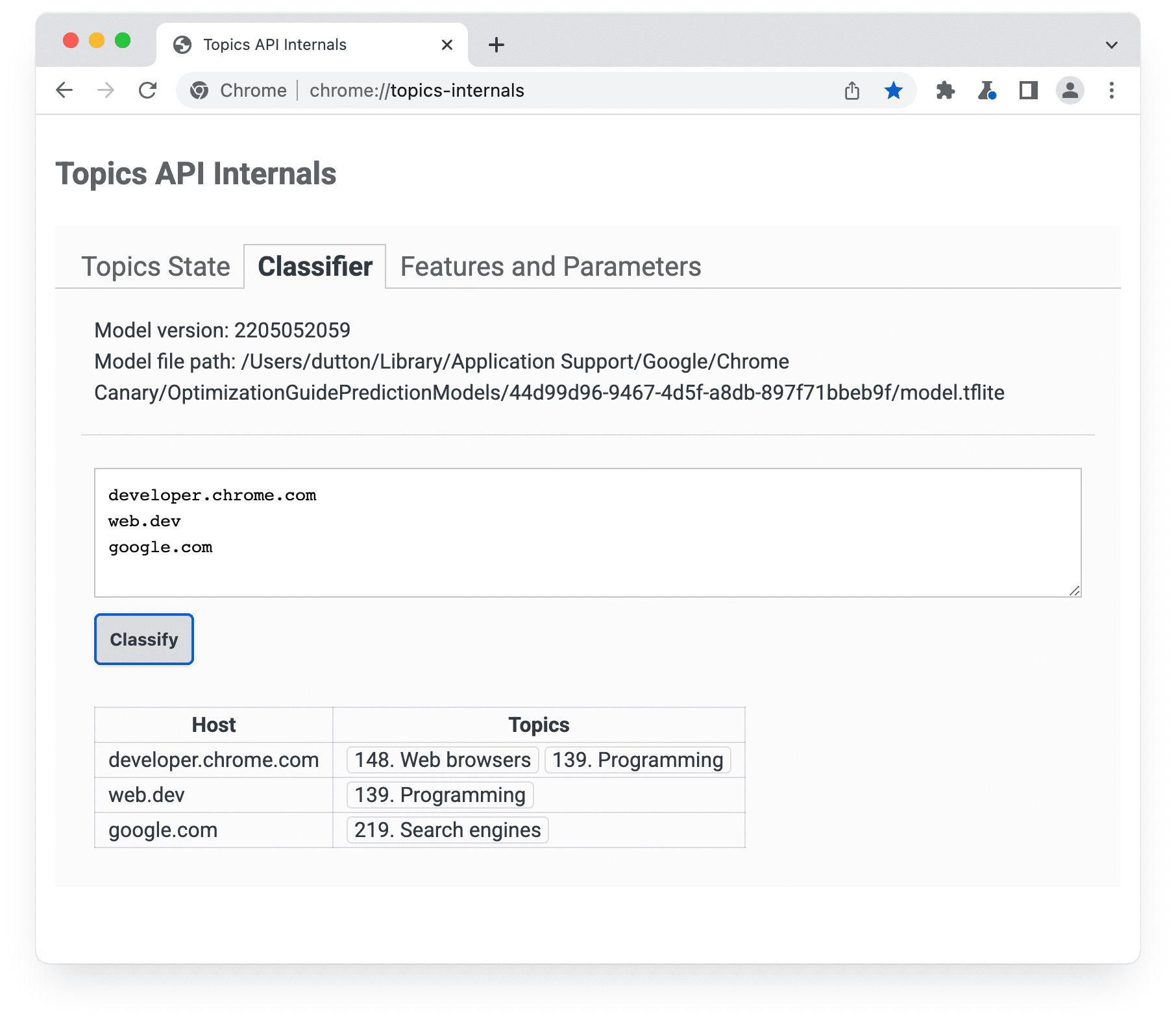
chrome://topics-internals نسخه مدل، مسیر آن و موضوعات مرتبط با هر میزبان فهرستشده را فهرست میکند.پیادهسازی API مربوط به Topics در کروم، یک فایل TensorFlow Lite را دانلود میکند که نشاندهندهی مدل است و بنابراین میتوان آن را به صورت محلی روی دستگاه کاربر استفاده کرد.
نحوه انتخاب پنج موضوع برتر کاربر
این API برای هر دوره (epoch) یک موضوع و حداکثر سه موضوع برمیگرداند. اگر سه موضوع برگردانده شود، این شامل موضوعات دوره فعلی و دو دوره قبلی میشود.
- در پایان هر دوره، مرورگر فهرستی از صفحاتی را که معیارهای زیر را دارند، گردآوری میکند:
- این صفحه در طول دوره توسط کاربر بازدید شده است.
- این صفحه شامل کدی است که
document.browsingTopics()را فراخوانی میکند. - API فعال شده است (برای مثال، توسط کاربر یا توسط هدر پاسخ مسدود نشده است).
- مرورگر، در دستگاه کاربر، از مدل طبقهبندی ارائه شده توسط API موضوعات برای نگاشت نام میزبان هر صفحه به لیستی از موضوعات استفاده میکند.
مرورگر فهرستی از پنج موضوع برتر را تولید میکند.
- هر یک از ۲۲ موضوع ریشه در طبقهبندی، بر اساس بازخورد از اکوسیستم تبلیغات، به یک سطل «کاربرد بالا» یا «کاربرد استاندارد» اختصاص داده میشود. مرورگر ابتدا موضوعات را بر اساس تخصیص سطل آنها مرتب میکند. همه موضوعات زیرمجموعه، تخصیص سطل موضوع ریشه والد خود را به ارث میبرند. موضوعات «کاربرد بالا» اولویتبندی میشوند.
- سپس مرورگر موضوعات را بر اساس فراوانی در هر دسته مرتب میکند.
- پنج موضوع برتر از این لیست مرتبشده، به عنوان موضوعات برتر کاربر برای آن دوره انتخاب میشوند.
سپس متد document.browsingTopics() برای هر دوره، یک موضوع تصادفی از بین پنج موضوع برتر را برمیگرداند، با احتمال ۵٪ که هر یک از این موضوعات به طور تصادفی از طبقهبندی کامل موضوعات انتخاب شوند. در کروم، کاربران همچنین میتوانند موضوعات را به صورت جداگانه حذف کنند یا تاریخچه مرور خود را پاک کنند تا تعداد موضوعات برگردانده شده توسط API کاهش یابد. کاربران همچنین میتوانند از API خارج شوند .
شما میتوانید اطلاعات مربوط به موضوعات مشاهده شده در دوره فعلی را از صفحه chrome://topics-internals مشاهده کنید.
مراحل بعدی

راه اندازی

موضوعات را پیاده سازی کنید
همچنین ببینید
برای درک بهتر Topics API در وب، منابع ما را بررسی کنید.
- دموی موضوعات، ویدیوهای مشارکتی و کلیپ را بررسی کنید.
- فهرست پرچمهای Chrome را ببینید که به توسعهدهندگان اجازه میدهد تا موضوعات API را برای آزمایش سفارشی کنند.
- ببینید کاربران و توسعه دهندگان چگونه می توانند API را کنترل کنند .
- منابع توضیح دهنده فنی و پشتیبانی را بررسی کنید. سوال بپرسید، مشارکت کنید و بازخورد خود را به اشتراک بگذارید.