

本页介绍了 Topics API 调用方观察和访问主题的实现细节。在开始实施解决方案之前,请确保浏览器已正确设置。如需详细了解来电者如何查看和访问用户的主题,请参阅概览部分。
查看和访问主题
您可以通过两种方式观察和访问用户感兴趣的主题:HTTP 标头和 JavaScript API。
HTTP 标头
建议使用 HTTP 标头来观察和访问用户主题。 与使用 JavaScript API 相比,这种方法可大幅提升性能。 对于 HTTP 标头,请求的网址会提供可注册的域名,该域名会记录为调用方网域。这是被视为已观察到用户主题的网域。
发起请求
您可以通过以下两种方式使用带标题的主题:
- 通过访问包含
browsingTopics: true选项的fetch()请求中的请求和响应标头。 - 通过访问包含
browsingtopics属性的 iframe 元素的标头。
使用 fetch 发起请求
使用 fetch 时,API 调用方会发出在 options 参数中包含 {browsingTopics: true} 的请求。提取请求的网址参数的来源是观察到主题的来源。
   fetch('<topics_caller_eTLD+1>', { browsingTopics: true })
    .then((response) => {
        // Process the response
    });
使用 iframe 发起请求
将 browsingtopics 属性添加到 <iframe> 元素中。浏览器将在 iframe 的请求中包含 Sec-Browsing-Topics 标头,并将 iframe 的来源作为调用方。
<iframe src="https://adtech.example" browsingtopics></iframe>
解读请求标头值
对于这两种方法(fetch 和 iframe),在服务器上都可以通过 Sec-Browsing-Topics 请求标头检索到用户感兴趣的主题。Topics API 将在 fetch() 或 iframe 请求中自动在标头中添加用户主题。如果 API 返回一个或多个主题,则向观察到这些主题的来源发出的提取请求将包含如下所示的 Sec-Browsing-Topics 标头:
(325);v=chrome.1:1:1, ();p=P000000000
如果 API 未返回任何主题,则标头如下所示:
();p=P0000000000000000000000000000000
系统会跟踪重定向,并且重定向请求中发送的主题将特定于重定向网址。
Sec-Browsing-Topics 标头值会进行填充,以降低攻击者根据标头长度了解调用方作用域内主题数量的风险。
处理服务器端响应
如果对请求的响应包含 Observe-Browsing-Topics: ?1 标头,则表示浏览器应将随附请求中的主题标记为已观测,并将当前网页访问纳入到用户下一个周期主题计算中。在服务器端代码中,将 Observe-Browsing-Topics: ?1 标头添加到响应中:
res.setHeader('Observe-Browsing-Topics', '?1');
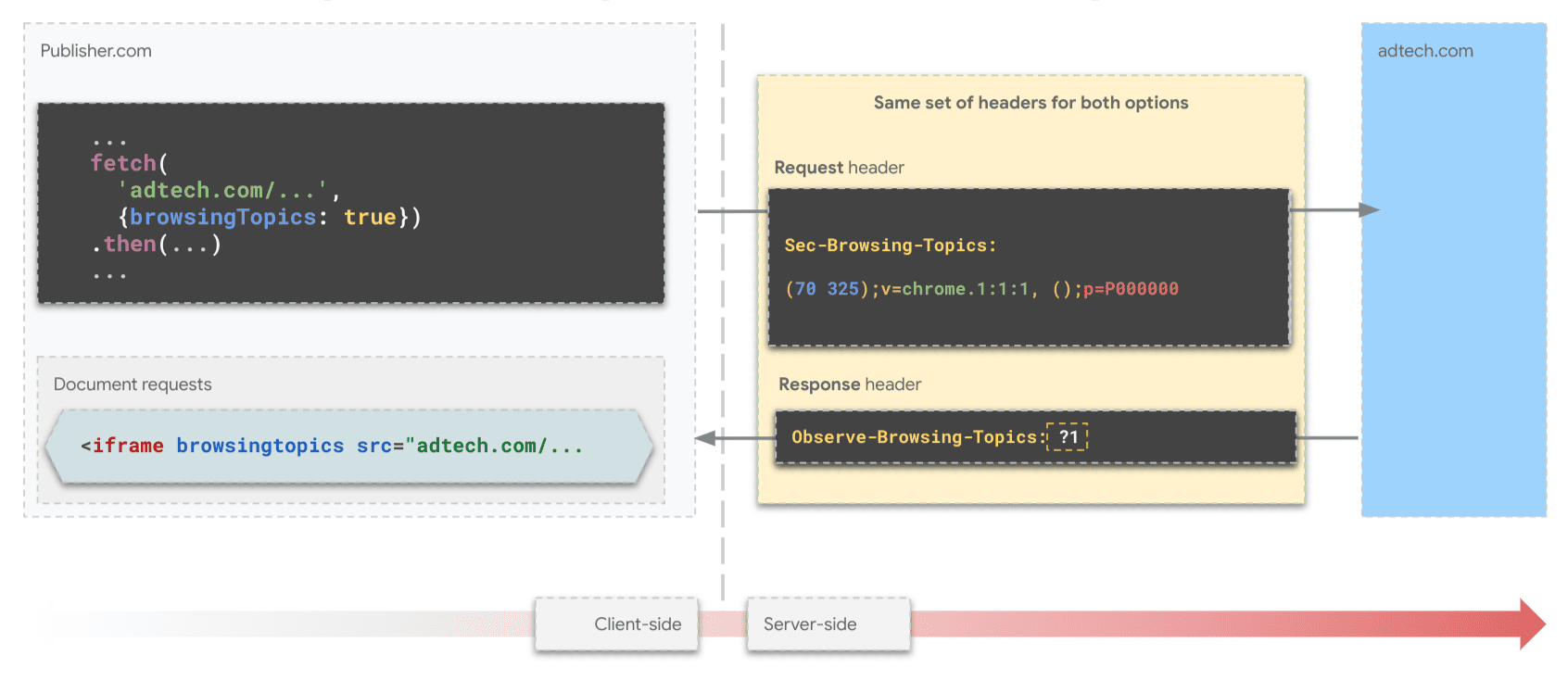
fetch() 的标头。与合作伙伴分享观测到的主题
由于 SSP 仅在发布商端存在,因此 DSP 可能希望与合作伙伴 SSP 分享其在广告客户网站上观察到的主题。为此,他们可以从广告客户的顶级上下文中向 SSP 发出包含主题标头的 fetch() 请求。
const response = await fetch("partner-ssp.example", {
 browsingTopics: true
});
使用 JavaScript 观察和访问 Topics
Topics JavaScript API 方法 document.browsingTopics() 提供了一种在浏览器环境中观察和检索用户感兴趣的主题的方法:
- 记录观察结果:告知浏览器调用方已观察到用户访问当前网页。此观测结果有助于在未来的周期中为调用方计算用户的主题。
- 访问 Topics:检索调用方之前观察到的用户感兴趣的主题。该方法会按随机顺序返回一个最多包含三个主题对象的数组,最近的三个周期中的每个周期各对应一个主题。
我们建议您派生 Topics JavaScript API 演示,并将其用作代码的起点。
API 可用性
在使用该 API 之前,请确保它受支持且可用:
 if ('browsingTopics' in document && document.featurePolicy.allowsFeature('browsing-topics')) {
    console.log('document.browsingTopics() is supported on this page');
 } else {
    console.log('document.browsingTopics() is not supported on this page');
 }
嵌入 iframe
必须使用跨源 iframe 进行调用,因为 API 的调用上下文用于确保浏览器返回适合调用方的主题。在 HTML 中添加 <iframe> 元素:
<iframe src="https://example.com" browsingtopics></iframe>
您还可以使用 JavaScript 动态创建 iframe:
 const iframe = document.createElement('iframe');
 iframe.setAttribute('src', 'https://adtech.example/');
 document.body.appendChild(iframe);
从 iframe 内调用 API
 try {
   // Get the array of top topics for this user.
   const topics = await document.browsingTopics();

   // Request an ad creative, providing topics information.
   const response = await fetch('https://ads.example/get-creative', {
   method: 'POST',
   headers: {
    'Content-Type': 'application/json',
   },
   body: JSON.stringify(topics)
   })

   // Get the JSON from the response.
   const creative = await response.json();

   // Display ad.

 } catch (error) {
   // Handle error.
 }
默认情况下,document.browsingTopics() 方法还会导致浏览器记录调用方观察到的当前网页访问,以便稍后用于主题计算。该方法可以传递一个可选实参,以跳过记录网页访问:{skipObservation:true}。
 // current page won't be included in the calculation of topics:
 const topics = await document.browsingTopics({skipObservation:true});
了解回答
系统最多会返回 3 个主题:过去 3 周内,每周返回一个或零个主题,具体取决于是否观测到主题。系统只会返回调用方为当前用户观察到的主题。以下是 API 返回的示例:
 [{
'configVersion': chrome.2,
 'modelVersion': 4,
 'taxonomyVersion': 2,
 'topic': 309,
 'version': chrome.2:2:4
}]
- configVersion:一个字符串,用于标识浏览器的主题算法配置版本。
- modelVersion:一个字符串,用于标识用于推断主题的机器学习分类器。
- taxonomyVersion:一个字符串,用于标识浏览器正在使用的一组主题。
- 主题:用于标识分类中主题的数字。
- 版本:一个连接
configVersion、taxonomyVersion和modelVersion的字符串。随着我们采纳生态系统反馈并对该 API 反复改进,本指南中所述的参数和该 API 的详细信息(例如分类大小、每周计算的主题数以及每次调用返回的主题数)随时可能会发生变化。
如需了解预期会收到哪种响应,以及如何使用主题作为额外信号来投放更相关的广告,请参阅测试和正式发布页面。
后续步骤


另请参阅
请查看我们的资源,以便更好地了解 Web 版 Topics API。
- 观看 Topics 的演示、协作和演示视频。
- 请参阅 Chrome 标志列表,这些标志可让开发者自定义 Topics API 以进行测试。
- 了解用户和开发者如何控制该 API。
- 查看相关资源,获取技术解说和支持。提问、互动和分享反馈。