

使用 Select URL API 搭配 Shared Storage,即可決定使用者在各個網站上看到的廣告素材。
廣告主或內容製作人可能會想對廣告活動套用不同的內容輪播策略,並輪播內容或廣告素材來提高成效。您可以使用 Select URL API,在不同網站上執行不同的輪播策略,例如依序輪播和平均分配輪播。
透過「選取網址 API 廣告素材輪播」,您可以儲存廣告素材 ID、觀看次數和使用者互動等資料,決定使用者在不同網站上看到的廣告素材。
如要進一步瞭解基礎 API 和選取方式,請參閱 Select URL API 說明文件。
試用廣告素材輪播
如要試用素材輪播功能,請務必啟用 Select URL API 和 Shared Storage:
- 在
chrome://settings/content/siteData中選取Allow sites to save data on your device或Delete data sites have saved to your device when you close all windows。 - 在
chrome://settings/adPrivacy/sites中選取Site-suggested ads。
如要查看本文程式碼範例的即時版本,請試用我們的共用儲存空間即時示範。
程式碼範例的示範
在這個例子中:
creative-rotation.js是第三方指令碼,用於定義要輪播的內容,以及決定要選取及顯示下一個內容的任何資料,例如本範例中的權重。發布商網頁會執行這項指令碼。這個指令碼會呼叫 Shared Storage Worklet,根據儲存空間中的可用資料和要選取的網址清單,判斷要顯示的內容。creative-rotation-worklet.js是第三方共用的儲存空間 Worklet,可查詢輪播策略、計算下一個要發布的內容,並傳回該內容。
示範運作方式
- 使用者造訪發布商網頁時,網頁會載入第三方的
creative-rotation.js指令碼。輪播廣告素材指令碼負責載入及執行共用儲存空間工作單元。指令碼會提供網址清單,供小程式呼叫選取。 - 在工作單元中,如果共用儲存空間尚未初始化,系統會使用初始廣告素材輪播策略和廣告素材索引初始化儲存空間。本示範中使用的初始輪播策略是依序輪播策略。
- 這個 worklet 會從共用儲存空間讀取輪播模式,並傳回下一個廣告的索引。如果是循序輪播模式,系統也會使用新值更新共用儲存空間中的素材資源索引,以供下次呼叫使用。根據呼叫
selectURL時使用的resolveToConfig值,工作單會傳回FencedFrameConfig或不透明的 URN 物件。 - 廣告素材輪播指令碼會在 Fenced Frame 或 iframe 中顯示所選廣告。如要瞭解回傳型別的詳細資料,請參閱算繪廣告文件。
- 使用者變更輪播模式時,共用儲存空間小程式會更新共用儲存空間中儲存的廣告素材輪播模式值。
- 重新載入發布商頁面時,系統會重複步驟 1 至 4,根據所選輪播策略,選取要顯示的下一個廣告
程式碼範例
以下是 creative-rotation.js 和 creative-rotation-worklet.js 的程式碼範例。
const contentProducerUrl = 'https://your-server.example';

// Ad config with the URL of the ad, a probability weight for rotation, and the clickthrough rate.
const DEMO_AD_CONFIG = [
  {
    url: `${contentProducerUrl}/ads/ad-1.html`,
    weight: 0.7,
  },
  {
    url: `${contentProducerUrl}/ads/ad-2.html`,
    weight: 0.2,
  },
  {
    url: `${contentProducerUrl}/ads/ad-3.html`,
    weight: 0.1,
  },
];

async function setRotationMode(rotationMode) {
  // Load the worklet module
  const creativeRotationWorklet = await window.sharedStorage.createWorklet(
    `${contentProducerUrl}/url-selection/creative-rotation-worklet.js`,
    { dataOrigin: 'script-origin' }
  );

  await creativeRotationWorklet.run('set-rotation-mode', {
    data: { rotationMode }
  });
  console.log(`creative rotation mode set to ${rotationMode}`);
}

async function injectAd() {
  // Load the worklet module
  const creativeRotationWorklet = await window.sharedStorage.createWorklet(
    `${contentProducerUrl}/url-selection/creative-rotation-worklet.js`,
    { dataOrigin: 'script-origin' }
  );

  const urls = DEMO_AD_CONFIG.map(({ url }) => ({ url }));

  // Resolve the selectURL call to a fenced frame config only when it exists on the page
  const resolveToConfig = typeof window.FencedFrameConfig !== 'undefined';

  // Run the URL selection operation to determine the next ad that should be rendered
  const selectedUrl = await creativeRotationWorklet.selectURL('creative-rotation', urls, {
    data: DEMO_AD_CONFIG,
    resolveToConfig
  });

  const adSlot = document.getElementById('ad-slot');

  if (resolveToConfig && selectedUrl instanceof FencedFrameConfig) {
    adSlot.config = selectedUrl;
  } else {
    adSlot.src = selectedUrl;
  }
}

injectAd();
class SelectURLOperation {
  async run(urls, data) {
    // Initially set the storage to sequential mode for the demo
    await SelectURLOperation.seedStorage();

    // Read the rotation mode from Shared Storage
    const rotationMode = await sharedStorage.get('creative-rotation-mode');

    // Generate a random number to be used for rotation
    const randomNumber = Math.random();

    let index;

    switch (rotationMode) {
      /**
       * Sequential rotation
       * - Rotates the creatives in order
       * - Example: A -> B -> C -> A ...
       */
      case 'sequential':
        const currentIndex = await sharedStorage.get('creative-rotation-index');
        index = parseInt(currentIndex, 10);
        const nextIndex = (index + 1) % urls.length;

        console.log(`index = ${index} / next index = ${nextIndex}`);

        await sharedStorage.set('creative-rotation-index', nextIndex.toString());
        break;

      /**
       * Evenly-distributed rotation
       * - Rotates the creatives with equal probability
       * - Example: A=33% / B=33% / C=33%
       */
      case 'even-distribution':
        index = Math.floor(randomNumber * urls.length);
        break;

      /**
       * Weighted rotation
       * - Rotates the creatives with weighted probability
       * - Example: A=70% / B=20% / C=10%
       */
      case 'weighted-distribution':
        console.log('data = ', JSON.stringify(data));
        // Find the first URL where the cumnulative sum of the weights
        // exceed the random number. The array is sorted by the weight
        // in descending order.
        let weightSum = 0;
        const { url } = data
          .sort((a, b) => b.weight - a.weight)
          .find(({ weight }) => {
            weightSum += weight;
            return weightSum > randomNumber;
          });

        index = urls.indexOf(url);
        break;

      default:
        index = 0;
    }

    console.log(JSON.stringify({ index, randomNumber, rotationMode }));
    return index;
  }

  // Set the mode to sequential and set the starting index to 0.
  static async seedStorage() {
    await sharedStorage.set('creative-rotation-mode', 'sequential', {
      ignoreIfPresent: true,
    });

    await sharedStorage.set('creative-rotation-index', 0, {
      ignoreIfPresent: true,
    });
  }
}

class SetRotationModeOperation {
  async run({ rotationMode }) {
    await sharedStorage.set('creative-rotation-mode', rotationMode);
  }
}

// Register the operation as 'creative-rotation'
register('creative-rotation', SelectURLOperation);
register('set-rotation-mode', SetRotationModeOperation);
附螢幕截圖的逐步說明
如要使用 Select URL API 和共用儲存空間存取廣告素材輪播功能,請前往 https://shared-storage-demo.web.app/。選擇「廣告素材輪播」示範。
選擇以「發布商 A」身分探索試用版。系統會將您重新導向至 https://shared-storage-demo-publisher-a.web.app/creative-rotation。網頁會根據儲存在 Shared Storage 中的廣告素材輪播資料載入編號內容,並透過 Select URL API 存取這些資料。廣告素材輪播的示範模式包括依序輪播、平均分配和加權分配。工作單會執行邏輯,選取要在 iframe 中顯示的內容。下圖顯示發布者頁面。
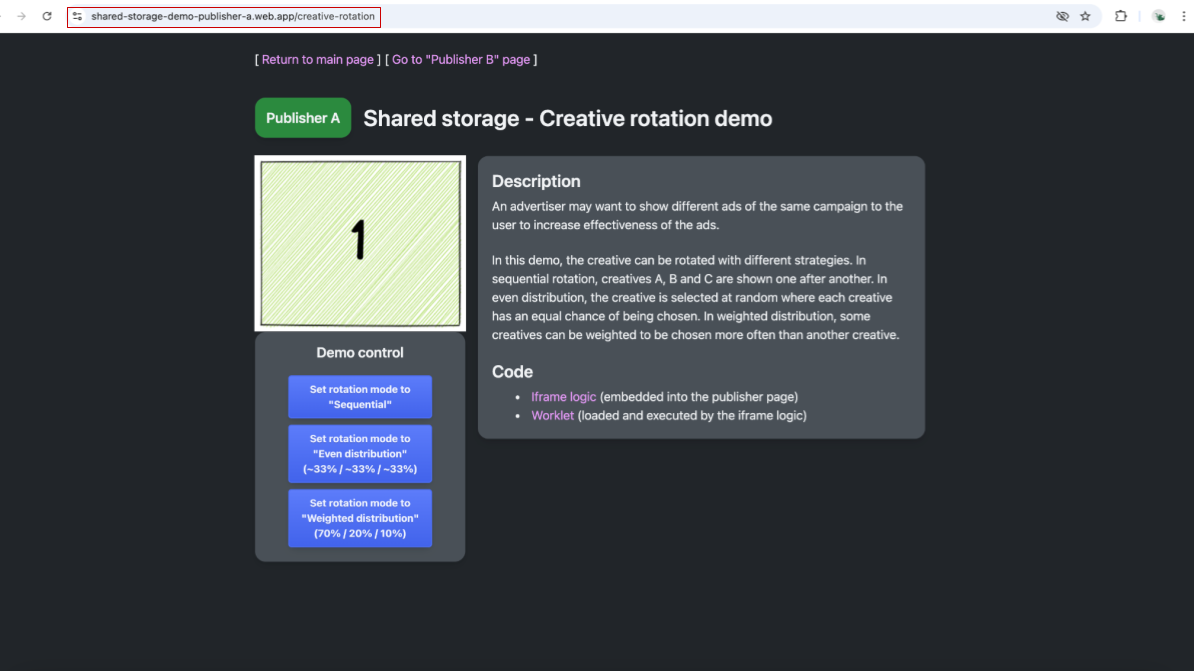
螢幕截圖:顯示「發布商 A」頁面,圖片中標示數字 1,並顯示可選擇廣告素材輪播策略的控制選項。 如要查看 Shared Storage 中儲存的內容,請前往 Chrome 開發人員工具中的「Application」->「Shared Storage」。系統會為共用儲存空間建立兩個項目。「https://shared-storage-demo-publisher-a.web.app」來源可使用空白儲存空間。https://shared-storage-demo-publisher-a.web.app這會包含該來源專屬的儲存空間,由於發布商不需要寫入共用儲存空間,因此在我們的示範中會保持空白。請注意,稍後在示範中造訪該頁面時,系統會為發布商 B 建立類似的儲存空間。
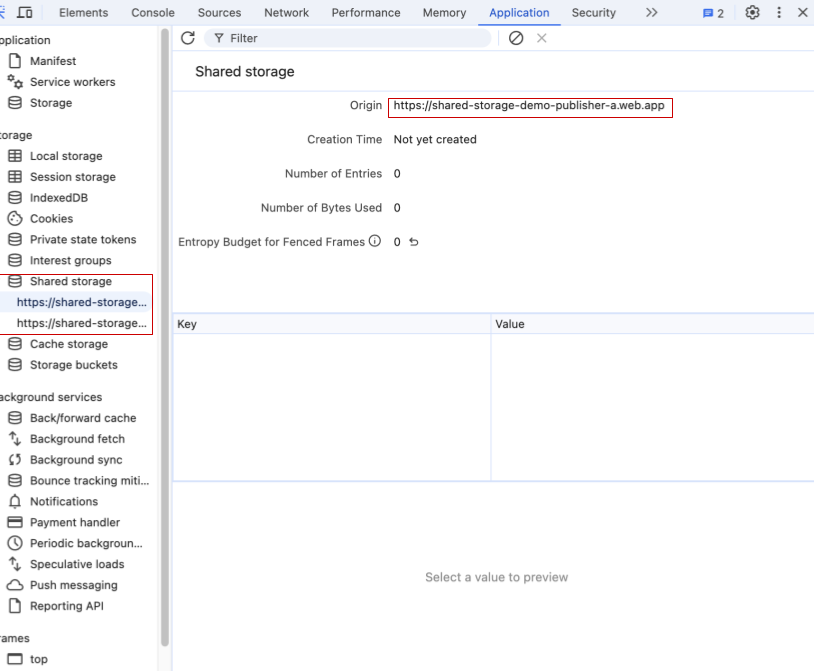
Chrome 開發人員工具顯示發布商 A 的共用儲存空間為空白。 系統會為 https://shared-storage-demo-content-producer.web.app 來源建立另一個 Shared Storage 項目。這是指儲存在發布商網頁中嵌入的第三方 iframe。這個儲存空間會用於在兩個可用的發布商之間共用資料,以協調廣告素材選取作業。這個共用儲存空間會儲存兩個鍵/值組合,用來儲存顯示的素材資源和輪播策略相關資訊。示範中使用的第一個鍵是
creative-rotation-index,其值為循序模式中的目前廣告素材索引。第二個鍵是creative-rotation-mode,用於指定使用的輪替策略。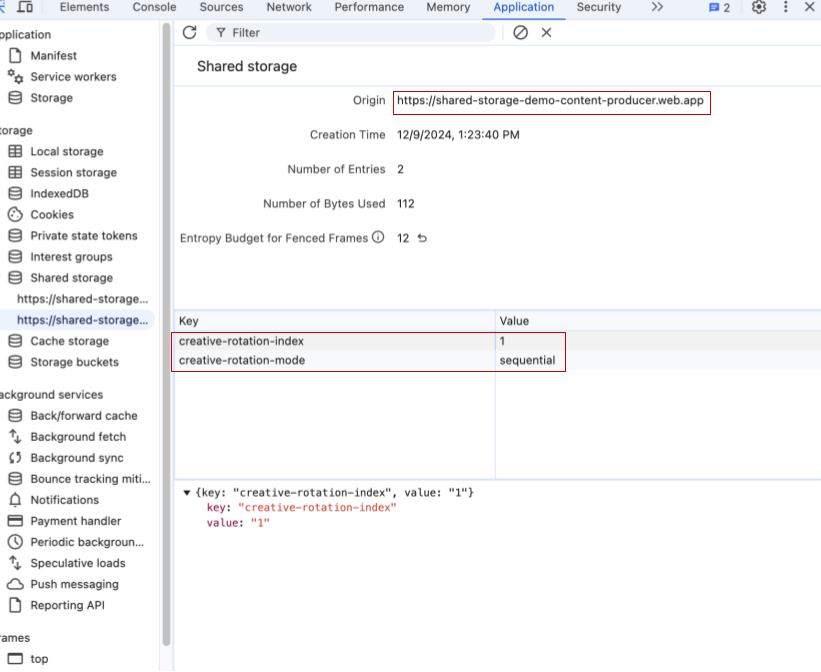
螢幕截圖:Chrome 開發人員工具的共用儲存空間,其中有兩個鍵/值組合:creative-rotation-index: 1 和 creative-rotation-mode:「sequential」。 在依序模式下重新整理頁面,會依序顯示下一個廣告素材 1、2、3、1 等。在依序模式下,系統會根據顯示的廣告素材索引變更索引鍵 creative-rotation-index 的值。
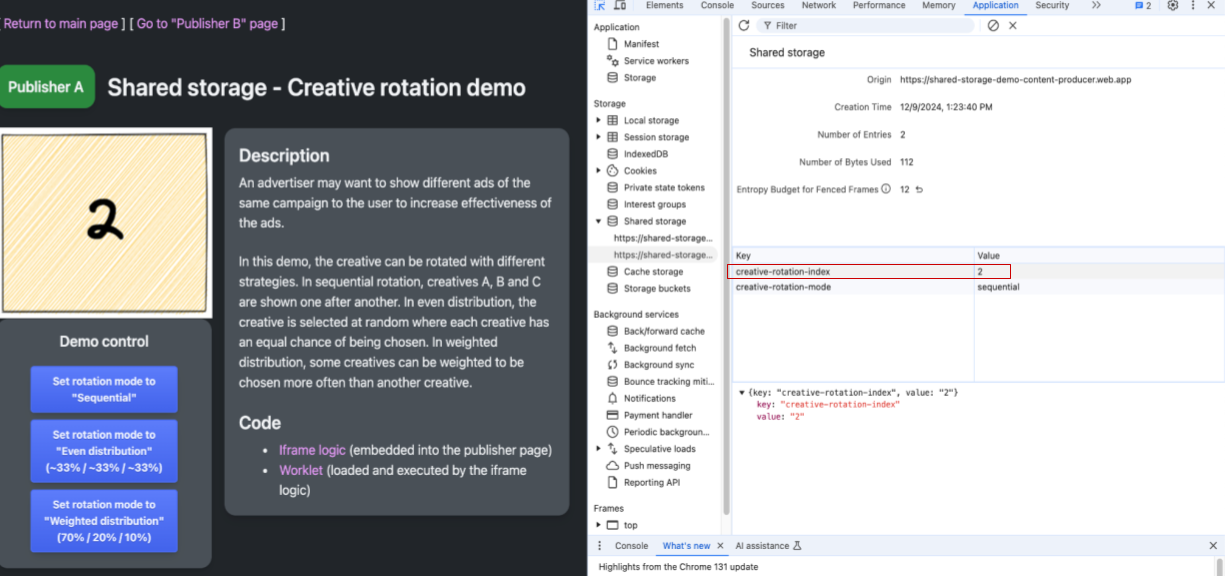
螢幕截圖:顯示發布商 A 的網頁和開發人員工具。顯示的廣告素材為 2,廣告素材輪播模式為依序,廣告素材輪播索引為 2。 使用控制按鈕變更廣告素材輪播模式時,系統會將主要廣告素材輪播模式的值更新為相應策略。工作子程式碼會使用這項資訊,選擇要在 iframe 中顯示的下一個廣告素材。請注意,除了依序輪播模式外,系統不會變更為廣告素材輪播索引儲存的值。
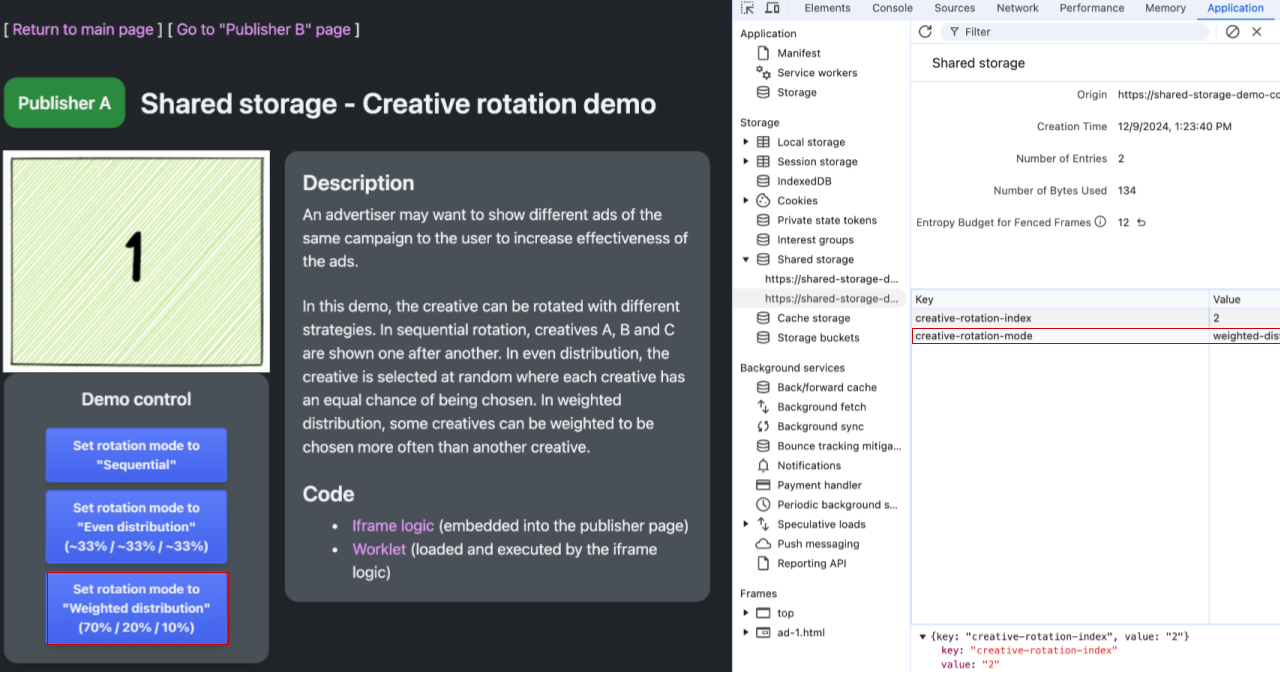
螢幕截圖:顯示發布商 A 的網頁和開發人員工具。顯示的廣告素材為 1,廣告素材輪播模式為加權分配,廣告素材輪播索引為 2 (未使用)。 前往「發布商 B」的頁面:https://shared-storage-demo-publisher-b.web.app/creative-rotation。在依序模式中,造訪「發布商 A」的網址時,顯示的廣告素材應為序列中的下一個廣告素材。檢查內容製作商的共用儲存空間,您會發現「發布商 A」和「發布商 B」共用相同的儲存空間,並使用該處的設定選取要顯示的下一個廣告素材,以及要使用的輪播策略。
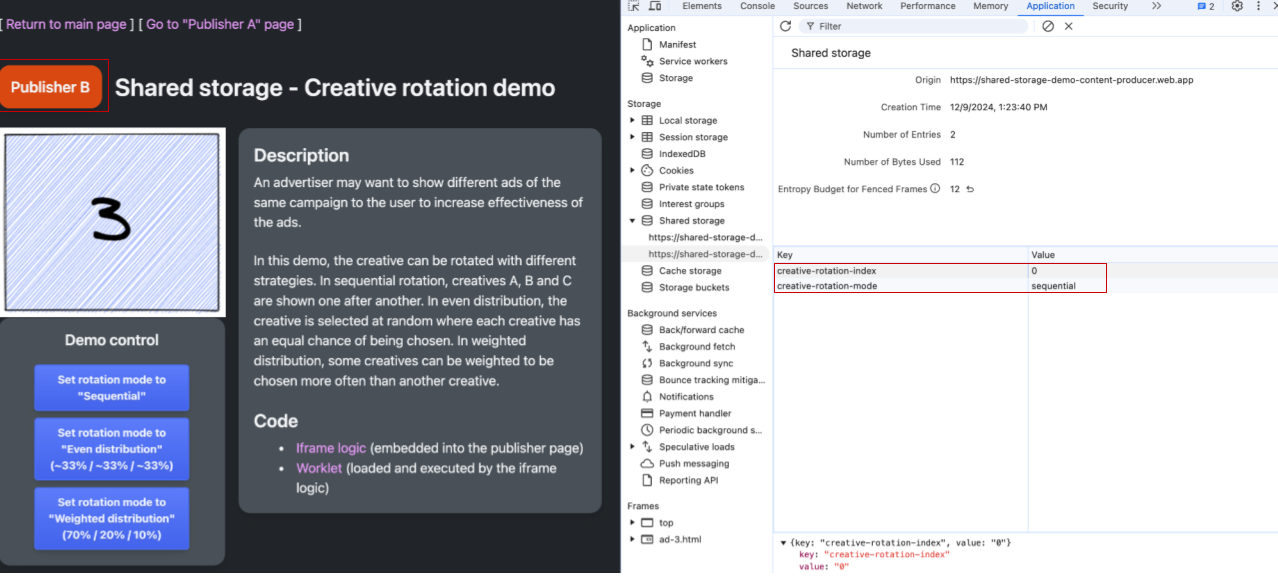
發布商 B 的網頁和開發人員工具。共用儲存空間廣告素材為 3,廣告素材輪播索引為 3,廣告素材輪播模式為依序。 「發布商 B」的 Shared Storage 為空,與「發布商 A」的 Shared Storage 類似。
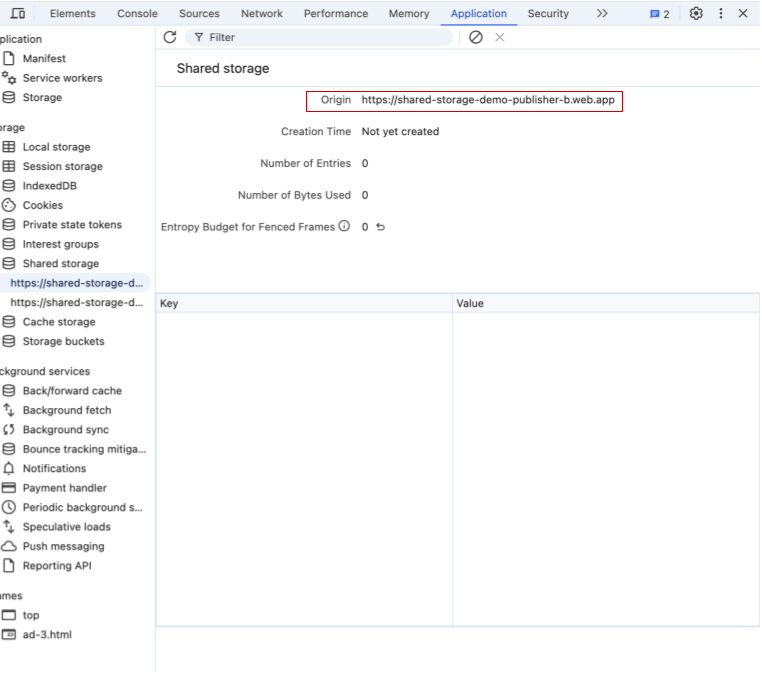
Chrome 開發人員工具顯示發布商 B 來源的空白共用儲存空間。
用途
請參閱本節,瞭解 Select URL API 的所有可用用途。我們會持續新增示例,以回應使用者意見並探索新的測試案例。
- 輪替廣告素材:儲存廣告素材 ID 和使用者互動等資料,以決定使用者在不同網站上看到的廣告素材。
- 依據頻率選取廣告素材:使用觀看次數資料,決定使用者在不同網站上看到的廣告素材。
- 執行 A/B 版本測試:您可以將使用者指派至實驗群組,然後將該群組儲存在共用儲存空間中,以便跨網站存取。
- 為已知客戶提供客製化體驗:根據使用者的註冊狀態或其他使用者狀態,分享自訂內容和行動號召。
參與討論及分享意見
請注意,「選取網址」API 提案目前仍在積極討論和開發中,隨時可能變更。
我們很期待聽到您對 Select URL API 的想法。