

기여 분석 보고 디버깅에 관한 3부작 중 2부입니다. 디버그 보고서를 설정합니다.
용어 설명
- 보고 출처는 Attribution Reporting 소스 및 트리거 헤더를 설정하는 출처입니다.
브라우저에서 생성된 모든 보고서가 이 출처로 전송됩니다. 이 안내에서는
https://adtech.example를 보고 출처의 예로 사용합니다. - 기여도 보고서 (줄여서 보고서)는 요청한 측정 데이터가 포함된 최종 보고서 (이벤트 수준 또는 집계 가능)입니다.
- 디버그 보고서에는 기여도 보고서나 소스 또는 트리거 이벤트에 관한 추가 데이터가 포함됩니다. 디버그 보고서를 수신한다고 해서 반드시 잘못 작동하는 것은 아닙니다. 두 가지 유형의 디버그 보고서
- 전환 디버그 보고서는 쿠키를 생성하여 전송해야 하는 디버그 보고서입니다. 쿠키가 설정되지 않았고 서드 파티 쿠키가 지원 중단된 후에는 전환 디버그 보고서를 사용할 수 없습니다. 이 가이드에 설명된 모든 디버그 보고서는 전환 디버그 보고서입니다.
- 성공 디버그 보고서는 기여도 보고서의 성공적인 생성을 추적합니다. 기여도 보고서와 직접 연결됩니다. 성공 디버그 보고서는 Chrome 101 (2022년 4월)부터 사용할 수 있습니다.
- 상세 디버그 보고서는 누락된 보고서를 추적하고 누락된 이유를 확인하는 데 도움이 됩니다. 브라우저가 소스 또는 트리거 이벤트를 기록하지 않은 경우(즉, 기여도 보고서가 생성되지 않음) 및 어떤 이유로든 기여도 보고서를 생성하거나 전송할 수 없는 경우를 나타냅니다.
상세 디버그 보고서에는 소스 이벤트, 트리거 이벤트 또는 기여 분석 보고서가 생성되지 않은 이유를 설명하는
type필드가 포함됩니다. 상세 디버그 보고서는 Chrome 109(2023년 1월 안정화 버전)부터 사용할 수 있습니다. - 디버그 키는 소스 측과 트리거 측 모두에서 설정할 수 있는 고유 식별자입니다. 디버그 키를 사용하면 쿠키 기반 전환과 기여 분석 기반 전환을 매핑할 수 있습니다. 디버그 보고서를 생성하고 디버그 키를 설정하도록 시스템을 설정하면 브라우저는 모든 기여 분석 보고서와 디버그 보고서에 이러한 디버그 키를 포함합니다.
문서 전반에 사용되는 추가 개념과 핵심 용어는 개인 정보 보호 샌드박스 용어집을 참고하세요.
구현 관련 질문이 있으신가요?
디버그 보고서를 설정하는 중에 문제가 발생하면 개발자 지원 저장소에 문제를 생성하세요. 문제 해결을 도와드리겠습니다.
디버그 보고서 설정 준비
디버그 보고서를 설정하기 전에 다음 단계를 따르세요.
API 통합을 위한 권장사항을 적용했는지 확인
코드가 기능 감지 뒤에 게이트로 설정되어 있는지 확인합니다. API가 Permissions-Policy에 의해 차단되지 않는지 확인하려면 다음 코드를 실행하세요.
if (document.featurePolicy.allowsFeature('attribution-reporting')) {
// the Attribution Reporting API is enabled
}
이 기능 감지 검사에서 true가 반환되면 검사가 실행된 컨텍스트 (페이지)에서 API가 허용됩니다.
(테스트 단계에서는 필요하지 않음: Permissions-Policy를 설정했는지 확인)
기본 통합 문제 해결
디버그 보고서는 대규모 손실을 감지하고 분석하는 데 유용하지만 일부 통합 문제는 로컬에서 감지할 수 있습니다. 소스 및 트리거 헤더 잘못된 구성 문제, JSON 파싱 문제, 보안되지 않은 컨텍스트 (비HTTPS) 및 API가 작동하지 못하도록 하는 기타 문제는 DevTools 문제 탭에 표시됩니다.
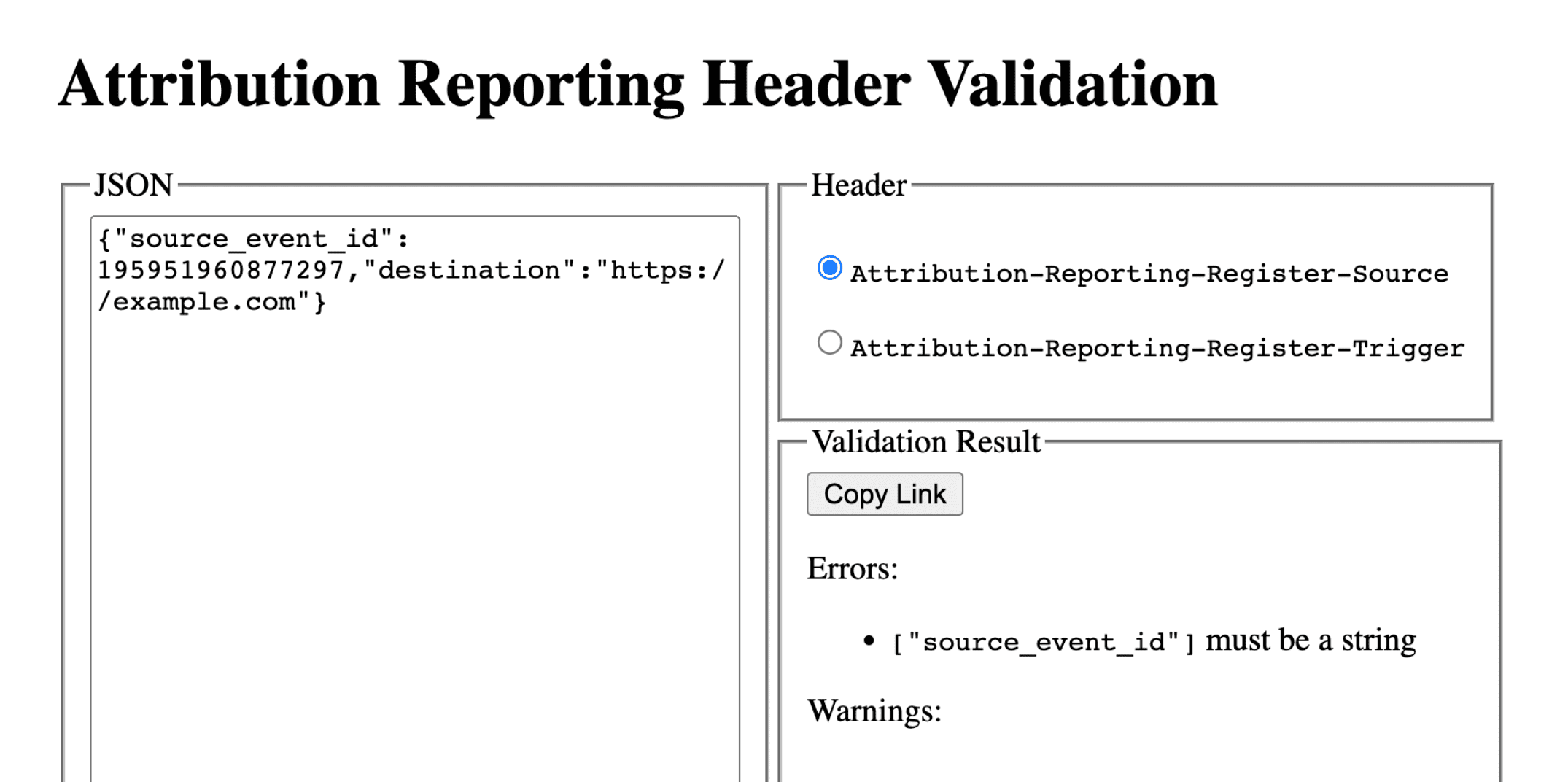
DevTools 문제는 다양한 유형이 있을 수 있습니다. invalid header 문제가 발생하면 헤더를 헤더 유효성 검사 도구에 복사하세요. 이렇게 하면 문제를 일으키는 필드를 식별하고 수정할 수 있습니다.
Attribution Reporting 헤더 검증
헤더 유효성 검사기를 사용하여 Attribution Reporting API와 관련된 헤더를 검증할 수 있습니다. 브라우저에서 발생하는 유효성 검사 오류를 모니터링하여 API 디버깅을 용이하게 할 수 있습니다.
디버깅 보고서를 수신하도록 선택하려면 Attribution-Reporting-Info 응답 헤더의 일부로 report-header-errors를 포함하여 응답합니다.
Attribution-Reporting-Info: report-header-errors
Attribution-Reporting-Info는 사전 구조 헤더Attribution-Reporting-Info이므로 불리언 report-header-errors 키를 제공하면 true 값이 암시됩니다.
디버깅 보고서는 보고 엔드포인트로 즉시 전송됩니다.
https://<reporting origin>/.well-known/attribution-reporting/debug/verbose
보고서 데이터는 다음과 같은 형식을 갖는 객체의 JSON 목록으로 요청 본문에 포함됩니다.
[{
  "type": "header-parsing-error",
  "body": {
    "context_site": "https://source.example",
    "header": "Attribution-Reporting-Register-Source",
    "value": "!!!", // header value received in the response
    "error": "invalid JSON" // optional error details that may vary across browsers or different versions of the same browser
  }
}]
디버그 보고서 설정: 성공 보고서와 상세 보고서에 공통적인 단계
보고 출처에 다음 쿠키를 설정합니다.
Set-Cookie: ar_debug=1; SameSite=None; Secure; Path=/; HttpOnly
브라우저는 소스 및 트리거 등록 모두에서 이 쿠키의 존재를 확인합니다. 성공 디버그 보고서는 두 시점에 모두 쿠키가 있는 경우에만 생성됩니다.
서드 파티 쿠키 지원 중단에 대비한 테스트와 준비를 위해 서드 파티 쿠키가 사용 중지된 모드 B의 브라우저에서는 디버그 보고서를 사용 설정할 수 있습니다. 모드 B의 브라우저에서는 디버그 보고서를 사용 설정하기 위해 디버그 쿠키를 설정하지 않아도 됩니다. 성공 디버그 보고서의 디버그 키를 설정하려면 2단계로 건너뛰세요.
2단계: 디버그 키 설정
각 디버그 키는 base-10 문자열 형식의 64비트 부호 없는 정수여야 합니다. 각 디버그 키를 고유 ID로 만듭니다. 성공 디버그 보고서는 디버그 키가 설정된 경우에만 생성됩니다.
- 소스 측 디버그 키를 디버그에 관련이 있다고 생각되는 추가 소스 시간 정보에 매핑합니다.
- 디버그하는 데 관련이 있다고 생각되는 추가 트리거 시간 정보에 트리거 측 디버그 키를 매핑합니다.
예를 들어 다음과 같은 디버그 키를 설정할 수 있습니다.
- 쿠키 ID + 소스 타임스탬프를 소스 디버그 키로 사용 (쿠키 기반 시스템에서 동일한 타임스탬프 캡처)
- 쿠키 ID + 트리거 타임스탬프를 트리거 디버그 키로 사용 (쿠키 기반 시스템에서 동일한 타임스탬프 캡처)
이를 통해 쿠키 기반 전환 정보를 사용하여 해당 디버그 보고서 또는 기여 분석 보고서를 조회할 수 있습니다. 3부: Cookbook에서 자세히 알아보세요.
소스 측 디버그 키를 source_event_id와 다르게 만들어 동일한 소스 이벤트 ID가 있는 개별 보고서를 구분할 수 있습니다.
Attribution-Reporting-Register-Source:
{
// … Usual fields for Attribution-Reporting-Register-Source
"debug_key":"647775351539539"
}
Attribution-Reporting-Register-Trigger:
{
// … Usual fields for Attribution-Reporting-Register-Trigger
"debug_key":"938321351539743"
}
데모 코드: 소스 디버그 키 데모 코드: 트리거 디버그 키
성공 디버그 보고서 설정
이 섹션의 예시 코드는 이벤트 수준 보고서와 집계 가능한 보고서 모두에 대한 성공 디버그 보고서를 생성합니다. 이벤트 수준 보고서와 집계 가능한 보고서는 동일한 디버그 키를 사용합니다.
3단계: 성공 디버그 보고서를 수집하는 엔드포인트 설정
디버그 보고서를 수집하는 엔드포인트를 설정합니다. 이 엔드포인트는 경로에 debug 문자열이 추가된 기본 기여 분석 엔드포인트와 유사해야 합니다.
- 이벤트 수준 성공 디버그 보고의 엔드포인트:
https://adtech.example/.well-known/attribution-reporting/debug/report-event-attribution- 집계 가능 성공 디버그 보고서의 엔드포인트:
https://adtech.example/.well-known/attribution-reporting/debug/report-aggregate-attribution
- 집계 가능 성공 디버그 보고서의 엔드포인트:
기여 분석이 트리거되면 브라우저는 즉시 이 엔드포인트에 POST 요청을 사용하여 디버그 보고서를 전송합니다. 수신되는 성공 디버그 보고서를 처리하는 서버 코드는 다음과 같을 수 있습니다 (여기서는 노드 엔드포인트에 있음).
// Handle incoming event-Level Success Debug reports
adtech.post(
  '/.well-known/attribution-reporting/debug/report-event-attribution',
  async (req, res) => {
    // Debug report is in req.body
    res.sendStatus(200);
  }
);

// Handle incoming aggregatable Success Debug reports
adtech.post(
  '/.well-known/attribution-reporting/debug/report-aggregate-attribution',
  async (req, res) => {
    // Debug report is in req.body
    res.sendStatus(200);
  }
);
4단계: 설정에서 성공 디버그 보고서가 생성되는지 확인
- 브라우저에서
chrome://attribution-internals을 엽니다. - 이벤트 수준 보고서 탭과 집계 가능한 보고서 탭 모두에서 디버그 보고서 표시 체크박스가 선택되어 있는지 확인합니다.
- 기여 분석 보고를 구현한 사이트를 엽니다. 기여 분석 보고서를 생성하는 데 사용하는 단계를 완료합니다. 동일한 단계로 성공 디버그 보고서가 생성됩니다.
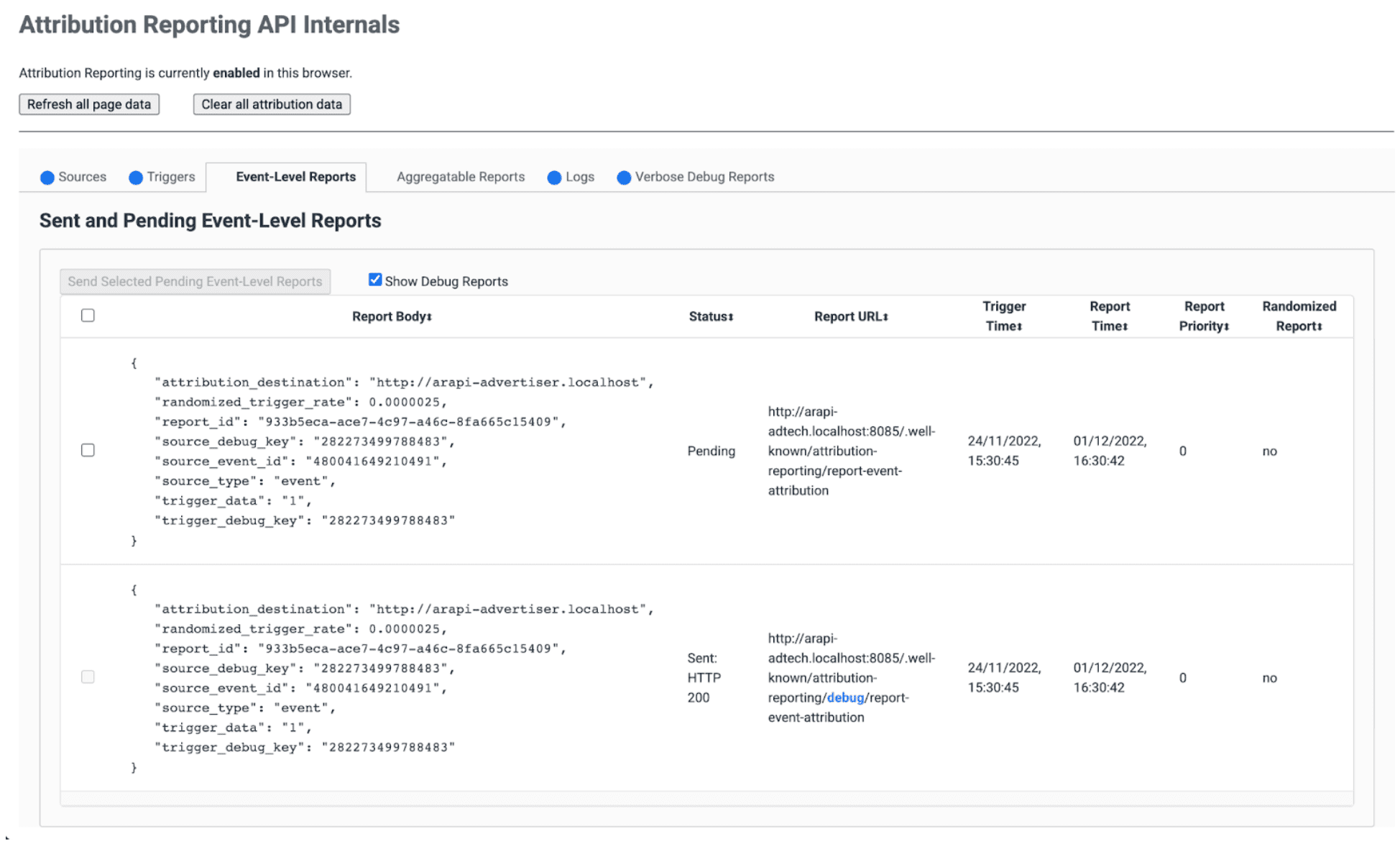
chrome://attribution-internals에서:- 기여 분석 보고서가 올바르게 생성되는지 확인합니다.
- 이벤트 수준 보고서 탭과 집계 가능한 보고서 탭에서 성공 디버그 보고서도 생성되는지 확인합니다. 파란색
debug경로가 있는 목록에서 이를 인식합니다.
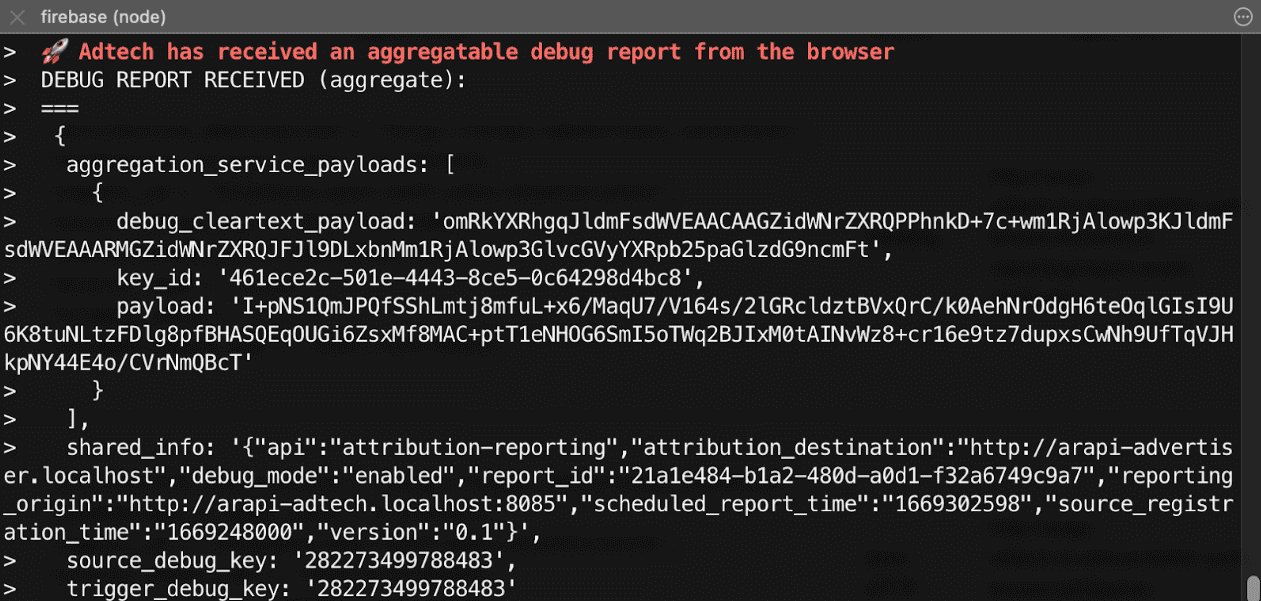
- 서버에서 엔드포인트가 이러한 성공 디버그 보고서를 즉시 수신하는지 확인합니다. 이벤트 수준 및 집계 가능한 성공 디버그 보고서를 모두 확인해야 합니다.
5단계: 성공 디버그 보고서 확인
성공 디버그 보고서는 기여 분석 보고서와 동일하며 소스 측과 트리거 측 디버그 키가 모두 포함됩니다.
{
  "attribution_destination": "https://advertiser.example",
  "randomized_trigger_rate": 0.0000025,
  "report_id": "7d76ef29-d59e-4954-9fff-d97a743b4715",
  "source_debug_key": "647775351539539",
  "source_event_id": "760938763735530",
  "source_type": "event",
  "trigger_data": "0",
  "trigger_debug_key": "156477391437535"
}
{
  "aggregation_service_payloads": [
    {
      "debug_cleartext_payload": "omRkYXRhgqJldmFsdWVEAACAAGZidWNrZXRQPPhnkD+7c+wm1RjAlowp3KJldmFsdWVEAAARMGZidWNrZXRQJFJl9DLxbnMm1RjAlowp3GlvcGVyYXRpb25paGlzdG9ncmFt",
      "key_id": "d5f32b96-abd5-4ee5-ae23-26490d834012",
      "payload": "0s9mYVIuznK4WRV/t7uHKquHPYCpAN9mZHsUGNiYd2G/9cg87Y0IjlmZkEtiJghMT7rmg3GtWVPWTJU5MvtScK3HK3qR2W8CVDmKRAhqqlz1kPZfdGUB4NsXGyVCy2UWapklE/r7pmRDDP48b4sQTyDMFExQGUTE56M/8WFVQ0qkc7UMoLI/uwh2KeIweQCEKTzw"
    }
  ],
  "shared_info": "{\"api\":\"attribution-reporting\",\"attribution_destination\":\"https://advertiser.example\",\"debug_mode\":\"enabled\",\"report_id\":\"4a04f0ff-91e7-4ef6-9fcc-07d000c20495\",\"reporting_origin\":\"https://adtech.example\",\"scheduled_report_time\":\"1669888617\",\"source_registration_time\":\"1669852800\",\"version\":\"0.1\"}",
  "source_debug_key": "647775351539539",
  "trigger_debug_key": "156477391437535"
}
상세 디버그 보고서 설정
3단계: 소스 및 트리거 헤더에서 상세 디버깅 선택
Attribution-Reporting-Register-Source 및 Attribution-Reporting-Register-Trigger 모두에서 debug_reporting을 true로 설정합니다.
Attribution-Reporting-Register-Source:
{
// … Usual fields for Attribution-Reporting-Register-Source
"debug_key":"938321351539743",
"debug_reporting": true // defaults to false if not present
}

Attribution-Reporting-Register-Trigger:
{
// … Usual fields for Attribution-Reporting-Register-Trigger
"debug_key":"938321351539743",
"debug_reporting": true // defaults to false if not present
}
4단계: 자세한 디버그 보고서를 수집하는 엔드포인트 설정
디버그 보고서를 수집하는 엔드포인트를 설정합니다. 이 엔드포인트는 경로에 debug/verbose 문자열이 추가된 기본 기여 분석 엔드포인트와 유사해야 합니다.
https://adtech.example/.well-known/attribution-reporting/debug/verbose
소스 또는 트리거가 등록되지 않은 경우와 같이 상세 디버그 보고서가 생성되면 브라우저가 POST 요청을 사용하여 이 엔드포인트에 상세 디버그 보고서를 즉시 전송합니다. 수신되는 상세 디버그 보고서를 처리하는 서버 코드는 다음과 같을 수 있습니다 (여기서는 노드 엔드포인트).
// Handle incoming verbose debug reports
adtech.post(
  '/.well-known/attribution-reporting/debug/verbose',
  async (req, res) => {
    // List of verbose debug reports is in req.body
    res.sendStatus(200);
  }
);
성공 디버그 보고서와 달리 상세 보고서에는 엔드포인트가 하나만 있습니다. 이벤트 수준 보고서 및 집계 보고서와 관련된 자세한 보고서는 모두 동일한 엔드포인트로 전송됩니다.
5단계: 설정에서 상세 디버그 보고서가 생성되는지 확인
상세 디버그 보고서에는 여러 유형이 있지만 상세 디버그 보고서의 한 유형만으로 상세 디버깅 설정을 확인하면 됩니다. 이 한 가지 유형의 상세 디버그 보고서가 올바르게 생성되고 수신되면 모든 유형의 상세 디버그 보고서도 올바르게 생성되고 수신됩니다. 모든 상세 디버그 보고서는 동일한 구성을 사용하고 동일한 엔드포인트로 전송되기 때문입니다.
- 브라우저에서
chrome://attribution-internals을 엽니다. - 기여 분석 보고로 설정된 사이트에서 기여 분석을 트리거합니다 (전환). 이 전환 전에 광고 참여 (노출 또는 클릭)가 없었으므로
trigger-no-matching-source유형의 상세 디버그 보고서가 생성될 것으로 예상됩니다. chrome://attribution-internals에서 상세 디버그 보고서 탭을 열고trigger-no-matching-source유형의 상세 디버그 보고서가 생성되었는지 확인합니다.- 서버에서 엔드포인트가 이 상세 디버그 보고서를 즉시 수신했는지 확인합니다.
6단계: 상세한 디버그 보고서 확인
트리거 시간에 생성된 상세 디버그 보고서에는 소스 측과 트리거 측 디버그 키가 모두 포함됩니다 (트리거와 일치하는 소스가 있는 경우). 소스 시간에 생성된 상세 디버그 보고서에는 소스 측 디버그 키가 포함됩니다.
브라우저에서 전송한 상세 디버그 보고서가 포함된 요청의 예:
[
  {
    "body": {
      "attribution_destination": "http://arapi-advertiser.localhost",
      "randomized_trigger_rate": 0.0000025,
      "report_id": "92b7f4fd-b157-4925-999e-aad6361de759",
      "source_debug_key": "282273499788483",
      "source_event_id": "480041649210491",
      "source_type": "event",
      "trigger_data": "1",
      "trigger_debug_key": "282273499788483"
    },
    "type": "trigger-event-low-priority"
  },
  {
    "body": {
      "attribution_destination": "http://arapi-advertiser.localhost",
      "limit": "65536",
      "source_debug_key": "282273499788483",
      "source_event_id": "480041649210491",
      "source_site": "http://arapi-publisher.localhost",
      "trigger_debug_key": "282273499788483"
    },
    "type": "trigger-aggregate-insufficient-budget"
  }
]
각 상세 보고서에는 다음 필드가 포함됩니다.
Type- 보고서가 생성된 이유입니다. 모든 상세 보고서 유형과 각 유형에 따라 취해야 하는 조치를 알아보려면 파트 3: 디버깅 쿡북의 상세 보고서 참조를 검토하세요.
Body- 보고서 본문입니다. 유형에 따라 다릅니다. 3부: 디버깅 쿡북에서 자세한 보고서 참조를 검토하세요.
요청의 본문에는 하나 이상, 최대 두 개의 상세 보고서가 포함됩니다.
- 실패가 이벤트 수준 보고서에만 영향을 미치는 경우 (또는 집계 가능한 보고서에만 영향을 미치는 경우) 하나의 상세 보고서 소스 또는 트리거 등록 실패에는 이유가 하나만 있으므로 실패 및 보고서 유형 (이벤트 수준 또는 집계 가능)당 하나의 상세 보고서를 생성할 수 있습니다.
- 실패가 이벤트 수준 보고서와 집계 가능한 보고서 모두에 영향을 미치는 경우 두 개의 상세 보고서(예외: 실패 이유가 이벤트 수준 보고서와 집계 가능한 보고서에 동일한 경우 하나의 상세 보고서만 생성됨(예:
trigger-no-matching-source))